MySQL Cluster database & MySQL Replication
RSS icon Email icon Home icon
  • Software preview MySQL Scriptable Replication

    Posted on November 24th, 2009 admin 7 comments
    Fig. 1 MySQL per-row replication filtering

    Fig. 1 MySQL per-row replication filtering

    A MySQL Software preview is available which allows you to write Lua scripts to control replication on a statement-by-statement basis. Note that this is prototype functionality and is not supported but feedback on its usefulness would be gratefully received.The final version would allow much greater functionality but this preview allows you to implement filters on either the master or slave to examine the statements being replicated and decide whether to continue processing each one or not.

    After reading this article, you may be interested in trying this out for yourself and want to create your own script(s). You can get more information on the functionality and download the special version of MySQL from http://forge.mysql.com/wiki/ReplicationFeatures/ScriptableReplication

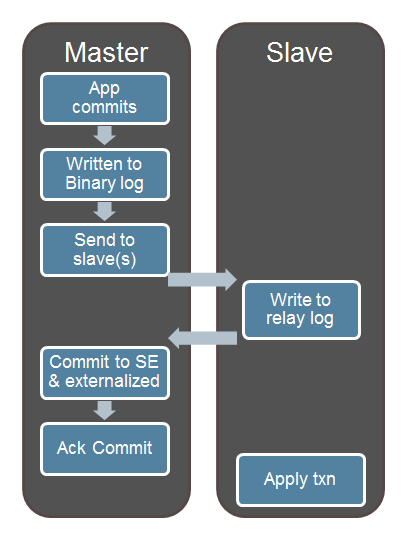
    To understand how this feature works, you first need to understand the very basics about how MySQL replication works. Changes that are made to the ‘Master’ MySQL Server are written to a binary log. Any slave MySQL Servers that subscribe to this master are sent the data from the master’s binary log; the slave(s) then copy this data to their own relay log(s). The slave(s) will then work through all of the updates in their relay logs and apply them to their local database(s). The implementation is a little more complex when using MySQL Cluster as the master’s updates may come through multiple MySQL Servers or directly from an application through the NDB API but all of the changes will still make it into the binary log.

    MySQL Replication supports both statement and row based replication (as well as mixed) but this software preview is restricted to statement based replication. As MySQL Cluster must use row based replication this preview cannot be used with Cluster but the final implementation should work with all storage engines.

    As show in Fig. 1 there are 4 points where you can choose to filter statements being replicated:

    1. Before the update is written to the binary log
    2. After the update has been read from the binary log
    3. Before the update is written to the relay log
    4. After the update has been read from the relay log

    The final 2 interest me most as it allows us to have multiple slaves which apply different filters – this article includes a worked example of how that could be exploited.

    Fig. 2 Details for each filtering point

    Fig. 2 Details for each filtering point

    The filters are written as Lua scripts. The names of the script file, module name and function names vary depending on which of these filtering points is to be used. Fig. 2 shows these differences. In all cases, the scripts are stored in the following folder: “<mysql-base-directory>/ext/replication”.

    This article creates 2 different scripts – one for each of 2 slave servers. In both cases the filter script is executed after an update is read from the relay log. One slave will discard any statement of the form “INSERT INTO <table-name> SET sub_id = 401, …” by searching for the sub string “sub_id = X” where X is even while the second slave will discard any where X is odd. Any statement that doesn’t include this pattern will be allowed through.

    Fig. 3 Implementation of odd/even sharded replication

    Fig. 3 Implementation of odd/even sharded replication

    If a script returns TRUE then the statement is discarded, if it returns FALSE then the replication process continues. Fig. 3 shows the architecture and pseudo code for the odd/even replication sharding.


    The actual code for the two slaves is included here:

    slave-odd: <mysql-base-directory>/ext/replication/relay_log.lua
    function after_read(event)
      local m = event.query
      if m then
        id = string.match(m, "sub_id = (%d+)")
        if id then
          if id %2 == 0 then
            return true
          else
            return false
          end
        else
          id = string.match(m, "sub_id=(%d+)")
            if id then
              if id %2 == 0 then
                return true
              else
                return false
              end
           else
             return false
           end
        end
      else
        return false
      end
    end
    slave-even: <mysql-base-directory>/ext/replication/relay_log.lua
    function after_read(event)
      local m = event.query
      if m then
        id = string.match(m, "sub_id = (%d+)")
        if id then
          if id %2 == 1 then
            return true
          else
            return false
          end
        else
          id = string.match(m, "sub_id=(%d+)")
            if id then
              if id %2 == 1 then
                return true
              else
                return false
              end
           else
             return false
           end
        end
      else
        return false
      end
    end

    Replication can then be set-up as normal as described in Setting up MySQL Asynchronous Replication for High Availability with the exception that we use 2 slaves rather than 1.

    Once replication has been started on both of the slaves, the database and tables should be created; note that for some reason, the creation of the tables isn’t replicated to the slaves when using this preview load and so the tables actually need to be created 3 times:

    mysql-master> CREATE DATABASE clusterdb; mysql-master> USE clusterdb; mysql-master> CREATE TABLE sys1 (code INT NOT NULL PRIMARY KEY, country VARCHAR (30)) engine=innodb; mysql-master> CREATE TABLE subs1 (sub_id INT NOT NULL PRIMARY KEY, code INT) engine=innodb;
    mysql-slave-odd> USE clusterdb; mysql-slave-odd> CREATE TABLE sys1 (code INT NOT NULL PRIMARY KEY, country VARCHAR (30)) engine=innodb; mysql-slave-odd> create table subs1 (sub_id INT NOT NULL PRIMARY KEY, code INT) engine=innodb;
    mysql-slave-even> USE clusterdb; mysql-slave-even> CREATE TABLE sys1 (code INT NOT NULL PRIMARY KEY, country VARCHAR (30)) engine=innodb; mysql-slave-even> CREATE TABLE subs1 (sub_id INT NOT NULL PRIMARY KEY, code INT) engine=innodb;

    The data can then be added to the master and then the 2 slaves can be checked to validate that it behaved as expected:

    mysql-master> INSERT INTO sys1 SET area_code=33, country="France";
    mysql-master> INSERT INTO sys1 SET area_code=44, country="UK";
    mysql-master> INSERT INTO subs1 SET sub_id=401, code=44;
    mysql-master> INSERT INTO subs1 SET sub_id=402, code=33;
    mysql-master> INSERT INTO subs1 SET sub_id=976, code=33;
    mysql-master> INSERT INTO subs1 SET sub_id=981, code=44;
    mysql-slave-odd> SELECT * FROM sys1;
    +------+---------+
    | code | country |
    +------+---------+
    |  33  | France  |
    |  44  | UK      |
    +------+---------+
    
    mysql-slave-odd> SELECT * FROM subs1;
    +--------+------+
    | sub_id | code |
    +--------+------+
    |   401  | 44   |
    |   981  | 44   |
    +--------+------+
    Fig. 4 Results of partitioned replication

    Fig. 4 Results of partitioned replication

    mysql-slave-even> SELECT * FROM sys1;
    +------+---------+
    | code | country |
    +------+---------+
    |  33  | France  |
    |  44  | UK      |
    +------+---------+
    mysql-slave-even> SELECT * FROM subs1;
    +--------+------+
    | sub_id | code |
    +--------+------+
    |   402  | 33   |
    |   976  | 33   |
    +--------+------+

    Fig. 4 illustrates this splitting of data between the 2 slaves – all rows from the system table are stored in both databases (as well as in the master) while the data in the subscriber table (and it would work for multiple subscriber tables too) are partitioned between the 2 databases – odd values in one, even in the other. Obviously, this could be extended to more slaves by changing the checks in the scripts.

    As an illustration of how this example could be useful, all administrative data could be provisioned into and maintained by the master – both system and subscriber data. Each slave could then serve a subset of the subscribers, providing read-access to the administrative data andread/write access for the more volatile subscriber data (which is mastered on the ’slave’). In this way, there can be a central point to manage the administrative data while being able to scale out to multiple, databases to provide maximum capacity and performance to the applications. For example, in a telco environment, you may filter rows by comparing a subscriber’s phone number to a set of area codes so that the local subscribers are accessed from the local database – minimising latency.

    From a data integrity perspective, this approach is safe if (and only if) the partitioning rules ensures that all related rows are on the same slave (in our example, all rows from all tables for a particular subscriber will be on the same slave – so as long as we don’t need transactional consistency between different subscribers then this should be safe).

    Fig. 5 Partioned replication for MySQL Cluster

    Fig. 5 Partitioned replication for MySQL Cluster

    As mentioned previously this software preview doesn’t work with MySQL Cluster but looking forward to when it does, the example could be extended by having each of the slave servers be part of the same Cluster. In this case, the partitioned data will be consolidated back into a single database (for this scenario, you would likely configure just one server to act as the slave for the system data). On the face of it, this would be a futile exercise but in cases where the performance bottlenecks on the throughput of a single slave server, this might be a way to horizontally scale the replication performance for applications which make massive numbers of database writes.

  • MySQL Cluster: Geographic Replication Deep-Dive webinar

    Posted on November 17th, 2009 admin No comments
    I will be presenting a free Webinar on Geographic Replication for MySQL Cluster at 9:00 am (UK time) on Tuesday 24 November.
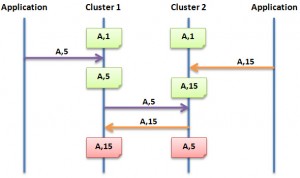
    Multi-Master Replication for HA with MySQL Cluster

    Multi-Master Replication for HA with MySQL Cluster

    MySQL Cluster has been deployed into some of the most demanding web, telecoms and enterprise /
    government workloads, supporting 99.999% availability with real time performance and linear write scalability.

    You can register on-line here.

    Tune into this webinar where you can hear from the MySQL Cluster product management team provide a detailed “deep dive” into one of MySQL Cluster’s key capabilities – Geographic Replication.

    In this session, you will learn how using Geographic Replication enables your applications to:

    • Achieve higher levels of availability within a data center or across a WAN
    • Locate data closer to users, providing lower latency access
    • Replicate to other MySQL storage engines for complex data analysis and reporting of real time data
    • Gow to get started with Geographic Replication

    Tuesday, November 24, 2009: 10:00 Central European time

    • Tue, Nov 24:  09:00 Western European time
    • Tue, Nov 24:  11:00 Eastern European time

    The presentation will be approximately 1 hour long, including on-line Q&A.

  • Free MySQL webinar today – High Availability Architectures for Online Applications

    Posted on September 29th, 2009 admin No comments

    Update: You can now download a recording of the webinar and the slides from http://www.mysql.com/news-and-events/on-demand-webinars/display-od-403.html

    I’ll be presenting the fourth (and final) session of the MySQL for Online Applications webinar series today (29 September). Today’s High Availability Architectures for Online Applications webinar covers:

    • MySQL Replication
    • MySQL Cluster
    • Distributed Replicated Block Device (DRBD)
    • Other high-availability technologies

    Register here.

    This session starts at 10:00 am Pacific Time but will be rerun tomorrow at 10:00 am CET (9:00 am UK) with Ivan Zoratti presenting (I’ll be handling questions).

    More details for today’s webinar:

    Tuesday, September 29, 2009

    Join us for the last of our 4 part webinar series exploring the different aspects of using MySQL as the backend database for online applications. With real life experience gained working with MySQL Customers such as Facebook, Alcatel Lucent and Google, this webinar series will give you the information you need to run scalable, highly available online applications.

    In this last installment we look at MySQL high availability technologies and architectures. We will explore the uses cases for implementing:

    • MySQL Replication
    • MySQL Cluster
    • Distributed Replicated Block Device (DRBD)
    • Other high-availability technologies

    Also, covered will be the fundamentals of how these technologies work and how they can be combined to create a more scalable and highly available database infrastructure. Several case studies will be presented to show how these technologies have been implemented in the real world.

    Whether you are already using MySQL for your online application or considering it for a new project then register today to learn how you can make best use of the world’s most popular database for online applications.

    WHO:

    Andrew Morgan, Senior Product Manager, MySQL

    WHAT:

    High Availability Architectures for Online Applications web presentation.

    WHEN:

    Tuesday, September 29, 2009: 10:00 Pacific time (America)

    Tue, Sep 29: 07:00 Hawaii time
    Tue, Sep 29: 11:00 Mountain time (America)
    Tue, Sep 29: 12:00 Central time (America)
    Tue, Sep 29: 13:00 Eastern time (America)
    Tue, Sep 29: 17:00 UTC
    Tue, Sep 29: 18:00 Western European time
    Tue, Sep 29: 19:00 Central European time
    Tue, Sep 29: 20:00 Eastern European time
    High Availability Architectures for Online Applications
  • MySQL Cluster: Geographic Replication Deep-Dive

    Posted on September 1st, 2009 admin No comments

    Following requests received during earlier MySQL Cluster webinars, a new (and as always, free) webinar has been scheduled which focuses on MySQL Cluster Replication. The webinar is scheduled for Thursday 10 September and you can register at http://www.mysql.com/news-and-events/web-seminars/display-415.html

    I’ll be on-line during the webinar, answering questions.

    Details….

    MySQL Cluster: Geographic Replication Deep-Dive

    Thursday, September 10, 2009

    MySQL Cluster has been deployed into some of the most demanding web, telecoms and enterprise / government workloads, supporting 99.999% availability with real time performance and linear write scalability.

    Tune into this webinar where you can hear from the Director of MySQL Server Engineering provide a detailed “deep dive” into one of MySQL Cluster’s key capabilities – Geographic Replication.

    In this session, you will learn how using Geographic Replication enables your applications to :

    • achieve higher levels of availability within a data center or across a WAN
    • locate data closer to users, providing lower latency access
    • replicate to other MySQL storage engines for complex data analysis and reporting of real time data
    • how to get started with Geographic Replication

    WHO:

    • Tomas Ulin, Director, MySQL Server Technologies
    • Matthew Keep, MySQL Cluster Product Management

    WHAT:

    MySQL Cluster: Geographic Replication Deep-Dive web presentation.

    WHEN:

    Thursday, September 10, 2009: 09:30 Pacific time (America)

    Thu, Sep 10: 06:30 Hawaii time
    Thu, Sep 10: 10:30 Mountain time (America)
    Thu, Sep 10: 11:30 Central time (America)
    Thu, Sep 10: 12:30 Eastern time (America)
    Thu, Sep 10: 16:30 UTC
    Thu, Sep 10: 17:30 Western European time
    Thu, Sep 10: 18:30 Central European time
    Thu, Sep 10: 19:30 Eastern European time

    The presentation will be approximately 45 minutes long followed by Q&A.

    WHERE:

    Simply access the web seminar from the comfort of your own office.

    WHY:

    To learn more about how you can use Geographic Replication in MySQL Cluster 7.0 to build real time, high performance applications delivering continuously available database services.

  • Using NDB API Events to mask/hide colum data when replicating

    Posted on August 13th, 2009 admin No comments

    If you  have asynchronous replication where the slave database is using MySQL Cluster then you can use the NDB API events functionality to mask/overwrite data. You might do this for example if the replica is to be used for generating reports where some of the data is sensitive and not relevant to those reports. Unlike stored procedures, NDB API events will be triggered on the slave.

    The first step is to set up replication (master->slave rather than multi-master) as described in Setting up MySQL Asynchronous Replication for High Availability).

    In this example, the following table definition is used:

    mysql> use clusterdb;
    mysql> create table ASSETS (CODE int not null primary key, VALUE int) engine=ndb;

    The following code should be compiled and then executed on a node within the slave Cluster:

    #include <NdbApi.hpp>
    #include <stdio.h>
    #include <iostream>
    #include <unistd.h>
    #include <cstdlib>
    #include <string.h>
    
    #define APIERROR(error) \
      { std::cout << "Error in " << __FILE__ << ", line:" << __LINE__ << ", code:" \
      << error.code << ", msg: " << error.message << "." << std::endl; \
      exit(-1); }
    
    int myCreateEvent(Ndb* myNdb,
    const char *eventName,
    const char *eventTableName,
    const char **eventColumnName,
    const int noEventColumnName);
    
    static void do_blank(Ndb*, int);
    
    int main(int argc, char** argv)
    {
      if (argc < 1)
     {
        std::cout << "Arguments are <connect_string cluster>.\n";
        exit(-1);
      }
      const char *connectstring = argv[1];
    
      ndb_init();
    
      Ndb_cluster_connection *cluster_connection=
      new Ndb_cluster_connection(connectstring); // Object representing the cluster
    
      int r= cluster_connection->connect(5 /* retries               */,
      3 /* delay between retries */,
      1 /* verbose               */);
      if (r > 0)
      {
        std::cout << "Cluster connect failed, possibly resolved with more retries.\n";
        exit(-1);
      }
      else if (r < 0)
      {
        std::cout << "Cluster connect failed.\n";
        exit(-1);
      }
    
      if (cluster_connection->wait_until_ready(30,30))
      {
        std::cout << "Cluster was not ready within 30 secs." << std::endl;
        exit(-1);
      }
    
      Ndb* myNdb= new Ndb(cluster_connection,
                          "clusterdb");  // Object representing the database
    
      if (myNdb->init() == -1) APIERROR(myNdb->getNdbError());
    
      const char *eventName= "CHNG_IN_ASSETS";
      const char *eventTableName= "ASSETS";
      const int noEventColumnName= 2;
      const char *eventColumnName[noEventColumnName]=
      {"CODE",
       "VALUE"};
    
      // Create events
      myCreateEvent(myNdb,
      eventName,
      eventTableName,
      eventColumnName,
      noEventColumnName);
    
      // Normal values and blobs are unfortunately handled differently..
      typedef union { NdbRecAttr* ra; NdbBlob* bh; } RA_BH;
    
      int i;
    
      // Start "transaction" for handling events
      NdbEventOperation* op;
      printf("create EventOperation\n");
      if ((op = myNdb->createEventOperation(eventName)) == NULL)
        APIERROR(myNdb->getNdbError());
    
      printf("get values\n");
      RA_BH recAttr[noEventColumnName];
      RA_BH recAttrPre[noEventColumnName];
    
      for (i = 0; i < noEventColumnName; i++) {
        recAttr[i].ra    = op->getValue(eventColumnName[i]);
        recAttrPre[i].ra = op->getPreValue(eventColumnName[i]);
      }
    
      // set up the callbacks
      // This starts changes to "start flowing"
      if (op->execute())
        APIERROR(op->getNdbError());
    
      while (true) {
        int r = myNdb->pollEvents(1000); // wait for event or 1000 ms
        if (r > 0) {
          while ((op= myNdb->nextEvent())) {
            NdbRecAttr* ra = recAttr[0].ra;
            if (ra->isNULL() >= 0) { // we have a value
              if (ra->isNULL() == 0) { // we have a non-null value
                printf("CODE: %d ", ra->u_32_value());
                do_blank(myNdb, ra->u_32_value());
              } else
                printf("%-5s", "NULL");
              } else
                printf("%-5s", "-"); // no value
                ra = recAttr[1].ra;
                printf("\n");
              }
            }
          }
        }
    
    int myCreateEvent(Ndb* myNdb,
                      const char *eventName,
                      const char *eventTableName,
                      const char **eventColumnNames,
                      const int noEventColumnNames)
    {
      NdbDictionary::Dictionary *myDict= myNdb->getDictionary();
      if (!myDict) APIERROR(myNdb->getNdbError());
    
      const NdbDictionary::Table *table= myDict->getTable(eventTableName);
      if (!table) APIERROR(myDict->getNdbError());
    
      NdbDictionary::Event myEvent(eventName, *table);
      myEvent.addTableEvent(NdbDictionary::Event::TE_INSERT);
    
      myEvent.addEventColumns(noEventColumnNames, eventColumnNames);
    
      // Add event to database
      if (myDict->createEvent(myEvent) == 0)
        myEvent.print();
      else if (myDict->getNdbError().classification ==
                NdbError::SchemaObjectExists) {
        printf("Event creation failed, event exists\n");
        printf("dropping Event...\n");
        if (myDict->dropEvent(eventName)) APIERROR(myDict->getNdbError());
        // try again
        // Add event to database
        if ( myDict->createEvent(myEvent)) APIERROR(myDict->getNdbError());
      } else
        APIERROR(myDict->getNdbError());
    
        return 0;
    }
    
    static void do_blank(Ndb* myNdb, int code)
    {
      const NdbDictionary::Dictionary* myDict= myNdb->getDictionary();
      const NdbDictionary::Table *myTable= myDict->getTable("ASSETS");
    
      if (myTable == NULL)
      APIERROR(myDict->getNdbError());
    
      NdbTransaction *myTransaction= myNdb->startTransaction();
      if (myTransaction == NULL) APIERROR(myNdb->getNdbError());
    
      printf("Replacing VALUE with 0 for CODE: %d ", code);
    
      NdbOperation *myOperation= myTransaction->getNdbOperation(myTable);
      if (myOperation == NULL) APIERROR(myTransaction->getNdbError());
    
      myOperation->updateTuple();
      myOperation->equal("CODE", code);
      myOperation->setValue("VALUE", 0);
    
      if (myTransaction->execute( NdbTransaction::Commit ) == -1)
        APIERROR(myTransaction->getNdbError());
    
      myNdb->closeTransaction(myTransaction);
    }
    
    shell> slave_filter 127.0.0.1:1186

    From the master Cluster, insert some values (note that the example can easily be extended to cover updates too):

    mysql> insert into ASSETS values (101, 50),(102, 40), (103, 99);

    and then check that on the slave the value has been set to 0 for each of the entries:

    mysql> select * from ASSETS;
    +------+-------+
    | CODE | VALUE |
    +------+-------+
    |  100 |     0 |
    |  103 |     0 |
    |  101 |     0 |
    |  102 |     0 |
    +------+-------+

    How this works…. The table data is replicated as normal and the real values are stored in the slave. The “slave_filter” process has registered against insert operations on this table and when it’s triggered it sets the VALUE field to 0. The event is processes asynchronously from the replication and so there will be some very narrow window during which the true values would be stored in the slave.

  • Setting up MySQL Asynchronous Replication for High Availability

    Posted on August 3rd, 2009 admin 8 comments
    Asynchronous Replication for High Availability

    Asynchronous Replication for High Availability

    MySQL replication is often positioned as a solution to provide extra throughput for your database (especially when dealing with high numbers of read operations). What tends to be overlooked is how it can be used to provide high availability (HA) – no matter how much redundancy you have at a local level, your system remains at risk from a single catastrophic failure – loss of power, earthquake, terrorist attack etc. By using MySQL asynchronous replication to maintain a geographically remote copy of that data, service can be maintained through any single site failure.

    As this replication is asynchronous, there are no low latency demands on the network and so the two sites can be thousands of miles apart while utilising low-cost connections.

    This article provides a simple example of how to set up asynchronous replication between 2 MySQL databases in order to provide a Highly Available solution. First of all, it will be 2 databases where the tables will be stored in the MyISAM storage engine and then between 2 MySQL Cluster databases where I also configure it for Multi-master replication where changes can be made at either site.

    Subsequent articles will build on this to show:

    • Collision detection and resolution when using MySQL Cluster multi-master asynchronous replication
    • Introducing asynchronous replication to a running MySQL Cluster database

    Throughout this article, two machines are used: ws1 (192.168.0.3) and ws2 (192.168.0.4). ws1 will be set up as the master and ws2 as the slave (in the multi-master configuration, both act as both master and slave).

    Setting up replication for non-Cluster databases

    Replication is performed from one MySQL Server to another; the master makes the changes available and then one or more other Servers pick up those changes and apply them to their own databases. In this example, both databases will store the table data using the same storage engine (MyISAM) but it’s possible to mix and match (for example, take a look at  MySQL Cluster – flexibility of replication). As this is intended as a simple introduction to replication, I’m keeping life simple by assuming that this is all being set up before the database goes into production – if that isn’t the case for you and you need to cope with existing data then check out the MySQL documentation or subsequent articles on this site.

    The my.cnf files can be set up as normal but the one for the MySQL Server that will act as the Master needs to have binary-logging enabled. Also, each of the server needs to have a unique server-id. Here are the my.cnf files used for this example:

    my.cnf (Master)

    [mysqld]
    datadir=/home/billy/mysql/myisam/data
    basedir=/usr/local/mysql
    port=3306
    server-id=1
    log-bin

    my.cnf (Slave)

    [mysqld]
    datadir=/home/billy/mysql/myisam/data
    basedir=/usr/local/mysql
    port=3306
    server-id=2

    Fire up the Master MySQL Server:

    [billy@ws1 myisam]$ mysqld --defaults-file=my.cnf&

    The slave needs a userid/password in order to access the master server – best practice is to create a dedicated user with just the required privileges:

    [billy@ws1 myisam]$ mysql -u root
    Welcome to the MySQL monitor.  Commands end with ; or \g.
    Your MySQL connection id is 1
    Server version: 5.1.34-ndb-7.0.6-cluster-gpl-log MySQL Cluster Server (GPL)
    
    Type 'help;' or '\h' for help. Type '\c' to clear the current input statement.
    
    mysql> grant replication slave on *.* to 'repl'@'192.168.0.4'
     -> identified by 'repl';
    Query OK, 0 rows affected (0.00 sec)

    The slave can now be told to start processing the replication data that will be staged by the master server:

    [billy@ws2 myisam]$ mysqld --defaults-file=my.cnf&
    [billy@ws2 myisam]$ mysql -u root
    Welcome to the MySQL monitor.  Commands end with ; or \g.
    Your MySQL connection id is 2
    Server version: 5.1.34-ndb-7.0.6-cluster-gpl MySQL Cluster Server (GPL)
    
    Type 'help;' or '\h' for help. Type '\c' to clear the current input statement.
    mysql> CHANGE MASTER TO
    -> MASTER_HOST='192.168.0.3',
    -> MASTER_PORT=3306,
    -> MASTER_USER='repl',
    -> MASTER_PASSWORD='repl',
    -> MASTER_LOG_FILE='',
    -> MASTER_LOG_POS=4;
    090803 15:48:09 [Warning] Neither --relay-log nor --relay-log-index were used; so replication may break when this MySQL server acts as a slave and has his hostname changed!! Please use '--relay-log=ws2-relay-bin' to avoid this problem.
    Query OK, 0 rows affected (0.01 sec)
    mysql> start slave;
    090803 15:51:24 [Note] Slave SQL thread initialized, starting replication in log 'FIRST' at position 0, relay log './ws2-relay-bin.000001' position: 4
    Query OK, 0 rows affected (0.00 sec)
    090803 15:51:24 [Note] Slave I/O thread: connected to master 'repl@192.168.0.3:3306',replication started in log 'FIRST' at position 4

    Now to test that replication is up and running, create a table on the master, add some data and then check that the table and data can be read from the slave:

    [billy@ws1 myisam]$ mysql -u root
    Welcome to the MySQL monitor.  Commands end with ; or \g.
    Your MySQL connection id is 3
    Server version: 5.1.34-ndb-7.0.6-cluster-gpl-log MySQL Cluster Server (GPL)
    
    Type 'help;' or '\h' for help. Type '\c' to clear the current input statement.
    
    mysql> use test
    Reading table information for completion of table and column names
    You can turn off this feature to get a quicker startup with -A
    
    Database changed
    mysql> create table numbers (num1 int, num2 int);
    Query OK, 0 rows affected (0.00 sec)
    
    mysql> insert into numbers values (1,10),(2,20),(3,30);
    Query OK, 3 rows affected (0.00 sec)
    Records: 3  Duplicates: 0  Warnings: 0
    [billy@ws2 myisam]$ mysql -u root
    Welcome to the MySQL monitor.  Commands end with ; or \g.
    Your MySQL connection id is 5
    Server version: 5.1.34-ndb-7.0.6-cluster-gpl MySQL Cluster Server (GPL)
    
    Type 'help;' or '\h' for help. Type '\c' to clear the current input statement.
    
    mysql> use test;
    Reading table information for completion of table and column names
    You can turn off this feature to get a quicker startup with -A
    
    Database changed
    mysql> select * from numbers;
    +------+------+
    | num1 | num2 |
    +------+------+
    |    1 |   10 |
    |    2 |   20 |
    |    3 |   30 |
    +------+------+
    3 rows in set (0.00 sec)

    Multi-Master Replication with MySQL Cluster

    Multi-Master Replication for HA with MySQL Cluster

    Multi-Master Replication for HA with MySQL Cluster

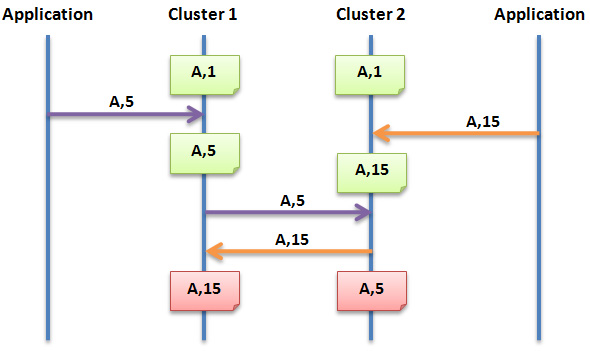
    There are a few asynchronous replication capabilities that are unique to MySQL Cluster – one of those is that changes are replicated even if they are made directly to the data nodes using the NDB API, another is that replication can be performed in both directions i.e. multi-master. One of the advantages of this is you can share both read and write operations across both sites so that no capacity is wasted – it also gives you the confidence that either site is sane and ready to take over for the other at any point. You should aim to minimise how often the same rows are modified at the same time on both sites – conflict detection/resolution has been implemented but it can only roll-back the rows changes that conflict with other row changes rather than the full transaction.

    It’s important to note that in this article, I’m not talking about the synchronous replication that takes place between data nodes within a single MySQL Cluster site (that happens in parallel and is orthogonal to the asynchronous replication to a remote site).

    When performing multi-master asynchronous replication between 2 Clusters, 1 (or more) MySQL Servers in each Cluster is nominated as a master and 1 or more as slaves (it can be the same server that takes on both roles and you can have multiple channels set up in case a channel or MySQL Server is lost). Changes made to the data at either site through any of their MySQL Servers (or directly to the data nodes using the NDB API) will be replicated to the other site.

    I will focus on setting up the replication, you can refer to Deploying MySQL Cluster over multiple hosts for the steps to configure and run each MySQL Cluster site.

    Most of the steps are very similar to those in the first example – the main differences would come when introducing asynchronous replication to  a MySQL Cluster instance that already contains data and is up and running (processing updates) which will be covered in a subsequent article.

    Binary logging needs to be enabled on the MySQL Server(s) at each site that will act as a replication master:

    my1.cnf (Master)

    [mysqld]
    ndb-nodeid=4
    ndbcluster
    datadir=/home/billy/mysql/replication/7_0_6/data
    basedir=/home/billy/mysql/replication/7_0_6
    port=3306
    server-id=1
    log-bin

    my1.cnf (Slave)

    [mysqld]
    ndb-nodeid=4
    ndbcluster
    datadir=/home/billy/mysql/replication/7_0_6/data
    basedir=/home/billy/mysql/replication/7_0_6
    port=3306
    server-id=2
    log-bin

    The MySQL Cluster nodes (including the MySQL Servers (mysqld) from both sites should be started up as normal.

    In this case, the replication users should be set up for both Clusters:

    
    [billy@ws1 7_0_6]$ mysqld --defaults-file=my.cnf&
    [billy@ws1 7_0_6]$ mysql -u root
    Welcome to the MySQL monitor.  Commands end with ; or \g.
    
    Your MySQL connection id is 2
    
    Server version: 5.1.34-ndb-7.0.6-cluster-gpl-log MySQL Cluster Server (GPL)
    Type 'help;' or '\h' for help. Type '\c' to clear the current input statement.
    mysql> grant replication slave on *.* to 'repl'@'192.168.0.4'
    -> identified by 'repl';
    
    Query OK, 0 rows affected (0.01 sec)
    
    [billy@ws2 7_0_6]$ mysqld --defaults-file=my.cnf&
    [billy@ws2 7_0_6]$ mysql -u root
    Welcome to the MySQL monitor.  Commands end with ; or \g.
    
    Your MySQL connection id is 3
    
    Server version: 5.1.34-ndb-7.0.6-cluster-gpl-log MySQL Cluster Server (GPL)
    Type 'help;' or '\h' for help. Type '\c' to clear the current input statement.
    mysql> grant replication slave on *.* to 'repl'@'192.168.0.3'
    -> identified by 'repl';
    
    Query OK, 0 rows affected (0.00 sec)

    Replication can then be setup and started on each of the MySQL Servers (those acting as slaves for each Cluster):

    [billy@ws1 7_0_6]$ mysql -u root
    Welcome to the MySQL monitor.  Commands end with ; or \g.
    Your MySQL connection id is 3
    Server version: 5.1.34-ndb-7.0.6-cluster-gpl-log MySQL Cluster Server (GPL)
    
    Type 'help;' or '\h' for help. Type '\c' to clear the current input statement.
    
    mysql> CHANGE MASTER TO
     -> MASTER_HOST='192.168.0.4',
     -> MASTER_PORT=3306,
     -> MASTER_USER='repl',
     -> MASTER_PASSWORD='repl',
     -> MASTER_LOG_FILE='',
     -> MASTER_LOG_POS=4;
    090803 17:25:00 [Warning] Neither --relay-log nor --relay-log-index were used; so replication may break when this MySQL server acts as a slave and has his hostname changed!! Please use '--relay-log=ws1-relay-bin' to avoid this problem.
    Query OK, 0 rows affected (0.01 sec)
    mysql> start slave;
    090803 17:27:20 [Note] Slave SQL thread initialized, starting replication in log 'FIRST' at position 0, relay log './ws1-relay-bin.000001' position: 4
    Query OK, 0 rows affected (0.02 sec)
    090803 17:27:20 [Note] Slave I/O thread: connected to master 'repl@192.168.0.4:3306',replication started in log 'FIRST' at position 4
    
    [billy@ws2 7_0_6]$ mysql -u root
    Welcome to the MySQL monitor.  Commands end with ; or \g.
    Your MySQL connection id is 4
    Server version: 5.1.34-ndb-7.0.6-cluster-gpl-log MySQL Cluster Server (GPL)
    
    Type 'help;' or '\h' for help. Type '\c' to clear the current input statement.
    
    mysql> CHANGE MASTER TO
     -> MASTER_HOST='192.168.0.3',
     -> MASTER_PORT=3306,
     -> MASTER_USER='repl',
     -> MASTER_PASSWORD='repl',
     -> MASTER_LOG_FILE='',
     -> MASTER_LOG_POS=4;
    090803 17:25:56 [Warning] Neither --relay-log nor --relay-log-index were used; so replication may break when this MySQL server acts as a slave and has his hostname changed!! Please use '--relay-log=ws2-relay-bin' to avoid this problem.
    Query OK, 0 rows affected (0.01 sec)
    mysql> start slave;
    090803 17:27:25 [Note] Slave SQL thread initialized, starting replication in log 'FIRST' at position 0, relay log './ws2-relay-bin.000001' position: 4
    Query OK, 0 rows affected (0.00 sec)
    090803 17:27:25 [Note] Slave I/O thread: connected to master 'repl@192.168.0.3:3306',replication started in log 'FIRST' at position 4

    This time, to make sure that replication is working in both directions, I make changes to both Clusters and then check that they appear at the other site:

    [billy@ws1 7_0_6]$ mysql -u root
    Welcome to the MySQL monitor.  Commands end with ; or \g.
    Your MySQL connection id is 8
    Server version: 5.1.34-ndb-7.0.6-cluster-gpl-log MySQL Cluster Server (GPL)
    
    Type 'help;' or '\h' for help. Type '\c' to clear the current input statement.
    
    mysql> use test;
    Database changed
    mysql> create table numbers (num1 int, num2 int) engine=ndb;
    090803 17:32:10 [Note] NDB Binlog: CREATE TABLE Event: REPL$test/numbers
    090803 17:32:10 [Note] NDB Binlog: logging ./test/numbers (UPDATED,USE_WRITE)
    Query OK, 0 rows affected (0.62 sec)
    
    mysql> insert into numbers values (1,10),(2,20),(3,30);
    Query OK, 3 rows affected (0.04 sec)
    Records: 3  Duplicates: 0  Warnings: 0
    billy@ws2 7_0_6]$ mysql -u root
    Welcome to the MySQL monitor.  Commands end with ; or \g.
    Your MySQL connection id is 8
    Server version: 5.1.34-ndb-7.0.6-cluster-gpl-log MySQL Cluster Server (GPL)
    
    Type 'help;' or '\h' for help. Type '\c' to clear the current input statement.
    
    mysql> use test
    Reading table information for completion of table and column names
    You can turn off this feature to get a quicker startup with -A
    
    Database changed
    mysql> select * from numbers;
    +------+------+
    | num1 | num2 |
    +------+------+
    |    2 |   20 |
    |    3 |   30 |
    |    1 |   10 |
    +------+------+
    3 rows in set (0.01 sec)
    
    mysql> insert into numbers values (4,40),(5,50),(6,60);
    Query OK, 3 rows affected (0.00 sec)
    Records: 3  Duplicates: 0  Warnings: 0
    [billy@ws1 7_0_6]$ mysql -u root
    Welcome to the MySQL monitor.  Commands end with ; or \g.
    Your MySQL connection id is 9
    Server version: 5.1.34-ndb-7.0.6-cluster-gpl-log MySQL Cluster Server (GPL)
    
    Type 'help;' or '\h' for help. Type '\c' to clear the current input statement.
    
    mysql> use test
    Reading table information for completion of table and column names
    You can turn off this feature to get a quicker startup with -A
    
    Database changed
    mysql> select * from numbers;
    +------+------+
    | num1 | num2 |
    +------+------+
    |    1 |   10 |
    |    6 |   60 |
    |    3 |   30 |
    |    5 |   50 |
    |    2 |   20 |
    |    4 |   40 |
    +------+------+
    6 rows in set (0.02 sec)
  • MySQL Cluster – flexibility of replication

    Posted on May 26th, 2009 admin 3 comments

    One of the better kept secrets about MySQL Cluster appears to be the flexibility available when setting up replication. Rather than being constrained to implementing a single replication scheme, you can mix and match approaches.

    Just about every Cluster deployment will use synchronous replication between the data nodes within a node group to implement High Availability (HA) by making sure that at the point a transaction is committed, the new data is stored in at least 2 physical hosts. Given that MySQL Cluster is usually used to store the data in main memory rather than on disk, this is pretty much mandatory (note that the data changes are still written to disk but that’s done asynchronously to avoid slowing down the database).

    MySQL Cluster Replication

    MySQL Cluster Replication

    MySQL asynchronous replication is often used for MySQL Cluster deployments in order to provide Geographic Redundancy. At the same time as the synchronous replication within a Cluster, the changes can be replicated asynchronously to a second Cluster (or to more than one) at a remote location. Asynchronous rather than synchronous replication is used so that the transaction commit is not delayed while waiting for the remote (could be thousands of miles away, connected by a high latency WAN) Cluster to receive, apply and acknowledge the change. A common misconception is that changes being made through the NDB API will not be replicated to the remote site as this replication is handled by a MySQL Server instance – the reality is that the MySQL Replication implementation will pick up the changes even when they’re written directly to the data nodes through the NDB API.

    A third use of replication is to store the Cluster’s data in a seperate database – for example to have a read-only, up-to-date copy of the data stored within the MyISAM storage engine so that complex reports can be generated from it. And the best news is that this can be done at the same time as the local HA and remote Geographic Redundancy replication!

    Johan’s Blog provides the technical details around configuring replication in order to provide some extra scaling by setting up non-Cluster slave databases that pick up all changes from the Cluster database.