The General Availability of MySQL Cluster 7.4 has just been announced by Oracle.
The MySQL team at Oracle are excited to announce the General Availability of MySQL Cluster 7.4, ready for production workloads.
MySQL Cluster 7.4.4 can be downloaded from mysql.com and the release notes viewed in the MySQL docs.
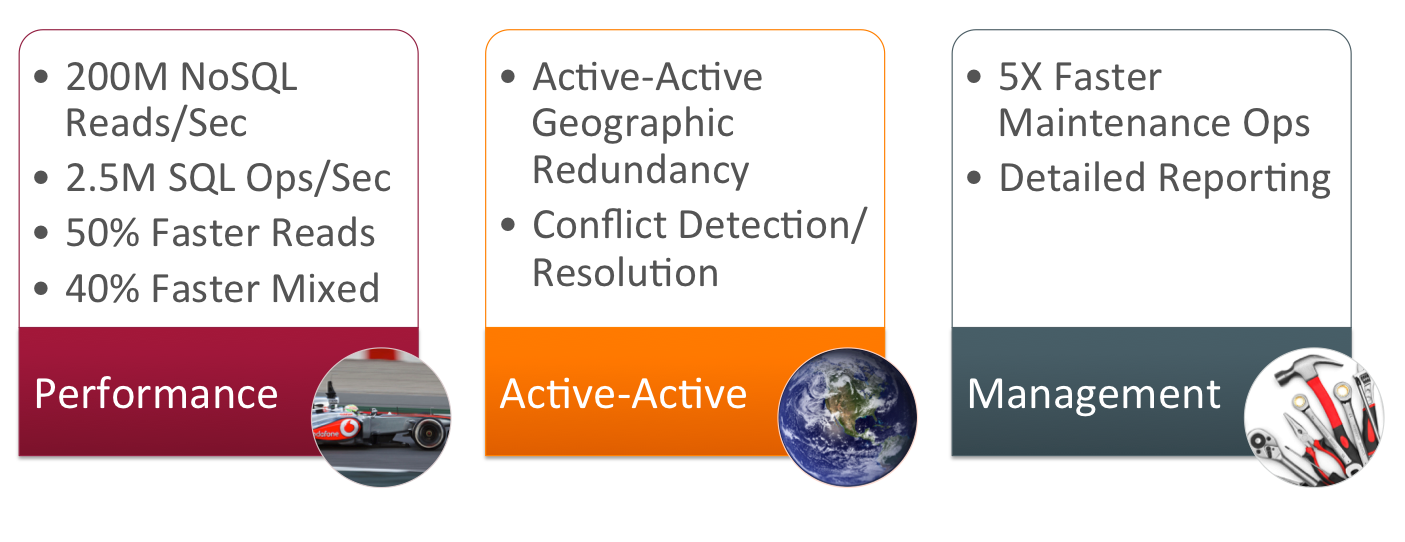
Figure 1 provides a summary of the enhancements delivered in this release:
- Performance
- 200M NoSQL Reads/Sec
- 2.5M SQL Ops/Sec
- 50% Faster Reads
- 40% Faster Mixed
- Active-Active
- Active-Active Geographic Redundancy
- Conflict Detection/Resolution
- Management
- 5X Faster Maintenance Ops
- Detailed Reporting
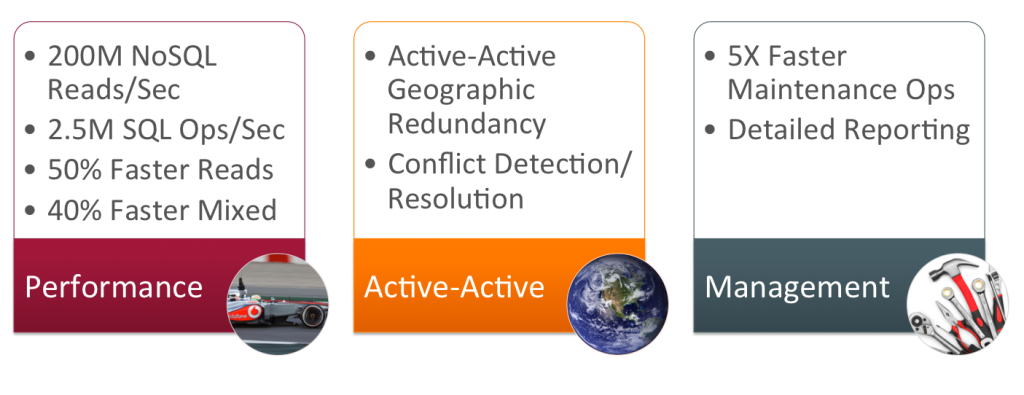
Figure 1: MySQL Cluster 7.4 content summary
The sections that follow delve into some more details.
Performance
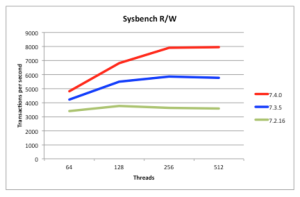
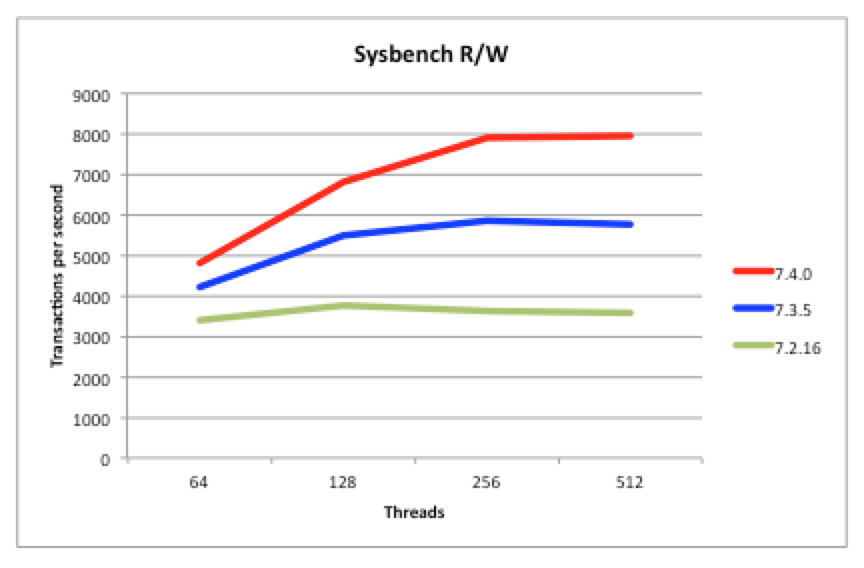
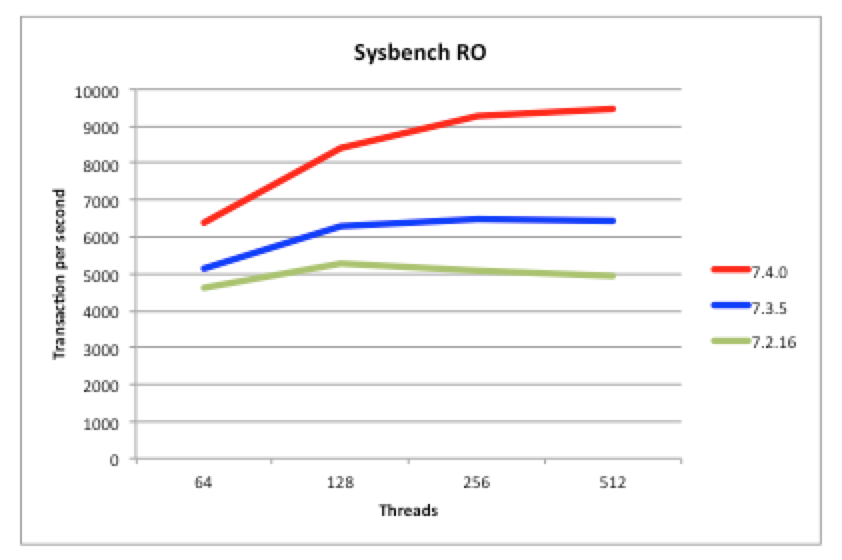
Figure 2: Read/Writes 40% Faster than MySQL Cluster 7.3
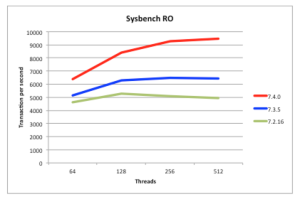
Figure 3: Reads 50% Faster than MySQL Cluster 7.3
50% Faster Reads than MySQL Cluster 7.3
Being a scaled-out, in-memory, real-time database, MySQL Cluster performance has always been great but we continue to work on making it faster each release. In particular, we want to keep pace with the trend of having more and more cores rather than faster ones. 7.4 continues along the path of better exploiting multiple cores – as can be seen from these benchmark results:
- Figure 3 shows that for reads, MySQL Cluster 7.4 is 50% faster than last release
- Figure 2 shows that for mixed traffic, MySQL Cluster 7.4 is 50% faster than last release
Just make sure that you’re using the multi-threaded data node (ndbmtd rather than ndbd) and have configured how many threads it should use.
The tests were performed using a 48 core/96 thread machine (also demonstrating how well MySQL Cluster can now scale up with large numbers of cores).
So, the sysbench benchmark results show how much faster MySQL Cluster 7.4 is compared to the previous 2 releases (a nice apples-to-apples test but on a very small cluster without any scale-out) but we now have some even more interesting benchmark results showing just how well MySQL Cluster can scale out to deliver incredible results…
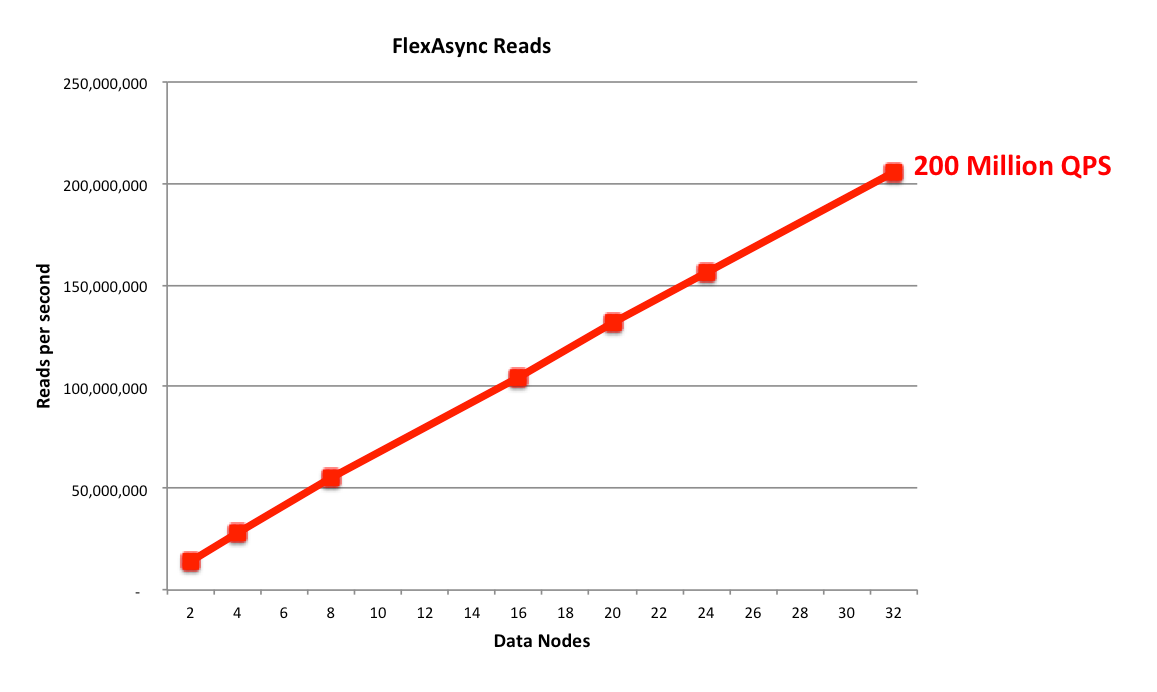
200 Million NoSQL NoSQL QPS!
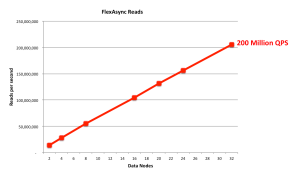
Figure 4: 200 Million NoSQL Queries Per Second
Using the flexAsynch benchmark tool and a pool of 32 data nodes (with each data node running on a dedicated 56 thread Intel E5-2697 v3 (Haswell) machine) the cluster was able to process 200,000,000 reads per second. These results are shown in Figure 4, where the number of data nodes are scaled on the x-axis – as you’ll observe, performance scales virtually linearly with the number of data nodes. Note that MySQL Cluster supports up to 48 data nodes and so there’s still plenty of scope to scale out even further.
2.5 Million SQL Operation per Second
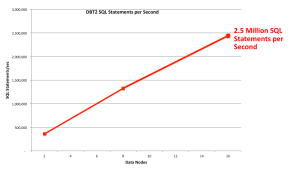
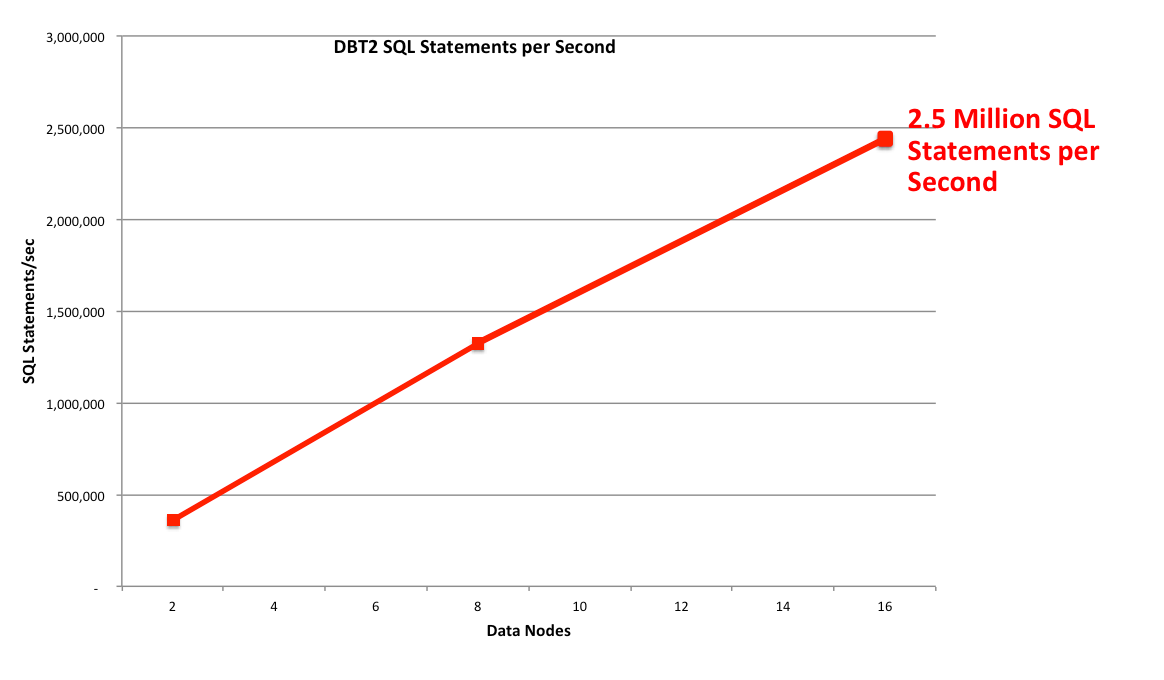
Figure 5: 2.5 Million SQL operations per second
Using a smaller cluster (just 16 data nodes running on the same 56 thread machines), the DBT2 Benchmark has been used to assess how well SQL performance scales as more data nodes are added. SQL performance was measured at 2,500,000 SQL read opeations per minute. This equates to around 5 Million Transactions Per Minutes or 2.2 Million NewOnly TPM.
As can be in Figure 5 the scaling of SQL reads is again almost linear.
Active-Active (Multi-Master) Replication
MySQL Cluster allows bi-directional replication between two (or more) clusters. Replication within each cluster is synchronous but between clusters it is asynchronous which means the following scenario is possible:
Conflict with asynchronous replication
| Site A |
Replication |
Site B |
| x == 10 |
|
x == 10 |
| x = 11 |
|
x = 20 |
|
— x=11 –> |
x == 11 |
| x==20 |
<– x=20 — |
|
In this example a value (column for a row in a table) is set to 11 on site A and the change is queued for replication to site B. In the mean time, an application sets the value to 20 on site B and that change is queued for replication to site A. Once both sites have received and applied the replicated change from the other cluster site A contains the value 20 while site B contains 11 – in other words the databases are now inconsistent.
How MySQL Cluster implements eventual consistency
There are two phases to establishing consistency between both clusters after an inconsistency has been introduced:
- Detect that a conflict has happened
- Resolve the inconsistency
The following animation illustrates how MySQL Cluster 7.2 detects that an inconsistency has been introduced by the asynchronous, active-active replication:
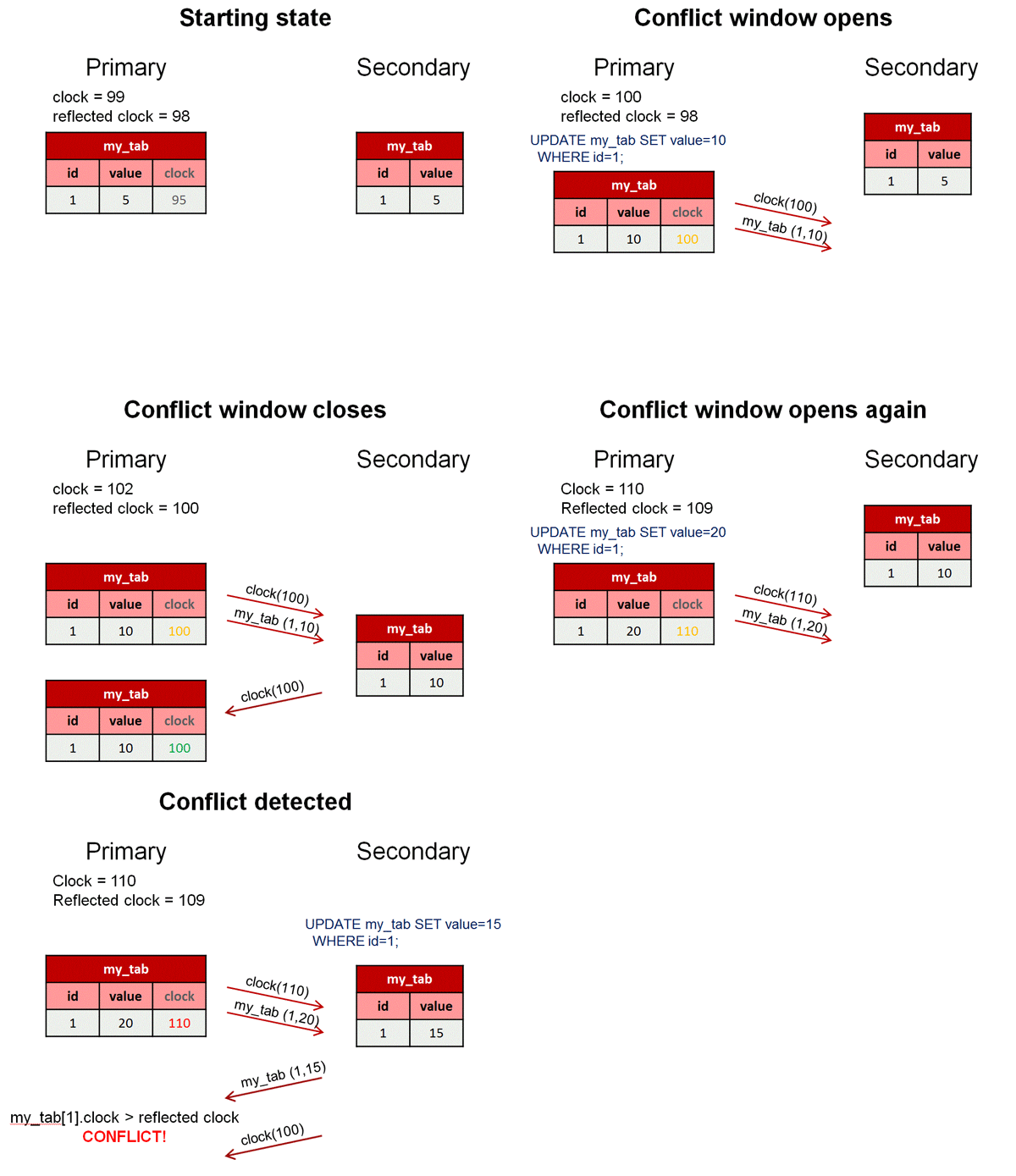
Figure 6: Detecting conflicts
While we typically consider the 2 clusters in an active-active replication configuration to be peers, in this case we designate one to be the primary and the other the secondary. Reads and writes can still be sent to either cluster but it is the responsibility of the primary to identify that a conflict has arisen and then remove the inconsistency.
A logical clock is used to identify (in relative terms) when a change is made on the primary – for those who know something of the MySQL Cluster internals, we use the index of the Global Checkpoint that the update is contained in. For all tables that have this feature turned on, an extra, hidden column is automatically added on the primary – this represents the value of the logical clock when the change was made.
Once the change has been applied on the primary, there is a “window of conflict” for the effected row(s) during which if a different change is made to the same row(s) on the secondary then there will be an inconsistency. Once the slave on the secondary has applied the change from the primary, it will send a replication event back to the slave on the primary, containing the primary’s clock value associated with the changes that have just been applied on the secondary. (Remember that the clock is actually the Global Checkpoint Index and so this feature is sometimes referred to as Reflected GCI). Once the slave on the primary has received this event, it knows that all changes tagged with a clock value no later than the reflected GCI are now safe – the window of conflict has closed.
If an application modifies this same row on the secondary before the replication event from the primary was applied then it will send an associated replication event to the slave on the primary before it reflects the new GCI. The slave on the primary will process this replication event and compare the clock value recorded with the effected rows with the latest reflected GCI; as the clock value for the conflicting row is higher the primary recognises that a conflict has occured and will launch the algorithm to resolve the inconsistency.
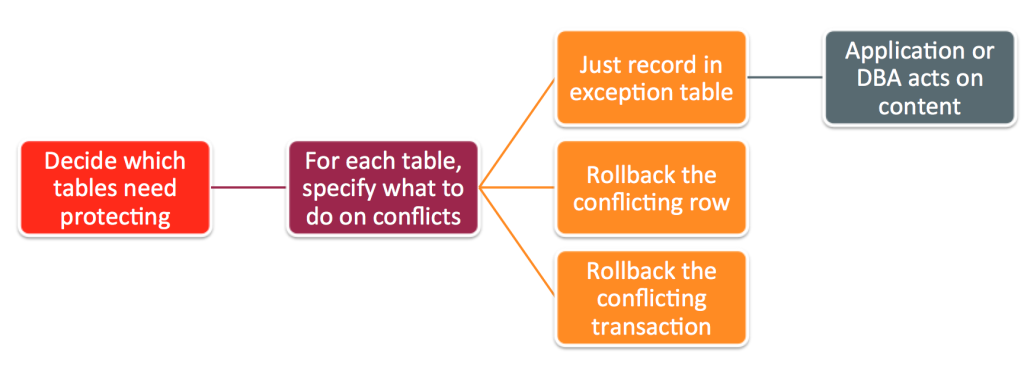
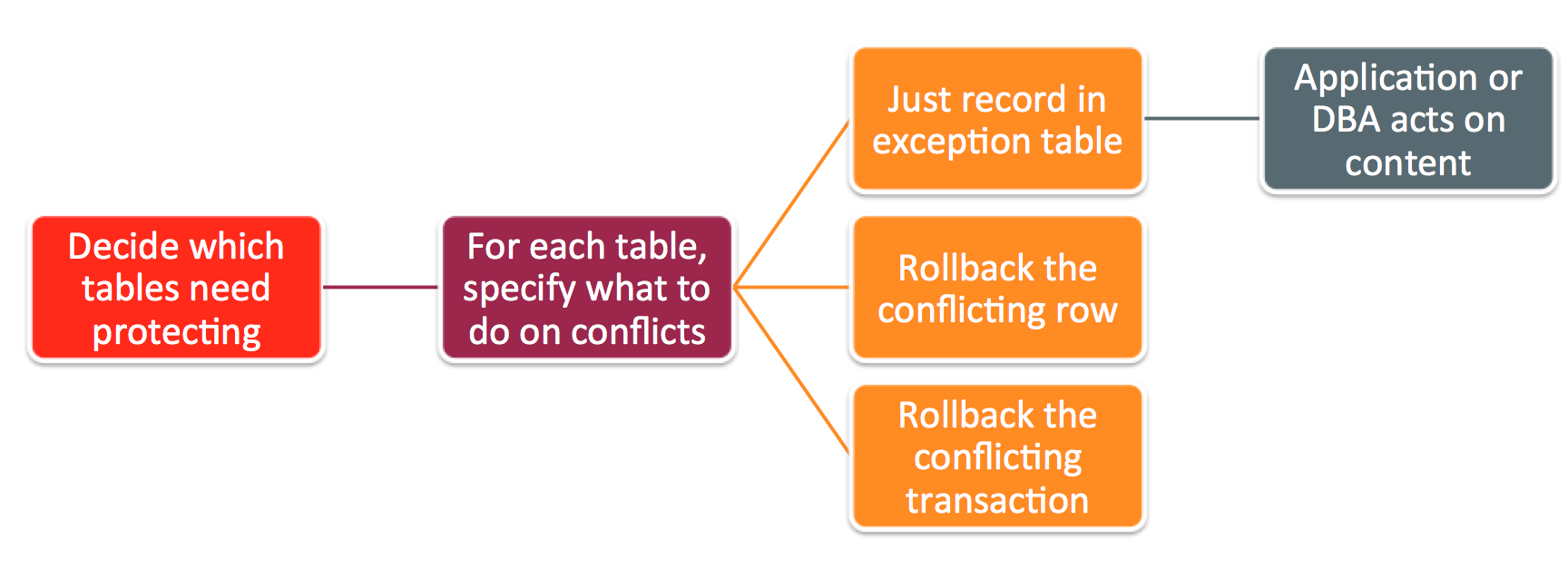
Figure 7: Options for MySQL Cluster replication conflict detection/resolution
After a conflict has been detected, you have the option of having the database simply report the conflict to the application or have it roll back just the conflicting row or the entire transaction and all subsequent transactions that were dependent on it.
So – what’s new in 7.4?
- Selective tracking of transaction reads for improved transaction dependency tracking
- Improved NDB Exceptions table format : Non-PK columns, operation type, transaction id, before and after values
- Improved manageability: Online conflict role change, improved visibility into system state, operations, current and historic consistency
Configuring Active-Active Replication with Transactional Conflict Resolution
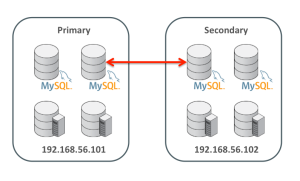
Figure 8: MySQL Replication Configuration
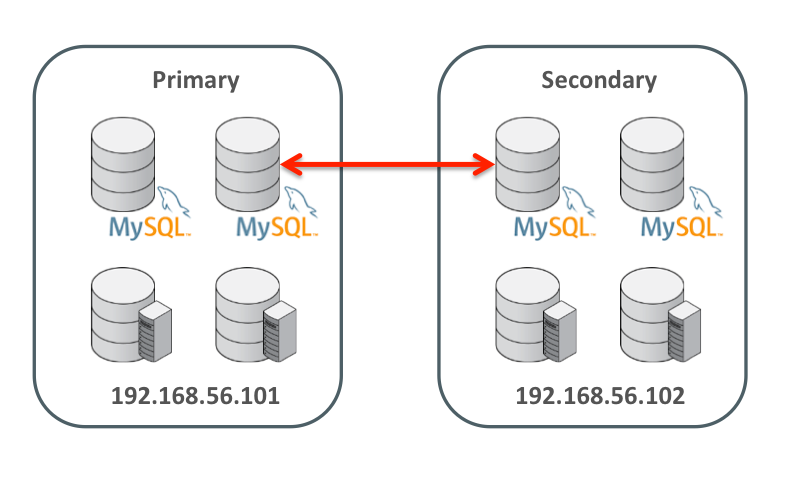
This section assumes that replication has already been set up between two clusters as shown in Figure 8. For more details on how to set up that configuration then refer to the blog: Enhanced conflict resolution with MySQL Cluster active-active replication.
To keep things simple, just two hosts are used; 192.168.56.101 contains all nodes for the primary cluster and 192.168.56.102 will contain all nodes for the secondary. A single MySQL Server in each cluster acts as both the master and the slave.
The first step is to identify the tables that need conflict detection enabling. Each of those tables then has to have an entry in the mysql.ndb_replication table where they’re tagged as using the new NDB$EPOCH2_TRANS() function – you could also choose to use NDB$EPOCH(), in which case only the changes to conflicting rows will be rolled-back rather than the full transactions. A few things to note:
- This must be done before creating the application tables themselves
- Should only be done on the primary
- By default the table doesn’t exist and so the very first step is to create it
PRIMARY> CREATE TABLE mysql.ndb_replication (
->     db VARBINARY(63),
->     table_name VARBINARY(63),
->     server_id INT UNSIGNED,
->     binlog_type INT UNSIGNED,
->     conflict_fn VARBINARY(128),
->     PRIMARY KEY USING HASH (db, table_name, server_id)
-> )   ENGINE=NDB
-> PARTITION BY KEY(db,table_name);

PRIMARY> REPLACE INTO mysql.ndb_replication VALUES ('clusterdb', 'simple1', 0, 0,  'NDB$EPOCH2_TRANS()');
PRIMARY> REPLACE INTO mysql.ndb_replication VALUES ('clusterdb', 'simple2', 0, 0,'NDB$EPOCH2_TRANS()');
PRIMARY> REPLACE INTO mysql.ndb_replication VALUES ('clusterdb', 'simple3', 0, 0,'NDB$EPOCH2_TRANS()');

SECONDARY> SELECT * FROM mysql.ndb_replication;
+-----------+------------+-----------+-------------+--------------------+
| db        | table_name | server_id | binlog_type | conflict_fn        |
+-----------+------------+-----------+-------------+--------------------+
| clusterdb | simple2    |         0 |           0 | NDB$EPOCH2_TRANS() |
| clusterdb | simple1    |         0 |           0 | NDB$EPOCH2_TRANS() |
| clusterdb | simple3    |         0 |           0 | NDB$EPOCH2_TRANS() |
+-----------+------------+-----------+-------------+--------------------+
Refer to the MySQL Cluster documentation for details on the contents of the mysql.ndb_replication table.
The next step is to define which MySQL Cluster instance is to act as the PRIMARY and which as the SECONDARY (note that the slave SQL thread must be halted to make this change):
PRIMARY> STOP SLAVE SQL_THREAD;
SECONDARY> STOP SLAVE SQL_THREAD;
PRIMARY> SET GLOBAL ndb_slave_conflict_role='PRIMARY';
SECONDARY> SET GLOBAL ndb_slave_conflict_role='SECONDARY';
SECONDARY> START SLAVE SQL_THREAD;
PRIMARY> START SLAVE SQL_THREAD;
For each of these tables you should also create an exceptions table which will record any conflicts that have resulted in changes being rolled back; the format of these tables is rigidly defined and so take care to copy the types exactly; again this only needs doing on the primary:
PRIMARY> CREATE DATABASE clusterdb;USE clusterdb;

PRIMARY> CREATE TABLE simple1$EX (
NDB$server_id INT UNSIGNED,
NDB$master_server_id INT UNSIGNED,
NDB$master_epoch BIGINT UNSIGNED,
NDB$count INT UNSIGNED,
NDB$OP_TYPE ENUM('WRITE_ROW','UPDATE_ROW', 'DELETE_ROW', 'REFRESH_ROW', 'READ_ROW') NOT NULL,
NDB$CFT_CAUSE ENUM('ROW_DOES_NOT_EXIST', 'ROW_ALREADY_EXISTS', 'DATA_IN_CONFLICT', 'TRANS_IN_CONFLICT') NOT NULL,
NDB$ORIG_TRANSID BIGINT UNSIGNED NOT NULL,
id INT NOT NULL,
value$OLD INT,
value$NEW INT,
PRIMARY KEY(NDB$server_id, NDB$master_server_id, NDB$master_epoch, NDB$count)) ENGINE=NDB;

PRIMARY> CREATE TABLE simple2$EX (
NDB$server_id INT UNSIGNED,
NDB$master_server_id INT UNSIGNED,
NDB$master_epoch BIGINT UNSIGNED,
NDB$count INT UNSIGNED,
NDB$OP_TYPE ENUM('WRITE_ROW','UPDATE_ROW', 'DELETE_ROW', 'REFRESH_ROW', 'READ_ROW') NOT NULL,
NDB$CFT_CAUSE ENUM('ROW_DOES_NOT_EXIST', 'ROW_ALREADY_EXISTS', 'DATA_IN_CONFLICT', 'TRANS_IN_CONFLICT') NOT NULL,
NDB$ORIG_TRANSID BIGINT UNSIGNED NOT NULL,
id INT NOT NULL,
value$OLD INT,
value$NEW INT,
PRIMARY KEY(NDB$server_id, NDB$master_server_id, NDB$master_epoch, NDB$count)) ENGINE=NDB;

PRIMARY> CREATE TABLE simple3$EX (
NDB$server_id INT UNSIGNED,
NDB$master_server_id INT UNSIGNED,
NDB$master_epoch BIGINT UNSIGNED,
NDB$count INT UNSIGNED,
NDB$OP_TYPE ENUM('WRITE_ROW','UPDATE_ROW', 'DELETE_ROW', 'REFRESH_ROW', 'READ_ROW') NOT NULL,
NDB$CFT_CAUSE ENUM('ROW_DOES_NOT_EXIST', 'ROW_ALREADY_EXISTS', 'DATA_IN_CONFLICT', 'TRANS_IN_CONFLICT') NOT NULL,
NDB$ORIG_TRANSID BIGINT UNSIGNED NOT NULL,
id INT NOT NULL,
value$OLD INT,
value$NEW INT,
PRIMARY KEY(NDB$server_id, NDB$master_server_id, NDB$master_epoch, NDB$count)) ENGINE=NDB;
Refer to the MySQL Cluster documentation for details on the format of the exception tables.
Finally, the application tables themselves can be created (this only needs doing on the primary as they’ll be replicated to the secondary):
PRIMARY> CREATE TABLE simple1 (id INT NOT NULL PRIMARY KEY, value INT) ENGINE=ndb;
PRIMARY> CREATE TABLE simple2 (id INT NOT NULL PRIMARY KEY, value INT) ENGINE=ndb;
PRIMARY> CREATE TABLE simple3 (id INT NOT NULL PRIMARY KEY, value INT) ENGINE=ndb;
Everything is now set up and the new configuration can be tested to ensure that conflicts are detected and the correct updates are rolled back.
Testing Active-Active Replication with Transactional Conflict Resolution
The first step is to add some data to our new tables (note that at this point replication is running and so they only need to be created on the primary) and confirm that everything is replicated to the secondary:
PRIMARY> REPLACE INTO simple1 VALUES (1,10);
PRIMARY> REPLACE INTO simple2 VALUES (1,10);
PRIMARY> REPLACE INTO simple3 VALUES (1,10);

SECONDARY> SELECT * FROM simple1;
+----+-------+
| id | value |
+----+-------+
|  1 |    10 |
+----+-------+

SECONDARY> SELECT * FROM simple2;
+----+-------+
| id | value |
+----+-------+
|  1 |    10 |
+----+-------+

SECONDARY> SELECT * FROM simple3;
+----+-------+
| id | value |
+----+-------+
|  1 |    10 |
+----+-------+
It is important that the NDB$EPOCH2_TRANS() function rolls back any transactions on the secondary that involve a conflict (as well as subsequent, dependent transactions that modify the same rows); to intentionally trigger this, the simplest approach is to stop the slave IO thread on the secondary Cluster in order to increase the size of the window of conflict (which is otherwise very short). Once the slave IO thread has been stopped a change is made to table simple1 on the primary and then the secondary makes a (conflicting) change to the same row as well as making a change to table simple2 in the same transaction. A second transaction on the primary will change a row in simple3 – as it doesn’t touch any rows that have been involved in a conflict then that change should stand.
SECONDARY> STOP SLAVE IO_THREAD;

PRIMARY> UPDATE simple1 SET value=13 WHERE id=1;

SECONDARY> BEGIN; # conflicting transaction
SECONDARY> UPDATE simple1 SET value=20 WHERE id=1;
SECONDARY> UPDATE simple2 SET value=20 WHERE id=1;
SECONDARY> COMMIT;
SECONDARY> UPDATE simple3 SET value=20 WHERE id=1; # non conflicting

SECONDARY> SELECT * FROM simple1; SELECT * FROM simple2; SELECT * FROM simple3;
+----+-------+
| id | value |
+----+-------+
|  1 |    20 |
+----+-------+

+----+-------+
| id | value |
+----+-------+
|  1 |    20 |
+----+-------+

+----+-------+
| id | value |
+----+-------+
|  1 |    20 |
+----+-------+
If you now check the exception tables then you can see that the primary has received the changes from the secondary and because the first transaction updated the same row in simple1 during its window of conflict it has recorded that the change needs to be rolled back – this will happen as soon as the replication thread is restarted on the secondary:
PRIMARY> SELECT * FROM simple1$EX\G
*************************** 1. row ***************************
NDB$server_id: 9
NDB$master_server_id: 20
NDB$master_epoch: 31344671326216
NDB$count: 3
NDB$OP_TYPE: UPDATE_ROW
NDB$CFT_CAUSE: TRANS_IN_CONFLICT
NDB$ORIG_TRANSID: 193282978304
id: 1
value$OLD: 10
value$NEW: 20
1 row in set (0.00 sec)

PRIMARY> SELECT * FROM simple2$EX\G
*************************** 1. row ***************************
NDB$server_id: 9
NDB$master_server_id: 20
NDB$master_epoch: 31344671326216
NDB$count: 1
NDB$OP_TYPE: UPDATE_ROW
NDB$CFT_CAUSE: TRANS_IN_CONFLICT
NDB$ORIG_TRANSID: 193282978304
id: 1
value$OLD: 10
value$NEW: 20

PRIMARY> SELECT * FROM simple3$EX\G
Empty set (0.01 sec)

SECONDARY> START SLAVE IO_THREAD;

SECONDARY> SELECT * FROM simple1; SELECT * FROM simple2; SELECT * FROM simple3;
+----+-------+
| id | value |
+----+-------+
|  1 |    13 |
+----+-------+

+----+-------+
| id | value |
+----+-------+
|  1 |    10 |
+----+-------+

+----+-------+
| id | value |
+----+-------+
|  1 |    20 |
+----+-------+
These are the results we expect – simple1 has the value set by the primary with the subsequent change on the secondary rolled back; simple2 was not updated by the primary but the change on the secondary was rolled back as it was made in the same transaction as the conflicting update to simple1. The change on the secondary to simple3 has survived as it was made outside of any conflicting transaction and the change was not dependent on any conflicting changes. Finally just confirm that the data is identical on the primary:
PRIMARY> SELECT * FROM simple1; SELECT * FROM simple2; SELECT * FROM simple3;
+----+-------+
| id | value |
+----+-------+
|  1 |    13 |
+----+-------+

+----+-------+
| id | value |
+----+-------+
|  1 |    10 |
+----+-------+

+----+-------+
| id | value |
+----+-------+
|  1 |    20 |
+----+-------+
Statistics are provided on the primary that record that 1 conflict has been detected, effecting 1 transaction and that it resulted in 2 row changes being rolled back:
PRIMARY> SHOW STATUS LIKE 'ndb_conflict%';
+------------------------------------------+----------------+
| Variable_name                            | Value          |
+------------------------------------------+----------------+
| Ndb_conflict_fn_max                      | 0              |
| Ndb_conflict_fn_old                      | 0              |
| Ndb_conflict_fn_max_del_win              | 0              |
| Ndb_conflict_fn_epoch                    | 0              |
| Ndb_conflict_fn_epoch_trans              | 0              |
| Ndb_conflict_fn_epoch2                   | 0              |
| Ndb_conflict_fn_epoch2_trans             | 1              |
| Ndb_conflict_trans_row_conflict_count    | 1              |
| Ndb_conflict_trans_row_reject_count      | 2              |
| Ndb_conflict_trans_reject_count          | 1              |
| Ndb_conflict_trans_detect_iter_count     | 1              |
| Ndb_conflict_trans_conflict_commit_count | 1              |
| Ndb_conflict_epoch_delete_delete_count   | 0              |
| Ndb_conflict_reflected_op_prepare_count  | 0              |
| Ndb_conflict_reflected_op_discard_count  | 0              |
| Ndb_conflict_refresh_op_count            | 0              |
| Ndb_conflict_last_conflict_epoch         | 37391985278995 |
| Ndb_conflict_last_stable_epoch           | 37417755082760 |
+------------------------------------------+----------------+

SECONDARY> SHOW STATUS LIKE 'ndb_conflict%';
+------------------------------------------+----------------+
| Variable_name                            | Value          |
+------------------------------------------+----------------+
| Ndb_conflict_fn_max                      | 0              |
| Ndb_conflict_fn_old                      | 0              |
| Ndb_conflict_fn_max_del_win              | 0              |
| Ndb_conflict_fn_epoch                    | 0              |
| Ndb_conflict_fn_epoch_trans              | 0              |
| Ndb_conflict_fn_epoch2                   | 0              |
| Ndb_conflict_fn_epoch2_trans             | 0              |
| Ndb_conflict_trans_row_conflict_count    | 0              |
| Ndb_conflict_trans_row_reject_count      | 0              |
| Ndb_conflict_trans_reject_count          | 0              |
| Ndb_conflict_trans_detect_iter_count     | 0              |
| Ndb_conflict_trans_conflict_commit_count | 0              |
| Ndb_conflict_epoch_delete_delete_count   | 0              |
| Ndb_conflict_reflected_op_prepare_count  | 1              |
| Ndb_conflict_reflected_op_discard_count  | 1              |
| Ndb_conflict_refresh_op_count            | 2              |
| Ndb_conflict_last_conflict_epoch         | 32280974196749 |
| Ndb_conflict_last_stable_epoch           | 18897856102416 |
+------------------------------------------+----------------+
These status variables are described in the MySQL Cluster documentation.
Faster Restarts
You can restart MySQL Cluster processes (nodes) without losing database service (for example if adding extra memory to a server) and so on the face of it, the speed of the restarts isn’t that important. Having said that, while the node is restarting you’ve lost some of your high-availability which for super-critical applications can make you nervous. Additionally, faster restarts mean that you can complete maintenance activities faster – for example, a software upgrade requires a rolling restart of all of the nodes – if you have 48 data nodes then you want each of the data nodes to restart as quickly as possible.
MySQL 7.4 includes a number of optimisations to the restart code and so if you’re already using MySQL Cluster, it might be interesting to see how much faster it gets for your application.
Enhanced Reporting
MySQL Cluster presents a lot of monitoring information through the ndbinfo database and in 7.4 we’ve added some extra information on how memory is used for individual tables and how operations are distributed.
Extra Memory Reporting
MySQL Cluster allocates all of the required memory when a data node starts and so any information on memory usage from the operating system is of limited use and provides no clues as to how memory is used with the data nodes – for example, which tables are using the most memory. Also, as this is a distributed database, it is helpful to understand whether a particular table is using a similar amount of memory in each data node (if not then it could be that a better partitioning/sharding key could be used). Finally, when rows are deleted from a table, the memory for those rows would typically remain allocated against that table and so it is helpful to understand how many of these ‘empty slots’ are available for use by new rows in that table. MySQL Cluster 7.4 introduces a new table – ndbinfo.memory_per_fragment – that provides that information.
For example; to see how much memory is being used by each data node for a particular table…
mysql> CREATE DATABASE clusterdb;USE clusterdb;
mysql> CREATE TABLE simples (id INT NOT NULL AUTO_INCREMENT PRIMARY KEY) ENGINE=NDB;
mysql> SELECT node_id AS node, fragment_num AS frag, \
        fixed_elem_alloc_bytes alloc_bytes, \
        fixed_elem_free_bytes AS free_bytes, \
        fixed_elem_free_rows AS spare_rows \
        FROM ndbinfo.memory_per_fragment \
        WHERE fq_name LIKE '%simples%';
+------+------+-------------+------------+------------+
| node | frag | alloc_bytes | free_bytes | spare_rows |
+------+------+-------------+------------+------------+
|    1 |    0 |      131072 |       5504 |        172 |
|    1 |    2 |      131072 |       1280 |         40 |
|    2 |    0 |      131072 |       5504 |        172 |
|    2 |    2 |      131072 |       1280 |         40 |
|    3 |    1 |      131072 |       3104 |         97 |
|    3 |    3 |      131072 |       4256 |        133 |
|    4 |    1 |      131072 |       3104 |         97 |
|    4 |    3 |      131072 |       4256 |        133 |
+------+------+-------------+------------+------------+
When you delete rows from a MySQL Cluster table, the memory is not actually freed up and so if you check the existing memoryusage table you won’t see a change. This memory will be reused when you add new rows to that same table. In MySQL Cluster 7.4, it’s possible to see how much memory is in that state for a table…
mysql> SELECT node_id AS node, fragment_num AS frag, \
        fixed_elem_alloc_bytes alloc_bytes, \
        fixed_elem_free_bytes AS free_bytes, \
        fixed_elem_free_rows AS spare_rows \
        FROM ndbinfo.memory_per_fragment \
        WHERE fq_name LIKE '%simples%';
+------+------+-------------+------------+------------+
| node | frag | alloc_bytes | free_bytes | spare_rows |
+------+------+-------------+------------+------------+
|    1 |    0 |      131072 |       5504 |        172 |
|    1 |    2 |      131072 |       1280 |         40 |
|    2 |    0 |      131072 |       5504 |        172 |
|    2 |    2 |      131072 |       1280 |         40 |
|    3 |    1 |      131072 |       3104 |         97 |
|    3 |    3 |      131072 |       4256 |        133 |
|    4 |    1 |      131072 |       3104 |         97 |
|    4 |    3 |      131072 |       4256 |        133 |
+------+------+-------------+------------+------------+
mysql> DELETE FROM clusterdb.simples LIMIT 1;
mysql> SELECT node_id AS node, fragment_num AS frag, \
        fixed_elem_alloc_bytes alloc_bytes, \
        fixed_elem_free_bytes AS free_bytes, \
        fixed_elem_free_rows AS spare_rows \
        FROM ndbinfo.memory_per_fragment \
        WHERE fq_name LIKE '%simples%';
+------+------+-------------+------------+------------+
| node | frag | alloc_bytes | free_bytes | spare_rows |
+------+------+-------------+------------+------------+
|    1 |    0 |      131072 |       5504 |        172 |
|    1 |    2 |      131072 |       1312 |         41 |
|    2 |    0 |      131072 |       5504 |        172 |
|    2 |    2 |      131072 |       1312 |         41 |
|    3 |    1 |      131072 |       3104 |         97 |
|    3 |    3 |      131072 |       4288 |        134 |
|    4 |    1 |      131072 |       3104 |         97 |
|    4 |    3 |      131072 |       4288 |        134 |
+------+------+-------------+------------+------------+
As a final example, we can check whether a table is being evenly sharded accross the data nodes (in this case a realy bad sharding key was chosen)…
mysql> CREATE TABLE simples (id INT NOT NULL AUTO_INCREMENT, \
        species VARCHAR(20) DEFAULT "Human",
        PRIMARY KEY(id, species)) engine=ndb PARTITION BY KEY(species);

// Add some data

mysql> SELECT node_id AS node, fragment_num AS frag, \
        fixed_elem_alloc_bytes alloc_bytes, \
        fixed_elem_free_bytes AS free_bytes, \
        fixed_elem_free_rows AS spare_rows \
        FROM ndbinfo.memory_per_fragment \
        WHERE fq_name LIKE '%simples%';
+------+------+-------------+------------+------------+
| node | frag | alloc_bytes | free_bytes | spare_rows |
+------+------+-------------+------------+------------+
|    1 |    0 |           0 |          0 |          0 |
|    1 |    2 |      196608 |      11732 |        419 |
|    2 |    0 |           0 |          0 |          0 |
|    2 |    2 |      196608 |      11732 |        419 |
|    3 |    1 |           0 |          0 |          0 |
|    3 |    3 |           0 |          0 |          0 |
|    4 |    1 |           0 |          0 |          0 |
|    4 |    3 |           0 |          0 |          0 |
+------+------+-------------+------------+------------+
Extra Operations Reporting
To ensure that resources are being used effectively, it is very helpful to understand the how each table is being access (how frequently and for what types of operations). To support this, the ndbinfo. operations_per_fragment table is provided. For example, the data in this table would let you identify that a large number of full table scans are performed on a particular table.
It is also important to identify if there are any hotspots where a disproportionate share of the queries for a table are hitting a particular fragment/data node. Again, ndbinfo. operations_per_fragment provides this information.
As an example of how to use some of the data from this table, a simple table is created and populated and then ndbinfo.operations_per_fragment is used to monitor how many Primary Key reads and table scans are performed[1]:
mysql> CREATE TABLE simples (id INT AUTO_INCREMENT PRIMARY KEY, time TIMESTAMP) ENGINE=NDB;

mysql> SELECT fq_name AS 'Table', node_id AS 'Data Node', tot_key_reads AS 'Reads', tot_frag_scans AS 'Scans' FROM ndbinfo.operations_per_fragment WHERE fq_name LIKE '%simples';
+-----------------------+-----------+-------+-------+
| Table                 | Data Node | Reads | Scans |
+-----------------------+-----------+-------+-------+
| clusterdb/def/simples |         3 |     0 |     1 |
| clusterdb/def/simples |         3 |     0 |     0 |
| clusterdb/def/simples |         4 |     0 |     0 |
| clusterdb/def/simples |         4 |     0 |     1 |
+-----------------------+-----------+-------+-------+

mysql> REPLACE INTO simples VALUES ();  # Repeated several times
mysql> SELECT * FROM simples;
+----+---------------------+
| id | time                |
+----+---------------------+
|  7 | 2015-01-22 15:12:42 |
…
|  8 | 2015-01-22 15:12:58 |
+----+---------------------+
23 rows in set (0.00 sec)

mysql> SELECT fq_name AS 'Table', node_id AS 'Data Node', tot_key_reads AS 'Reads', tot_frag_scans AS 'Scans' FROM ndbinfo.operations_per_fragment WHERE fq_name LIKE '%simples';
+-----------------------+-----------+-------+-------+
| Table                 | Data Node | Reads | Scans |
+-----------------------+-----------+-------+-------+
| clusterdb/def/simples |         3 |     0 |     2 |
| clusterdb/def/simples |         3 |     0 |     0 |
| clusterdb/def/simples |         4 |     0 |     0 |
| clusterdb/def/simples |         4 |     0 |     2 |
+-----------------------+-----------+-------+-------+

mysql> SELECT * FROM simples WHERE id=11;
+----+---------------------+
| id | time                |
+----+---------------------+
| 11 | 2015-01-22 15:12:59 |
+----+---------------------+

mysql> SELECT fq_name AS 'Table', node_id AS 'Data Node', tot_key_reads AS 'Reads', tot_frag_scans AS 'Scans' FROM ndbinfo.operations_per_fragment WHERE fq_name LIKE '%simples';
+-----------------------+-----------+-------+-------+
| Table                 | Data Node | Reads | Scans |
+-----------------------+-----------+-------+-------+
| clusterdb/def/simples |         3 |     0 |     2 |
| clusterdb/def/simples |         3 |     0 |     0 |
| clusterdb/def/simples |         4 |     0 |     0 |
| clusterdb/def/simples |         4 |     1 |     2 |
+-----------------------+-----------+-------+-------+
Note that there are two rows listed for each data node but only one row for each has non-zero values; this is because each data node holds the primary fragment for one of the partitions and the secondary fragment for the other – all operations are performed only on the active fragments. This is made clearer if the fragment number is included in the query:
mysql> SELECT fq_name AS 'Table', node_id AS 'Data Node', fragment_num AS 'Fragment', tot_key_reads AS 'Reads', tot_frag_scans AS 'Scans' FROM ndbinfo.operations_per_fragment WHERE fq_name LIKE '%simples';
+-----------------------+-----------+----------+-------+-------+
| Table                 | Data Node | Fragment | Reads | Scans |
+-----------------------+-----------+----------+-------+-------+
| clusterdb/def/simples |         3 |        0 |     0 |     2 |
| clusterdb/def/simples |         3 |        1 |     0 |     0 |
| clusterdb/def/simples |         4 |        0 |     0 |     0 |
| clusterdb/def/simples |         4 |        1 |     1 |     2 |
+-----------------------+-----------+----------+-------+-------+
Conclusion
We’re really excited about the GA for this new MySQL Cluster release; if you get chance to try it out then please let us know how you get on – either through a comment on this blog, a MySQL bug report or a post to the MySQL Cluster Forum.