



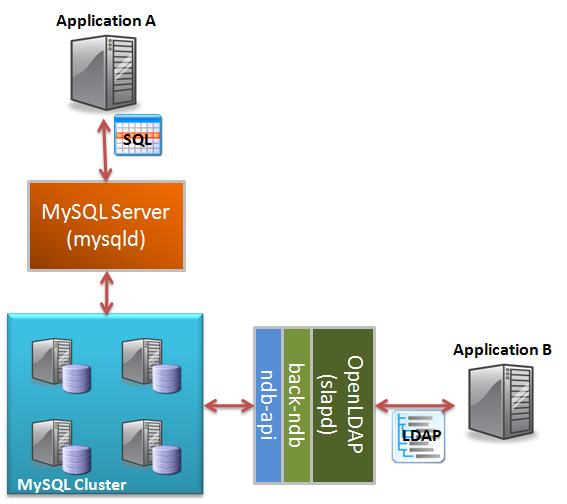
 OpenLDAP includes a driver that allows it to store and access data held in MySQL Cluster. It uses the NDB-API to access the database and so the performance is extremely good. One of the great things about the solution is that it lets you simultaneously access the same data through both LDAP and SQL (or the NDB-API or any of the MySQL connectors). This article gives an example of how this can be done.
Prerequisites:
This article assumes that you’ve already installed MySQL Cluster – if that isn’t the case then please first refer to “Creating a simple Cluster on a single LINUX host” or “Deploying MySQL Cluster over multiple hosts“.
Once MySQL Cluster has been installed, you need to build and configure OpenLDAP to use MySQL Cluster (alternatively, you can engage Symas to provide you pre-built binaries); Johan provides a good walkthrough of this in his Blog “OpenLDAP for MySQL Cluster“. One extra note is that slapd must be run as root due to the ports it accesses. That Blog entry also explains how to test that everything is working – do that before proceeding to the next step.
Example 1 Extending the LDAP Data Schema and reading/writing the data through LDAP and SQL:
The standard schemas that come with OpenLDAP will be suitable for lots of scenarios that have typically used directories. In this article, we’re interested in other applications where we need to store and access additional attributes.
We create a new schema file “x-clusterdb-hlr.schema” that represents some of the data that would be needed for an HLR application:
attributetype ( 1.3.6.1.4.1.33913.1.0 NAME 'clusterdbsubid'
DESC 'Represents the internal subscriber identifier'
EQUALITY integerMatch
SYNTAX 1.3.6.1.4.1.1466.115.121.1.27{8})

attributetype ( 1.3.6.1.4.1.33913.1.1 NAME 'clusterdbimsi'
DESC 'Represents the IMSI associated with a subscriber'
EQUALITY numericStringMatch
SUBSTR numericStringSubstringsMatch
SYNTAX 1.3.6.1.4.1.1466.115.121.1.36{15})

attributetype ( 1.3.6.1.4.1.33913.1.2 NAME 'clusterdbmsisdn'
DESC 'Represents the MSISDN associated with a subscriber'
EQUALITY numericStringMatch
SUBSTR numericStringSubstringsMatch
SYNTAX 1.3.6.1.4.1.1466.115.121.1.36{15})

attributetype ( 1.3.6.1.4.1.33913.1.3 NAME 'clusterdbvlrnumber'
DESC 'Represents the visited VLR number associated with a subscriber'
EQUALITY numericStringMatch
SUBSTR numericStringSubstringsMatch
SYNTAX 1.3.6.1.4.1.1466.115.121.1.36{15})

attributetype ( 1.3.6.1.4.1.33913.1.4 NAME 'clusterdbsmscnumber'
DESC 'Represents the SMS SC that handles messages for a subscriber'
EQUALITY numericStringMatch
SUBSTR numericStringSubstringsMatch
SYNTAX 1.3.6.1.4.1.1466.115.121.1.36{15})

attributetype ( 1.3.6.1.4.1.33913.1.5 NAME 'clusterdbsmscount'
DESC 'Represents the number of SMS messages waiting for the subscriber'
EQUALITY integerMatch
SYNTAX 1.3.6.1.4.1.1466.115.121.1.27{4})

attributetype ( 1.3.6.1.4.1.33913.1.6 NAME 'clusterdbcfu'
DESC 'Represents the Call Forwarding Unconditional number for the sub'
EQUALITY numericStringMatch
SUBSTR numericStringSubstringsMatch
SYNTAX 1.3.6.1.4.1.1466.115.121.1.36{15})

attributetype ( 1.3.6.1.4.1.33913.1.7 NAME 'clusterdbcfnryt'
DESC 'Represents the CFNRY timer'
EQUALITY numericStringMatch
SUBSTR numericStringSubstringsMatch
SYNTAX 1.3.6.1.4.1.1466.115.121.1.36{15})

attributetype ( 1.3.6.1.4.1.33913.1.8 NAME 'clusterdbreleasemin'
DESC 'Represents the software release (minor) of the subscriber data'
EQUALITY numericStringMatch
SUBSTR numericStringSubstringsMatch
SYNTAX 1.3.6.1.4.1.1466.115.121.1.36{15})

attributetype ( 1.3.6.1.4.1.33913.1.9 NAME 'clusterdbreleasemaj'
DESC 'Represents the software release (major) of the subscriber data'
EQUALITY numericStringMatch
SUBSTR numericStringSubstringsMatch
SYNTAX 1.3.6.1.4.1.1466.115.121.1.36{15})

objectclass ( 1.3.6.1.4.1.33913.1 NAME 'clusterdbhlrrecord'
DESC 'The HLR data record for a subscriber'
MUST (clusterdbsubid $ clusterdbimsi)
MAY (clusterdbmsisdn $ clusterdbvlrnumber $ clusterdbsmscnumber $ clusterdbsmscount $ clusterdbcfu $ clusterdbcfnryt))
One thing to note is that the identifier for each objectclass or attributetype has to be globally unique and you should apply for a unique prefix for your organization from the Internet Assigned Numbers Authority – the enterprise ID for clusterdb.com is 33913 and so any identifier starting with 1.3.6.1.4.1.33913 has been defined by clusterdb.com. This article does not attempt to explain exactly how to define your own schema; you can use this example as a starting point and then refer to the OpenLDAP chapter on extending schemas.
To use this schema, you need to copy the schema file to the ‘schema’ directory in the OpenLDAP installation directory – for example “/usr/local/openldap/etc/openldap/schema”. The “slapd.conf” file also needs updating/replacing to include the new schema (and in our case, change the domain and database name to clusterdb):
include      /usr/local/openldap/etc/openldap/schema/core.schema
include     /usr/local/openldap/etc/openldap/schema/cosine.schema
include     /usr/local/openldap/etc/openldap/schema/inetorgperson.schema
include     /usr/local/openldap/etc/openldap/schema/x-clusterdb-hlr.schema

pidfile        /usr/local/openldap/var/run/slapd.pid
argsfile    /usr/local/openldap/var/run/slapd.args

#NDB database defintions
database ndb
suffix "dc=clusterdb,dc=com"
rootdn "cn=Manager,dc=clusterdb,dc=com"
rootpw secret
directory /usr/local/openldap/var/openldap-data
dbconnect localhost:1186
dbhost localhost
dbname clusterdb
dbuser root
dbpass ""
dbconnections 2
attrset billy clusterdbreleasemaj,clusterdbreleasemin
For this to take effect, you now need to stop and restart the slapd process.
To test that everything is working as intended, we need some test data covering the new schema – create a file called “add_clusterdb_hlr.txt“:
dn: dc=clusterdb,dc=com
dc: clusterdb
objectClass: dcObject
objectClass: organization
description: HLR operator
o: GSM PlC

dn: clusterdbsubid=12,dc=clusterdb,dc=com
objectclass: clusterdbhlrrecord
clusterdbsubid: 12
clusterdbimsi: 456123123456789
clusterdbmsisdn: 611231234512345
clusterdbvlrnumber: 611230000000000
clusterdbsmscnumber: 611230000000001
clusterdbsmscount: 2

dn: clusterdbsubid=97,dc=clusterdb,dc=com
objectclass: clusterdbhlrrecord
clusterdbsubid: 97
clusterdbimsi: 456123123456788
clusterdbmsisdn: 611231234512344
clusterdbvlrnumber: 611230000000000
clusterdbsmscnumber: 611230000000001
clusterdbsmscount: 0
Use the slapadd tool to load the data:
[billy@ws1 OpenLDAP]$ slapadd -l add_clusterdb_hlr.txt
091009 11:49:26 [Note] NDB Binlog: CREATE TABLE Event: REPL$clusterdb/OL_dn2id
091009 11:49:26 [Note] NDB Binlog: CREATE TABLE Event: REPL$clusterdb/OL_nextid
091009 11:49:27 [Note] NDB Binlog: CREATE TABLE Event: REPL$clusterdb/OL_opattrs
091009 11:49:28 [Note] NDB Binlog: CREATE TABLE Event: REPL$clusterdb/billy
091009 11:49:28 [Note] NDB Binlog: CREATE TABLE Event: REPL$clusterdb/dcObject
091009 11:49:29 [Note] NDB Binlog: CREATE TABLE Event: REPL$clusterdb/organization
_###########           59.97% eta        elapsed                 spd 258.2  /s 091009 11:49:30 [Note] NDB Binlog: CREATE TABLE Event: REPL$clusterdb/clusterdbhlrrecord
-#################### 100.00% eta   none elapsed             02s spd 313.5  /s
Closing DB...
Behind the scenes, OpenLDAP has now created the “clusterdb” database as well as a number of tables:
mysql> use clusterdb;
Reading table information for completion of table and column names
You can turn off this feature to get a quicker startup with -A
[billy@ws1 OpenLDAP]$ mysql -u root
Welcome to the MySQL monitor.  Commands end with ; or g.
Your MySQL connection id is 13
Server version: 5.1.37-ndb-7.0.8a Source distribution

Type 'help;' or 'h' for help. Type 'c' to clear the current input statement.

mysql> use clusterdb;
Reading table information for completion of table and column names
You can turn off this feature to get a quicker startup with -A

Database changed
mysql> show tables;
+---------------------+
| Tables_in_clusterdb |
+---------------------+
| OL_dn2id            |
| OL_nextid           |
| OL_opattrs          |
| billy               |
| clusterdbhlrrecord  |
| dcObject            |
| organization        |
+---------------------+
7 rows in set (0.00 sec)
Again, this article doesn’t attempt to explain all of details around all of these tables but the 2 key ones here are OL_dn2id and clusterdbhlrrecord. The OL_dn2id table is used to map from a distinguished name to an entry-id (eid) which is then used a key into the table that actually holds the data (in our example, clusterdbhlrrecord). A table is created for each objectclass in the LDDAP schema that we’ve added data to (in this example, that means organization and clusterdbhlrrecord:
mysql> select * from OL_dn2id;
+-----+-------------------------------+--------+--------------+-------------------+----+----+----+----+----+----+----+-----+-----+-----+-----+-----+-----+
| eid | object_classes                | a0     | a1           | a2                | a3 | a4 | a5 | a6 | a7 | a8 | a9 | a10 | a11 | a12 | a13 | a14 | a15 |
+-----+-------------------------------+--------+--------------+-------------------+----+----+----+----+----+----+----+-----+-----+-----+-----+-----+-----+
|   1 |  dcObject organization @ top  | dc=com | dc=clusterdb |                   |    |    |    |    |    |    |    |     |     |     |     |     |     |
|   2 |  clusterdbhlrrecord @ top     | dc=com | dc=clusterdb | clusterdbsubid=12 |    |    |    |    |    |    |    |     |     |     |     |     |     |
|   3 |  clusterdbhlrrecord @ top     | dc=com | dc=clusterdb | clusterdbsubid=97 |    |    |    |    |    |    |    |     |     |     |     |     |     |
+-----+-------------------------------+--------+--------------+-------------------+----+----+----+----+----+----+----+-----+-----+-----+-----+-----+-----+
3 rows in set (0.00 sec)

mysql> select * from clusterdbhlrrecord;
+-----+-----+----------------+-----------------+-----------------+--------------------+---------------------+-------------------+--------------+-----------------+
| eid | vid | clusterdbsubid | clusterdbimsi   | clusterdbmsisdn | clusterdbvlrnumber | clusterdbsmscnumber | clusterdbsmscount | clusterdbcfu | clusterdbcfnryt |
+-----+-----+----------------+-----------------+-----------------+--------------------+---------------------+-------------------+--------------+-----------------+
|   3 |   0 | 97             | 456123123456788 | 611231234512344 | 611230000000000    | 611230000000001     | 0                 | NULL         | NULL            |
|   2 |   0 | 12             | 456123123456789 | 611231234512345 | 611230000000000    | 611230000000001     | 2                 | NULL         | NULL            |
+-----+-----+----------------+-----------------+-----------------+--------------------+---------------------+-------------------+--------------+-----------------+
2 rows in set (0.00 sec)
Clearly, the application can now use LDAP or SQL to read and modify these same fields.
Example 2 Only exposing a subset of the data through LDAP
There are some restrictions on the schema created in MySQL Cluster by OpenLDAP – for example, all columns are varchars. It could be that your application needs a richer data schema when using SQL to access the data, including data that doesn’t need accessing through LDAP. The simplest way to do this would be to have some tables in the data base that aren’t included in the LDAP schema – OpenLDAP just won’t see them.
Another option is to have OpenLDAP only see a subset of the columns in a table (it only sees those fields that are in the LDAP schema). This is fairly straightforward to acheive as OpenLDAP only creates the database and tables if they don’t already exist and it is happy to ignore any columns that are not included. For simplicity, we assume that you’ve executed Example 1 and then we remove the database and then recreate it by hand (and then you should restart slapd):
mysql> drop database clusterdb;
Query OK, 7 rows affected (4.41 sec)

mysql> create database clusterdb;
Query OK, 1 row affected (0.00 sec)

mysql> use clusterdb;
Database changed

mysql> CREATE TABLE clusterdbhlrrecord (
-> eid bigint(20) unsigned NOT NULL,
-> vid int(10) unsigned NOT NULL,
-> clusterdbsubid varchar(8) DEFAULT NULL,
-> clusterdbimsi varchar(15) DEFAULT NULL,
-> clusterdbmsisdn varchar(15) DEFAULT NULL,
-> clusterdbvlrnumber varchar(15) DEFAULT NULL,
-> clusterdbsmscnumber varchar(15) DEFAULT NULL,
-> clusterdbsmscount varchar(4) DEFAULT NULL,
-> clusterdbcfu varchar(15) DEFAULT NULL,
-> clusterdbcfnryt varchar(15) DEFAULT NULL,
-> contractstart date default null,
-> PRIMARY KEY (eid,vid))
-> engine=ndb partition by key (eid);
and then add the same data (which doesn’t contain “contractstart”) as in Example 1 and then use LDAP to check that it has been stored correctly and can be retrieved:
[billy@ws1 OpenLDAP]$ slapadd -l add_clusterdb_hlr.txt
091009 12:41:44 [Note] NDB Binlog: CREATE TABLE Event: REPL$clusterdb/OL_dn2id
091009 12:41:45 [Note] NDB Binlog: CREATE TABLE Event: REPL$clusterdb/OL_nextid
091009 12:41:46 [Note] NDB Binlog: CREATE TABLE Event: REPL$clusterdb/OL_opattrs
091009 12:41:46 [Note] NDB Binlog: CREATE TABLE Event: REPL$clusterdb/billy
091009 12:41:47 [Note] NDB Binlog: CREATE TABLE Event: REPL$clusterdb/dcObject
091009 12:41:48 [Note] NDB Binlog: CREATE TABLE Event: REPL$clusterdb/organization
.#################### 100.00% eta   none elapsed                 spd 627.0  /s
Closing DB...

[billy@ws1 OpenLDAP]$ ldapsearch -x -b 'dc=clusterdb,dc=com'
# extended LDIF
#
# LDAPv3
# base <dc=clusterdb,dc=com> with scope subtree
# filter: (objectclass=*)
# requesting: ALL
#

# 97, clusterdb.com
dn: clusterdbsubid=97,dc=clusterdb,dc=com
objectClass: clusterdbhlrrecord
clusterdbsubid: 97
clusterdbimsi: 456123123456788
clusterdbmsisdn: 611231234512344
clusterdbvlrnumber: 611230000000000
clusterdbsmscnumber: 611230000000001
clusterdbsmscount: 0

# clusterdb.com
dn: dc=clusterdb,dc=com
objectClass: dcObject
objectClass: organization
dc: clusterdb
o: GSM PlC
description: HLR operator

# 12, clusterdb.com
dn: clusterdbsubid=12,dc=clusterdb,dc=com
objectClass: clusterdbhlrrecord
clusterdbsubid: 12
clusterdbimsi: 456123123456789
clusterdbmsisdn: 611231234512345
clusterdbvlrnumber: 611230000000000
clusterdbsmscnumber: 611230000000001
clusterdbsmscount: 2

# search result
search: 2
result: 0 Success

# numResponses: 4
# numEntries: 3
As you can see, the ‘contractstart’ field is ignored by OpenLDAP but we can work with it through SQL:
[billy@ws1 OpenLDAP]$ mysql -u root;
Welcome to the MySQL monitor.  Commands end with ; or g.
Your MySQL connection id is 24
Server version: 5.1.37-ndb-7.0.8a Source distribution

Type 'help;' or 'h' for help. Type 'c' to clear the current input statement.

mysql> use clusterdb;
Reading table information for completion of table and column names
You can turn off this feature to get a quicker startup with -A

Database changed
mysql> update clusterdbhlrrecord set contractstart='2009-01-04' where clusterdbsubid=12;
Query OK, 1 row affected (0.00 sec)
Rows matched: 1  Changed: 1  Warnings: 0

mysql> select * from clusterdbhlrrecord;
+-----+-----+----------------+-----------------+-----------------+--------------------+---------------------+-------------------+--------------+-----------------+---------------+
| eid | vid | clusterdbsubid | clusterdbimsi   | clusterdbmsisdn | clusterdbvlrnumber | clusterdbsmscnumber | clusterdbsmscount | clusterdbcfu | clusterdbcfnryt | contractstart |
+-----+-----+----------------+-----------------+-----------------+--------------------+---------------------+-------------------+--------------+-----------------+---------------+
|   3 |   0 | 97             | 456123123456788 | 611231234512344 | 611230000000000    | 611230000000001     | 0                 | NULL         | NULL            | NULL          |
|   2 |   0 | 12             | 456123123456789 | 611231234512345 | 611230000000000    | 611230000000001     | 2                 | NULL         | NULL            | 2009-01-04    |
+-----+-----+----------------+-----------------+-----------------+--------------------+---------------------+-------------------+--------------+-----------------+---------------+
Example 3 Making rows added through SQL visible through OpenLDAP
This example builds upon Example 2 by showing how rows can be added to the clusterdbhlrrecord and then be accessed using LDAP.
The first step is to just add the row:
mysql> insert into clusterdbhlrrecord values (4,0,101,456231234554321,61777777777,611230000000000,
-> 611230000000000,0,NULL,NULL,'2008-01-01');
Query OK, 1 row affected (0.00 sec)
When we try to read this entry through LDAP, it can’t be found:
[billy@ws1 OpenLDAP]$ ldapsearch -x -b 'clusterdbsubid=101,dc=clusterdb,dc=com'
# extended LDIF
#
# LDAPv3
# base <clusterdbsubid=101,dc=clusterdb,dc=com> with scope subtree
# filter: (objectclass=*)
# requesting: ALL
#

# search result
search: 2
result: 32 No such object
matchedDN: dc=clusterdb,dc=com

# numResponses: 1
The reason for this is that this row doesn’t yet have a corresponding entry in the OL_dn2id table; that can now be fixed:
mysql> insert into OL_dn2id values (4,'clusterdbhlrrecord @ top','dc=com','dc=clusterdb','clusterdbsubid=101','','','','','','','','','','','','','');
Query OK, 1 row affected (0.01 sec)

[billy@ws1 OpenLDAP]$ ldapsearch -x -b 'clusterdbsubid=101,dc=clusterdb,dc=com'
# extended LDIF
#
# LDAPv3
# base <clusterdbsubid=101,dc=clusterdb,dc=com> with scope subtree
# filter: (objectclass=*)
# requesting: ALL
#

# 101, clusterdb.com
dn: clusterdbsubid=101,dc=clusterdb,dc=com
objectClass: clusterdbhlrrecord
clusterdbsubid: 101
clusterdbimsi: 456231234554321
clusterdbmsisdn: 61777777777
clusterdbvlrnumber: 611230000000000
clusterdbsmscnumber: 611230000000000
clusterdbsmscount: 0

# search result
search: 2
result: 0 Success

# numResponses: 2
# numEntries: 1
If you want to hide this extra step from the application then you can of course use stored procedures to automatically add the extra row to OL_dn2id.