-
MySQL 5.6 GA – Replication Enhancements
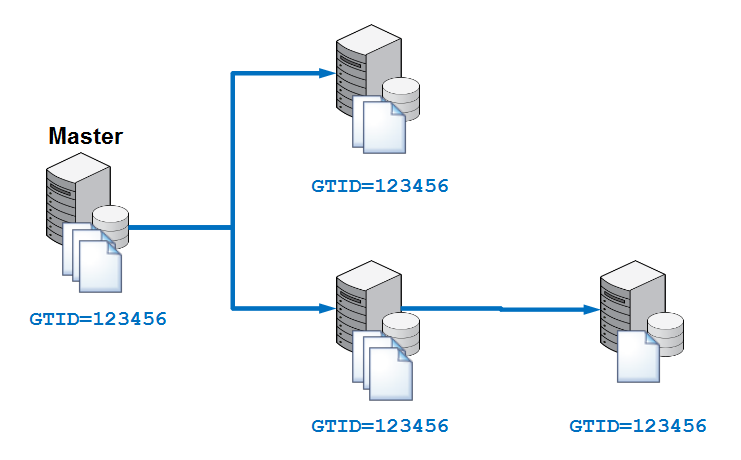
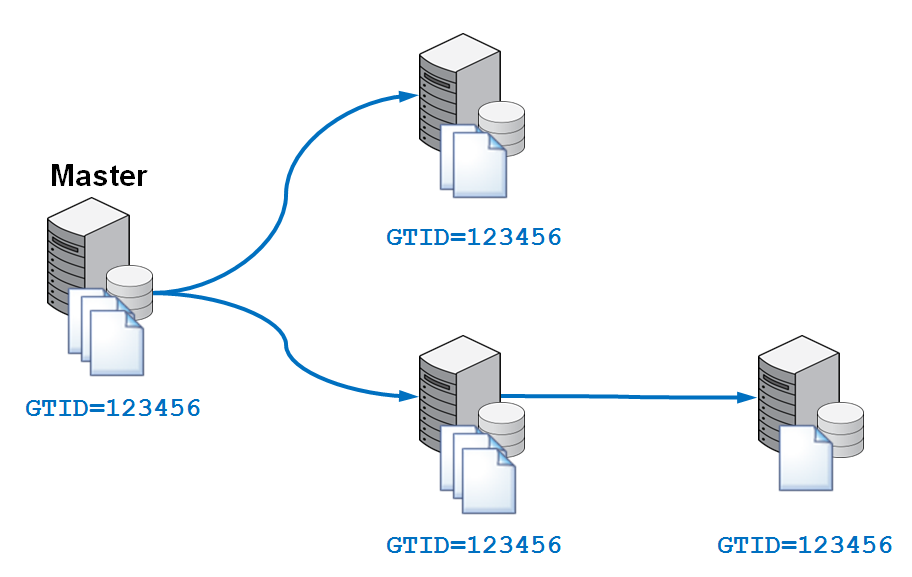
Posted on February 5th, 2013 1 commentMySQL 5.6 has now been declared Generally Available (i.e. suitable for production use). This is a very exciting release from a MySQL replication perspective with some big new features. These include:- Global Transaction Identifiers (GTIDs) – a unique identifier that is used accross your replication topology to identify a transaction. Makes setting up and managing your cluster (including the promotion of a new master) far simpler and more reliable.
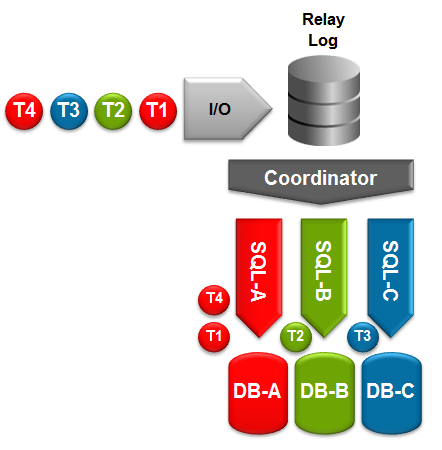
- Multi-threaded slaves (MTS) – Increases the performance of replication on the slave; different threads will handle applying events to different databases.
- Binary Log Group Commit – Improves replication performance on the master.
- Optimized Row Based Replication – reduces the amount of data that needs to be replicated; reducing network usage and potentially speeding up replication.
- Crash-Safe Replication – makes replication transactional. The data and replication positioning information are both updated as part of the same transaction.
- Replication Event Checksums – checks to ensure that the data being replicated hasn’t become corrupted, avoids writing corrupted data to the slave.
- Time-Delayed Replication – configure one or more of your slaves to only apply replicated events after a configured time. This can be useful to protect against DBA mistakes.
- Informational Logs – includes the original statement in the binary log when using row-based-replication to aid in debugging.
To coincide with the GA announcement, a new white paper has been released – MySQL 5.6 Replication An Introduction – that provides a lot more details on these new features. We’ve also released a second white paper – MySQL 5.6 Replication, Enhancing Scalability and Availability – A Tutorial that steps you through using MySQL Replication, with a particular focus on the new features.
If you’re already familiar with using MySQL Replication, here are a few pointers on what to do differently for the new MySQL 5.6 features but you should refer to the full tutorial to see these changes in context.
First of all, here are some extra configuration parameters to include…
[mysqld] gtid-mode=on # GTID enforce-gtid-consistency=true # GTID master-info-repository=TABLE # Chrash-safe replication relay-log-info-repository=TABLE # Chrash-safe replication slave-parallel-workers=2 # MTS binlog-checksum=CRC32 # Checksums master-verify-checksum=1 # Checksums slave-sql-verify-checksum=1 # Checksums binlog-rows-query-log_events=1 # Informational logs
When initiating (or restarting) replication on the slave, it is no longer necessary to include the binary log positioning information as the master and slave will automatically negotiate what outstanding events need to be replicated based on any GTIDs previously received by the slave…
slave> CHANGE MASTER TO MASTER_HOST='black', MASTER_USER='repl_user', MASTER_PASSWORD='billy', MASTER_AUTO_POSITION=1;Please try out these new features and let us know what you think.
-
“MySQL & Friends devroom” at FOSDEM 2013
Posted on January 18th, 2013 No commentsThe Free and Open source Software Developers’ European Meeting (FOSDEM) is a two-day event organized by volunteers to promote the widespread use of Free and Open Source software. As in previous years, there is a dedicated stream of MySQL Sessions. On Saturday (2nd Feb) evening there’s a MySQL community dinner and then we’ve a packed program from 9:15 through 17:30 on Sunday (3rd Feb).FOSDEM 2013 is a free event and there’s no requirement to pre-register – just get yourself along to Brussels.
This year I’ll be making a presentation introducing MySQL Cluster. Several of my colleagues from Oracle will also be there to present on the latest and greatest MySQL capabilities – including what’s coming in MySQL 5.6. This will be a great opportunity to politely listen to some real technical experts but an even better one to pester them for extra details – whether during the presentations or when you can grab them at other times.
Hope to see some of you there!
-
Replication and auto-failover made easy with MySQL Utilities
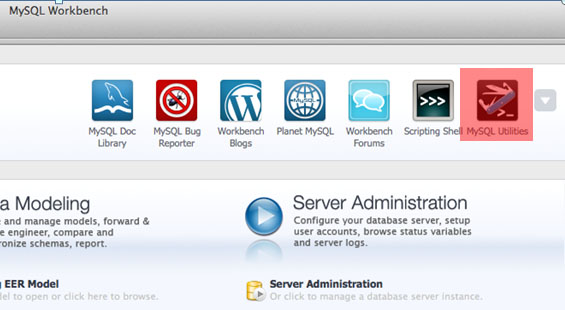
Posted on September 24th, 2012 22 commentsIf you’re a user of MySQL Workbench then you may have noticed a pocket knife icon appear in the top right hand corner – click on that and a terminal opens which gives you access to the MySQL utilities. In this post I’m focussing on the replication utilities but you can also refer to the full MySQL Utilities documentation.What I’ll step through is how to uses these utilities to:
- Set up replication from a single master to multiple slaves
- Automatically detect the failure of the master and promote one of the slaves to be the new master
- Introduce the old master back into the topology as a new slave and then promote it to be the master again
Tutorial Video
Before going through the steps in detail here’s a demonstration of the replication utilities in action…
To get full use of these utilities you should use the InnoDB storage engine together with the Global Transaction ID functionality from the latest MySQL 5.6 DMR.
Do you really need/want auto-failover?
For many people, the instinctive reaction is to deploy a fully automated system that detects when the master database fails and then fails over (promotes a slave to be the new master) without human intervention. For many applications this may be the correct approach.
There are inherent risks to this though – What if the failover implementation has a flaw and fails (after all, we probably don’t test this out in the production system very often)? What if the slave isn’t able to cope with the workload and makes things worse? Is it just a transitory glitch and would the best approach have been just to wait it out?
Following a recent, high profile outage there has been a great deal of debate on the topic between those that recommend auto-failover and those that believe it should only ever be entrusted to a knowledgeable (of the application and the database architecture) and well informed (of the state of the database nodes, application load etc.) human. Of course, if the triggering of the failover is to be left to a human then you want that person to have access to the information they need and an extremely simple procedure (ideally a single command) to execute the failover. Probably the truth is that it all depends on your specific circumstances.
The MySQL replication utilities aim to support you whichever camp you belong to:
- In the fully automated mode, the utilities will continually monitor the state of the master and in the event of its failure identify the best slave to promote – by default it will select the one that is most up-to-date and then apply any changes that are available on other slaves but not on this one before promoting it to be the new master. The user can override this behaviour (for example by limiting which of the slaves are eligible for promotion). The user is also able to bind in their own programs to be run before and after the failover (for example, to inform the application).
- In the monitoring mode, the utility still continually checks the availability of the master, and informs the user if it should fail. The user then executes a single command to fail over to their preferred slave.
Step 1. Make sure MySQL Servers are configured correctly
For some of the utilities, it’s important that you’re using Global Transaction IDs; binary logging needs to be enabled; may as well use the new crash-safe slave functionality… It’s beyond the scope of this post to go through all of those and so instead I’ll just give example configuration files for the 5 MySQL Servers that will be used:
my1.cnf
[mysqld] binlog-format=ROW log-slave-updates=true gtid-mode=on disable-gtid-unsafe-statements=true # Use enforce-gtid-consistency from 5.6.9+ master-info-repository=TABLE relay-log-info-repository=TABLE sync-master-info=1 datadir=/home/billy/mysql/data1 server-id=1 log-bin=util11-bin.log report-host=utils1 report-port=3306 socket=/home/billy/mysql/sock1 port=3306
my2.cnf
[mysqld] binlog-format=ROW log-slave-updates=true gtid-mode=on disable-gtid-unsafe-statements=true # Use enforce-gtid-consistency from 5.6.9+ master-info-repository=TABLE relay-log-info-repository=TABLE sync-master-info=1 datadir=/home/billy/mysql/data2 server-id=2 log-bin=util12-bin.log report-host=utils1 report-port=3307 socket=/home/billy/mysql/sock2 port=3307
my3.cnf
[mysqld] binlog-format=ROW log-slave-updates=true gtid-mode=on disable-gtid-unsafe-statements=true # Use enforce-gtid-consistency from 5.6.9+ master-info-repository=TABLE relay-log-info-repository=TABLE sync-master-info=1 datadir=/home/billy/mysql/data3 server-id=3 log-bin=util2-bin.log report-host=utils2 report-port=3306 socket=/home/billy/mysql/sock3 port=3306
my4.cnf
[mysqld] binlog-format=ROW log-slave-updates=true gtid-mode=on disable-gtid-unsafe-statements=true # Use enforce-gtid-consistency from 5.6.9+ master-info-repository=TABLE relay-log-info-repository=TABLE master-info-file=/home/billy/mysql/master4.info datadir=/home/billy/mysql/data4 server-id=4 log-bin=util4-bin.log report-host=utils2 report-port=3307 socket=/home/billy/mysql/sock4 port=3307
my5.cnf
[mysqld] binlog-format=ROW log-slave-updates=true gtid-mode=on disable-gtid-unsafe-statements=true # Use enforce-gtid-consistency from 5.6.9+ datadir=/home/billy/mysql/data5 master-info-repository=TABLE relay-log-info-repository=TABLE sync-master-info=1 #master-info-file=/home/billy/mysql/master5.info server-id=5 log-bin=util5-bin.log report-host=utils2 report-port=3308 socket=/home/billy/mysql/sock5 port=3308
The utilities are actually going to be run from a remote host and so it will be necessary for that host to access each of the MySQL Servers and so a user has to be granted remote access (note that the utilities will automatically create the replication user):
[billy@utils1 ~]$ mysql -h 127.0.0.1 -P3306 -u root -e "grant all on *.* to root@'%' with grant option;" [billy@utils1 ~]$ mysql -h 127.0.0.1 -P3307 -u root -e "grant all on *.* to root@'%' with grant option;" [billy@utils2 ~]$ mysql -h 127.0.0.1 -P3306 -u root -e "grant all on *.* to root@'%' with grant option;" [billy@utils2 ~]$ mysql -h 127.0.0.1 -P3307 -u root -e "grant all on *.* to root@'%' with grant option;" [billy@utils2 ~]$ mysql -h 127.0.0.1 -P3308 -u root -e "grant all on *.* to root@'%' with grant option;"
OK – that’s the most painful part of the whole process out of the way!
Set up replication
While there are extra options (such as specifying what username/password to use for the replication user or providing a password for the root user) I’m going to keep things simple and use the defaults as much as possible. The following commands are run from the MySQL Utilities terminal – just click on the pocket-knife icon in MySQL Workbench.
mysqlreplicate --master=root@utils1:3306 --slave=root@utils1:3307 # master on utils1: ... connected. # slave on utils1: ... connected. # Checking for binary logging on master... # Setting up replication... # ...done. mysqlreplicate --master=root@utils1:3306 --slave=root@utils2:3306 # master on utils1: ... connected. # slave on utils2: ... connected. # Checking for binary logging on master... # Setting up replication... # ...done. mysqlreplicate --master=root@utils1:3306 --slave=root@utils2:3307 # master on utils1: ... connected. # slave on utils2: ... connected. # Checking for binary logging on master... # Setting up replication... # ...done. mysqlreplicate --master=root@utils1:3306 --slave=root@utils2:3308 # master on utils1: ... connected. # slave on utils2: ... connected. # Checking for binary logging on master... # Setting up replication... # ...done.
That’s it, replication has now been set up from one master to four slaves.
You can now check that the replication topology matches what you intended:
mysqlrplshow --master=root@utils1; # master on utils1: ... connected. # Finding slaves for master: utils1:3306 # Replication Topology Graph utils1:3306 (MASTER) | +--- utils1:3307 - (SLAVE) | +--- utils2:3306 - (SLAVE) | +--- utils2:3307 - (SLAVE) | +--- utils2:3308 - (SLAVE)
Additionally, you can also check that any of the replication relationships is correctly configure:
mysqlrplcheck --master=root@utils1 --slave=root@utils2:3307 # master on utils1: ... connected. # slave on utils2: ... connected. Test Description Status --------------------------------------------------------------------------- Checking for binary logging on master [pass] Are there binlog exceptions? [pass] Replication user exists? [pass] Checking server_id values [pass] Is slave connected to master? [pass] Check master information file [pass] Checking InnoDB compatibility [pass] Checking storage engines compatibility [pass] Checking lower_case_table_names settings [pass] Checking slave delay (seconds behind master) [pass] # ...done.
Including the -s option would have included the output that you’d expect to see from SHOW SLAVE STATUS\G on the slave.
Automated monitoring and failover
The previous section showed how you can save some serious time (and opportunity for user-error) when setting up MySQL replication. We now look at using the utilities to automatically monitor the state of the master and then automatically promote a new master from the pool of slaves. For simplicity I'll stick with default values wherever possible but note that there are a number of extra options available to you such as:
- Constraining which slaves are eligible for promotion to master; the default is to take the most up-to-date slave
- Binding in your own scripts to be run before or after the failover (e.g. inform your application to switch master?)
- Have the utility monitor the state of the servers but don't automatically initiate failover
Here is how to set it up:
mysqlfailover --master=root@utils1:3306 --discover-slaves-login=root --rediscover MySQL Replication Failover Utility Failover Mode = auto Next Interval = Wed Aug 15 13:19:30 2012 Master Information ------------------ Binary Log File Position Binlog_Do_DB Binlog_Ignore_DB util11-bin.000001 2586 Replication Health Status +---------+-------+---------+--------+------------+---------+ | host | port | role | state | gtid_mode | health | +---------+-------+---------+--------+------------+---------+ | utils1 | 3306 | MASTER | UP | ON | OK | | utils1 | 3307 | SLAVE | UP | ON | OK | | utils2 | 3306 | SLAVE | UP | ON | OK | | utils2 | 3307 | SLAVE | UP | ON | OK | | utils2 | 3308 | SLAVE | UP | ON | OK | +---------+-------+---------+--------+------------+---------+ Q-quit R-refresh H-health G-GTID Lists U-UUIDs
mysqlfailover will then continue to run, refreshing the state - just waiting for something to go wrong.
Rather than waiting, I kill the master MySQL Server:
mysqladmin -h utils1 -P3306 -u root shutdown
Checking with the still-running mysqlfailover we can see that it has promoted utils1:3307.
MySQL Replication Failover Utility Failover Mode = auto Next Interval = Wed Aug 15 13:21:13 2012 Master Information ------------------ Binary Log File Position Binlog_Do_DB Binlog_Ignore_DB util12-bin.000001 7131 Replication Health Status +---------+-------+---------+--------+------------+---------+ | host | port | role | state | gtid_mode | health | +---------+-------+---------+--------+------------+---------+ | utils1 | 3307 | MASTER | UP | ON | OK | | utils2 | 3306 | SLAVE | UP | ON | OK | | utils2 | 3307 | SLAVE | UP | ON | OK | | utils2 | 3308 | SLAVE | UP | ON | OK | +---------+-------+---------+--------+------------+---------+ Q-quit R-refresh H-health G-GTID Lists U-UUIDs
Add the recovered MySQL Server back into the topology
After restarting the failed MySQL Server, it can be added back into the mix as a slave to the new master:
mysqlreplicate --master=root@utils1:3307 --slave=root@utils1:3306 # master on utils1: ... connected. # slave on utils1: ... connected. # Checking for binary logging on master... # Setting up replication... # ...done.
The output from mysqlfailover (still running) confirms the addition:
MySQL Replication Failover Utility Failover Mode = auto Next Interval = Wed Aug 15 13:24:38 2012 Master Information ------------------ Binary Log File Position Binlog_Do_DB Binlog_Ignore_DB util12-bin.000001 7131 Replication Health Status +---------+-------+---------+--------+------------+---------+ | host | port | role | state | gtid_mode | health | +---------+-------+---------+--------+------------+---------+ | utils1 | 3307 | MASTER | UP | ON | OK | | utils1 | 3306 | SLAVE | UP | ON | OK | | utils2 | 3306 | SLAVE | UP | ON | OK | | utils2 | 3307 | SLAVE | UP | ON | OK | | utils2 | 3308 | SLAVE | UP | ON | OK | +---------+-------+---------+--------+------------+---------+ Q-quit R-refresh H-health G-GTID Lists U-UUIDs
If it were important that the recovered MySQL Server be restored as the master then it is simple to manually trigger the promotion (after quitting out of mysqlfailover):
mysqlrpladmin --master=root@utils1:3307 --new-master=root@utils1:3306 --demote-master --discover-slaves-login=root switchover # Discovering slaves for master at utils1:3307 # Checking privileges. # Performing switchover from master at utils1:3307 to slave at utils1:3306. # Checking candidate slave prerequisites. # Waiting for slaves to catch up to old master. # Stopping slaves. # Performing STOP on all slaves. # Demoting old master to be a slave to the new master. # Switching slaves to new master. # Starting all slaves. # Performing START on all slaves. # Checking slaves for errors. # Switchover complete. # # Replication Topology Health: +---------+-------+---------+--------+------------+---------+ | host | port | role | state | gtid_mode | health | +---------+-------+---------+--------+------------+---------+ | utils1 | 3306 | MASTER | UP | ON | OK | | utils1 | 3307 | SLAVE | UP | ON | OK | | utils2 | 3306 | SLAVE | UP | ON | OK | | utils2 | 3307 | SLAVE | UP | ON | OK | | utils2 | 3308 | SLAVE | UP | ON | OK | +---------+-------+---------+--------+------------+---------+ # ...done.
As always, we'd really appreciate people trying this out and giving us feedback!
-
MySQL 5.6 Replication – webinar replay
Posted on May 29th, 2012 No commentsOn Wednesday (16th May 2012), Mat Keep and I presented on the new replication features that are previewed as part of the latest MySQL 5.6 Development Release.
The replay for that webinar (together with the chart deck) is now available from here.
In addition, there were a huge number of great questions raised and we had a couple of key engineers answering them on-line – view the Q&A transcript here.
A reminder of the topics covered in the webinar…
MySQL 5.6 delivers new replication capabilities which we will discuss in the webinar:
- High performance with Multi-Threaded Slaves and Optimized Row Based Replication
- High availability with Global Transaction Identifiers, Failover Utilities and Crash Safe Slaves & Binlog
- Data integrity with Replication Event Checksums
- Dev/Ops agility with new Replication Utilities, Time Delayed Replication and more
-
Upcoming webinar: MySQL 5.6 Replication – For Next Generation of Web and Cloud Services
Posted on May 10th, 2012 No commentsOn Wednesday (16th May 2012), Mat Keep and I will be presenting the new replication features that are previewed as part of the latest MySQL 5.6 Development Release. If you’d like to attend then register here.
MySQL 5.6 delivers new replication capabilities which we will discuss in the webinar:
- High performance with Multi-Threaded Slaves and Optimized Row Based Replication
- High availability with Global Transaction Identifiers, Failover Utilities and Crash Safe Slaves & Binlog
- Data integrity with Replication Event Checksums
- Dev/Ops agility with new Replication Utilities, Time Delayed Replication and more
The session will wrap up with resources to get started with MySQL 5.6 and an opportunity to ask questions.
The webinar will last 45-60 minutes and will start on Wednesday, May 16, 2012 at 09:00 Pacific time (America); start times in other time zones:
- Wed, May 16: 06:00 Hawaii time
- Wed, May 16: 10:00 Mountain time (America)
- Wed, May 16: 11:00 Central time (America)
- Wed, May 16: 12:00 Eastern time (America)
- Wed, May 16: 16:00 UTC
- Wed, May 16: 17:00 Western European time
- Wed, May 16: 18:00 Central European time
- Wed, May 16: 19:00 Eastern European time
As always, it’s worth registering even if you can’t make the live webcast as you’ll be emailed a link to the replay as soon as it’s available.
-
NoSQL and MySQL – free webinar, replay now available
Posted on April 18th, 2012 4 commentsUpdate – the webinar replay is now available from here.
On Thursday, I’ll be presenting a webinar on NoSQL (of course with a MySQL twist!) – as always it’s free to attend but you need to register here in advance. Even if you can’t attend, it’s worth registering as you’ll be sent a link to the replay and the charts. The session will introduce the concepts and motivations behind the NoSQL movement and then go on to explain how you can get most of the same benefits with MySQL (including MySQL Cluster) while still getting the RDBMS benefits such as ACID transactions.
The official description:
The ever increasing performance demands of web-based services has generated significant interest in providing NoSQL access methods to MySQL – enabling users to maintain all of the advantages of their existing relational database infrastructure, while providing blazing fast performance for simple queries, using an API to complement regular SQL access to their data. This session looks at the existing NoSQL access methods for MySQL as well as the latest developments for both the InnoDB and MySQL Cluster storage engines. See how you can get the best of both worlds – persistence, consistency, rich queries, high availability, scalability and simple, flexible APIs and schemas for agile development.
When:
- Thursday, March 29, 2012: 09:00 Pacific time (America)
- Thu, Mar 29: 06:00 Hawaii time
- Thu, Mar 29: 10:00 Mountain time (America)
- Thu, Mar 29: 11:00 Central time (America)
- Thu, Mar 29: 12:00 Eastern time (America)
- Thu, Mar 29: 16:00 UTC
- Thu, Mar 29: 17:00 Western European time
- Thu, Mar 29: 18:00 Central European time
- Thu, Mar 29: 19:00 Eastern European time
-
MySQL 5.6 Replication Enhancements – webinar replay
Posted on January 6th, 2012 1 commentThe replay has now been released for the MySQL 5.6 replication enhancements replay where you can get the latest information on all of the great new content that has been included in the MySQL 5.6 Development Releases as well as some features that are still being developed. You can view the replay here.
Some of the topics discussed are:
- Enhanced data integrity: Global Transactions Identifiers, Crash-Safe Slaves and Replication Event Checksums;
- High performance: Multi-Threaded Slaves, Binlog Group Commit and Optimized Row-Based Replication;
- Improved flexibility: Time Delayed Replication, Multi-Source Replication, Binlog API and Informational Log Events
-
What’s new in MySQL 5.6 Replication – free webinar
Posted on December 12th, 2011 No commentsThere will be a webinar this Wednesday where you can get the latest information on all of the great new content that has been included in the MySQL 5.6 Development Releases as well as some features that are still being developed. As always, the webinar is free but you need to register here in advance. Even if you can’t attend the live event it’s worth registering so that you get sent the replay.
Some of the topics we’ll be discussing are:
- Enhanced data integrity: Global Transactions Identifiers, Crash-Safe Slaves and Replication Event Checksums;
- High performance: Multi-Threaded Slaves, Binlog Group Commit and Optimized Row-Based Replication;
- Improved flexibility: Time Delayed Replication, Multi-Source Replication, Binlog API and Informational Log Events
The event starts on Wednesday, December 14, 2011: 09:00 Pacific time; 17:00 UK; 18:00 CET. -
Delayed Replication in MySQL 5.6 Development Release
Posted on April 13th, 2011 4 commentsThe new Development Release for MySQL 5.6 contains a great feature that our users have been asking for for a while (work log 344 first raised in 2010!) – delayed replication.
The concept (and as you’ll see the execution) is extremely simple. If a user makes a mistake on the master – such as dropping some critical tables – then we want to give them the opportunity to recover the situation by using the data held on one of the slaves. The problem is that the slave is busily trying to keep up with the master and in all likelihood will have dropped these tables before the user has time to pull the plug on the replication stream. What this feature does is give the DBA the option to introduce a configurable delay into the replication process so that they have time to cut it off before the mistake is propagated.
This blog explains how this works, how to set that up and then how to bring the slave up to date (to the point in time just before the mistake was made on the master).
To understand how this is implemented, it helps to have a little bit of background on how MySQL replication is implemented. When a change is made on the master, it is applied to the master’s local disk copy and then written to the binary log. The change is then asynchronously (but normally immediately) copied from the master’s binary log to the relay log on the slave; from there an SQL thread on the slave will read the change from the relay log and apply it to the slave’s copy of the data.
This feature works by allowing the user to configure a delay between when the change is applied on the master and when that change is taken from the relay log and applied to the slave. Note that if the master fails during this delay period then the change is not lost as it is has already been safely recorded in the slave’s relay log.
As the delay is implemented on the slave, you are free to use ‘real-time’ replication to one slave (to allow the fastest possible failover if the master fails) and delayed replication to a second slave to guard against user error. This is the setup that this post steps through.
For simplicity, all three MySQL Servers will be run on a single host but each uses a different port number as shown in the diagram. “slave” will apply changes as quickly as it can while “slave2″ will introduce a delay when applying changes from its relay log.
Setting up the first slave is very standard:
master> CREATE USER repl_user@localhost; master> GRANT REPLICATION SLAVE ON *.* TO repl_user@localhost IDENTIFIED BY 'pw';
slave> CHANGE MASTER TO -> MASTER_HOST = 'localhost', -> MASTER_PORT = 3306, -> MASTER_USER = 'repl_user', -> MASTER_PASSWORD = 'pw';
slave> start slave;When setting up the delayed slave, one extra parameter is included in the CHANGE MASTER command:slave2> CHANGE MASTER TO -> MASTER_HOST = 'localhost', -> MASTER_PORT = 3306, -> MASTER_USER = 'repl_user', -> MASTER_PASSWORD = 'pw', -> MASTER_DELAY = 20;
slave2> START SLAVE;The MASTER_DELAY parameter indicates the delay in seconds (here I’ve used 20 seconds – in a production environment you’d probably want to give your self much longer.Prior to this, a simple table had already been created:master> CREATE DATABASE clusterdb;USE clusterdb; master> CREATE TABLE towns (Town VARCHAR(20));
Next we check that changes are immediately applied on slave while delayed on slave2:master> INSERT INTO towns VALUES ("Maidenhead"),("Bray");slave> SELECT * FROM towns; +------------+ | Town | +------------+ | Maidenhead | | Bray | +------------+slave2> SELECT * FROM towns; Empty set (0.00 sec) slave2> SELECT * FROM towns; +------------+ | Town | +------------+ | Maidenhead | | Bray | +------------+
The next step is to simulate a user error; I add some more data to the table and then drop the table. Following on from that I stop the replication on slave2 before the mistake is applied:master> INSERT INTO towns VALUES ("Cookham"),("Marlow"); master> DROP TABLE towns;slave> SELECT * FROM tables; ERROR 1146 (42S02): Table 'clusterdb.tables' doesn't existslave2> STOP SLAVE; slave2> SELECT * FROM towns; +------------+ | Town | +------------+ | Maidenhead | | Bray | +------------+
This is a good start, while slave has dropped the table, it still exists on slave2. Unfortunately, slave2 is missing the additions to the table that were made just before the mistake was made. The next step is to bring slave 2 almost up to date – stopping just before the table was dropped. To do this we need to find the position within the master’s binary log just before the table was dropped – this can be done using the SHOW BINLOG EVENTS command on the master. Once we have that position (file-name + position) we can tell slave 2 to catch up just to that point using START SLAVE UNTIL
. Once that has been done, I check that the extra 2 inserts have been applied to slave2: master> SHOW BINLOG EVENTS\G....*************************** 10. row *************************** Log_name: ws2-bin.000001 Pos: 842 Event_type: Query Server_id: 1 End_log_pos: 957 Info: use `clusterdb`; INSERT INTO towns VALUES ("Cookham"),("Marlow") *************************** 11. row *************************** Log_name: ws2-bin.000001 Pos: 957 Event_type: Xid Server_id: 1 End_log_pos: 984 Info: COMMIT /* xid=32 */ *************************** 12. row *************************** Log_name: ws2-bin.000001 Pos: 984 Event_type: Query Server_id: 1 End_log_pos: 1096 Info: use `clusterdb`; DROP TABLE `towns` /* generated by server */
slave2> START SLAVE UNTIL -> MASTER_LOG_FILE='ws2-bin.000001', -> MASTER_LOG_POS=984;
slave2> SELECT * FROM towns; +------------+ | Town | +------------+ | Maidenhead | | Bray | | Cookham | | Marlow | +------------+
Success! Now slave2 contains exactly the data we need. After this it’s up to you what to do next; typically this could involve promoting slave2 to be the new master.
If you want to try this out for yourselves then you can download the MySQL 5.6 Milestone Development Release from dev.mysql.com (select the Development Maintenance Release sub-tab to get MySQL 5.6).