MySQL Cluster database & MySQL Replication
RSS icon Email icon Home icon
  • MySQL Cluster 7.1.23 has been released

    Posted on July 20th, 2012 andrew No comments

    The binary & source versions for MySQL Cluster 7.1.23 have now been made available at https://www.mysql.com/downloads/cluster/7.1.html#downloads (GPL version) or https://support.oracle.com/ (commercial version).

    A description of all of the changes (fixes) that have gone into MySQL Cluster 7.1.23 (compared to 7.1.22) are available from the 7.1.23 Change log.

  • MySQL Cluster 7.1.22 is available for download

    Posted on May 25th, 2012 andrew No comments

    The binary version for MySQL Cluster 7.1,21 has now been made available at https://www.mysql.com/downloads/cluster/7.1.html#downloads (GPL version) or https://support.oracle.com/ (commercial version).

    A description of all of the changes (fixes) that have gone into MySQL Cluster 7.1.22 (compared to 7.1.21) are available from the 7.1.22 Change log.

  • MySQL Cluster 7.1.19 is available to download

    Posted on January 31st, 2012 andrew 2 comments

    The binary version for MySQL Cluster 7.1.19 has now been made available at http://www.mysql.com/downloads/cluster/ (GPL version) or https://support.oracle.com/ (commercial version)

    A description of all of the changes (fixes) that have gone into MySQL Cluster 7.1.19 (compared to 7.1.18) will appear in the 7.1.19 Change log.

  • MySQL Cluster 7.1.18 is available to download

    Posted on December 15th, 2011 andrew No comments


    The binary version for MySQL Cluster 7.1.18 has now been made available at http://www.mysql.com/downloads/cluster/ (GPL version) or https://support.oracle.com/ (commercial version)

    A description of all of the changes (fixes) that have gone into MySQL Cluster 7.1.18 (compared to 7.1.17) will appear in the 7.1.18 Change log soon.

  • MySQL Cluster 7.1.17 available

    Posted on November 19th, 2011 andrew No comments


    The binary version for MySQL Cluster 7.1.17 has now been made available at http://www.mysql.com/downloads/cluster/ (GPL version) or https://support.oracle.com/ (commercial version)

    A description of all of the changes (fixes) that have gone into MySQL Cluster 7.1.17 (compared to 7.1.15a) can be found by combining the summaries from the official MySQL Cluster documentation for Cluster – 7.1.16 Change log & 7.1.17 Change log.

  • Further MySQL Cluster additions to MySQL Enterprise Monitor

    Posted on October 17th, 2011 andrew No comments

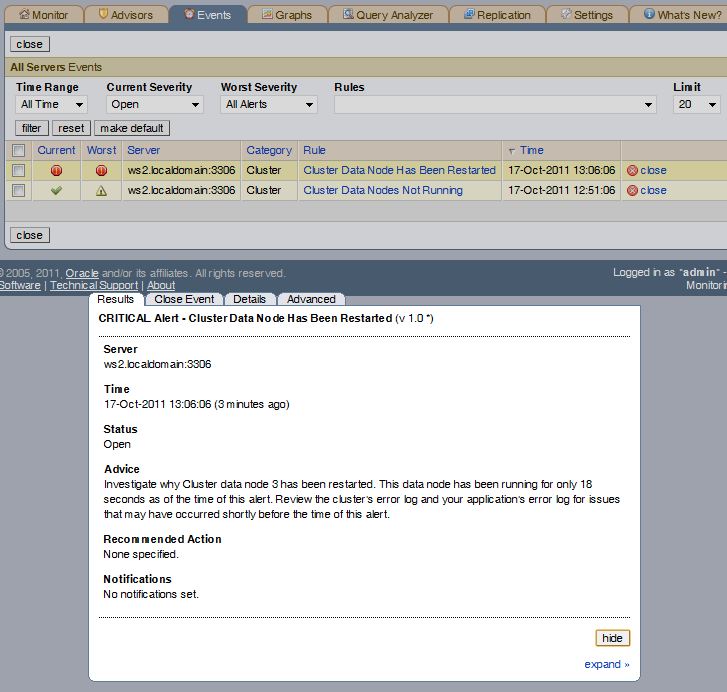
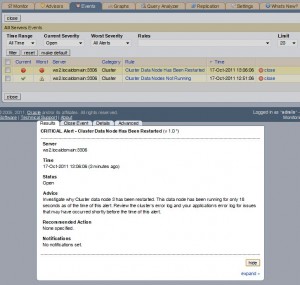
    Data Node Restarted alert

    About 11 months ago I described the MySQL Cluster functionality that was added to MySQL Enterprise Monitor 2.3; this new post is intended to just bring this up to date – briefly describing the new graph and advisors which have been added since then (up to and including MEM 2.3.7).

    Cluster Data Node Has Been Restarted

    This new alert flags when a data node has been restarted (by default it alerts on any data node that has started in the last 10 minutes but you can change that interval if you wish). If you manually perform a restart (e.g. as part of a rolling upgrade) then you can safely ignore this alert (or you may even want to temporarily unschedule it first). However if the restart was spontaneous then this can be an early warning for you to take a look at the error logs and address any issues before the situation worsens.

    Cluster DiskPageBuffer Hit Ratio Is Low (& associated graph)

    The Disk Page Buffer is a cache on each data node which is used when using disk-based tables. Like any cache, the higher the hit rate the better the performance. Tuning the size of this cache can have a significant effect on your system – the new graph helps you see the results of your changes and the alert warns you when the ration falls below an acceptable level (this could happen for example temporarily after a data node restart or permanently when the active data set grows).

    The ndbinfo database has a new table “diskpagebuffer” which contains the raw information needed to calculate the cache hit ration and it is the source of the data for the new alert and graph. If you wanted to calculate the cache hit ratio for yourself directly from this table then you can use the following query:

    mysql> SELECT node_id, page_requests_direct_return AS hit, 
     page_requests_wait_io AS miss,  100*page_requests_direct_return/
     (page_requests_direct_return+page_requests_wait_io) AS hit_rate 
      FROM ndbinfo.diskpagebuffer;
    
    +---------+------+------+----------+
    | node_id | hit  | miss | hit_rate |
    +---------+------+------+----------+
    | 3       | 6    | 3    | 66.6667  |
    | 4       | 10   | 3    | 76.9231  |
    +---------+------+------+----------+

    The alert is first raised (info level) when the hit rate falls bellow 97%, the warning level is raised at 90% and the critical level at 80%. Again, you can alter any of these thresholds.

    The new graph simply displays how the hit rate varies over time so that you can spot trends.

    As a reminder you can get more information on the original set of alerts and graphs here.

  • MySQL Cluster 7.1.15a is available

    Posted on September 14th, 2011 andrew No comments


    The binary version for MySQL Cluster 7.1.15a has now been made available at http://www.mysql.com/downloads/cluster/ (GPL version) or https://edelivery.oracle.com/ (commercial version)

    A description of all of the changes (fixes) that have gone into MySQL Cluster 7.1.15a (compared to 7.1.15) can be found in the official MySQL Cluster documentation for Cluster 7.1.15a Change log.

  • Webinar: MySQL Cluster, Scaling Web Databases with Auto-Partitioning and SQL/NoSQL Access

    Posted on June 6th, 2011 andrew 3 comments

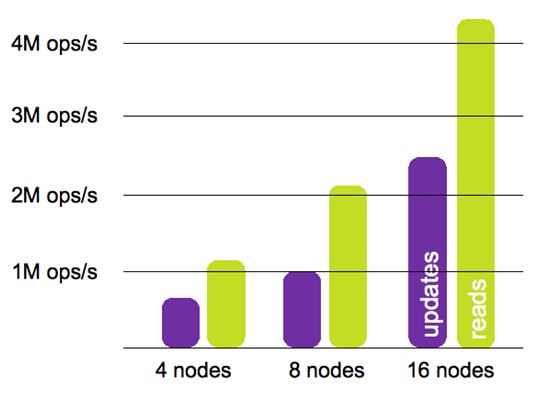
    Scale-out with MySQL Cluster

    Update: webinar replay is now available from http://event.on24.com/r.htm?e=311660&s=1&k=3DCFE1CB3E1CF3F0FD0969DC66D93989

    On Thursday 26th May Mat Keep and I will be presenting a webinar on how MySQL Cluster can deliver linear scalability – together with some tips on how to achieve it. As always the webinar is free but you need to register here.


    The session starts on Thu, May 26 at 17:00 UK time, 18:00 Central European Time, 09:00 Pacific.

    This webinar will discuss best practices in scaling services on-demand for high volumes of reads and writes, and provide insight on the range of NoSQL and SQL access methods available to developers, specifically covering:

    • Automatic partitioning (sharding) for high scalability
    • On-line scaling of the cluster across commodity hardware
    • SQL and NoSQL interfaces, and what should be used when
    • On-line updating of schema design to accommodate rapidly evolving applications
    • Resources to get started
  • MySQL Cluster 7.1.13 Released

    Posted on May 23rd, 2011 andrew No comments


    The binary version for MySQL Cluster 7.1.13 has now been made available at http://www.mysql.com/downloads/cluster/

    A description of all of the changes (fixes) that have gone into MySQL Cluster 7.1.13 (compared to 7.1.10) can be found in the official MySQL Cluster documentation for Cluster 7.1.13, 7.1.12 & 7.1.11.

  • High Availability Solutions – part for the MySQL On Windows Forum

    Posted on March 23rd, 2011 andrew 2 comments

    STOP PRESS: the recording of this forum is now available for replay.

    On March 16th, we’re holding an on-line forum to discuss MySQL on Windows – I’ll be handling the High Availability session (includes MySQL replication and MySQL Cluster). The event runs from 9 am Pacific Time until 12:00 pm; the HA session is schedules for 11:00 Pacific and runs for half an hour. I’ll also be answering questions on-line during the forum. As always the even is free but you need to register here.

    Here is the official description…

    Join our Online Forum and discover how you can win with MySQL on Windows. Oracle’s MySQL Vice President of Engineering Tomas Ulin will kick off a comprehensive agenda of presentations enabling you to better understand:

    • Why the world’s most popular open source database is extremely popular on Windows, both for enterprise users and ISVs
    • How MySQL fits into the Windows environment, and what are the upcoming milestones to make MySQL even better on the Microsoft platform
    • What are the visual tools at your disposal to effectively develop, deploy and manage MySQL applications on Windows
    • How you can deliver highly available business critical Windows based MySQL applications
    • Why Security Solutions Provider SonicWall selected MySQL over Microsoft SQL Server, and how they successfully deliver MySQL based solutions

    Additionally, Oracle experts will be on live chat throughout the event to answer your toughest questions.

    MySQL on Windows: It Just Keeps Getting Better!

    Oracle’s MySQL Vice President of Engineering Tomas Ulin will kick off the Online Forum and review why MySQL has become highly popular on Windows for both enterprise users and ISVs, as well as Oracle’s MySQL on Windows Strategy. Senior Product Manager Rob Young will then help you understand how MySQL fits into your familiar Windows environment, covering MySQL Connectors, integration with Visual Studio, security aspects…and more. They will also review the improvements Oracle recently delivered as well as the upcoming milestones to make MySQL even better on Windows.

    From Modeling to Performance Tuning: MySQL Visual Tools for Developers & DBAs

    Are you wondering what visual tools are at your disposal to effectively develop, deploy and manage MySQL applications on Windows? Mike Zinner and Rob Young will show you how you can benefit from the following tools:

    • MySQL Workbench, which provides visual data modeling, SQL development, and comprehensive administration tools for MySQL server configuration, user administration, and much more.
    • The MySQL Enterprise Monitor, a “Virtual DBA assistant” that helps MySQL DBAs manage more MySQL databases as well as find and fix problems before they become serious problems or costly outages.
    • The MySQL Query Analyzer, which helps improve your C# and .Net application performance by monitoring query performance and accurately pinpointing SQL code that is causing a slow down.
    • MySQL Enterprise Backup, to perform online hot MySQL backups.

    Implementing MySQL High Availability Solutions on Windows

    Databases play a key role in ensuring application availability, and MySQL offers a range of HA solutions on Windows. Senior Product Manager Andrew Morgan will in this session explore two of them:

    • MySQL Replication, which has been widely deployed by some of the leading web properties and in the enterprise to deliver highly available database services, providing a means of mirroring data across multiple hosts to withstand failures of individual systems.
    • MySQL Cluster combining 99.999% availability with the low TCO of an open source solution. With a distributed shared-nothing architecture and no single point of failure, MySQL Cluster can scale linearly to meet the unprecedented demands of the next generation web services & telecom applications.

    Customer Story: SonicWall

    SonicWALL provides network security and data protection solutions enabling to secure, control and scale global networks. Director of Product Management Jan Sijp will share with you how they have successfully delivered MySQL based solutions on both Windows & Linux, providing information about the challenges they were facing, why they selected MySQL over Microsoft SQL Server, and the implementation process.

  • On-demand-webinar – What’s New in Managing MySQL Cluster

    Posted on January 14th, 2011 andrew No comments

    The recording of this webinar is now available to view on-line here.

    There will be a live webinar on Wednesday January 12 describing the new ways that you can manage MySQL Cluster (with a bit of monitoring thrown in). As always, the webinar is free but you need to register here. The event is scheduled for 09:00 Pacific / 17:00 UK / 18:00 Central European time but if you can’t make the live webinar it’s still worth registering so that you’re emailed the replay after the event.

    By their very nature, clustered environments involve more effort and resource to administer than standalone systems, and the same is true of MySQL Cluster, the database designed for web-scale throughput with carrier-grade availability.

    In this webinar, we will present an overview of the three latest enhancements to provisioning, monitoring and managing MySQL Cluster – collectively serving to lower costs, enhance agility and reduce the risk of downtime caused by manual configuration errors.

    In this webinar, we will present:

    • NDBINFO: released with MySQL Cluster 7.1, NDBINFO presents real-time status and usage statistics, providing developers and DBAs with a simple means of pro-actively monitoring and optimizing database performance and availability.
    • MySQL Cluster Manager: available as part of the commercial MySQL Cluster Carrier Grade Edition simplifies the creation and management of MySQL Cluster by automating common management tasks, delivering higher administration productivity and enhancing cluster agility. Tasks that used to take 46 commands can be reduced to just one!
    • MySQL Cluster Advisors & Graphs: part of the MySQL Enterprise Monitor and available in the commercial MySQL Cluster Carrier Grade Edition, the Enterprise Advisor includes automated best practice rules that alert on key performance and availability metrics from MySQL Cluster data nodes.

    You will also learn how you can get started evaluating and using all of these tools to simplify MySQL Cluster management.

    This session will be approximately 1 hour in length and will include interactive Q&A throughout. Please join us for this informative webinar!

    WHO:

    • Andrew Morgan, MySQL Cluster Product Management, Oracle
    • Mat Keep, MySQL Cluster Product Management, Oracle
  • MySQL Cluster 7.1.9 binaries released

    Posted on November 17th, 2010 andrew No comments

    The binary version for MySQL Cluster 7.1.9 has now been made available at http://www.mysql.com/downloads/cluster/

    A description of all of the changes (fixes) that have gone into MySQL Cluster 7.1.9 (compared to 7.1.8) can be found in the official MySQL Cluster documentation. In addition, there is a great BLOG posting from Johan Anderson explaining how to use the new table added to ndbinfo to tune DiskPageBufferMemory when storing tables on disk.

  • Monitoring MySQL Cluster with MySQL Enterprise Monitor

    Posted on November 8th, 2010 andrew No comments

    MySQL Enterprise Monitor with MySQL Cluster

    A few months ago, I posted a walkthrough of how to extend MySQL Enterprise Monitor in order to monitor MySQL Cluster. The great news is that as of MySQL Enterprise Monitor 2.3 (available from Oracle E-Delivery since 1st November) this functionality is included in the core product and so there is no need to add the extra features in manually. Of course, that post might still be of interest if you want to further extend MySQL Enterprise Monitor.

    This post briefly steps through the new (Cluster-specific) functionality but if you’re interested, why not try it for yourself and download the new MySQL Enterprise Monitor software from Oracle E-Delivery. If you like what you see then the good news is that if you take out a subscription for MySQL Cluster CGE (or buy a license) then this now also entitles you to use MySQL Enterprise Monitor.

    There are two main aspects that have been extended to cover MySQL Cluster:

    • A new MySQL Cluster Advisor has been added. This Advisor is made up of a set of rules that check various aspects of the data nodes and raise alerts if a configurable threshold is exceeded
    • A set of new graphs have been added so that you can monitor the usage of key resources over time.

    Note that MySQL Enterprise Monitor has no direct connection to the data nodes and so one or more of the MySQL Servers from the Cluster is effectively used as a proxy. There is nothing special for you to configure on the servers, behind the scenes, Enterprise Monitor is reading the contents of the ndbinfo database that was introduced in MySQL Cluster 7.1.

    If using an older version of MySQL Cluster then you get less benefit from MySQL Enterprise Monitor but there is still some value in using it to monitor the MySQL Servers that are part of the cluster:

    • Use the Query Analyzer to keep track of how your applications access the database and troubleshoot performance issues
    • Monitor the state of the MySQL Server itself (number of client connections, CPU usage etc.)
    • Generate alerts when data nodes are out of service.

    Schedule Cluster Rules Against the Servers

    There is documentation covering installing and running the MySQL Enterprise Monitor service manager and agents and so I won’t repeat the steps here except to point out that you need one or more of the agents to be configured to monitor one or more of the MySQL Servers in your Cluster. Of course, you could monitor multiple MySQL Cluster deployments from the same dashboard – just make sure that you have an agent monitoring at least one MySQL Server from each one.

    By default, none of the rules from the MySQL Cluster Advisor are scheduled against any of your servers and so the first thing you need to do is go to the “Advisors” tab and from their select “Add to Schedule”. Select the server(s) on the left and then check the radio button(s) against the whole Cluster advisor or against one or more of the rules within it and click the “schedule” button. You’ll then be given the option to override the default frequency that each rule is run before confirming the activation (scheduling) of the rule(s) for your server(s). This is also the point where you can indicate whether or not an SNMP Trap should be raised when the alert is raised/cleared (the destinations for the SNMP notifications can be set under the “Settings” tab).

    Error scheduling rules against wrong version of MySQL Server

    Note that if you try scheduling the Cluster Advisor rules against a MySQL Server that is not part of a MySQL Cluster 7.1 (or later) deployment they you will get errors indicating that the server cannot provide the required data.


    MySQL Cluster Graphs

    The new MySQL Cluster graphs are activated by default and you can view them from the “Graphs” tab but note that if there are no MySQL Cluster 7.1 servers in the list that you highlight on the left of the browser then the Cluster graphs will be hidden.


    Customize Cluster Rule

    Note that there is still scope for simple customizations directly from the the MySQL Enterprise Monitor GUI. For example if you don’t think that the default thresholds are appropriate for your configuration then select “Manage Rules” within the “Advisors” tab and then click “edit” next to the rule in question – you then get the option to alter the threshold values.

    As a final configuration step, go back to the “Monitor” tab and click on “edit favorites” to promote your favourite Cluster graphs to the home screen.


    Details of Cluster alert

    Any Critical alerts (including ones for the newly scheduled Cluster rules) will appear on the Monitor page – to see the Info and Warning alerts, select the “Events” tab. Clicking on any of these alerts will give you extra details and the opportunity to close the alert.

  • MySQL Cluster Demo from Oracle OpenWorld

    Posted on October 27th, 2010 andrew No comments

    If you weren’t able to attend Oracle OpenWorld or didn’t get chance to  visit the MySQL demo booths then you can watch a recording of the demo here. The video gives a brief description of MySQL Cluster and then dives into a series of demos showing MySQL Cluster’s ability to cope with a number of events without losing service – including node failure, on-line upgrades and on-line horizontal scaling.

    To view a higher quality version click here.

  • MySQL Cluster 7.1.8 binaries released

    Posted on October 11th, 2010 andrew 2 comments

    The binary version for MySQL Cluster 7.1.8 has now been made available at http://www.mysql.com/downloads/cluster/

    A description of all of the changes (fixes) that have gone into MySQL Cluster 7.1.8 (compared to 7.1.5) can be found in the official MySQL Cluster documentation.

  • MySQL Cluster session from Oracle OpenWorld – replay is available.

    Posted on September 28th, 2010 andrew No comments

    As part of “MySQL Sunday” at this year’s Oracle Open World, Mat Keep and I  presented on the MySQL Cluster architecture and the latest features. If you weren’t able to attend then you can watch/listen to the replay here.

  • MySQL Cluster documentation on iPhone/iPad

    Posted on September 13th, 2010 andrew No comments

    MySQL Cluster in iBooks

    MySQL documentation has now been made available in ePub format (fetch the MySQL Cluster versions from http://dev.mysql.com/doc/index-cluster.html ). This format is intended for various book readers.

    I’ve tried it on 2 iPhone applications; Apple’s iBooks and the iPhone version of Stanza. The documents render well in both applications but as with most reference books you get the best results if you reduce the font size so that you get more on the screen at once.

    With both applications, you can add the books through iTunes but Stanza also has the advantage that if you browse to the document in Opera on the iPhone then it gives you the option of opening it in Stanza – cutting out the need to use iTunes. I also prefer the rendering in Stanza. The only problems I’ve come across with Stanza is that you have to add the cover images yourself (if you care) – not a huge problem.

    Page in iBooks

    MySQL Cluster docs in Stanza library

    Page in Stanza

    Browse MySQL Cluster ePub docs on iPhone

  • MySQL Cluster 7.1.5 binaries released

    Posted on August 23rd, 2010 andrew No comments

    The binary version for MySQL Cluster 7.1.5 has now been made available at http://www.mysql.com/downloads/cluster/

    A description of all of the changes (fixes) that have gone into MySQL Cluster 7.1.5 (compared to 7.1.4) can be found in the MySQL Cluster 7.1.5 Change Log.

  • Upcoming webinar: MySQL Cluster deployment best practices

    Posted on August 2nd, 2010 andrew No comments

    On Wednesday 25 August, Johan Anderson and Mat keep will be presenting a free webinar on the best practices for deploying MySQL Cluster. If you’d like to attend then just register here.

    Johan has years of MySQL Cluster professional services experience – and so if you’re interested in deploying a product ready MySQL Cluster database then this is a must-view session. Even if you can’t make it live, register anyway and you’ll be sent a link to the recording and charts afterwards.

    Content

    An invaluable session for those who are about to, or who already have, deployed MySQL Cluster. Delivered by the lead MySQL Cluster professional services consultant in Oracle, this session will present best practices on deploying MySQL Cluster in order to accelerate time to service with the highest levels of availability and performance to support your most critical web and telecoms applications.

    The session will cover:

    • identifying suitable applications for MySQL Cluster
    • comparing differences in functionality and configuration with InnoDB
    • using triggers and stored procedures to implement foreign key functionality
    • hardware, networking and file system selection
    • dimensioning and capacity planning
    • configuration best practices
    • disk data deployment
    • administration and monitoring
    • services available to get started

    WHEN

    Wednesday, August 25, 2010: 09:00 Pacific time (America)
    Wed, Aug 25: 06:00 Hawaii time
    Wed, Aug 25: 10:00 Mountain time (America)
    Wed, Aug 25: 11:00 Central time (America)
    Wed, Aug 25: 12:00 Eastern time (America)
    Wed, Aug 25: 16:00 UTC
    Wed, Aug 25: 17:00 Western European time
    Wed, Aug 25: 18:00 Central European time
    Wed, Aug 25: 19:00 Eastern European time
  • Install, configure and run MySQL Cluster – demo video

    Posted on July 23rd, 2010 andrew 10 comments

    There is a new video available: Demonstration of installing, configuring and running MySQL Cluster (LINUX) to accompany the MySQL Cluster Quick Start guides. The Flash video video lasts for about 7 minutes.

    If you aren’t able to view Flash on your device then a (poorer quality) version is included here – watch the Flash version if you’re able to!