-
MySQL Cluster 7.2.12 Released
Posted on March 28th, 2013 No comments
The binary version for MySQL Cluster 7.2.12 has now been made available at http://www.mysql.com/downloads/cluster/ (GPL version) and should soon be available at https://support.oracle.com/ (commercial version).A description of all of the changes (fixes) that have gone into MySQL Cluster 7.2.12 (compared to 7.2.10) is available from the 7.2.12 Change log.
-
MySQL Cluster 7.2.10 Released
Posted on January 7th, 2013 No comments
The binary version for MySQL Cluster 7.2.10 has now been made available at http://www.mysql.com/downloads/cluster/ (GPL version) or https://support.oracle.com/ (commercial version).A description of all of the changes (fixes) that have gone into MySQL Cluster 7.2.10 (compared to 7.2.9) is available from the 7.2.10 Change log.
-
MySQL Cluster Auto-Installer – labs release
Posted on September 29th, 2012 43 commentsDeploying a well configured cluster has just got a lot easier! Oracle have released a new auto-installer/configurator for MySQL Cluster that makes the processes extremely simple while making sure that the cluster is well configured for your application. The installer is part of MySQL Cluster 7.3 and so is not yet GA but it can also be used on MySQL Cluster 7.2. A single command launches the web-based wizard which then steps you through configuring the cluster; to keep things even simpler, it will automatically detect the resources on your target machines and use these results together with the type of workload you specify in order to determine values for the key configuration parameters.
Tutorial Video
Before going through the detailed steps, here’s a demonstration of the auto-installer in action…
Downloading and running the wizard
The software can be downloaded from MySQL Labs; just select the MySQL-Cluster-Auto-Installer build, unzip the file and then run. To run on Windows, just double click setup.bat – note that if you installed from the MSI and didn’t change the install directory then this will be located somewhere like C:\Program Files (x86)\MySQL\MySQL Cluster 7.2. On Linux, just run ndb_setup.
Creating your cluster
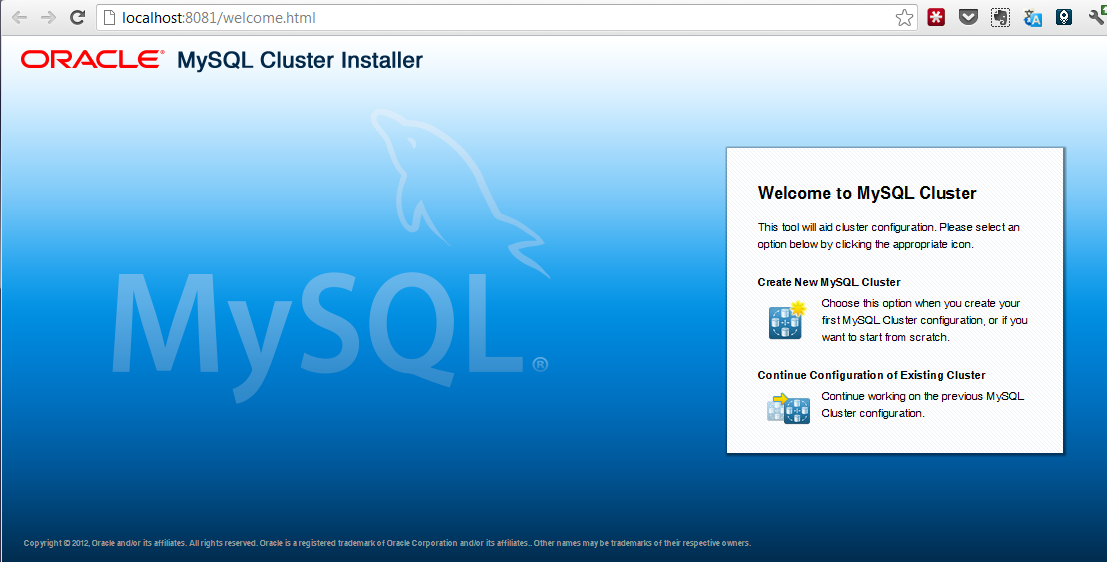
When you run the auto-installer it starts a small web server and then (if possible) automatically connects your web browser to it – presenting you with the first page of the wizard. If this isn’t possible (for example the server isn’t running a desktop environment), then you can connect to it remotely using the URL http://your-server-name-goes-here:8081/index.html. It may take a number of seconds to load and so please be patient. Note that the machine where you run this doesn’t need to be a host that will be included in the cluster.From the landing page, just click on the “Create new MySQL Cluster” icon to get started.
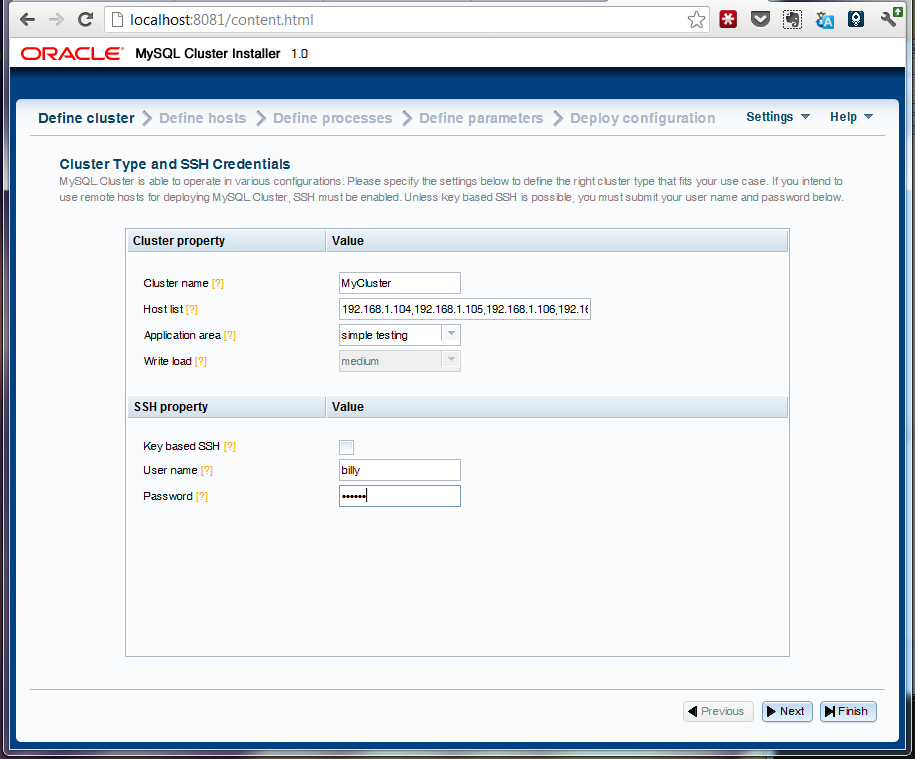
On the next page you need to specify the list of servers that will form part of the cluster. The machine where the installer is being run from needs to have ssh access to all of the cluster hosts (further, access to those machines must already have been approved from this one – if you’re uncertain, just manually connect to each one using an ssh client.By default, the wizard assumes that ssh keys have been set up (so that a password isn't needed) - if that isn't the case, just un-check the checkbox and provide your username and password.
On this page, you also get to specify what "type" of cluster you want; if you're experimenting for the first time then it's probably safest to stick with "Simple testing" but for a production system you'd want to specify the kind of application and whether it will a write-intensive application.
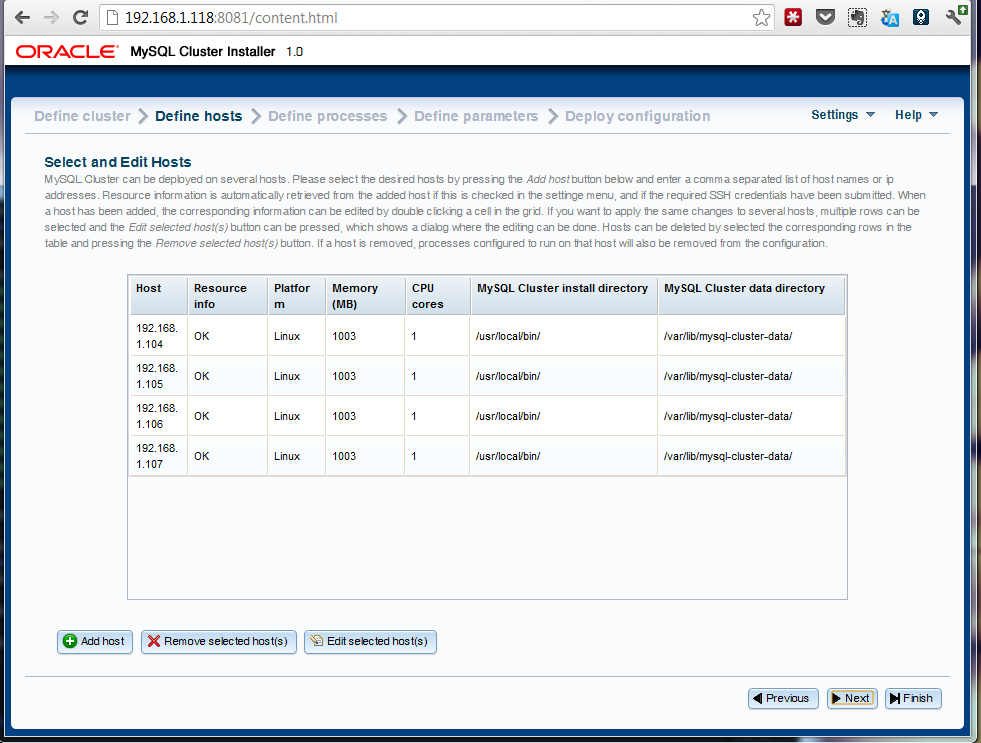
On the next page, you will see the wizard attempt to auto-detect the resources on your target machines. If this fails then you can enter the data manually.You can also overwrite the resource-values (for example, if you don't want the cluster to use up a big share of the memory on the target systems then just overwrite the amount of memory.
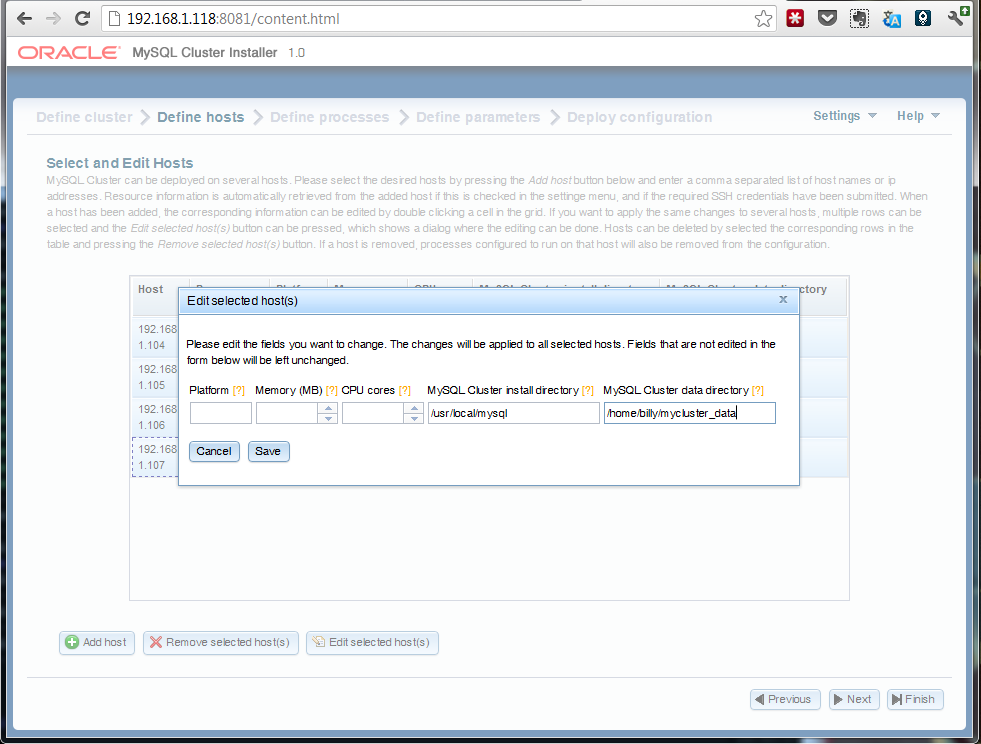
It's also on this page that you can specify where the MySQL Cluster software is stored on each of the hosts (if the defaults aren't correct) - this should be the path to where you unzipped the MySQL Cluster tar-ball/zip file - as well as where the data (and configuration files) should be stored. You can just overwrite the values or select multiple rows and hit the "edit" button.
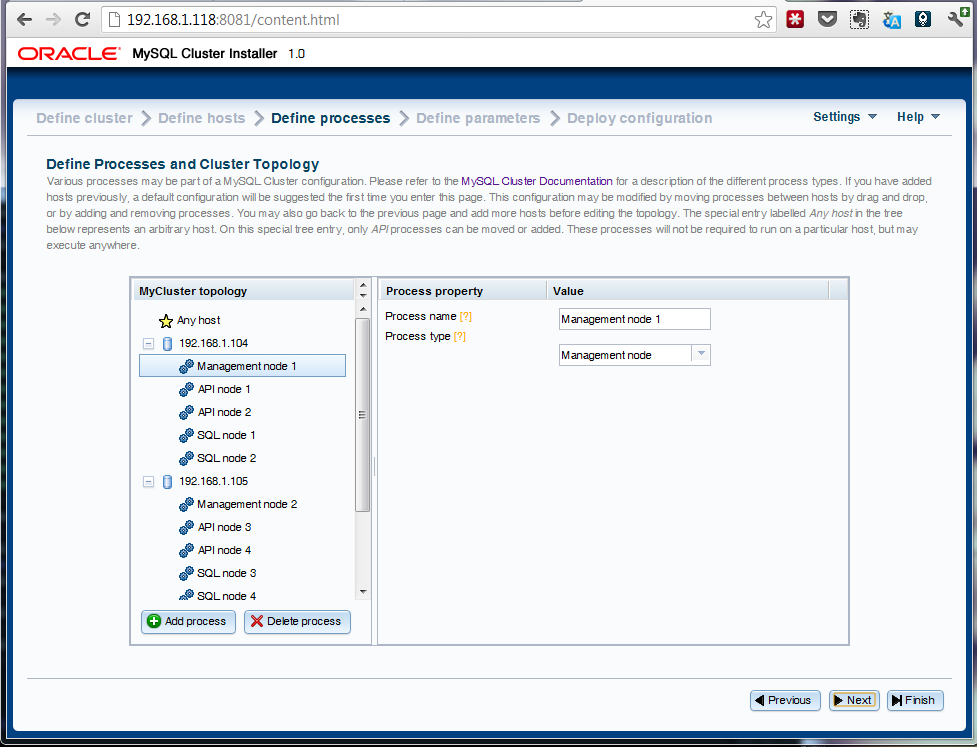
The following page presents you with a default set of nodes (processes) and how they'll be distributed across all of the target hosts - if you're happy with the proposal then just advance to the next page. So what can you change:- Add extra nodes
- Move nodes from one host to another (just drag and drop)
- Delete nodes
- Change a node from one type to another
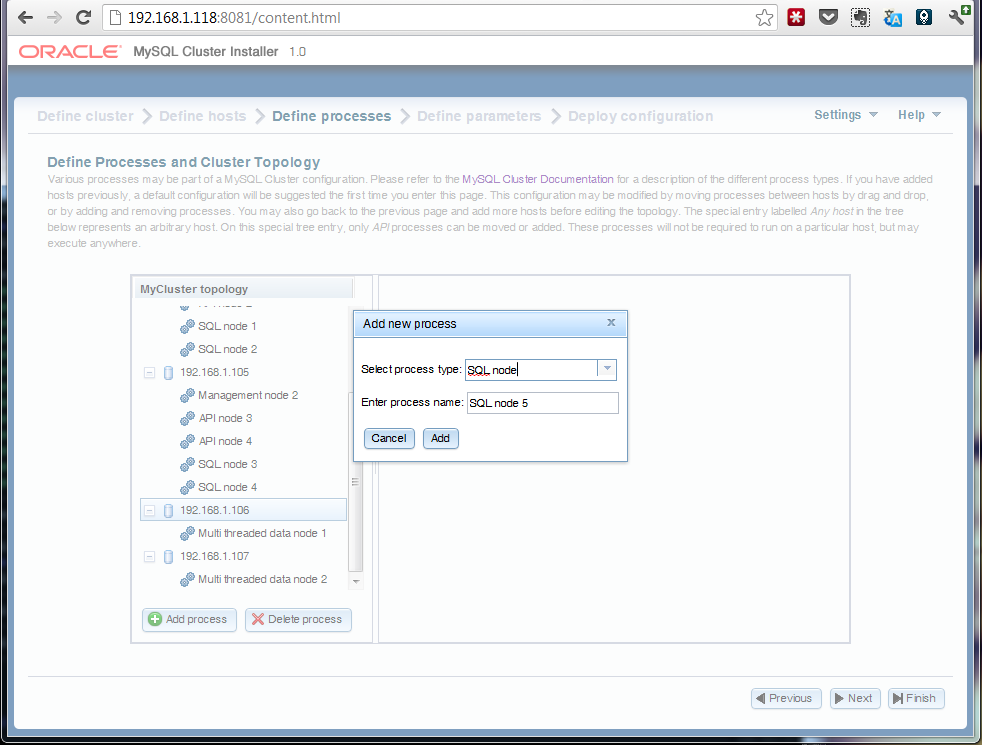
The diagram to the right shows an example of adding an extra MySQL Server.
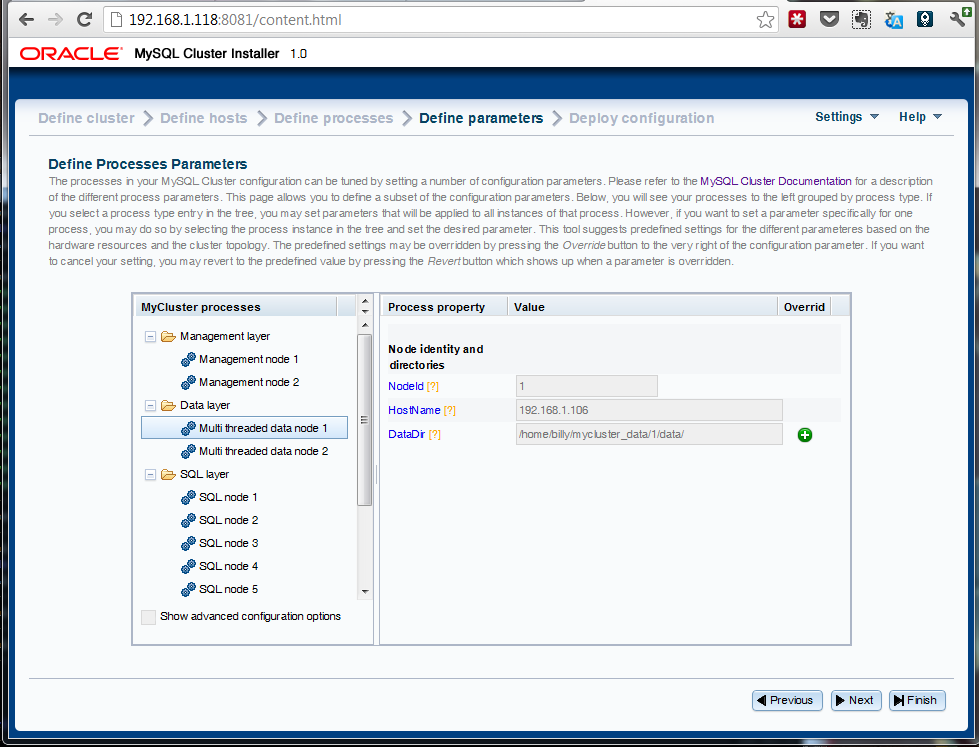
On the next screen you're presented with some of the key configuration parameters that have been set (behind the scenes, the wizard sets many more) that you might want to override; if you're happy then just progress to the next screen. If you do want to make any changes then make them here before continuing. If you'd previously selected anything other than "simple" for the kind of cluster to create then you can check the "Show advanced configuration options" box in order to view/modify more parameters.
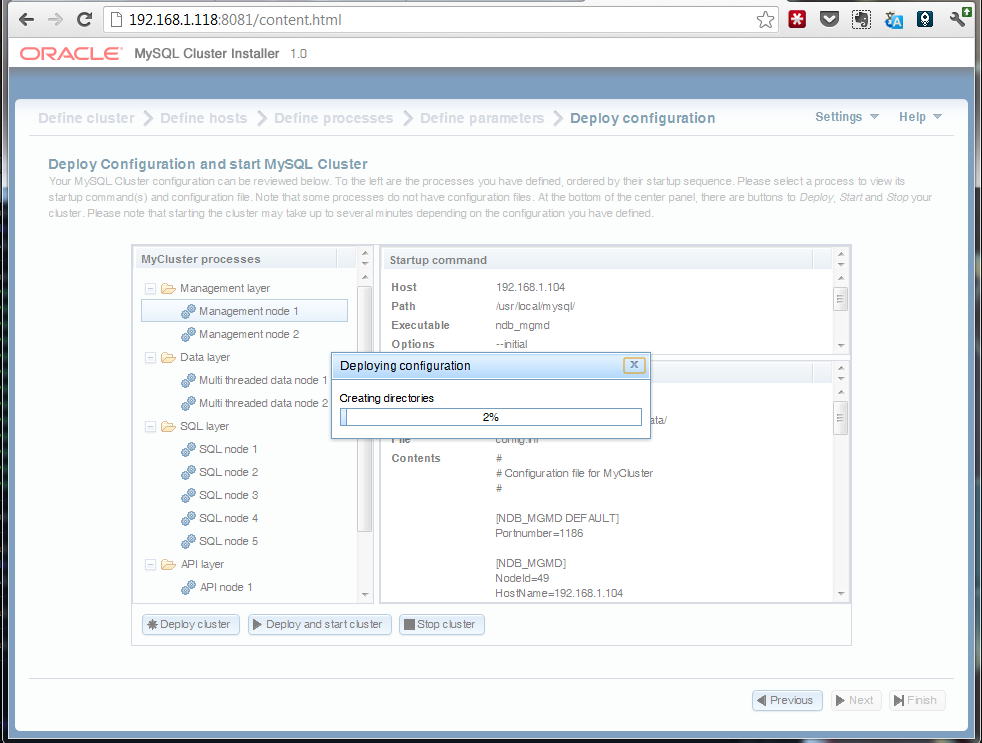
On the final screen you can review the details of the final recommended configuration and then just hit "Deploy and start cluster" and it will do just that. Depending on the complexity of the cluster, it can take a while to deploy and start everything but you're shown a progress bar together with an explanation of what stage the process is at.If for some reason you prefer or need to start the processes manually, this page also shows you the commands that you'd need to run (as well as the configuration files if you need to create them manually).
Once the wizard declares the process complete, you can check for yourself before going ahead and start your testing:
billy@black:~ $ ndb_mgm -e show Connected to Management Server at: localhost:1186 Cluster Configuration --------------------- [ndbd(NDB)] 2 node(s) id=1 @192.168.1.106 (mysql-5.5.25 ndb-7.2.8, Nodegroup: 0, Master) id=2 @192.168.1.107 (mysql-5.5.25 ndb-7.2.8, Nodegroup: 0) [ndb_mgmd(MGM)] 2 node(s) id=49 @192.168.1.104 (mysql-5.5.25 ndb-7.2.8) id=52 @192.168.1.105 (mysql-5.5.25 ndb-7.2.8) [mysqld(API)] 9 node(s) id=50 (not connected, accepting connect from 192.168.1.104) id=51 (not connected, accepting connect from 192.168.1.104) id=53 (not connected, accepting connect from 192.168.1.105) id=54 (not connected, accepting connect from 192.168.1.105) id=55 @192.168.1.104 (mysql-5.5.25 ndb-7.2.8) id=56 @192.168.1.104 (mysql-5.5.25 ndb-7.2.8) id=57 @192.168.1.105 (mysql-5.5.25 ndb-7.2.8) id=58 @192.168.1.105 (mysql-5.5.25 ndb-7.2.8) id=59 @192.168.1.106 (mysql-5.5.25 ndb-7.2.8)
As always it would be great to hear some feedback especially if you've ideas on improving it or if you hit any problems.
-
MySQL Cluster 7.2.8 Released
Posted on September 10th, 2012 4 comments
The binary version for MySQL Cluster 7.2.8 has now been made available at http://www.mysql.com/downloads/cluster/ (GPL version) or https://support.oracle.com/ (commercial version).A description of all of the changes (fixes) that have gone into MySQL Cluster 7.2.8 (compared to 7.2.7) is available from the 7.2.8 Change log.
-
MySQL Cluster 7.2.7 released
Posted on July 20th, 2012 No comments
The binary version for MySQL Cluster 7.2.7 has now been made available at http://www.mysql.com/downloads/cluster/ (GPL version) or https://support.oracle.com/ (commercial version).A description of all of the changes (fixes) that have gone into MySQL Cluster 7.2.7 (compared to 7.2.6) are available from the 7.2.7 Change log.
-
Optimizing Performance of the MySQL Cluster Database – White Paper update
Posted on July 13th, 2012 No commentsA new version of the white paper “Guide to Optimizing Performance of the MySQL Cluster Database” has been released; download it here.This paper steps you through:
- Identifying if your application is a good fit for MySQL Cluster
- Measuring performance and identifying problem performance areas to address
- Optimizing performance:
- Access patterns
- Using Adaptive Query Localization for complex Joins
- Distribution aware applications
- Batching operations
- Schema optimizations
- Query optimization
- Parameter tuning
- Connection pools
- Multi-Threaded Data Nodes
- Alternative APIs
- Hardware enhancements
- Miscellaneous
- Scaling MySQL Cluster by Adding Nodes
As well as the kind of regular updates that are needed from time to time, this version includes the extra opportunities for optimizations that are available with MySQL Cluster 7.2 such as faster joins and engineering the threads within a multi-threaded data node.
As a reminder, I’ll be covering much of this material in an upcoming webinar.
-
MySQL Cluster : Delivering Breakthrough Performance (upcoming webinar)
Posted on July 9th, 2012 No commentsI’ll be presenting a webinar covering MySQL Cluster performance on Thursday, July 26. As always, the webinar will be free but you’ll need to register here – you’ll then also receive a link to the charts and a recording of the session after the event.The replay of this webinar is now available from here.
Here’s the agenda (hoping that I can squeeze it all in!):
- Introduction to MySQL Cluster
- Where does MySQL Cluster fit?
- Benchmarks:
- ANALYZE TABLE
- Access patterns
- AQL (fast JOINs)
- Distribution aware
- Batching
- Schema optimisations
- Connection pooling
- Multi-threaded data nodes
- High performance NoSQL APIs
- Hardware choices
- More tips
- The measure/optimise loop
- Techniques to boost performance
- Scaling out
- Other useful resources
The session starts at 9:00 am UK time / 10:00 am Central European time.
-
MySQL Cluster running on Raspberry Pi
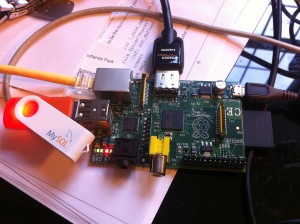
Posted on June 1st, 2012 8 commentsI start a long weekend tonight and it’s the kids’ last day of school before their school holidays and so last night felt like the right time to play a bit. This week I received my Raspberry Pi – if you haven’t heard of it then you should take a look at the Raspberry Pi FAQ - basically it’s a ridiculously cheap ($25 or $35 if you want the top of the range model) ARM based PC that’s the size of a credit card.
A knew I had to have one to play with but what to do with it? Why not start by porting MySQL Cluster onto it? We always claim that Cluster runs on commodity hardware – surely this would be the ultimate test of that claim.
I chose the customised version of Debian – you have to copy it onto the SD memory card that acts as the storage for the Pi. Once up and running on the Pi, the first step was to increase the size of the main storage partition – it starts at about 2 Gbytes – using gparted. I then had to compile MySQL Cluster – ARM isn’t a supported platform and so there are no pre-built binaries. I needed to install a couple of packages before I could get very far:
sudo apt-get update sudo apt-get install cmake sudo apt-get install libncurses5-dev
Compilation initially got about 80% through before failing and so if you try this yourself then save yourself some time by applying the patch from this bug report before starting. The build scripts wouldn’t work but I was able to just run make…
make sudo make install
As I knew that memory was tight I tried to come up with a config.ini file that cut down on how much memory would be needed (note that 192.168.1.122 is the Raspberry Pi while 192.168.1.118 is an 8GByte Linux x86-64 PC – doesn’t seem a very fair match!):
[ndb_mgmd] hostname=192.168.1.122 NodeId=1 [ndbd default] noofreplicas=2 DataMemory=2M IndexMemory=1M DiskPageBufferMemory=4M StringMemory=5 MaxNoOfConcurrentOperations=1K MaxNoOfConcurrentTransactions=500 SharedGlobalMemory=500K LongMessageBuffer=512K MaxParallelScansPerFragment=16 MaxNoOfAttributes=100 MaxNoOfTables=20 MaxNoOfOrderedIndexes=20 [ndbd] hostname=192.168.1.122 datadir=/home/pi/mysql/ndb_data NodeId=3 [ndbd] hostname=192.168.1.118 datadir=/home/billy/my_cluster/ndbd_data NodeId=4 [mysqld] NodeId=50 [mysqld] NodeId=51 [mysqld] NodeId=52 [mysqld] NodeId=53 [mysqld] NodeId=54
Running the management node worked pretty easily but then I had problems starting the data nodes – checking how much memory I had available gave me a hint as to why!
pi@raspberrypi:~$ free -m total used free shared buffers cached Mem: 186 29 157 0 1 11 -/+ buffers/cache: 16 169 Swap: 0 0 0OK – so 157 Mbytes of memory available and no swap space, not ideal and so the next step was to use gparted again to create swap partitions on the SD card as well a massive 1Gbyte on my MySQL branded USB stick (need to persuade marketing to be a bit more generous with those). A quick edit of /etc/fstab and a restart and things were looking in better shape:
pi@raspberrypi:~$ free -m total used free shared buffers cached Mem: 186 29 157 0 1 11 -/+ buffers/cache: 16 169 Swap: 1981 0 1981Next to start up the management node and 1 data node on the Pi as well as a second data node on the Linux server “ws2″ (I want High Availability after all – OK so running the management node on the same host as a data node is a single point of failure)…
pi@raspberrypi:~/mysql$ ndb_mgmd -f conf/config.ini --configdir=/home/pi/mysql/conf/ --initial pi@raspberrypi:~/mysql$ ndbd billy@ws2:~$ ndbd -c 192.168.1.122:1186
I could then confirm that everything was up and running:
pi@raspberrypi:~$ ndb_mgm -e show Connected to Management Server at: localhost:1186 Cluster Configuration --------------------- [ndbd(NDB)] 2 node(s) id=3 @192.168.1.122 (mysql-5.5.22 ndb-7.2.6, Nodegroup: 0, Master) id=4 @192.168.1.118 (mysql-5.5.22 ndb-7.2.6, Nodegroup: 0) [ndb_mgmd(MGM)] 1 node(s) id=1 @192.168.1.122 (mysql-5.5.22 ndb-7.2.6) [mysqld(API)] 5 node(s) id=50 (not connected, accepting connect from any host) id=51 (not connected, accepting connect from any host) id=52 (not connected, accepting connect from any host) id=53 (not connected, accepting connect from any host) id=54 (not connected, accepting connect from any host)
Cool!
Next step is to run a MySQL Server so that I can actually test the Cluster – if I tried running that on the Pi then it caused problems (157 Mbytes of RAM doesn’t stretch as far as it used to) – on ws2:
billy@ws2:~/my_cluster$ cat conf/my.cnf [mysqld] ndbcluster datadir=/home/billy/my_cluster/mysqld_data ndb-connectstring=192.168.1.122:1186 billy@ws2:~/my_cluster$ mysqld --defaults-file=conf/my.cnf&
Check that it really has connected to the Cluster:
pi@raspberrypi:~/mysql$ ndb_mgm -e show Connected to Management Server at: localhost:1186 Cluster Configuration --------------------- [ndbd(NDB)] 2 node(s) id=3 @192.168.1.122 (mysql-5.5.22 ndb-7.2.6, Nodegroup: 0, Master) id=4 @192.168.1.118 (mysql-5.5.22 ndb-7.2.6, Nodegroup: 0) [ndb_mgmd(MGM)] 1 node(s) id=1 @192.168.1.122 (mysql-5.5.22 ndb-7.2.6) [mysqld(API)] 5 node(s) id=50 @192.168.1.118 (mysql-5.5.22 ndb-7.2.6) id=51 (not connected, accepting connect from any host) id=52 (not connected, accepting connect from any host) id=53 (not connected, accepting connect from any host) id=54 (not connected, accepting connect from any host)
Finally, just need to check that I can read and write data…
billy@ws2:~/my_cluster$ mysql -h 127.0.0.1 -P3306 -u root mysql> CREATE DATABASE clusterdb;USE clusterdb; Query OK, 1 row affected (0.24 sec) Database changed mysql> CREATE TABLE simples (id INT NOT NULL PRIMARY KEY) engine=ndb; 120601 13:30:20 [Note] NDB Binlog: CREATE TABLE Event: REPL$clusterdb/simples Query OK, 0 rows affected (10.13 sec) mysql> INSERT INTO simples VALUES (1),(2),(3),(4); Query OK, 4 rows affected (0.04 sec) Records: 4 Duplicates: 0 Warnings: 0 mysql> SELECT * FROM simples; +----+ | id | +----+ | 1 | | 2 | | 4 | | 3 | +----+ 4 rows in set (0.09 sec)
OK – so is there any real application to this? Well, probably not other than providing a cheap development environment – imagine scaling out to 48 data nodes, that would cost $1,680 (+ the cost of some SD cards)! More practically might be management nodes – we know that they need very few resources. As a reminder – this is not a supported platform!
-
MySQL Cluster 7.2.6 is available for download
Posted on May 22nd, 2012 No comments
The binary version for MySQL Cluster 7.2.6 has now been made available at http://www.mysql.com/downloads/cluster/ (GPL version) or https://support.oracle.com/ (commercial version).A description of all of the changes (fixes) that have gone into MySQL Cluster 7.2.6 (compared to 7.2.5) are available from the 7.2.6 Change log.
-
On-line add-node with MCM; a more complex example
Posted on May 8th, 2012 No comments
I’ve previously provided an example of using MySQL Cluster Manager to add nodes to a running MySQL Cluster deployment but I’ve since received a number of questions around how to do this in more complex circumstances (for example when ending up with more than 1 MySQL Server on a single host where each mysqld process should use a different port). The purpose of this post is to work through one of these more complex scenarios.The starting point is an existing cluster made up of 3 hosts with the nodes (processes) as described in this MCM report:
mcm> SHOW STATUS -r mycluster; +--------+----------+-------------------------------+---------+-----------+---------+ | NodeId | Process | Host | Status | Nodegroup | Package | +--------+----------+-------------------------------+---------+-----------+---------+ | 1 | ndbmtd | paas-23-54.osc.uk.oracle.com | running | 0 | 7_2_5 | | 2 | ndbmtd | paas-23-55.osc.uk.oracle.com | running | 0 | 7_2_5 | | 49 | ndb_mgmd | paas-23-56.osc.uk.oracle.com | running | | 7_2_5 | | 50 | mysqld | paas-23-54.osc.uk.oracle.com | running | | 7_2_5 | | 51 | mysqld | paas-23-55.osc.uk.oracle.com | running | | 7_2_5 | | 52 | mysqld | paas-23-56.osc.uk.oracle.com | running | | 7_2_5 | | 53 | ndbapi | *paas-23-56.osc.uk.oracle.com | added | | | +--------+----------+-------------------------------+---------+-----------+---------+ 7 rows in set (0.01 sec)
This same configuration is shown graphically in this diagram:
Note that the ‘ndbapi’ node isn’t actually a process but is instead a ‘slot’ that can be used by any NDB API client to access the data in the data nodes directly – this could be any of:
- A MySQL Server
- An application using the C++ NDB API directly
- A Memcached server using the direct NDB driver
- An application using the ClusterJ, JPA or modndb REST API
- The MySQL database restore command
This Cluster is now going to be extended by adding an extra host as well as extra nodes (both processes and ndbapi slots).
The following diagram illustrates what the final Cluster will look like:
The first step is to add the new host to the configuration and make it aware of the MySQL Cluster package being used (in this example, 7.2.5). Note that you should already have started the mcmd process on this new host (if not then do that now):
mcm> ADD HOSTS --hosts=paas-23-57.osc.uk.oracle.com mysite; +--------------------------+ | Command result | +--------------------------+ | Hosts added successfully | +--------------------------+ 1 row in set (8.04 sec) mcm> ADD PACKAGE -h paas-23-57.osc.uk.oracle.com --basedir=/home/oracle/cluster_7_2_5 7_2_5; +----------------------------+ | Command result | +----------------------------+ | Package added successfully | +----------------------------+ 1 row in set (0.68 sec)
At this point the MCM agent on the new host is connected with the existing 3 but it has not become part of the Cluster – this is done by declaring which nodes should be on that host; at the same time I add some extra nodes to the existing hosts. As there will be more than one MySQL server (mysqld) running on some of the hosts, I’ll explicitly tell MCM what port number to use for some of the mysqlds (rather than just using the default of 3306).
mcm> ADD PROCESS -R ndbmtd@paas-23-54.osc.uk.oracle.com, ndbmtd@paas-23-55.osc.uk.oracle.com,mysqld@paas-23-56.osc.uk.oracle.com, ndbapi@paas-23-56.osc.uk.oracle.com,mysqld@paas-23-57.osc.uk.oracle.com, mysqld@paas-23-57.osc.uk.oracle.com,ndbapi@paas-23-57.osc.uk.oracle.com -s port:mysqld:54=3307,port:mysqld:57=3307 mycluster;
+----------------------------+ | Command result | +----------------------------+ | Process added successfully | +----------------------------+ 1 row in set (2 min 34.22 sec)
In case you’re wondering how I was able to predict the node-ids that would be allocated to the new nodes, the scheme is very simple:
- Node-ids 1-48 are reserved for data nodes
- Node-ids 49-256 are used for all other node types
- Within those ranges, node-ids are allocated sequentially
If you look carefully at the results you’ll notice that the ADD PROCESS command took a while to run (2.5 minutes) – the reason for this is that behind the scenes, MCM performed a rolling restart – ensuring that all of the existing nodes pick up the new configuration without losing database service. Before starting the new processes, it makes sense to double check that the correct ports are allocated to each of the mysqlds:
mcm> GET -d port:mysqld mycluster; +------+-------+----------+---------+----------+---------+---------+---------+ | Name | Value | Process1 | NodeId1 | Process2 | NodeId2 | Level | Comment | +------+-------+----------+---------+----------+---------+---------+---------+ | port | 3306 | mysqld | 50 | | | Default | | | port | 3306 | mysqld | 51 | | | Default | | | port | 3306 | mysqld | 52 | | | Default | | | port | 3307 | mysqld | 54 | | | | | | port | 3306 | mysqld | 56 | | | Default | | | port | 3307 | mysqld | 57 | | | | | +------+-------+----------+---------+----------+---------+---------+---------+ 6 rows in set (0.07 sec)
At this point the new processes can be started and then the status of all of the processes confirmed:
mcm> START PROCESS --added mycluster; +------------------------------+ | Command result | +------------------------------+ | Process started successfully | +------------------------------+ 1 row in set (26.30 sec) mcm> SHOW STATUS -r mycluster; +--------+----------+-------------------------------+---------+-----------+---------+ | NodeId | Process | Host | Status | Nodegroup | Package | +--------+----------+-------------------------------+---------+-----------+---------+ | 1 | ndbmtd | paas-23-54.osc.uk.oracle.com | running | 0 | 7_2_5 | | 2 | ndbmtd | paas-23-55.osc.uk.oracle.com | running | 0 | 7_2_5 | | 49 | ndb_mgmd | paas-23-56.osc.uk.oracle.com | running | | 7_2_5 | | 50 | mysqld | paas-23-54.osc.uk.oracle.com | running | | 7_2_5 | | 51 | mysqld | paas-23-55.osc.uk.oracle.com | running | | 7_2_5 | | 52 | mysqld | paas-23-56.osc.uk.oracle.com | running | | 7_2_5 | | 53 | ndbapi | *paas-23-56.osc.uk.oracle.com | added | | | | 3 | ndbmtd | paas-23-54.osc.uk.oracle.com | running | 1 | 7_2_5 | | 4 | ndbmtd | paas-23-55.osc.uk.oracle.com | running | 1 | 7_2_5 | | 54 | mysqld | paas-23-56.osc.uk.oracle.com | running | | 7_2_5 | | 55 | ndbapi | *paas-23-56.osc.uk.oracle.com | added | | | | 56 | mysqld | paas-23-57.osc.uk.oracle.com | running | | 7_2_5 | | 57 | mysqld | paas-23-57.osc.uk.oracle.com | running | | 7_2_5 | | 58 | ndbapi | *paas-23-57.osc.uk.oracle.com | added | | | +--------+----------+-------------------------------+---------+-----------+---------+ 14 rows in set (0.08 sec)
The enlarged Cluster is now up and running but any existing MySQL Cluster tables will only be stored across the original data nodes. To remedy that, each of those existing tables should be repartitioned:
mysql> ALTER ONLINE TABLE simples REORGANIZE PARTITION; Query OK, 0 rows affected (0.22 sec) Records: 0 Duplicates: 0 Warnings: 0 mysql> OPTIMIZE TABLE simples; +-------------------+----------+----------+----------+ | Table | Op | Msg_type | Msg_text | +-------------------+----------+----------+----------+ | clusterdb.simples | optimize | status | OK | +-------------------+----------+----------+----------+ 1 row in set (0.00 sec)
You can safely perform the repartitioning while the Cluster is up and running (with your application sending in reads and writes) but there is a performance impact (has been measured at 50%) and so you probably want to do this at a reasonably quiet time of day.
As always, please post feedback and questions in the comments section of this post.
-
NoSQL and MySQL – free webinar, replay now available
Posted on April 18th, 2012 4 commentsUpdate – the webinar replay is now available from here.
On Thursday, I’ll be presenting a webinar on NoSQL (of course with a MySQL twist!) – as always it’s free to attend but you need to register here in advance. Even if you can’t attend, it’s worth registering as you’ll be sent a link to the replay and the charts. The session will introduce the concepts and motivations behind the NoSQL movement and then go on to explain how you can get most of the same benefits with MySQL (including MySQL Cluster) while still getting the RDBMS benefits such as ACID transactions.
The official description:
The ever increasing performance demands of web-based services has generated significant interest in providing NoSQL access methods to MySQL – enabling users to maintain all of the advantages of their existing relational database infrastructure, while providing blazing fast performance for simple queries, using an API to complement regular SQL access to their data. This session looks at the existing NoSQL access methods for MySQL as well as the latest developments for both the InnoDB and MySQL Cluster storage engines. See how you can get the best of both worlds – persistence, consistency, rich queries, high availability, scalability and simple, flexible APIs and schemas for agile development.
When:
- Thursday, March 29, 2012: 09:00 Pacific time (America)
- Thu, Mar 29: 06:00 Hawaii time
- Thu, Mar 29: 10:00 Mountain time (America)
- Thu, Mar 29: 11:00 Central time (America)
- Thu, Mar 29: 12:00 Eastern time (America)
- Thu, Mar 29: 16:00 UTC
- Thu, Mar 29: 17:00 Western European time
- Thu, Mar 29: 18:00 Central European time
- Thu, Mar 29: 19:00 Eastern European time
-
MySQL Cluster 7.2.5 available for download
Posted on March 26th, 2012 No comments
The binary version for MySQL Cluster 7.2.5 has now been made available at http://www.mysql.com/downloads/cluster/ (GPL version) or https://support.oracle.com/ (commercial version).A description of all of the changes (fixes) that have gone into MySQL Cluster 7.2.5 (compared to 7.2.4) will appear in the 7.2.5 Change log.
-
MySQL Scaling breakfast seminar – London, April 25th
Posted on February 28th, 2012 No comments
I’ll be presenting on/demoing MySQL Cluster 7.2 at this free breakfast seminar in Oracle’s London office on 25th April – starting with coffee at 9:00 and ending with lunch at 13:00 (quite a generous take on “breakfast”!). Space is limited and so if you would like to attend then register early here.As well as MySQL Cluster there will be sessions on optimising MySQL Server for performance and scaling and Oracle’s roadmap for cloud deployment.
Full agenda:
09:00 Registration and Welcome Coffee 09:30 Introduction
Simon Deighton, MySQL Sales Manager09:45 MySQL Database: Performance & Scalability Optimizations
Tony Holmes, Principal PreSales Consultant10:45 Coffee/Tea Break 11:00 Performance & Scalability with MySQL Cluster 7.2
Mat Keep, Senior Product Marketing Manager & Andrew Morgan, Senior Product Manager12:00 The MySQL Roadmap: Discover What’s Next For On-Premise & Cloud-Based Deployments
Tony Holmes, Principal PreSales Consultant12:45 Q&A 13:00 Light lunch buffet and end of seminar -
1 Billion queries per minute and much more – free webinar on MySQL Cluster 7.2 GA
Posted on February 15th, 2012 4 commentsOracle announced the General Availability of MySQL Cluster 7.2 today. Join this live webinar to learn about what’s new in the production-ready, GA release of MySQL Cluster 7.2, enabling the latest generation of web and telecoms applications to take advantage of high write scalability, SQL and NoSQL interfaces and 99.999% availability, including:
- Performance enhancements delivering 1 billion queries per minute, using just 8 data nodes
- 70x higher JOIN performance with Adaptive Query Localization, enabling real-time analytics across live data sets
- New NoSQL API via Memcached, creating a persistent, key-value datastore for schema and schemaless data
- Auto-sharding across data centers with synchronous replication for scaling of highly available, global services
- Simplified ease-of-use with new options for on-premise and cloud deployments
- Integration with the latest MySQL 5.5 GA release
The webinar takes place on Thursday 23rd February at 09:00 PST, 17:00 GMT, 18:00 CET. Mat Keep and I will be presenting.
As always, the webinar is free but you’ll need to register here in advance - even if you can’t make the live event, this will make sure that you get emailed a link to the recording.
-
1 Billion Queries Per Minute – MySQL Cluster 7.2 is GA!
Posted on February 15th, 2012 3 commentsOracle have just announced that MySQL Cluster 7.2 is now GA and available for production deployments.Amongst the highlights for the release are:
- Performance enhancements delivering 1 billion queries per minute, using just 8 data nodes
- 70x higher JOIN performance with Adaptive Query Localization, enabling real-time analytics across live data sets
- New NoSQL API via Memcached, creating a persistent, key-value datastore for schema and schemaless data
- Auto-sharding across data centers with synchronous replication for scaling of highly available, global services
- Simplified ease-of-use with new options for on-premise and cloud deployments
- Integration with the latest MySQL 5.5 GA release
You can find more of the details on this release together with links to lots of resources from this MySQL Dev-Zone article – “MySQL Cluster 7.2 GA Released, Delivers 1 BILLION Queries per Minute”
-
MySQL Cluster Manager 1.1.4 Released – includes support for MySQL Cluster 7.2
Posted on February 15th, 2012 No comments
MySQL Cluster Manager 1.1. is now available to download and try from Oracle E-Delivery (select “MySQL Database” as the product pack).There’s lots of good stuff gone in under the covers as part of this release, with some of the highlights being:
- Support for MySQL Cluster 7.2
- Configuration of MySQL Server parameters
- Verbose option added to commands for extra info on what’s going on
- Faster Cluster rolling restarts – data nodes from different node groups will be restarted in parallel (still avoids an outage but cuts the end-to-end restart time)
- Robustness enhancements to the configurator – especially important when managing large Clusters
- Bug fixes (well we always need to include that one)
More details on the changes can be found in the MySQL Cluster Manager documentation.
Please give it a try and let me know what you think.
-
Scalable, persistent, HA NoSQL Memcache storage using MySQL Cluster
Posted on February 15th, 2012 43 commentsThe native Memcached API for MySQL Cluster is now GA as part of MySQL Cluster 7.2
This post was first published in April 2011 when the first trial version of the Memcached API for MySQL Cluster was released; it was then up-versioned for the second MySQL Cluster 7.2 Development Milestone Release in October 2011. I’ve now refreshed the post based on the GA of MySQL Cluster 7.2 which includes the completed Memcache API.
There are a number of attributes of MySQL Cluster that make it ideal for lots of applications that are considering NoSQL data stores. Scaling out capacity and performance on commodity hardware, in-memory real-time performance (especially for simple access patterns), flexible schemas… sound familiar? In addition, MySQL Cluster adds transactional consistency and durability. In case that’s not enough, you can also simultaneously combine various NoSQL APIs with full-featured SQL – all working on the same data set. This post focuses on a new Memcached API that is now available to download, try out and deploy. This post steps through setting up Cluster with the Memcached API and then demonstrates how to read and write the same data through both Memcached and SQL (including for existing MySQL Cluster tables).
Download the community version from mysql.com or the commercial version from Oracle’s Software Delivery Cloud (note that there is not currently a Windows version).
First of all a bit of background about Memcached. It has typically been used as a cache when the performance of the database of record (the persistent database) cannot keep up with application demand. When changing data, the application will push the change to the database, when reading data, the application first checks the Memached cache, if it is not there then the data is read from the database and copied into Memcached. If a Memcached instance fails or is restarted for maintenance reasons, the contents are lost and the application will need to start reading from the database again. Of course the database layer probably needs to be scaled as well so you send writes to the master and reads to the replication slaves.
This has become a classic architecture for web and other applications and the simple Memcached attribute-value API has become extremely popular amongst developers.
As an illustration of the simplicity of this API, the following example stores and then retrieves the string “Maidenhead” against the key “Test”:
telnet localhost 11211 set Test 0 0 10 Maidenhead! END
get Test VALUE Test 0 10 Maidenhead! END
Note that if we kill and restart the memcached server, the data is lost (as it was only held in RAM):
get Test ENDNew options for using Memcached API with MySQL Cluster
What we’re doing with MySQL Cluster is to offer a bunch of new ways of using this API but with the benefits of MySQL Cluster. The solution has been designed to be very flexible, allowing the application architect to find a configuration that best fits their needs.
A quick diversion on how this is implemented. The application sends reads and writes to the memcached process (using the standard Memcached API). This in turn invokes the Memcached Driver for NDB (which is part of the same process) which in turn calls the NDB API for very quick access to the data held in MySQL Cluster’s data nodes (it’s the fastest way of accessing MySQL Cluster).
Because the data is now stored in MySQL Cluster, it is persistent and you can transparently scale out by adding more data nodes (this is an on-line operation).
Another important point is that the NDB API is already a commonly used, fully functional access method that the Memcached API can exploit. For example, if you make a change to a piece of data then the change will automatically be written to any MySQL Server that has its binary logging enabled which in turn means that the change can be replicated to a second site.
So the first (and probably simplest) architecture is to co-locate the Memcached API with the data nodes.
The applications can connect to any of the memcached API nodes – if one should fail just switch to another as it can access the exact same data instantly. As you add more data nodes you also add more memcached servers and so the data access/storage layer can scale out (until you hit the 48 data node limit).
Another simple option is to co-locate the Memcached API with the application. In this way, as you add more application nodes you also get more Memcached throughput. If you need more data storage capacity you can independently scale MySQL Cluster by adding more data nodes. One nice feature of this approach is that failures are handled very simply – if one App/Memcached machine should fail, all of the other applications just continue accessing their local Memcached API.
For maximum flexibility, you can have a separate Memcached layer so that the application, the Memcached API & MySQL Cluster can all be scaled independently.
In all of the examples so far, there has been a single source for the data (it’s all held in MySQL Cluster).
If you choose, you can still have all or some of the data cached within the memcached server (and specify whether that data should also be persisted in MySQL Cluster) – you choose how to treat different pieces of your data. If for example, you had some data that is written to and read from frequently then store it just in MySQL Cluster, if you have data that is written to rarely but read very often then you might choose to cache it in Memcached as well and if you have data that has a short lifetime and wouldn’t benefit from being stored in MySQL Cluster then only hold it in Memcached. The beauty is that you get to configure this on a per-key-prefix basis (through tables in MySQL Cluster) and that the application doesn’t have to care – it just uses the Memcached API and relies on the software to store data in the right place(s) and to keep everything in sync.
Of course if you want to access the same data through SQL then you’d make sure that it was configured to be stored in MySQL Cluster.
Enough of the theory, how to try it out…
Installing & configuarying the software
As this post is focused on API access to the data rather than testing High Availability, performance or scalability the Cluster can be kept extremely simple with all of the processes (nodes) running on a single server. The only thing to be careful of when you create your Cluster is to make sure that you define at least 5 API sections (e.g. [mysqld]) in your configuration file so you can access using SQL and 2 Memcached servers (each uses 2 connections) at the same time.
For further information on how to set up a single-host Cluster, refer to this post or just follow the next few steps.
Create a config.ini file for the Cluster configuration:
[ndb_mgmd] hostname=localhost datadir=/home/billy/my_cluster/ndb_data NodeId=1 [ndbd default] noofreplicas=2 datadir=/home/billy/my_cluster/ndb_data [ndbd] hostname=localhost NodeId=3 [ndbd] hostname=localhost NodeId=4 [mysqld] NodeId=50 [mysqld] NodeId=51 [mysqld] NodeId=52 [mysqld] NodeId=53 [mysqld] NodeId=54
and a my.cnf file for the MySQL server:
[mysqld] ndbcluster datadir=/home/billy/my_cluster/mysqld_data
Before starting the Cluster, install the standard databases for the MySQL Server (from wherever you have MySQL Cluster installed – typically /usr/local/mysql):
[billy@ws2 mysql]$ ./scripts/mysql_install_db --basedir=/usr/local/mysql --datadir=/home/billy/my_cluster/mysqld_data --user=billy
Start up the system
We are now ready to start up the Cluster processes:
[billy@ws2 my_cluster]$ ndb_mgmd -f conf/config.ini --initial --configdir=/home/billy/my_cluster/conf/ [billy@ws2 my_cluster]$ ndbd [billy@ws2 my_cluster]$ ndbd [billy@ws2 my_cluster]$ ndb_mgm -e show # Wait for data nodes to start [billy@ws2 my_cluster]$ mysqld --defaults-file=conf/my.cnf &
If your version doesn’t already have the ndbmemcache database installed then that should be your next step:
[billy@ws2 ~]$ mysql -h 127.0.0.1 -P3306 -u root < /usr/local/mysql/share/memcache-api/ndb_memcache_metadata.sqlAfter that, start the Memcached server (with the NDB driver activated):
[billy@ws2 ~]$ memcached -E /usr/local/mysql/lib/ndb_engine.so -e "connectstring=localhost:1186;role=db-only" -vv -c 20
Notice the “connectstring” – this allows the primary Cluster to be on a different machine to the Memcached API. Note that you can actually use the same Memcached server to access multiple Clusters – you configure this within the ndbmemcached database in the primary Cluster. In a production system you may want to include reconf=false amogst the -e parameters in order to stop configuration changes being applied to running Memcached servers (you’d need to restart those servers instead).
Try it out!
Next the fun bit – we can start testing it out:
[billy@ws2 ~]$ telnet localhost 11211 set maidenhead 0 0 3 SL6 STORED get maidenhead VALUE maidenhead 0 3 SL6 END
We can now check that the data really is stored in the database:
mysql> SELECT * FROM ndbmemcache.demo_table; +------------------+------------+-----------------+--------------+ | mkey | math_value | cas_value | string_value | +------------------+------------+-----------------+--------------+ | maidenhead | NULL | 263827761397761 | SL6 | +------------------+------------+-----------------+--------------+
Of course, you can also modify this data through SQL and immediately see the change through the Memcached API:
mysql> UPDATE ndbmemcache.demo_table SET string_value='sl6 4' WHERE mkey='maidenhead'; [billy@ws2 ~]$ telnet localhost 11211 get maidenhead VALUE maidenhead 0 5 SL6 4 END
By default, the normal limit of 14K per row still applies when using the Memcached API; however, the standard configuration treats any key-value pair with a key-pefix of “b:” differently and will allow the value to be up to 3 Mb (note the default limit imposed by the Memcached server is 1 Mb and so you’d also need to raise that). Internally the contents of this value will be split between 1 row in ndbmemcache.demo_table_large and one or more rows in ndbmemcache.external_values.
Note that this is completely schema-less, the application can keep on adding new key/value pairs and they will all get added to the default table. This may well be fine for prototyping or modest sized databases. As you can see this data can be accessed through SQL but there’s a good chance that you’ll want a richer schema on the SQL side or you’ll need to have the data in multiple tables for other reasons (for example you want to replicate just some of the data to a second Cluster for geographic redundancy or to InnoDB for report generation).
The next step is to create your own databases and tables (assuming that you don’t already have them) and then create the definitions for how the app can get at the data through the Memcached API. First let’s create a table that has a couple of columns that we’ll also want to make accessible through the Memcached API:
mysql> CREATE DATABASE clusterdb; USE clusterdb; mysql> CREATE TABLE towns_tab (town VARCHAR(30) NOT NULL PRIMARY KEY, zip VARCHAR(10), population INT, county VARCHAR(10)) ENGINE=NDB; mysql> INSERT INTO towns_tab VALUES ('Marlow', 'SL7', 14004, 'Berkshire');Next we need to tell the NDB driver how to access this data through the Memcached API. Two ‘containers’ are created that identify the columns within our new table that will be exposed. We then define the key-prefixes that users of the Memcached API will use to indicate which piece of data (i.e. database/table/column) they are accessing:
mysql> USE ndbmemcache; mysql> INSERT INTO containers VALUES ('towns_cnt', 'clusterdb', 'towns_tab', 'town', 'zip', 0, NULL, NULL, NULL, NULL); mysql> INSERT INTO containers VALUES ('pop_cnt', 'clusterdb', 'towns_tab', 'town', 'population', 0, NULL, NULL, NULL, NULL); mysql> SELECT * FROM containers; +------------+-------------+------------------+-------------+----------------+-------+------------------+------------+--------------------+-----------------------------+ | name | db_schema | db_table | key_columns | value_columns | flags | increment_column | cas_column | expire_time_column | large_values_table | +------------+-------------+------------------+-------------+----------------+-------+------------------+------------+--------------------+-----------------------------+ | demo_ext | ndbmemcache | demo_table_large | mkey | string_value | 0 | NULL | cas_value | NULL | ndbmemcache.external_values | | towns_cnt | clusterdb | towns_tab | town | zip | 0 | NULL | NULL | NULL | NULL | | demo_table | ndbmemcache | demo_table | mkey | string_value | 0 | math_value | cas_value | NULL | NULL | | pop_cnt | clusterdb | towns_tab | town | population | 0 | NULL | NULL | NULL | NULL | | demo_tabs | ndbmemcache | demo_table_tabs | mkey | val1,val2,val3 | flags | NULL | NULL | expire_time | NULL | +------------+-------------+------------------+-------------+----------------+-------+------------------+------------+--------------------+-----------------------------+ mysql> INSERT INTO key_prefixes VALUES (1, 'twn_pr:', 0, 'ndb-only', 'towns_cnt'); mysql> INSERT INTO key_prefixes VALUES (1, 'pop_pr:', 0, 'ndb-only', 'pop_cnt'); mysql> SELECT * FROM key_prefixes; +----------------+------------+------------+---------------+------------+ | server_role_id | key_prefix | cluster_id | policy | container | +----------------+------------+------------+---------------+------------+ | 1 | pop_pr: | 0 | ndb-only | pop_cnt | | 0 | t: | 0 | ndb-test | demo_tabs | | 3 | | 0 | caching | demo_table | | 0 | | 0 | ndb-test | demo_table | | 0 | mc: | 0 | memcache-only | NULL | | 1 | b: | 0 | ndb-only | demo_ext | | 2 | | 0 | memcache-only | NULL | | 1 | | 0 | ndb-only | demo_table | | 0 | b: | 0 | ndb-test | demo_ext | | 3 | t: | 0 | caching | demo_tabs | | 1 | t: | 0 | ndb-only | demo_tabs | | 4 | | 0 | ndb-test | demo_ext | | 1 | twn_pr: | 0 | ndb-only | towns_cnt | | 3 | b: | 0 | caching | demo_ext | +----------------+------------+------------+---------------+------------+At present it is necessary to restart the Memcached server in order to pick up the new key_prefix (and so you’d want to run multiple instances in order to maintain service):
[billy@ws2:~]$ memcached -E /usr/local/mysql/lib/ndb_engine.so -e "connectstring=localhost:1186;role=db-only" -vv -c 20 07-Feb-2012 11:22:29 GMT NDB Memcache 5.5.19-ndb-7.2.4 started [NDB 7.2.4; MySQL 5.5.19] Contacting primary management server (localhost:1186) ... Connected to "localhost:1186" as node id 51. Retrieved 5 key prefixes for server role "db-only". The default behavior is that: GET uses NDB only SET uses NDB only DELETE uses NDB only. The 4 explicitly defined key prefixes are "b:" (demo_table_large), "pop_pr:" (towns_tab), "t:" (demo_table_tabs) and "twn_pr:" (towns_tab)Now these columns (and the data already added through SQL) are accessible through the Memcached API:
[billy@ws2 ~]$ telnet localhost 11211 get twn_pr:Marlow VALUE twn_pr:Marlow 0 3 SL7 END set twn_pr:Maidenhead 0 0 3 SL6 STORED set pop_pr:Maidenhead 0 0 5 42827 STORED
and then we can check these changes through SQL:
mysql> SELECT * FROM clusterdb.towns_tab; +------------+------+------------+-----------+ | town | zip | population | county | +------------+------+------------+-----------+ | Maidenhead | SL6 | 42827 | NULL | | Marlow | SL7 | 14004 | Berkshire | +------------+------+------------+-----------+
One final test is to start a second memcached server that will access the same data. As everything is running on the same host, we need to have the second server listen on a different port:
[billy@ws2 ~]$ memcached -E /usr/local/mysql/lib/ndb_engine.so -e "connectstring=localhost:1186;role=db-only" -vv -c 20 -p 11212 -U 11212 [billy@ws2 ~]$ telnet localhost 11212 get twn_pr:Marlow VALUE twn_pr:Marlow 0 3 SL7 END
As mentioned before, there’s a wide range of ways of accessing the data in MySQL Cluster – both SQL and NoSQL. You’re free to mix and match these technologies – for example, a mission critical business application using SQL, a high-running web app using the Memcached API and a real-time application using the NDB API. And the best part is that they can all share the exact same data and they all provide the same HA infrastructure (for example synchronous replication and automatic failover within the Cluster and geographic replication to other clusters).
Finally, a reminder – please try this out and let us know what you think (or if you don’t have time to try it then let us now what you think anyway) by adding a comment to this post.
-
70x Faster Joins with AQL now GA with MySQL Cluster 7.2
Posted on February 15th, 2012 9 commentsThe new GA MySQL Cluster 7.2 Release (7.2.4) just announced by Oracle includes 2 new features which when combined can improve the performance of joins by a factor of 70x (or even higher). The first enhancement is that MySQL Cluster now provides the MySQL Server with better information on the available indexes which allows the MySQL optimizer to automatically produce better query execution plans. Previously it was up to the user to manually provide hints to the optimizer. The second new feature is Adaptive Query Localization which allows the work of the join to be distributed across the data nodes (local to the data it’s working with) rather than up in the MySQL Server; this allows more computing power to be applied to calculating the join as well as dramatically reducing the number of messages being passed around the system. The combined result is that your joins can now run MUCH faster and this post describes a test that results in a 70x speed-up for a real-world query.
The Query
The join used in this test is based on a real-world example used for an on-line store/Content Management System. The original query identified all of the media in the system which was appropriate to a particular device and for which a user is entitled to access. As this query is part of a customer’s application I’ve replaced all of the table and column names.
The join runs across 11 tables (which contain 33.5K rows in total) and produces a result set of 2,060 rows, each with 19 columns. The figure to the right illustrates the join and the full join is included below.
SELECT tab1.uniquekey, tab8.name, tab8.tab8id, tab11.name, tab11.tab11id, tab11.value, tab10.tab10id, tab10.name, tab2.name, tab2.tab2id, tab4.value + tab5.value + tab6.value, tab3.colx, tab3.tab3id, tab4.tab4id, tab4.name, tab5.tab5id, tab5.name, tab6.tab6id, tab6.name FROM tab1,tab2,tab3,tab4,tab5,tab6,tab7,tab8,tab9,tab10,tab11 WHERE tab7.tab2id = tab2.tab2id AND tab7.tab8id = tab8.tab8id AND tab9.tab2id = tab2.tab2id AND tab9.tab10id = tab10.tab10id AND tab10.tab11id = tab11.tab11id AND tab3.tab2id = tab2.tab2id AND tab3.tab4id = tab4.tab4id AND tab4.tab5id = tab5.tab5id AND tab4.colz = 'Y' AND tab5.tab6id = tab6.tab6id AND tab6.tab6id IN (6) AND (tab3.tab4id IN (66, 77, 88)) AND tab1.tab2id = tab2.tab2id AND tab1.colx = 6;Enabling AQL
First of all, make sure that you’re using the GA version of MySQL Cluster (7.2.4 or later); the Open Source version is available from http://dev.mysql.com/downloads/cluster/#downloads
and the commercial version from the Oracle Software Delivery Cloud. You can double check that AQL is enabled:
mysql> show variables like 'ndb_join_pushdown'; | ndb_join_pushdown | ON |
Running the Query & Results
To get the full benefit from AQL, you should run “ANALYZE TABLE;” once for each of the tables (no need to repeat for every query and it only needs running on one MySQL Server in the Cluster). This is very important and you should start doing this as a matter of course when you create or modify a table.
For this test, 3 machines were used:
- Intel Core 2 Quad Core @2.83 GHz; 8 Gbytes RAM; single, multi-threaded data node (ndbmtd)
- 4 Core Fedora VM running on VirtualBox on Windows 7, single MySQL Server
The query was then run and compared to MySQL CLuster 7.1.15a:
MySQL Cluster 7.1.15a 1 minute 27.23 secs MySQL Cluster 7.2.1 (without having run ANALYZE TABLE) 1 minute 5.3 secs 1.33x Cluster 7.1 MySQL Cluster 7.2.1 (having run ANALYZE TABLE) 1.26 secs 69.23x Cluster 7.1 How it Works
Traditionally, joins have been implemented in the MySQL Server where the query was executed. This is implemented as a nested-loop join; for every row from the first part of the join, a request has to be sent to the data nodes in order to fetch the data for the next level of the join and for every row in that level…. This method can result in a lot of network messages which slows down the query (as well as wasting resources). When turned on, Adaptive Query Localization results in the hard work being pushed down to the data nodes where the data is locally accessible. As a bonus, the work is divided amongst the pool of data nodes and so you get parallel execution.
I’ll leave the real deep and dirty details to others but cover the basic concepts here. All API nodes access the data nodes using the native C++ NDB API, the MySQL Server is one example of an API node (the new Memcached Cluster API is another). This API has been expanded to allow parameterised or linked queries where the input from one query is dependent on the previous one. To borrow an example from an excellent post by Frazer Clement on the topic, the classic way to implement a join would be…
SQL > select t1.b, t2.c from t1,t2 where t1.pk=22 and t1.b=t2.pk; ndbapi > read column b from t1 where pk = 22;
[round trip]
(b = 15) ndbapi > read column c from t2 where pk = 15;
[round trip]
(c = 30) [ return b = 15, c = 30 ]Using the new functionality this can be performed with a single network round trip where the second read operation is dependent on the results of the first…
ndbapi > read column @b:=b from t1 where pk = 22; read column c from t2 where pk=@b;
[round trip]
(b = 15, c = 30) [ return b = 15, c = 30 ]You can check whether your query is fitting these rules using EXPLAIN, for example:
mysql> set ndb_join_pushdown=on;mysql> EXPLAIN SELECT COUNT(*) FROM residents,postcodes WHERE residents.postcode=postcodes.postcode AND postcodes.town="MAIDENHEAD"; +----+-------------+-----------+--------+---------------+---------+---------+------------------------------+--------+--------------------------------------------------------------------------+ | id | select_type | table | type | possible_keys | key | key_len | ref | rows | Extra | +----+-------------+-----------+--------+---------------+---------+---------+------------------------------+--------+--------------------------------------------------------------------------+ | 1 | SIMPLE | residents | ALL | NULL | NULL | NULL | NULL | 100000 | Parent of 2 pushed join@1 | | 1 | SIMPLE | postcodes | eq_ref | PRIMARY | PRIMARY | 22 | clusterdb.residents.postcode | 1 | Child of 'residents' in pushed join@1; Using where with pushed condition | +----+-------------+-----------+--------+---------------+---------+---------+------------------------------+--------+--------------------------------------------------------------------------+
mysql> EXPLAIN EXTENDED SELECT COUNT(*) FROM residents,postcodes,towns WHERE residents.postcode=postcodes.postcode AND postcodes.town=towns.town AND towns.county="Berkshire"; +----+-------------+-----------+--------+---------------+---------+---------+------------------------------+--------+----------+------------------------------------------------------------------------------------------------------------------------+ | id | select_type | table | type | possible_keys | key | key_len | ref | rows | filtered | Extra | +----+-------------+-----------+--------+---------------+---------+---------+------------------------------+--------+----------+------------------------------------------------------------------------------------------------------------------------+ | 1 | SIMPLE | residents | ALL | NULL | NULL | NULL | NULL | 100000 | 100.00 | Parent of 3 pushed join@1 | | 1 | SIMPLE | postcodes | eq_ref | PRIMARY | PRIMARY | 22 | clusterdb.residents.postcode | 1 | 100.00 | Child of 'residents' in pushed join@1 | | 1 | SIMPLE | towns | eq_ref | PRIMARY | PRIMARY | 22 | clusterdb.postcodes.town | 1 | 100.00 | Child of 'postcodes' in pushed join@1; Using where with pushed condition: (`clusterdb`.`towns`.`county` = 'Berkshire') | +----+-------------+-----------+--------+---------------+---------+---------+------------------------------+--------+----------+------------------------------------------------------------------------------------------------------------------------+Note that if you want to check for more details why your join isn’t currently being pushed down to the data node then you can use “EXPLAIN EXTENDED” and then “SHOW WARNINGS” to get more hints. Hopefully that will allow you to tweak your queries to get the best improvements.
PLEASE let us know your experiences and give us examples of queries that worked well and (just as importantly) those that didn’t so that we can improve the feature – just leave a comment on this Blog with your table schemas, your query and your before/after timings.
-
Chance to give your views on MySQL Cluster 7.2 content
Posted on January 27th, 2012 No comments
The MySQL Cluster 7.2 Development Milestone Release has been out for a while now and we’d love to hear which are your favourite features – it takes just a few seconds to complete the Quick-Poll. It should literally take seconds to complete and will provide us with valuable feedback on the kind of features are most useful – so that we can build more of them in the future! -
MySQL Cluster Evaluation Guide – refreshed for Cluster 7.2 DMR
Posted on January 11th, 2012 2 comments
There is an updated version of the MySQL Cluster Evaluation Guide to go with the MySQL Cluster 7.2 Development Milestone Release.The purpose of this guide is to enable you to efficiently evaluate the MySQL
Cluster database and determine if it is the right choice for your application,
whether as part of a new project or an upgrade to an existing service.
This guide presents a brief overview of the MySQL Cluster database and new
features in the latest 7.2 Development Milestone Release, and then discusses:- Considerations before initiating an evaluation
- Evaluation best practices
- Configuration options and sanity checking
- Troubleshooting
By following the recommendations in this Guide, you will be able to quickly and
effectively evaluate the MySQL Cluster 7.2 Development Milestone Release
(DMR).Please note that the MySQL Cluster 7.2 Development Milestone is not a currently
production-ready release. It is published to provide a preview of new features that
are planned, but not committed, for the next production-ready “General
Availability” release of MySQL Cluster.