MySQL Cluster database & MySQL Replication
RSS icon Email icon Home icon
  • MySQL Cluster Database 7: Performance Benchmark

    Posted on March 14th, 2011 andrew 2 comments

    (Note that this is a copy of the original article from Hasham Pathan posted on 21st April 2009).

    Summary of Results:

    We recently conducted a Performance Benchmark of the newly released version of MySQL Cluster database software version 7.0 using the DBT2 Benchmark. The results are very impressive.

    Highlight of the results:

    • For 4 Node Cluster, we achieved 251,000 Transactions per minute which is more than 4X improvement over the MySQL Cluster 6.3 release.
    • For 2 Node Cluster, we achieved 143,000 Transactions per minute which is more than 4X improvement over the MySQL Cluster 6.3 release.
    • Whether a user is looking to take advantage of the latest multi-core, multi-thread server processors, or is seeking to reduce space and energy consumption of their Cluster hardware, MySQL Cluster 7.0 provides a higher throughput, more efficient solution than previous generations of the MySQL Cluster database.

    Note that these results were obtained using 1GB Gigabit Ethernet. We expect improved performance for high speed cluster interconnect like InfiniBand and Dolphinics interconnect solutions. Testing using these interconnects is currently underway.

    Some of the KEY features of MySQL cluster 7.0 include “ability to add nodes and node groups online” and “Data node multithreading support” You can look at the list of new feature available in MySQL cluster 7.0 here.

    Deployment Architecture and Configuration Details:
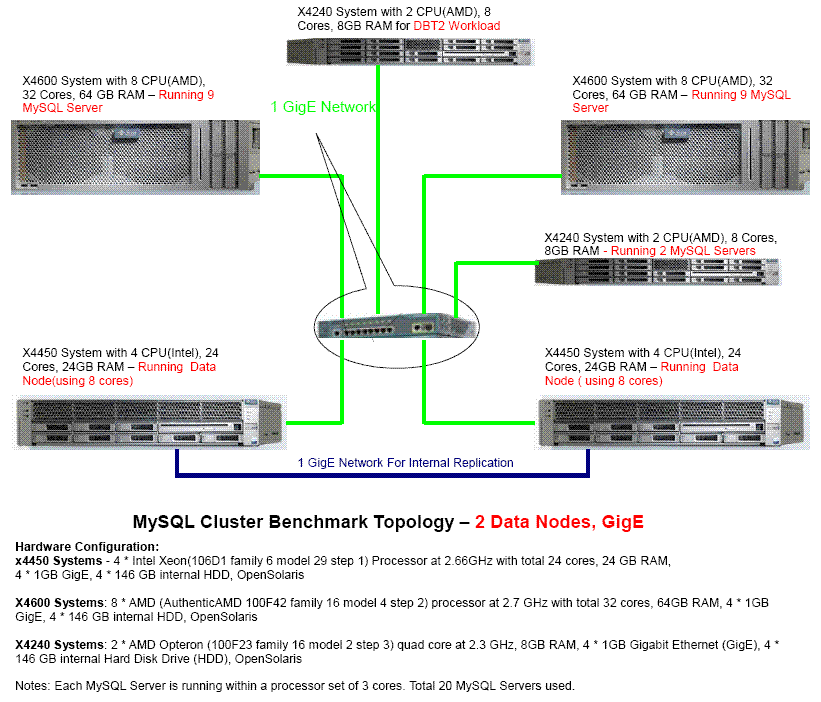
    The topology diagram for 2 Node Scenario

    In the case of a 2 node scenario, the data node processes were running on TWO Sun Fire x4450 system with 8 processor cores per data node. The MySQL server nodes were running a combination of Sun Fire x4450 systems and Sun Fire x4600 systems as shown in the deployment diagram below.
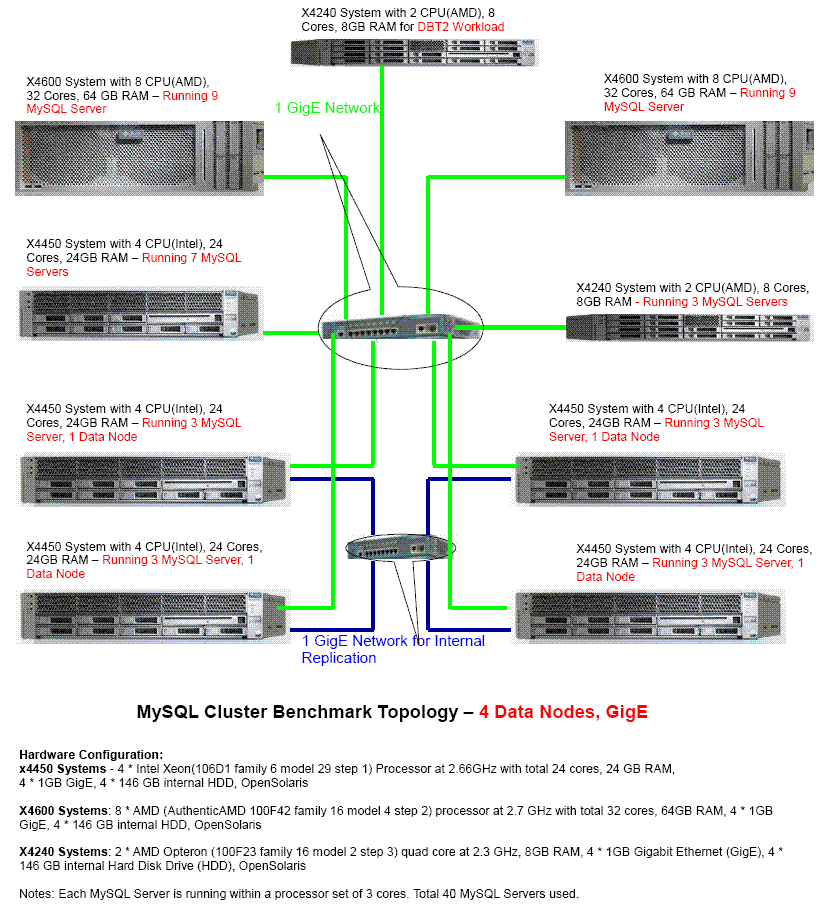


    The topology diagram for 4 Node Scenario

    In the case of a 4 node scenario, FOUR x4450 system were used to deploy the Data Nodes, each data node using 8 cores. The MySQL Server nodes were running on a combination of TWO Sun Fire x4600, ONE Sun Fire x4240 and FOUR Sun Fire x4450 systems.(co-located with data node systems). Other relevant details are captured in the deployment topology diagram.


    Detailed Results:
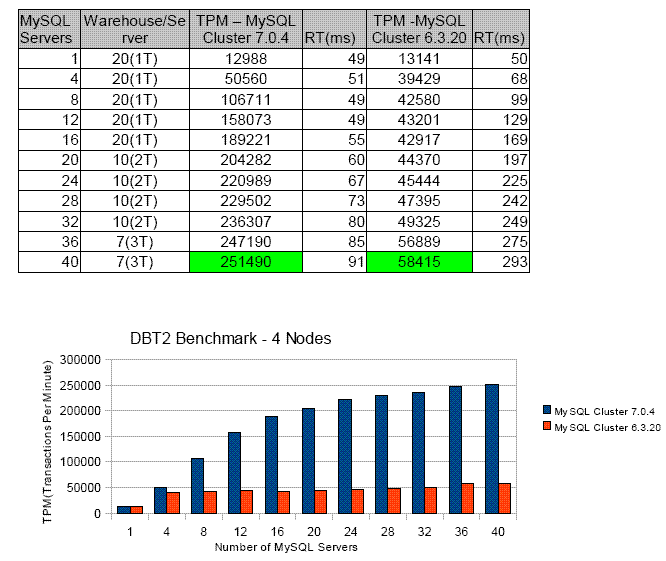
    Four Data Node Results

    Two Data Node Results

    Important Notes:

    1. Each MySQL server was bound to 3 processor cores using “processor set” feature(to accommodate more MySQL Servers on the available hardware). It is observed that we get increased TPM/MySQL Server and slight decrease in the response time with 4 processor cores per MySQL server). An example: With 3 processor cores assigned for the MySQL server process, we get the TPM of 12988 for 1 Server, 20 Warehouses. With 4 processor cores, the TPM increases to 19113 with decrease in the response time from 52ms to 34ms.
    2. TPM – New-order transactions per minute. It should be noted that the each transaction comprises of about 30 queries, so average response time per query if calculated would be ~3ms. More details on the “transaction” are available in the TPC-C specification document and DBT2 code base.
    3. The MySQL 6.3 Cluster saturate with fewer number of MySQL servers. For comparison purpose, we ran the tests with equal number of MySQL servers for both MySQL Cluster 6.3 and 7.0

    Benchmark Description

    Database Test 2 (DBT-2) : DBT2 is an open source benchmark developed by OSDL (Open Source Development Labs ). Significant updates to the benchmark were made to simplify its ability to run with a clustered database such as MySQL Cluster Carrier Grade Edition. DBT2 simulates a typical OLTP (Online Transaction Processing) application that performs transactions with around ten to twenty SQL statements per transaction within five distinct transaction types. The DBT2 benchmark can be used as a good indicator in regards to the expected performance of any application that performs fairly simple transactions and executes these transactions in a repetitive fashion.

    For the benchmark results above, DBT2 and MySQL Cluster were configured as an “in memory” database to simulate typical “real-time” database configurations. It should be noted that performance results are being measured as new-order transactions per minute (TPM). The changes made to the DBT2 benchmark are documented and can be found on the SourceForge page for DBT2 downloads. It can also be downloaded from ww.iclaustron.com.

    Additional Information:

    More information on MySQL Cluster

  • On-demand-webinar – What’s New in Managing MySQL Cluster

    Posted on January 14th, 2011 andrew No comments

    The recording of this webinar is now available to view on-line here.

    There will be a live webinar on Wednesday January 12 describing the new ways that you can manage MySQL Cluster (with a bit of monitoring thrown in). As always, the webinar is free but you need to register here. The event is scheduled for 09:00 Pacific / 17:00 UK / 18:00 Central European time but if you can’t make the live webinar it’s still worth registering so that you’re emailed the replay after the event.

    By their very nature, clustered environments involve more effort and resource to administer than standalone systems, and the same is true of MySQL Cluster, the database designed for web-scale throughput with carrier-grade availability.

    In this webinar, we will present an overview of the three latest enhancements to provisioning, monitoring and managing MySQL Cluster – collectively serving to lower costs, enhance agility and reduce the risk of downtime caused by manual configuration errors.

    In this webinar, we will present:

    • NDBINFO: released with MySQL Cluster 7.1, NDBINFO presents real-time status and usage statistics, providing developers and DBAs with a simple means of pro-actively monitoring and optimizing database performance and availability.
    • MySQL Cluster Manager: available as part of the commercial MySQL Cluster Carrier Grade Edition simplifies the creation and management of MySQL Cluster by automating common management tasks, delivering higher administration productivity and enhancing cluster agility. Tasks that used to take 46 commands can be reduced to just one!
    • MySQL Cluster Advisors & Graphs: part of the MySQL Enterprise Monitor and available in the commercial MySQL Cluster Carrier Grade Edition, the Enterprise Advisor includes automated best practice rules that alert on key performance and availability metrics from MySQL Cluster data nodes.

    You will also learn how you can get started evaluating and using all of these tools to simplify MySQL Cluster management.

    This session will be approximately 1 hour in length and will include interactive Q&A throughout. Please join us for this informative webinar!

    WHO:

    • Andrew Morgan, MySQL Cluster Product Management, Oracle
    • Mat Keep, MySQL Cluster Product Management, Oracle
  • MySQL Cluster 7.0.13 binaries released

    Posted on March 16th, 2010 andrew No comments

    The binary version for MySQL Cluster 7.0.13 has now been made available at http://dev.mysql.com/downloads/cluster/ under the GA tab.

    A description of all of the changes (fixes) that have gone into MySQL Cluster 7.0.13 (compared to 7.0.12) can be found in the MySQL Cluster 7.0.13 Change Log.

  • MySQL Cluster on Windows – webinar replay available

    Posted on March 10th, 2010 andrew No comments

    If you missed the recent webinar on running MySQL Cluster on Windows then you can watch/listen to the replay at http://www.mysql.com/news-and-events/on-demand-webinars/display-od-517.html

  • Presenting Cluster tutorial at MySQL UC (and discount code!)

    Posted on February 26th, 2010 andrew No comments

    Together with Geert and Andrew I’ll be teaching the MySQL Cluster tutrial at this year’s MySQL Cluster User Conference – Santa Clara, on April 12th. If you’re interested in using MySQL Cluster but aren’t sure how to get started (or you’ve used it but would like some tips) then this is a great opportunity. Check out the tutorial description.

    If you register by 15 March then you get the early-bird price and if you use this ‘friend of a speaker’ code then you get an additional 25% off: mys10fsp

    mys10fsp
  • MySQL Cluster 7.0.11b source released

    Posted on February 22nd, 2010 andrew No comments

    The source version for MySQL Cluster 7.0.11b has now been made available at ftp://ftp.mysql.com/pub/mysql/download/cluster_telco/mysql-5.1.41-ndb-7.0.11b/

    This replaces MySQL Cluster 7.0.10 and 7.0.11.

    You can either wait for the binaries to be released or if you’re in a rush then you can find instructions on building the binaries for yourself in the earlier article: “MySQL Cluster 7.0.7 source released“.

    A description of all of the changes (fixes) that have gone into MySQL Cluster 7.0.11b (compared to 7.0.10) can be found in the MySQL Cluster 7.0.11b Change Log

  • MySQL Cluster 7.0.11 source released

    Posted on February 3rd, 2010 andrew No comments

    The source version for MySQL Cluster 7.0.11 has now been made available at ftp://ftp.mysql.com/pub/mysql/download/cluster_telco/mysql-5.1.41-ndb-7.0.11/

    This replaces MySQL Cluster 7.0.10.

    You can either wait for the binaries to be released or if you’re in a rush then you can find instructions on building the binaries for yourself in the earlier article: “MySQL Cluster 7.0.7 source released“.

    A description of all of the changes (fixes) that have gone into MySQL Cluster 7.0.11 (compared to 7.0.11) can be found in the MySQL_Cluster_7_0_11_ChangeLog.

  • Upcoming webinar – MySQL performance tuning best practices

    Posted on January 26th, 2010 andrew 2 comments

    MySQL Cluster Performance Tuning Best Practices

    Are you experiencing current performance bottlenecks in your high availability applications ? Are you designing a new mission-critical application and want to know how best to structure your schema and index strategy for optimal performance? Interested in how to transform your SQL into faster, more efficient queries?

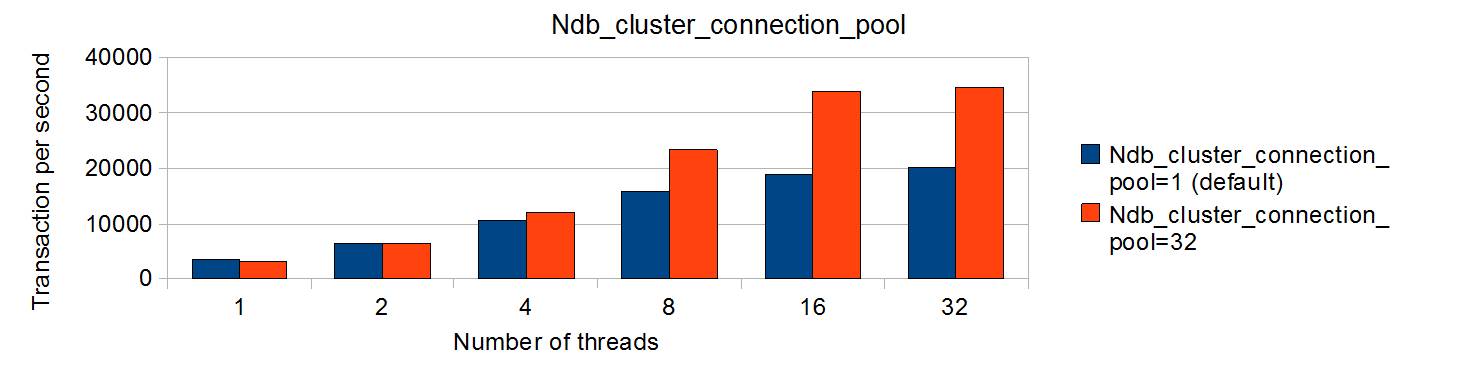
    Benefits of connection pooling

    Benefits of connection pooling

    Then this free web presentation is for you! You will get expert insight and learn best practices to help you identify those areas of database and application design that will give you the greatest benefits for performance when using MySQL Cluster.

    We will discuss guidelines and best practices covering the following areas:

    • General Design Concepts and Guidelines
    • Schema Optimization
      • BLOB/Text vs VARBINARY/VARCHAR
      • Partition by Key
    • Index Selection and Tuning
    • Basic Query Tuning
    • MySQL Cluster Parameter Tuning Guidelines
    • Tools to accelerate application development and testing

    Johan Andersson and Mat Keep will be presenting and I’ll be helping with the Q&A.

    Tuesday, February 2, 2009: 10:00 CET (Central European Time)/ 09:00 UK/GMT.

    Register here at mysql.com.

  • Running MySQL Cluster over multiple Windows servers

    Posted on January 20th, 2010 andrew 98 comments

    Windows Logo
    Following on from the earlier article on running MySQL Cluster on a single Windows host, this one looks at installing and running over multiple Windows machines.

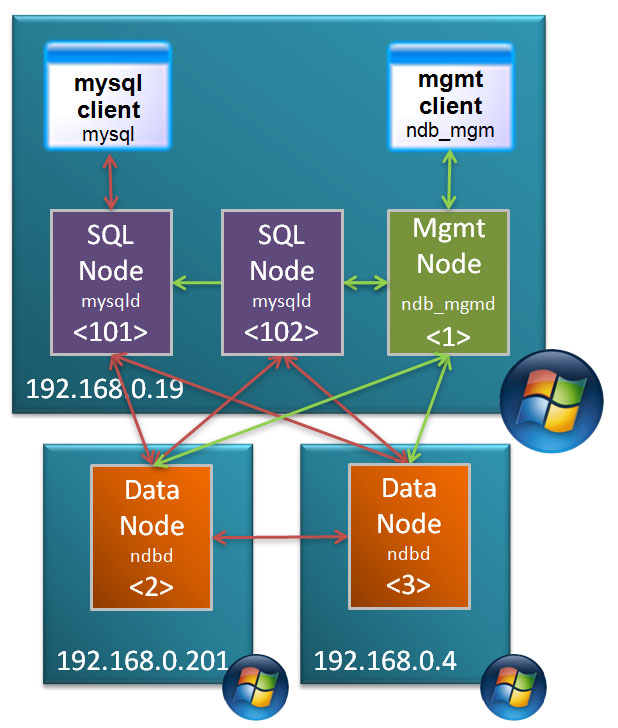
    Target Deployment

    Target Deployment

    In this post, the MySQL Cluster database will be split over 3 Windows machines:

    • 2 hosts with each running 1 data node
    • 3rd host running management node and 2 MySQL Servers


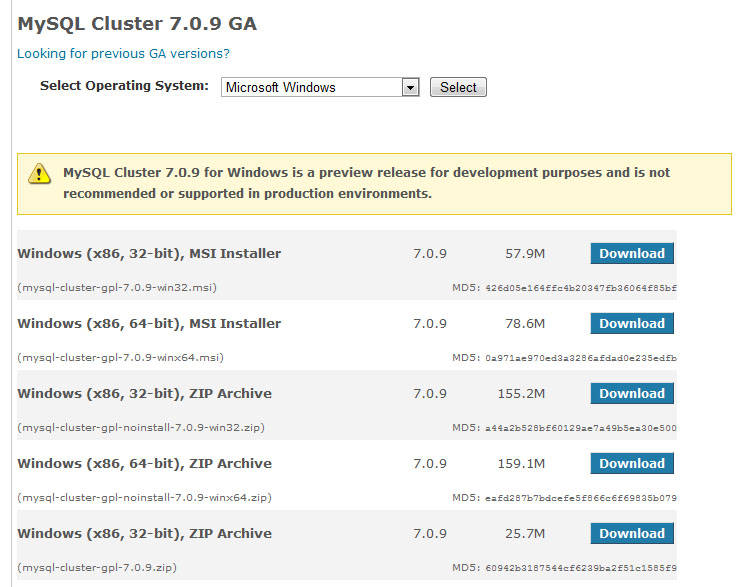
    MySQL Cluster Downloads

    MySQL Cluster Downloads

    The first step is to download and install the software on each of the Windows hosts. There are 2 main ways that you can install MySQL Cluster on Windows – the first is an MSI installer and the second is extracting the files from a Zip archive – this article focuses on using the Zip file as the single host article used the MSI installer. You can get the Zip archive from the Cluster downloads page on mysql.com

    Make sure that you choose the correct file MSI vs. Zip, 32 bit vs. 64 bit. Also make sure that you don’t download the source code rather than the binaries (you can tell the source archive as it’s a much smaller file).

    Repeat this on each of the hosts that will run a Cluster node (or download it once and then copy it to each of the hosts).

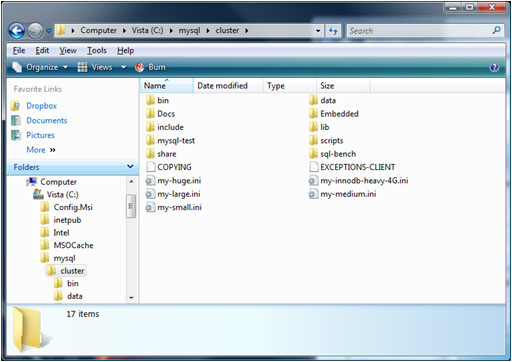
    Extract Zip archive

    Extract Zip archive

    Extract the contents of the Zip archive to “c:\mysql\cluster”.

    I prefer to keep the configuration and data files separate from the software and so I create a new folder “MySQL_Cluster\My_Cluster” in my home directory and in there create “conf” and “data” folders. Within the “data” folder on 192.168.0.19, create a sub-folder for each of the 2 MySQL Server (mysqld) processes and then copy “c:\mysql\cluster\data\mysql” to each – this creates the mysql database for each of the MySQL nodes containing data such as privileges and password.

    Add MySQL executables to PATH

    Add MySQL executables to PATH

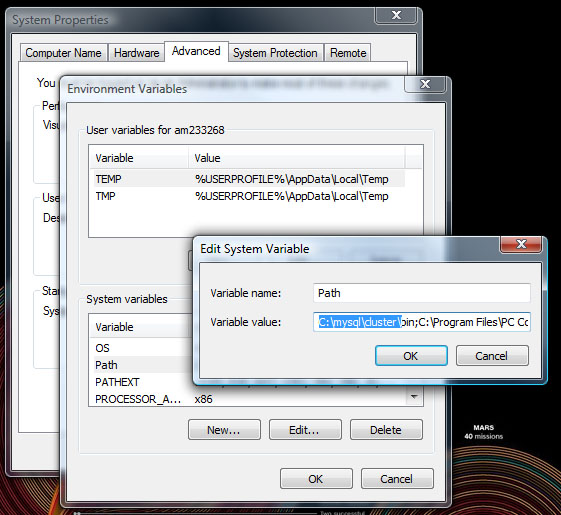
    To get access to the executables from the command line, add “c:\mysql\cluster\bin” to the PATH environment variable.


    Create a “config.ini” file within the “conf” folder that was created on the host to run the management node (ndb_mgmd) – which in this example is 192.168.0.19:

    [ndbd default]
    noofreplicas=2
    datadir=E:\am233268\Documents\MySQL_Cluster\My_Cluster\data\
    
    [ndbd]
    hostname=192.168.0.201
    id=2
    
    [ndbd]
    hostname=192.168.0.4
    id=3
    
    [ndb_mgmd]
    id=1
    hostname=192.168.0.19
    
    mysqld]
    id=101
    hostname=192.168.0.19
    
    [mysqld]
    id=102
    hostname=192.168.0.19
    

    As both of the MySQL Server nodes will also run on 192.168.0.19, we create a cnf file for each of them in that same “conf” folder:

    my.101.cnf

    [mysqld]
    ndb-nodeid=101
    ndbcluster
    datadir=E:\am233268\Documents\MySQL_Cluster\My_Cluster\data\mysqld_1
    port=3306
    ndb-connectstring=192.168.0.19:1186

    my.102.cnf

    [mysqld]
    ndb-nodeid=102
    ndbcluster
    datadir=E:\am233268\Documents\MySQL_Cluster\My_Cluster\data\mysqld_2
    port=3307
    ndb-connectstring=192.168.0.19:1186

    Note that the “ndb-connectstring” is not strictly needed as the MySQL Servers happen to be on the same host as the management node but they’ve been included to make it clearer what to change if you moved those nodes to another machine.

    Ports to open for MySQL Cluster nodes

    Ports to open for MySQL Cluster nodes

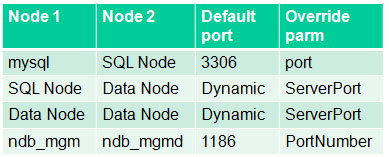
    The information from this table can help you set up the firewall rules to allow the nodes to communitcate with each other but if possible, turn off the firewall for connections between these 3 nodes.

    The next step is to start the nodes (processes) but before then, a hint.

    If you run each command from a different command prompt then your screen will quickly fill with Windows. Instead, rather than just typing “c:\ <command>” use “c:\ start /B <command>” (for example “c:\ start /B ndbd –initial”) so that multiple processes can be run from the same Window. To keep things simple, the “start /B” has been skipped for the rest of this article.

    The first process to start is the management node; run the following from the “<home>\Documents\MySQL_Cluster\My_Cluster” folder on 192.168.0.19:

    192.168.0.19: ndb_mgmd --initial -f conf/config.ini --configdir=./conf

    Next, start the data nodes on 192.168.0.201 and 192.168.0.4:

    192.168.0.201: ndbd -c 192.168.0.19:1186 --initial
    
    192.168.0.4: ndbd -c 192.168.0.19:1186 --initial

    and then finally start the MySQL Server nodes on 192.168.0.19:

    192.168.0.19: mysqld --defaults-file=conf\my.101.cnf
    192.168.0.19: mysqld --defaults-file=conf\my.102.cnf

    Finally, check that all of the nodes are up and running:

    192.168.0.19: ndb_mgm
    -- NDB Cluster -- Management Client --
    ndb_mgm> show
    Connected to Management Server at: localhost:1186
    Cluster Configuration
    ---------------------
    [ndbd(NDB)]     2 node(s)
    id=2    @192.168.0.201  (mysql-5.1.39 ndb-7.0.9, Nodegroup: 0, Master)
    id=3    @192.168.0.4  (mysql-5.1.39 ndb-7.0.9, Nodegroup: 0)
    
    [ndb_mgmd(MGM)] 1 node(s)
    id=1    @192.168.0.19  (mysql-5.1.39 ndb-7.0.9)
    
    [mysqld(API)]   2 node(s)
    id=101  @192.168.0.19  (mysql-5.1.39 ndb-7.0.9)
    id=102  @192.168.0.19  (mysql-5.1.39 ndb-7.0.9)

    Known limitation of running MySQL Cluster on Windows:

    • No angel process for data nodes -> processes will not be automatically restarted even if you set StopOnError to FALSE
    • Running nodes as Windows services is not really practical (as well as software limitations, would still need to activate processes through ndb_mgm)
    • Safe to run management node or MySQL Servers (or NDB API Apps) on Windows in production: will soon be supported
    • See open MySQL Cluster bugs reported for Windows:
    • You tell us! Help us get to GA quality on Windows:
  • MySQL Cluster 7.0.10 source released

    Posted on December 16th, 2009 andrew No comments

    The source version for MySQL Cluster 7.0.10 has now been made available at ftp://ftp://ftp.mysql.com/pub/mysql/download/cluster_telco/mysql-5.1.39-ndb-7.0.10//

    This replaces MySQL Cluster 7.0.9.

    You can either wait for the binaries to be released or if you’re in a rush then you can find instructions on building the binaries for yourself in the earlier article: “MySQL Cluster 7.0.7 source released“.

    A description of all of the changes (fixes) that have gone into MySQL Cluster 7.0.10 (compared to 7.0.9) can be found in the MySQL_Cluster_7_0_10_ChangeLog.

  • New white paper: Guide to Optimizing Performance of the MySQL Cluster Database

    Posted on December 7th, 2009 andrew 2 comments
    MySQL Cluster Connection Pooling

    MySQL Cluster Connection Pooling

    This guide explores how to tune and optimize the MySQL Cluster database to handle diverse workload requirements. It discusses data access patterns and how to build distribution awareness into applications, before exploring schema and query optimization, tuning of parameters and how to get the best out of the latest innovations in hardware design.

    The Guide concludes with recent performance benchmarks conducted with the MySQL Cluster database, an overview of how MySQL Cluster can be integrated with other MySQL storage engines, before summarizing additional resources that will enable you to optimize MySQL Cluster performance with your applications.

    Download the white paper (as always, for free) from: http://www.mysql.com/why-mysql/white-papers/mysql_wp_cluster_perfomance.php

  • MySQL Cluster 7.0.9 GA binaries released

    Posted on November 25th, 2009 andrew No comments

    The GA binaries for MySQL Cluster 7.0.9 have been released – download them from http://dev.mysql.com/downloads/select.php?id=14

    A summary of the changes can be found in the MySQL Cluster 7.0.9 Change Log

  • Free Webinar: Shopatron’s eCommerce Services Powered by MySQL Cluster – Best Practices

    Posted on October 16th, 2009 andrew No comments

    As one of the world’s leading eCommerce Service Providers, Shopatron needed to further improve scalability and availability of their eCommerce services to keep pace with their rapidly growing business, while at the same time, reducing costs.

    After extensive evaluations, Shopatron selected MySQL Cluster to power its back-end database, running the entire eCommerce fulfillment engine.

    Since deploying MySQL Cluster, Shopatron have achieved:

    • continuous service availability with sub-second failover and fully automated recovery
    • real-time performance, reducing query times from 3 seconds to 2 milliseconds
    • extreme levels of scalability on commodity hardware and open source software
    • reduced licensing, support and operational management costs

    Tune into this webinar where Shopatron’s CIO/COO and VP of Engineering will both share their experiences and best practices of implementing the MySQL Cluster database for eCommerce applications.

    WHO:

    Sean Collier, CIO & COO, Shopatron Inc.
    David Dalrymple, VP of Engineering, Shopatron Inc.
    Matthew Keep, MySQL Product Management

    WHEN:

    Thursday, October 22, 2009: 10:00 Pacific time (America)
    Thu, Oct 22: 07:00 Hawaii time
    Thu, Oct 22: 11:00 Mountain time (America)
    Thu, Oct 22: 12:00 Central time (America)
    Thu, Oct 22: 13:00 Eastern time (America)
    Thu, Oct 22: 17:00 UTC
    Thu, Oct 22: 18:00 Western European time
    Thu, Oct 22: 19:00 Central European time
    Thu, Oct 22: 20:00 Eastern European time

  • Free webinar: FreeRADIUS & MySQL Cluster: Scalable and Highly Available AAA Services – EMEA

    Posted on October 16th, 2009 andrew 3 comments

    FreeRADIUS And MySQL ClusterAs network use grows and services become more dynamic, so existing Authentication, Authorization and Accounting (AAA) environments can struggle to keep pace with demand.

    Tune into this webinar where you can hear from the Alan Dekok, one of the founders of the FreeRADIUS project and CEO of Network RADIUS, discuss the concepts and implementation of RADIUS services using the FreeRADIUS server and the MySQL Cluster database to deliver highly available and scalable AAA services.

    As always, this webinar is free and you can register here. I will be manning the Q&A during the webinar.

    In this session, you will learn about:

    • potential AAA limitations as network environments grow
    • advantages of deploying FreeRADIUS with MySQL Cluster
    • Performance, sizing and deployment of an AAA environment using FreeRADIUS with MySQL Cluster
    • customer case studies
    • how to get started

    WHO:

    Alan Dekok, Founder of the FreeRADIUS project and CEO of Network RADIUS
    Matthew Keep, MySQL Cluster Product Management

    WHAT:

    FreeRADIUS & MySQL Cluster: Scalable and Highly Available AAA Services web presentation.

    WHEN:

    Tuesday, October 20, 2009: 10:00 Central European time

    Tue, Oct 20: 09:00 Western European time

    Tue, Oct 20: 11:00 Eastern European time

    The presentation will be approximately 45 minutes long followed by Q&A.

    WHERE:

    Simply access the web seminar from the comfort of your own office.

    WHY:

    To learn more about how you can use FreeRADIUS and MySQL Cluster 7.0

  • MySQL Cluster 7.0.8a is now released

    Posted on October 14th, 2009 andrew 1 comment

    The GA binaries for MySQL Cluster 7.0.8a (the “a” is used to indicate that this is an increment on the original 7.0.8 source release) have been released – download them from http://dev.mysql.com/downloads/select.php?id=14

    A summary of the changes can be found in the MySQL Cluster 7.0.8a Change Log

  • Free MySQL webinar today – High Availability Architectures for Online Applications

    Posted on September 29th, 2009 andrew No comments

    Update: You can now download a recording of the webinar and the slides from http://www.mysql.com/news-and-events/on-demand-webinars/display-od-403.html

    I’ll be presenting the fourth (and final) session of the MySQL for Online Applications webinar series today (29 September). Today’s High Availability Architectures for Online Applications webinar covers:

    • MySQL Replication
    • MySQL Cluster
    • Distributed Replicated Block Device (DRBD)
    • Other high-availability technologies

    Register here.

    This session starts at 10:00 am Pacific Time but will be rerun tomorrow at 10:00 am CET (9:00 am UK) with Ivan Zoratti presenting (I’ll be handling questions).

    More details for today’s webinar:

    Tuesday, September 29, 2009

    Join us for the last of our 4 part webinar series exploring the different aspects of using MySQL as the backend database for online applications. With real life experience gained working with MySQL Customers such as Facebook, Alcatel Lucent and Google, this webinar series will give you the information you need to run scalable, highly available online applications.

    In this last installment we look at MySQL high availability technologies and architectures. We will explore the uses cases for implementing:

    • MySQL Replication
    • MySQL Cluster
    • Distributed Replicated Block Device (DRBD)
    • Other high-availability technologies

    Also, covered will be the fundamentals of how these technologies work and how they can be combined to create a more scalable and highly available database infrastructure. Several case studies will be presented to show how these technologies have been implemented in the real world.

    Whether you are already using MySQL for your online application or considering it for a new project then register today to learn how you can make best use of the world’s most popular database for online applications.

    WHO:

    Andrew Morgan, Senior Product Manager, MySQL

    WHAT:

    High Availability Architectures for Online Applications web presentation.

    WHEN:

    Tuesday, September 29, 2009: 10:00 Pacific time (America)

    Tue, Sep 29: 07:00 Hawaii time
    Tue, Sep 29: 11:00 Mountain time (America)
    Tue, Sep 29: 12:00 Central time (America)
    Tue, Sep 29: 13:00 Eastern time (America)
    Tue, Sep 29: 17:00 UTC
    Tue, Sep 29: 18:00 Western European time
    Tue, Sep 29: 19:00 Central European time
    Tue, Sep 29: 20:00 Eastern European time
    High Availability Architectures for Online Applications
  • MySQL Cluster 7.0.7 binaries released

    Posted on September 11th, 2009 andrew 1 comment

    The binaries for MySQL Cluster 7.0.7 have now been released and can be downloaded from http://dev.mysql.com/downloads/cluster/7.0.html

    A description of all of the changes (fixes) that have gone into MySQL Cluster 7.0.7 (compared to 7.0.6) can be found in the MySQL Cluster 7.0.7 Change Log.

  • MySQL Cluster 7.0.7 source released

    Posted on September 2nd, 2009 andrew 14 comments

    Update: As explained in “MySQL Cluster 7.0.7 binaries released” you can now download the compiled binaries for your particular platform. I am going to leave this entry in place as it will hopefully be useful for future releases but for 7.0.7 you should refer to that other post.

    You’ll need to wait for the pre-built binaries but you can now download the source code and build it for yourself to get started. This article explains where to get it and how to build, install and test the installation.

    In this example, I’ve used Ubuntu.

    The first step is to download the compressed tar ball containing the source code by pointing your browser to ftp://ftp.mysql.com/pub/mysql/download/cluster_telco/mysql-5.1.35-ndb-7.0.7/mysql-cluster-gpl-7.0.7.tar.gz

    Then you need to extract the code and then build and install the software:

    billy@billy-laptop:~/mysql$ tar -xzf mysql-cluster-gpl-7.0.7.tar.gz
    billy@billy-laptop:~/mysql$ mv mysql-cluster-gpl-7.0.7 7_0_7
    billy@billy-laptop:~/mysql$ cd 7_0_7
    billy@billy-laptop:~/mysql/7_0_7$ autoreconf --force --install
    billy@billy-laptop:~/mysql/7_0_7$ ./configure --with-plugins=max --prefix=/usr/local/mysql
    billy@billy-laptop:~/mysql/7_0_7$ make
    billy@billy-laptop:~/mysql/7_0_7$ sudo make install
    billy@billy-laptop:~/mysql/7_0_7$ sudo cp storage/ndb/src/kernel/ndbd /usr/local/mysql/bin
    billy@billy-laptop:~/mysql/7_0_7$ sudo cp storage/ndb/src/kernel/ndbmtd /usr/local/mysql/bin
    billy@billy-laptop:~/mysql/7_0_7$ sudo cp storage/ndb/src/mgmsrv/ndb_mgmd /usr/local/mysql/bin
    billy@billy-laptop:~/mysql/7_0_7$ cd /usr/local/mysql/mysql-test
    billy@billy-laptop:/usr/local/mysql/mysql-test$ sudo chmod 777 .
    billy@billy-laptop:/usr/local/mysql/mysql-test$ sudo chmod 777 *

    You can then test that the installation has been successful:

    billy@billy-laptop:/usr/local/mysql/mysql-test$ ./mtr ndb_basic
    
    Logging: ./mtr  ndb_basic
    090902 18:17:43 [Warning] Forcing shutdown of 2 plugins
    MySQL Version 5.1.35
    Checking supported features...
    - using ndbcluster when necessary, mysqld supports it
    - skipping SSL, mysqld not compiled with SSL
    - multi threaded ndbd, will be used "round robin"
    Collecting tests...
    vardir: /usr/local/mysql/mysql-test/var
    Removing old var directory...
    Creating var directory '/usr/local/mysql/mysql-test/var'...
    Installing system database...
    Using server port 43993
    
    ==============================================================================
    
    TEST                                      RESULT   TIME (ms)
    ------------------------------------------------------------
    
    worker[1] Using MTR_BUILD_THREAD 250, with reserved ports 12500..12509
    ndb.ndb_basic                            [ pass ]  73661
    ------------------------------------------------------------
    The servers were restarted 0 times
    Spent 73.661 of 143 seconds executing testcases
    
    All 1 tests were successful.

    Following this you can configure and use the software as normal (refer to Creating a simple Cluster on a single LINUX host).

    The annotated header information has already been updated in the NDB API Docs section.

    A description of all of the changes (fixes) that have gone into MySQL Cluster 7.0.7 (compared to 7.0.6) can be found in the MySQL Cluster 7.0.7 Change Log.

  • Webinar: MySQL Cluster 7.0: What’s New? (AS/ANZ/IN)

    Posted on August 3rd, 2009 andrew 2 comments

    Mat Keep and I will be presenting a Webinar on Wednesday, August 12, 2009 describing the new capabilities of MySQL Cluster 7.0. The time is designed to be Asia/Australasia-friendly but of course it’s open to everyone.

    Register for the MySQL Cluster 7 Webinar here.

    By attending this webinar, you will learn more about the next generation of MySQL Cluster, and how it enables you to deliver 99.999% database availability, with real time performance and linear scalability, while slashing TCO.

    Boasting a range of breakthrough capabilities, MySQL Cluster 7.0 will enable you to stay ahead of your most demanding, mission-critical application requirements. Enhanced scalability delivers higher database performance with fewer nodes to simplify deployment and administration. Expanded platform support and interoperability delivers more choice in both the development and deployment of MySQL Cluster. Simplified cluster monitoring tools reduce DBA administration overhead and operational costs.

    Wednesday, August 12, 2009: 14:00 Singapore/Malaysia/Philippines time

    Wed, Aug 12: 11:30 India, Sri Lanka
    Wed, Aug 12: 13:00 Thailand/Vietnam/Western Indonesia time
    Wed, Aug 12: 14:00 Western Australia
    Wed, Aug 12: 15:30 Northern Territory (Australia)
    Wed, Aug 12: 15:30 South Australia
    Wed, Aug 12: 16:00 Queensland (Australia)
    Wed, Aug 12: 16:00 NSW, ACT, Victoria, Tasmania (Australia)
    Wed, Aug 12: 18:00 New Zealand time
  • MySQL Cluster Data Node restart times

    Posted on July 30th, 2009 andrew 10 comments

    Restart times have been reduced in MySQL Cluster 6.3.28a & 7.0.9a – refer to that article for the new timings: http://www.clusterdb.com/mysql-cluster/mysql-cluster-restarts-get-faster/

    Restarts are required for certain, infrequent maintenance activities. Note that there is no loss of service while a single node restarts.

    When a data node restarts, it first attempts to load the data into memory from the local log files and then it will catch up with any subsequent changes by retrieveing them from the surviving node(s) in its node group.

     Based on this, you would expect the time taken to restart a data node to be influenced by:

    1. The amount of data that was stored on the data node before the restart
    2. Rate of updates being made to the data during the restart
    3. Network performance (assuming the data is being updated during recovery)

    The times will also be influenced bycertain configuration parameters, performance of the host machine and whether the multi-threaded data node (ndbmtd) is being used.

    To provide some insight into how these factors impact restart times, tests have been performed where the following factors are varied:

    • Database size (Each Gbyte is made up of 1,000,000 tuples in each of 5 tables)
    • Whether traffic is running or not (a single thread using the NDB API to send in up to 2K tps (10K updates/second))
    • Whether the 2 data nodes in the node group are on the same host or separated by a Gbit Ethernet network

    The following factors are kept constant:

    • Physical hosts: Intel Core 2 Quad Q8200@2.33 GHz; 7.7 GBytes RAM
    • NoOfFragmentLogFiles: 300
    • MaxNoOfExecutionThreads=4

    Here are the observed results:

    Data Node restart times

    Data Node restart times

    There are a couple of things to note from these results:

    • Using the multi-threaded data node (ndbmtd) greatly improves the restart time (in this case, 4 threads were available, improvements could be even greater on an 8 core/thread system)
    • Results become less predictable when heavy update traffic is being processed (in this case, up to 10,000 updated rows/second on a single node group). In the tests, no attempt was made to regulate this traffic and the test application was run on the same host as the one of the data nodes. Changes to the rate of updates will vary how long it takes for the restarting node to catch-up as it’s a moving target.

    There is another recovery/restart scenario. The measurements shown above assumed that the file system on the data node’s host was intact and could be used to recover the in-memory copy – if that were not the case (or the data nodes were restarted with the “initial” option) then all of the data would have to be recovered from the surviving data node(s) in the same node group. As a comparison restarting a 6 Gbyte data node with the “initial” option took 20 minutes compared to 8 minutes without it (ndbmtd, over Gbit n/w).