MySQL Cluster database & MySQL Replication
RSS icon Email icon Home icon
  • MySQL Cluster 7.3 is now Generally Available – an overview

    Posted on June 18th, 2013 andrew No comments

    MySQL Cluster 7.3 logoMySQL Cluster 7.3 has now been declared GA! This means that you can deploy it in your live systems and get support from Oracle.

    This post briefly describes the main new features in the release; for a deeper dive, refer to the What’s new in MySQL Cluster 7.3 white paper and the more specialised blog posts that you’ll find links to from this post.

    I’ll also be giving more details in the MySQL Cluster 7.3 Webinar which is scheduled for 09:00 Pacific / Noon Eastern / 17:00 UK / 18:00 CET this Thursday (20th June). This is a great opportunity to get your questions answered in real-time by the experts. As usual, the webinar is free but you should n the register here ahead of time. Even if you can’t attend it’s worth registering as you’ll then be sent a link to the replay.

    MySQL Cluster Auto-Installer

    MySQL Cluster Auto-Installer

    MySQL Cluster Auto-Installer

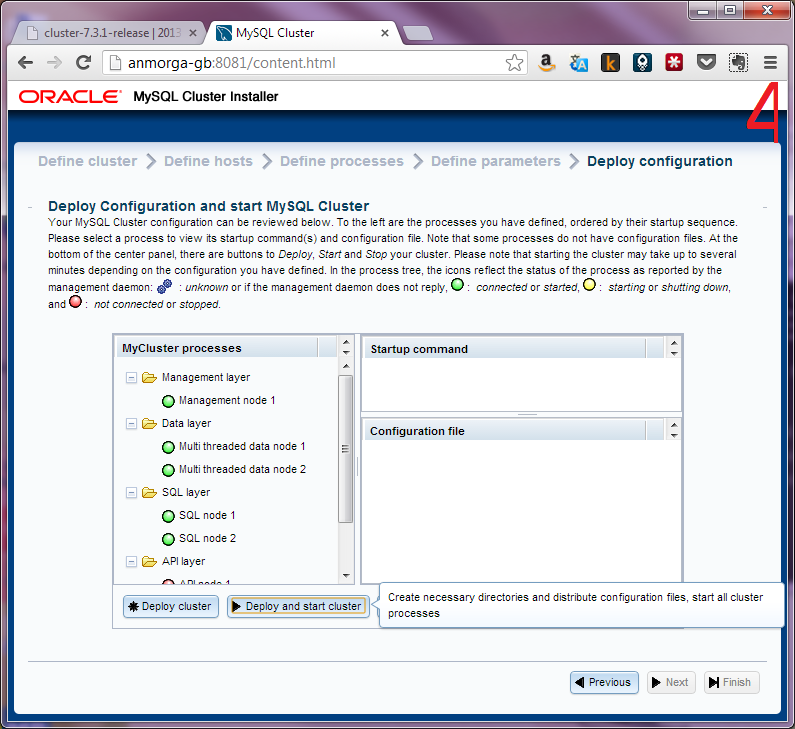
    The MySQL Cluster Auto-Installer is a browser-based GUI that will provision a well configured, distributed Cluster in minutes, ready for test, development or production environments.

    A major priority for this release is to make it much easier and faster to provision a cluster that is well tuned for your application and environment; we want you to focus on exploiting the benefits of MySQL Cluster in your application rather than on figuring out how to install, configure and start the database. The MySQL Cluster Auto-Installer provides a browser-based GUI which steps you through creating a Cluster tailored to your requirements. For a really good view of how the tool works, a tutorial video and detailed worked example is available from the blog post: MySQL Cluster 7.3 MySQL Cluster Auto-Installer.

    Foreign Keys

    Foreign Key constraints between tables

    Tables with Foreign Key constraint

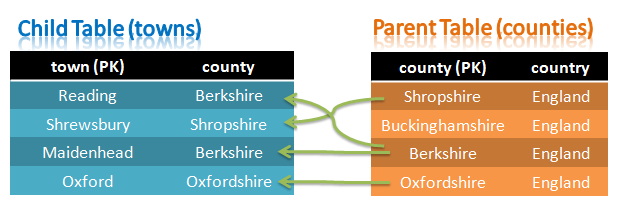
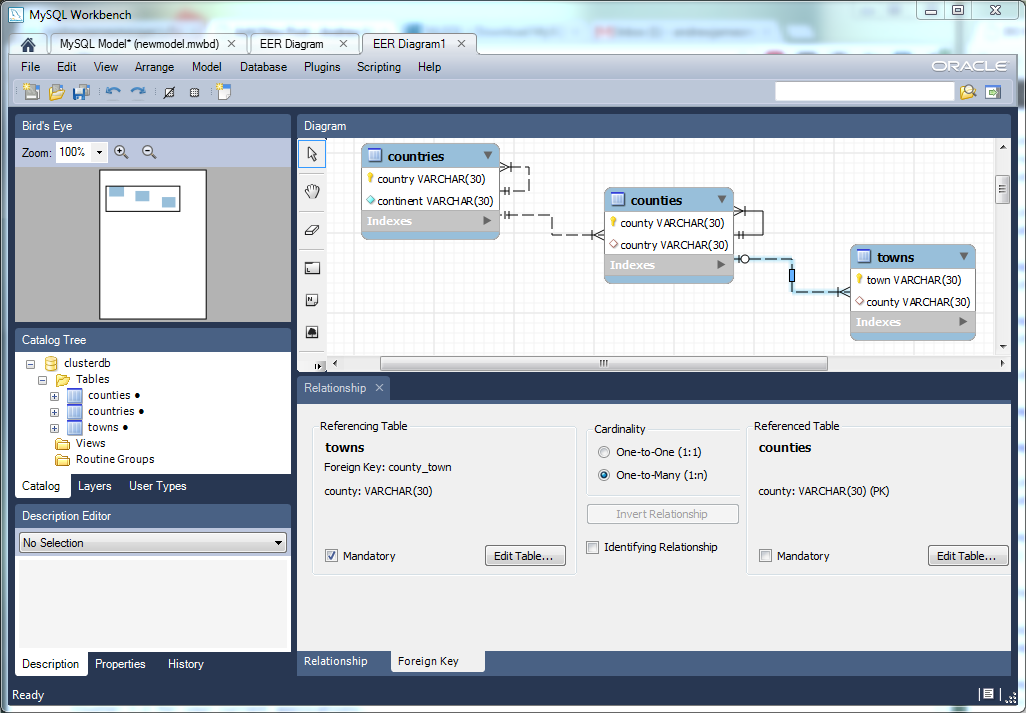
    Foreign Keys (FKs) are a way of implementing relationships/constraints between columns in different tables. For example if we want to make sure that the value of the county column in the towns table has an associated entry in the counties table. In this way, no-one can place a town in a non-existent county and similarly no one can remove a county and leave orphaned towns behind.

    We believe that this is going to enable a whole new set of applications exploit the advantages of MySQL Cluster where:

    • Developers want to simplify their application by pushing referential checks down into the database
    • The application is built upon 3rd party middleware that is dependent on FKs
    • The application is already so dependent on FKs that it would be too complex to remove them

    Note that the FK constraints will be applied regardless of how data is subsequently written (i.e. through SQL or any of the available NoSQL APIs that bypass the MySQL Server) – this ensures that the intended data integrity is always maintained.

    More details and a worked example of using Foreign Keys with MySQL Cluster can be found in this post: Foreign Keys in MySQL Cluster.

    JavaScript Driver for Node.js

    MySQL Cluster driver for JavaScript/Node.jsNode.js is a platform that allows fast, scalable network applications (typically web applications) to be developed using JavaScript. Node.js is designed for a single thread to serve millions of client connections in real-time – this is achieved by an asynchronous, event-driven architecture – just like MySQL Cluster, making them a great match.

    The MySQL Cluster NoSQL Driver for Node.js is implemented as a module for the V8 engine, providing Node.js with a native, asynchronous JavaScript interface that can be used to both query and receive results sets directly from MySQL Cluster, without transformations to SQL. As an added benefit, you can direct the driver to use SQL so that the same API can be used with InnoDB tables.

    With the MySQL Cluster JavaScript Driver for Node.js, architects can re-use JavaScript from the client to the server, all the way through to a distributed, fault-tolerant, transactional database supporting real-time, high-scale services.

    Developing an application to use this API is very straightforward and an example application with full setup instructions is provided in the post Using JavaScript and Node.js with MySQL Cluster – First steps.

    Connection Thread scalability

    MySQL Cluster thrives when it is offered as many operations in parallel as possible. To achieve this, parallelism should be configured at each layer. There should be multiple application threads sending work to the MySQL Server (or other API), there should be multiple MySQL Servers and finally multiple connections between the MySQL Server (or other API node) and the data nodes. This is explained in more detail in the MySQL Cluster Performance white paper.

    Increased throughput with Connection Thread Scalability

    Increased throughput with Connection Thread Scalability

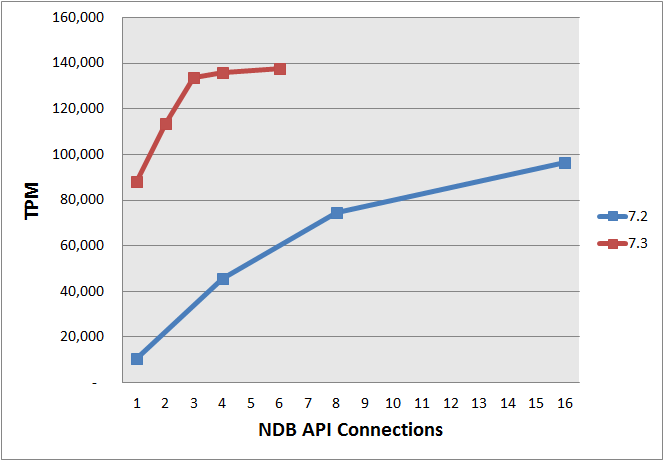
    Each of the connections to the data nodes consumes one of the 256 available node-ids and so in some scenarios they could cap the scalability of the Cluster. MySQL Cluster 7.3 greatly increases the throughput of each of these connections meaning that less connections (and therefore node-ids) are needed to tackle the same workload; this in turn means that more API nodes and data nodes can be added to the Cluster to scale the capacity and performance even further. Benchmarks have shown up to a 8x increase in throughput per connection. The graph illustrates how less NDB API connection threads in MySQL Cluster 7.3 can deliver increased throughput compared with MySQL Cluster 7.2; the benchmark was based on DBT2 using a single data node; a single MySQL Server and 128 client connections.

    MySQL 5.6 Server

    MySQL Cluster 7.3 also rebases onto MySQL 5.6. What this means is that the MySQL Server that comes with MySQL Cluster 7.3 is based on MySQL 5.6. This in turn means that when you mix and match MySQL Cluster (NDB) and InnoDB tables, you’ll be getting the benefits of the latest and greatest version of each storage engine.

    Try it out!

    Please go ahead and download and start experimenting with MySQL Cluster 7.3. We look forward to hearing how you get on!

  • Foreign Keys in MySQL Cluster

    Posted on June 18th, 2013 andrew 19 comments
    Foreign Key constraints between tables

    Foreign Key constraints between tables

    The newly announced GA of MySQL Cluster 7.3 (7.3.2) builds upon second DMR (7.3.1 m2) released earlier in the year which added Foreign Keys to MySQL Cluster. Foreign Keys is a feature requested by many, many people and has often been cited as the reason for not being able to replace InnoDB with MySQL Cluster when they needed the extra availability or scalability.

    Note that this post is an up-version of the original – and was first published with the 7.3 labs release in June 2012.

    What’s a Foreign Key

    The majority of readers who are already familiar with Foreign Keys can skip to the next section.

    Foreign Keys are a way of implementing relationships/constraints between columns in different tables. For example, in the above figure, we want to make sure that the value of the county column in the towns table has an associated entry in the counties table. In this way, no-one can place a town in a non-existent county and similarly no one can remove a county and leave orphaned towns behind.

    We refer to the towns table as the child and the counties table as the parent.

    There are different categories of constraints that influence how they’re enforced when a row is updated or deleted from the parent table:

    • Cascade: If a row is deleted from the parent then any rows in the child table with a matching FK value will also be deleted. Similarly for changes to the value in the parent table.
    • Restrict: A row cannot be deleted from the parent table if this would break a FK constraint with the child table. Similarly for changes to the value in the parent table.
    • No Action: Very similar to “Restrict” except that any events/triggers on the parent table will be executed before the constraint is enforced – giving the application writer the option to resolve any FK constraint conflicts using a stored procedure.
    • Set NULL: If NULL is a permitted value for the FK column in the child table then it will be set to NULL if the associated data in the parent table is updated or deleted.
    • Set Default: If there is a default value for the FK column in the child table then it will be used if the associated data in the parent table is updated or deleted. Note that this is not implemented in this version – the constraint can be added to the schema but any subsequent deletion or update to the column in the parent table will fail.

    How to use Foreign Keys with MySQL Cluster

    For anyone familiar with using FKs with InnoDB, a lot of this will be very similar – that’s intentional in the design of this Cluster feature. Throughout this section we will use the tables shown in the above figure.

    First of all, create the tables and add some data:

    mysql> CREATE DATABASE clusterdb;USE clusterdb;
    mysql> CREATE TABLE counties (county VARCHAR(30) NOT NULL PRIMARY KEY, country VARCHAR(30))
      ENGINE=ndb;
    mysql> INSERT INTO counties VALUES ('Berkshire','England'),('Shropshire','England'),
      ('Oxfordshire','England'),('Buckinghamshire','England');
    mysql> CREATE TABLE towns (town VARCHAR(30) NOT NULL PRIMARY KEY, county VARCHAR(30),
      INDEX county_county_index (county), CONSTRAINT county_town FOREIGN KEY (county) 
      REFERENCES counties(county) ON DELETE RESTRICT ON UPDATE RESTRICT) ENGINE=ndb;
    mysql> INSERT INTO towns VALUES ('Maidenhead','Berkshire'),('Reading','Berkshire'),
      ('Shrewsbury','Shropshire'),('Oxford','Oxfordshire');
    mysql> SELECT * FROM counties;SELECT * FROM towns;
    +-----------------+---------+
    | county          | country |
    +-----------------+---------+
    | Shropshire      | England |
    | Buckinghamshire | England |
    | Berkshire       | England |
    | Oxfordshire     | England |
    +-----------------+---------+
    4 rows in set (0.00 sec)
    
    +------------+-------------+
    | town       | county      |
    +------------+-------------+
    | Reading    | Berkshire   |
    | Shrewsbury | Shropshire  |
    | Maidenhead | Berkshire   |
    | Oxford     | Oxfordshire |
    +------------+-------------+
    4 rows in set (0.00 sec)

    Note that the FK is actually defined as part of creating the towns table with CONSTRAINT county_town FOREIGN KEY (county) REFERENCES counties(county) ON DELETE RESTRICT ON UPDATE RESTRICT. county_town is the label assigned to the constraint (if you don’t specify one then one will be automatically created – you can see it by executing SHOW CREATE TABLE towns). The constraint is set up from the county column in the towns (child) table to the county column in the counties (parent) table.

    As a first check, we can confirm that values that are not part of the constraint can be modified in the parent table – in this case we’ll move the England/Wales border:

    mysql> UPDATE counties SET country='WALES' WHERE county='Shropshire';
    Query OK, 1 row affected (0.00 sec)
    Rows matched: 1  Changed: 1  Warnings: 0

    Next, to illustrate the kind of user error that can be prevented, we attempt to add a town in a county that has not yet been defined – we want this to fail as it would break the constraint we created:

    mysql> INSERT towns VALUES ('Cambridge','Cambridgeshire');
    ERROR 1452 (23000): Cannot add or update a child row: a foreign key constraint fails
      (Unknown error code)
    mysql> SHOW WARNINGS;
    +---------+------+---------------------------------------------------------------------------------------+
    | Level   | Code | Message                                                                               |
    +---------+------+---------------------------------------------------------------------------------------+
    | Warning | 1296 | Got error 255 'Foreign key constaint violated: No parent row found' from NDB          |
    | Error   | 1452 | Cannot add or update a child row: a foreign key constraint fails (Unknown error code) |
    +---------+------+---------------------------------------------------------------------------------------+
    2 rows in set (0.00 sec)

    We can also confirm that the constraint checking works in the opposite direction, by attempting to delete a county that has towns defined for it:

    mysql> DELETE FROM counties WHERE county='Berkshire';
    ERROR 1451 (23000): Cannot delete or update a parent row: a foreign key constraint fails (Unknown error code)
    mysql> SHOW WARNINGS;
    +---------+------+-------------------------------------------------------------------------------------------+
    | Level   | Code | Message                                                                                   |
    +---------+------+-------------------------------------------------------------------------------------------+
    | Warning | 1296 | Got error 256 'Foreign key constaint violated: Referenced row exists' from NDB            |
    | Error   | 1451 | Cannot delete or update a parent row: a foreign key constraint fails (Unknown error code) |
    +---------+------+-------------------------------------------------------------------------------------------+
    2 rows in set (0.00 sec)

    It is also possible to delete FK constraints and add new ones, we do that next and at the same time we’ll switch to a CASCADE restriction. Note that adding and deleting FKs are on-line operations. In case you have forgotten the name of the constraint (or we had not explicitly named it) we can use the SHOW CREATE TABLE command to remind us:

    mysql> SHOW CREATE TABLE towns;
    +-------+------------------------------------------------------------------------------------------------------------------------------------------------------------------------------------------------------------------------------------------------------------------------------------------------------------------------------+
    | Table | Create Table                                                                                                                                                                                                                                                                                                                 |
    +-------+------------------------------------------------------------------------------------------------------------------------------------------------------------------------------------------------------------------------------------------------------------------------------------------------------------------------------+
    | towns | CREATE TABLE `towns` (
      `town` varchar(30) NOT NULL,
      `county` varchar(30) DEFAULT NULL,
      PRIMARY KEY (`town`),
      KEY `county_county_index` (`county`),
    CONSTRAINT `county_town` FOREIGN KEY(`county`) REFERENCES `counties` (`county`)
      ON DELETE RESTRICT ON UPDATE RESTRICT
    ) ENGINE=ndbcluster DEFAULT CHARSET=latin1 |
    +-------+------------------------------------------------------------------------------------------------------------------------------------------------------------------------------------------------------------------------------------------------------------------------------------------------------------------------------+
    1 row in set (0.00 sec)
    
    mysql> ALTER TABLE towns DROP FOREIGN KEY county_town;
    Query OK, 0 rows affected (0.47 sec)
    Records: 0  Duplicates: 0  Warnings: 0
    
    mysql> ALTER TABLE towns ADD CONSTRAINT county_town FOREIGN KEY (county)
      REFERENCES counties(county) ON DELETE CASCADE ON UPDATE CASCADE;

    The data in the tables will not have changed as part of dropping and adding constraints and so you can always DROP and the re-add constraints if you need to turn FKs off for a while:

    mysql> SELECT * FROM counties;SELECT * FROM towns;
    +-----------------+---------+
    | county          | country |
    +-----------------+---------+
    | Buckinghamshire | England |
    | Berkshire       | England |
    | Oxfordshire     | England |
    | Shropshire      | WALES   |
    +-----------------+---------+
    4 rows in set (0.00 sec)
    
    +------------+-------------+
    | town       | county      |
    +------------+-------------+
    | Reading    | Berkshire   |
    | Shrewsbury | Shropshire  |
    | Maidenhead | Berkshire   |
    | Oxford     | Oxfordshire |
    +------------+-------------+
    4 rows in set (0.00 sec)

    Now if we delete the county of Berkshire then the CASCADE option will cause all of the associated towns to be deleted too:

    mysql> DELETE FROM counties WHERE county='Berkshire';
    Query OK, 1 row affected (0.00 sec)
    
    mysql> SELECT * FROM counties;SELECT * FROM towns;
    +-----------------+---------+
    | county          | country |
    +-----------------+---------+
    | Shropshire      | WALES   |
    | Buckinghamshire | England |
    | Oxfordshire     | England |
    +-----------------+---------+
    3 rows in set (0.00 sec)
    
    +------------+-------------+
    | town       | county      |
    +------------+-------------+
    | Shrewsbury | Shropshire  |
    | Oxford     | Oxfordshire |
    +------------+-------------+
    2 rows in set (0.00 sec)

    Note that MySQL Cluster implements FKs in the data nodes and the constraints will be enforced regardless of how the data is written (through SQL, javascript, Memcached, ClusterJ, REST or directly through the NDB API). Before illustrating this, we add back the data we have just deleted:

    mysql> INSERT INTO counties VALUES ('Berkshire','England');
    Query OK, 1 row affected (0.00 sec)
    
    mysql> INSERT INTO towns VALUES ('Maidenhead','Berkshire'),('Reading','Berkshire');
    Query OK, 2 rows affected (0.00 sec)
    Records: 2  Duplicates: 0  Warnings: 0
    
    mysql> SELECT * FROM counties;SELECT * FROM towns;
    +-----------------+---------+
    | county          | country |
    +-----------------+---------+
    | Shropshire      | WALES   |
    | Buckinghamshire | England |
    | Berkshire       | England |
    | Oxfordshire     | England |
    +-----------------+---------+
    4 rows in set (0.00 sec)
    
    +------------+-------------+
    | town       | county      |
    +------------+-------------+
    | Reading    | Berkshire   |
    | Shrewsbury | Shropshire  |
    | Maidenhead | Berkshire   |
    | Oxford     | Oxfordshire |
    +------------+-------------+
    4 rows in set (0.00 sec)

    We’ll then run a simple C++ app to delete the ‘Berkshire’ row from the counties table. The full source for the app is available here but the key part of the code is this:

    static void do_change(Ndb &myNdb)
    {
    const NdbDictionary::Dictionary* myDict= myNdb.getDictionary();
    const NdbDictionary::Table *countiesTable= myDict->getTable("counties");
    
    char royalBorough[255];
    royalBorough[0]=9;
    strcpy(royalBorough + 1, "Berkshire");
    
    if (countiesTable == NULL)
    APIERROR(myDict->getNdbError());
    
    NdbTransaction *myTransaction= myNdb.startTransaction();
    if (myTransaction == NULL) APIERROR(myNdb.getNdbError());
    
    NdbOperation *myOperation= myTransaction->getNdbOperation(countiesTable);
    if (myOperation == NULL) APIERROR(myTransaction->getNdbError());
    
    std::cout << "About to delete " << royalBorough << "\n";
    
    myOperation->deleteTuple(); 
    myOperation->equal("county", (const char *) royalBorough);
    
    if (myTransaction->execute( NdbTransaction::Commit ) == -1)
    APIERROR(myTransaction->getNdbError());
    
    myNdb.closeTransaction(myTransaction);
    }

    We then run this code and confirm that the cascaded delete has worked:

    billy@ws2:~/projects/fk$ ./testfk localhost:1186
    About to delete         Berkshire
    
    mysql> SELECT * FROM counties;SELECT * FROM towns;
    +-----------------+---------+
    | county          | country |
    +-----------------+---------+
    | Shropshire      | WALES   |
    | Buckinghamshire | England |
    | Oxfordshire     | England |
    +-----------------+---------+
    3 rows in set (0.00 sec)
    
    +------------+-------------+
    | town       | county      |
    +------------+-------------+
    | Shrewsbury | Shropshire  |
    | Oxford     | Oxfordshire |
    +------------+-------------+
    2 rows in set (0.00 sec)

    Comparison with InnoDB’s Foreign Keys

    As mentioned, we’ve attempted to mirror the way that InnoDB works as much as possible in the way that it implements Foreign Keys as that’s what we think will allow people to move more easily to MySQL Cluster when appropriate. There are a couple of exceptions though:

    • InnoDB doesn’t support “No Action” constraints, MySQL Cluster does
    • You cannot set up FKs between 2 tables where one is stored using MySQL Cluster and the other InnoDB.
    • You cannot change primary keys through the NDB API which means that the MySQL Server actually has to simulate such operations by deleting and re-adding the row. If the PK in the parent table has a FK constraint on it then this causes non-ideal behaviour. With Restrict or No Action constraints, the change will result in an error. With Cascaded constraints, you’d want the rows in the child table to be updated with the new FK value but, the implicit delete of the row from the parent table would remove the associated rows from the child table and the subsequent implicit insert into the parent wouldn’t reinstate the child rows. For this reason, an attempt to add an ON UPDATE CASCADE where the parent column is a primary key will be rejected.

    MySQL Workbench

    Viewing & updating Foreign Key Constraints in MySQL Workbench

    Viewing and updating Foreign Key Constraints in MySQL Workbench

    While not really the subject of this post, MySQL Workbench is a great tool for database developers and one of the features is the creation, modification and reverse engineering of schemas. For example, you could import your existing schema, add a new table and then introduce a FK constraint between an existing table and your new one. Previously, WorkBench would only allow you to play with FKs for InnoDB tables.

    Closing remarks

    We believe that this is going to enable a whole new set of applications exploit the advantages of MySQL Cluster (on-line scalability, real-time performance, NoSQL APIs, real-time performance, on-line schema changes,…) either because:

    • they want to simplify their application by pushing these referential checks down into the database – letting the developer focus more of their time on extending the application;
    • because they’re stuck with 3rd party middleware that is dependent on FKs
    • or that the application is already so dependent on FKs that it would be too much pain to remove them.

    If you are new to MySQL Cluster then here are some useful resources to get you started:

  • “MySQL & Friends devroom” at FOSDEM 2013

    Posted on January 18th, 2013 andrew No comments

    FOSDEM 2013

    FOSDEM 2013

    The Free and Open source Software Developers’ European Meeting (FOSDEM) is a two-day event organized by volunteers to promote the widespread use of Free and Open Source software. As in previous years, there is a dedicated stream of MySQL Sessions. On Saturday (2nd Feb) evening there’s a MySQL community dinner and then we’ve a packed program from 9:15 through 17:30 on Sunday (3rd Feb).

    FOSDEM 2013 is a free event and there’s no requirement to pre-register – just get yourself along to Brussels.

    This year I’ll be making a presentation introducing MySQL Cluster. Several of my colleagues from Oracle will also be there to present on the latest and greatest MySQL capabilities – including what’s coming in MySQL 5.6. This will be a great opportunity to politely listen to some real technical experts but an even better one to pester them for extra details – whether during the presentations or when you can grab them at other times.

    Hope to see some of you there!

  • MySQL Cluster Manager 1.2 – using the new features

    Posted on December 13th, 2012 andrew 2 comments

    MySQL Cluster Manager logoOracle have just announced that MySQL Cluster Manager 1.2 is Generally Available. For anyone not familiar with MySQL Cluster Manager – it’s a command-line management tool that makes it simpler and safer to manage your MySQL Cluster deployment – use it to create, configure, start, stop, upgrade…. your cluster.

    So what has changed since MCM 1.1 was released?

    The first thing is that a lot of work has happened under the covers and it’s now faster, more robust and can manage larger clusters. Feature-wise you get the following (note that a couple of these were released early as part of post-GA versions of MCM 1.1):

    • Automation of on-line backup and restore
    • Single command to start MCM and a single-host Cluster
    • Multiple clusters per site
    • Single command to stop all of the MCM agents in a Cluster
    • Provide more details in “show status” command
    • Ability to restart “initial” the data nodes in order to wipe out the database ahead of a restore

    A new version of the MySQL Cluster Manager white paper has been released that explains everything that you can do with it and also includes a tutorial for the key features; you can download it here.

    Watch this video for a tutorial on using MySQL Cluster Manager, including the new features:

    Using the new features

    Single command to run MCM and then create and run a Cluster

    A single-host cluster can very easily be created and run – an easy way to start experimenting with MySQL Cluster:

    billy@black:~$ mcm/bin/mcmd –bootstrap
    		
    MySQL Cluster Manager 1.2.1 started
    Connect to MySQL Cluster Manager by running "/home/billy/mcm-1.2.1-cluster-7.2.9_32-linux-rhel5-x86/bin/mcm" -a black.localdomain:1862
    Configuring default cluster 'mycluster'...
    Starting default cluster 'mycluster'...
    Cluster 'mycluster' started successfully
            ndb_mgmd        black.localdomain:1186
            ndbd            black.localdomain
            ndbd            black.localdomain
            mysqld          black.localdomain:3306
            mysqld          black.localdomain:3307
            ndbapi          *
    Connect to the database by running "/home/billy/mcm-1.2.1-cluster-7.2.9_32-linux-rhel5-x86/cluster/bin/mysql" -h black.localdomain -P 3306 -u root
    

    You can then connect to MCM:

    billy@black:~$ mcm/bin/mcm 

    Or access the database itself simply by running the regular mysql client.

    Extra status information

    When querying the status of the processes in a Cluster, you’re now also shown the package being used for each node:

    mcm> show status --process mycluster;
    +--------+----------+------ +---------+-----------+---------+
    | NodeId | Process  | Host  | Status  | Nodegroup | Package |
    +--------+----------+-------+---------+-----------+---------+
    | 49     | ndb_mgmd | black | running |           | 7.2.9   |
    | 50     | ndb_mgmd | blue  | running |           | 7.2.9   |
    | 1      | ndbd     | green | running | 0         | 7.2.9   |
    | 2      | ndbd     | brown | running | 0         | 7.2.9   |
    | 3      | ndbd     | green | running | 1         | 7.2.9   |
    | 4      | ndbd     | brown | running | 1         | 7.2.9   |
    | 51     | mysqld   | black | running |           | 7.2.9   |
    | 52     | mysqld   | blue  | running |           | 7.2.9   |
    +--------+----------+-------+---------+-----------+---------+
    

    Simplified on-line backup & restore

    MySQL Cluster supports on-line backups (and the subsequent restore of that data); MySQL Cluster Manager 1.2 simplifies the process.

    The database can be backed up with a single command (which in turn makes every data node in the cluster backup their data):

    mcm> backup cluster mycluster;
    

    The list command can be used to identify what backups are available in the cluster:

    mcm> list backups mycluster;
    
    +----------+--------+--------+----------------------+
    | BackupId | NodeId | Host   | Timestamp            |
    +----------+--------+--------+----------------------+
    | 1        | 1      | green  | 2012-11-31T06:41:36Z |
    | 1        | 2      | brown  | 2012-11-31T06:41:36Z |
    | 1        | 3      | green  | 2012-11-31T06:41:36Z |
    | 1        | 4      | brown  | 2012-11-31T06:41:36Z |
    | 1        | 5      | purple | 2012-11-31T06:41:36Z |
    | 1        | 6      | red    | 2012-11-31T06:41:36Z |
    | 1        | 7      | purple | 2012-11-31T06:41:36Z |
    | 1        | 8      | red    | 2012-11-31T06:41:36Z |
    +----------+--------+--------+----------------------+
    

    You may then select which of these backups you want to restore by specifying the associated BackupId when invoking the restore command:

    mcm> restore cluster -I 1 mycluster;
    

    Note that if you need to empty the database of its existing contents before performing the restore then MCM 1.2 introduces the initial option to the start cluster command which will delete all data from all MySQL Cluster tables.

    Stopping all MCM agents for a site

    A single command will now stop all of the agents for your site:

    mcm> stop agents mysite;
    

    Getting started with MySQL Cluster Manager

    You can fetch the MCM binaries from edelivery.oracle.com and then see how to use it in the MySQL Cluster Manager white paper.

    Please try it out and let us know how you get on!

  • MySQL Cluster 7.1.23 has been released

    Posted on July 20th, 2012 andrew No comments

    The binary & source versions for MySQL Cluster 7.1.23 have now been made available at https://www.mysql.com/downloads/cluster/7.1.html#downloads (GPL version) or https://support.oracle.com/ (commercial version).

    A description of all of the changes (fixes) that have gone into MySQL Cluster 7.1.23 (compared to 7.1.22) are available from the 7.1.23 Change log.

  • MySQL Cluster 7.2.7 released

    Posted on July 20th, 2012 andrew No comments

    The binary version for MySQL Cluster 7.2.7 has now been made available at http://www.mysql.com/downloads/cluster/ (GPL version) or https://support.oracle.com/ (commercial version).

    A description of all of the changes (fixes) that have gone into MySQL Cluster 7.2.7 (compared to 7.2.6) are available from the 7.2.7 Change log.

  • MySQL Cluster : Delivering Breakthrough Performance (upcoming webinar)

    Posted on July 9th, 2012 andrew No comments

    MySQL Cluster partitioning key

    MySQL Cluster partitioning key

    I’ll be presenting a webinar covering MySQL Cluster performance on Thursday, July 26. As always, the webinar will be free but you’ll need to register here – you’ll then also receive a link to the charts and a recording of the session after the event.

    The replay of this webinar is now available from here.

    Here’s the agenda (hoping that I can squeeze it all in!):

    • Introduction to MySQL Cluster
    • Where does MySQL Cluster fit?
    • Benchmarks:
      • ANALYZE TABLE
      • Access patterns
      • AQL (fast JOINs)
      • Distribution aware
      • Batching
      • Schema optimisations
      • Connection pooling
      • Multi-threaded data nodes
      • High performance NoSQL APIs
      • Hardware choices
      • More tips
    • The measure/optimise loop
    • Techniques to boost performance
    • Scaling out
    • Other useful resources

    The session starts at 9:00 am UK time / 10:00 am Central European time.

  • Upcoming conferences to learn more about MySQL Cluster & Replication

    Posted on May 18th, 2012 andrew No comments

    There are a couple of conferences coming up where you can expect to learn about the latest developments in MySQL Cluster and MySQL Replication (as well as what else is happening in MySQL 5.6).

    The first is the Oracle MySQL Innovation Day which is being held in Oracle HQ at Redwood Shores. This is an all-day event on 5th June – unfortunately I won’t be able to attend this one but there will be lots of great Cluster and replication sessions. If you can’t make it out to California then there will be a live Webcast. You can register here to attend in person or join the webcast.

    The second is MySQL Connect – this runs the weekend before Oracle OpenWorld in San Francisco; it’s not  until 29th September but it’s worth registering now to get the early bird pricing and save $500 (end 13th July). There are lots of great sessions lined up both from the MySQL experts within Oracle and users and community members.

  • On-line add-node with MCM; a more complex example

    Posted on May 8th, 2012 andrew No comments

    I’ve previously provided an example of using MySQL Cluster Manager to add nodes to a running MySQL Cluster deployment but I’ve since received a number of questions around how to do this in more complex circumstances (for example when ending up with more than 1 MySQL Server on a single host where each mysqld process should use a different port). The purpose of this post is to work through one of these more complex scenarios.

    The starting point is an existing cluster made up of 3 hosts with the nodes (processes) as described in this MCM report:

    mcm> SHOW STATUS -r mycluster;
    +--------+----------+-------------------------------+---------+-----------+---------+
    | NodeId | Process  | Host                          | Status  | Nodegroup | Package |
    +--------+----------+-------------------------------+---------+-----------+---------+
    | 1      | ndbmtd   | paas-23-54.osc.uk.oracle.com  | running | 0         | 7_2_5   |
    | 2      | ndbmtd   | paas-23-55.osc.uk.oracle.com  | running | 0         | 7_2_5   |
    | 49     | ndb_mgmd | paas-23-56.osc.uk.oracle.com  | running |           | 7_2_5   |
    | 50     | mysqld   | paas-23-54.osc.uk.oracle.com  | running |           | 7_2_5   |
    | 51     | mysqld   | paas-23-55.osc.uk.oracle.com  | running |           | 7_2_5   |
    | 52     | mysqld   | paas-23-56.osc.uk.oracle.com  | running |           | 7_2_5   |
    | 53     | ndbapi   | *paas-23-56.osc.uk.oracle.com | added   |           |         |
    +--------+----------+-------------------------------+---------+-----------+---------+
    7 rows in set (0.01 sec)

    This same configuration is shown graphically in this diagram:

    On-Line scalability with MySQL Cluster - starting point

    Original MySQL Cluster deployment


    Note that the ‘ndbapi’ node isn’t actually a process but is instead a ‘slot’ that can be used by any NDB API client to access the data in the data nodes directly – this could be any of:

    • A MySQL Server
    • An application using the C++ NDB API directly
    • A Memcached server using the direct NDB driver
    • An application using the ClusterJ, JPA or modndb REST API
    • The MySQL database restore command

    This Cluster is now going to be extended by adding an extra host as well as extra nodes (both processes and ndbapi slots).

    The following diagram illustrates what the final Cluster will look like:

    MySQL Cluster after on-line scaling

    MySQL Cluster after on-line scaling

    The first step is to add the new host to the configuration and make it aware of the MySQL Cluster package being used (in this example, 7.2.5). Note that you should already have started the mcmd process on this new host (if not then do that now):

    mcm> ADD HOSTS --hosts=paas-23-57.osc.uk.oracle.com mysite;
    +--------------------------+
    | Command result           |
    +--------------------------+
    | Hosts added successfully |
    +--------------------------+
    1 row in set (8.04 sec)
    
    mcm> ADD PACKAGE -h paas-23-57.osc.uk.oracle.com --basedir=/home/oracle/cluster_7_2_5 7_2_5;
    +----------------------------+
    | Command result             |
    +----------------------------+
    | Package added successfully |
    +----------------------------+
    1 row in set (0.68 sec)

    At this point the MCM agent on the new host is connected with the existing 3 but it has not become part of the Cluster – this is done by declaring which nodes should be on that host; at the same time I add some extra nodes to the existing hosts. As there will be more than one MySQL server (mysqld) running on some of the hosts, I’ll explicitly tell MCM what port number to use for some of the mysqlds (rather than just using the default of 3306).

    mcm> ADD PROCESS -R ndbmtd@paas-23-54.osc.uk.oracle.com,
    ndbmtd@paas-23-55.osc.uk.oracle.com,mysqld@paas-23-56.osc.uk.oracle.com,
    ndbapi@paas-23-56.osc.uk.oracle.com,mysqld@paas-23-57.osc.uk.oracle.com,
    mysqld@paas-23-57.osc.uk.oracle.com,ndbapi@paas-23-57.osc.uk.oracle.com 
    -s port:mysqld:54=3307,port:mysqld:57=3307 mycluster;
    +----------------------------+
    | Command result             |
    +----------------------------+
    | Process added successfully |
    +----------------------------+
    1 row in set (2 min 34.22 sec)

    In case you’re wondering how I was able to predict the node-ids that would be allocated to the new nodes, the scheme is very simple:

    • Node-ids 1-48 are reserved for data nodes
    • Node-ids 49-256 are used for all other node types
    • Within those ranges, node-ids are allocated sequentially

    If you look carefully at the results you’ll notice that the ADD PROCESS command took a while to run (2.5 minutes) – the reason for this is that behind the scenes, MCM performed a rolling restart – ensuring that all of the existing nodes pick up the new configuration without losing database service. Before starting the new processes, it makes sense to double check that the correct ports are allocated to each of the mysqlds:

    mcm> GET -d port:mysqld mycluster;
    +------+-------+----------+---------+----------+---------+---------+---------+
    | Name | Value | Process1 | NodeId1 | Process2 | NodeId2 | Level   | Comment |
    +------+-------+----------+---------+----------+---------+---------+---------+
    | port | 3306  | mysqld   | 50      |          |         | Default |         |
    | port | 3306  | mysqld   | 51      |          |         | Default |         |
    | port | 3306  | mysqld   | 52      |          |         | Default |         |
    | port | 3307  | mysqld   | 54      |          |         |         |         |
    | port | 3306  | mysqld   | 56      |          |         | Default |         |
    | port | 3307  | mysqld   | 57      |          |         |         |         |
    +------+-------+----------+---------+----------+---------+---------+---------+
    6 rows in set (0.07 sec)

    At this point the new processes can be started and then the status of all of the processes confirmed:

    mcm> START PROCESS --added mycluster;
    +------------------------------+
    | Command result               |
    +------------------------------+
    | Process started successfully |
    +------------------------------+
    1 row in set (26.30 sec)
    
    mcm> SHOW STATUS -r mycluster;
    +--------+----------+-------------------------------+---------+-----------+---------+
    | NodeId | Process  | Host                          | Status  | Nodegroup | Package |
    +--------+----------+-------------------------------+---------+-----------+---------+
    | 1      | ndbmtd   | paas-23-54.osc.uk.oracle.com  | running | 0         | 7_2_5   |
    | 2      | ndbmtd   | paas-23-55.osc.uk.oracle.com  | running | 0         | 7_2_5   |
    | 49     | ndb_mgmd | paas-23-56.osc.uk.oracle.com  | running |           | 7_2_5   |
    | 50     | mysqld   | paas-23-54.osc.uk.oracle.com  | running |           | 7_2_5   |
    | 51     | mysqld   | paas-23-55.osc.uk.oracle.com  | running |           | 7_2_5   |
    | 52     | mysqld   | paas-23-56.osc.uk.oracle.com  | running |           | 7_2_5   |
    | 53     | ndbapi   | *paas-23-56.osc.uk.oracle.com | added   |           |         |
    | 3      | ndbmtd   | paas-23-54.osc.uk.oracle.com  | running | 1         | 7_2_5   |
    | 4      | ndbmtd   | paas-23-55.osc.uk.oracle.com  | running | 1         | 7_2_5   |
    | 54     | mysqld   | paas-23-56.osc.uk.oracle.com  | running |           | 7_2_5   |
    | 55     | ndbapi   | *paas-23-56.osc.uk.oracle.com | added   |           |         |
    | 56     | mysqld   | paas-23-57.osc.uk.oracle.com  | running |           | 7_2_5   |
    | 57     | mysqld   | paas-23-57.osc.uk.oracle.com  | running |           | 7_2_5   |
    | 58     | ndbapi   | *paas-23-57.osc.uk.oracle.com | added   |           |         |
    +--------+----------+-------------------------------+---------+-----------+---------+
    14 rows in set (0.08 sec)

    The enlarged Cluster is now up and running but any existing MySQL Cluster tables will only be stored across the original data nodes. To remedy that, each of those existing tables should be repartitioned:

    mysql> ALTER ONLINE TABLE simples REORGANIZE PARTITION;
    Query OK, 0 rows affected (0.22 sec)
    Records: 0  Duplicates: 0  Warnings: 0
    
    mysql> OPTIMIZE TABLE simples;
    +-------------------+----------+----------+----------+
    | Table             | Op       | Msg_type | Msg_text |
    +-------------------+----------+----------+----------+
    | clusterdb.simples | optimize | status   | OK       |
    +-------------------+----------+----------+----------+
    1 row in set (0.00 sec)

    You can safely perform the repartitioning while the Cluster is up and running (with your application sending in reads and writes) but there is a performance impact (has been measured at 50%) and so you probably want to do this at a reasonably quiet time of day.

    As always, please post feedback and questions in the comments section of this post.

  • MySQL Cluster 7.2.5 available for download

    Posted on March 26th, 2012 andrew No comments

    The binary version for MySQL Cluster 7.2.5 has now been made available at http://www.mysql.com/downloads/cluster/ (GPL version) or https://support.oracle.com/ (commercial version).

    A description of all of the changes (fixes) that have gone into MySQL Cluster 7.2.5 (compared to 7.2.4) will appear in the 7.2.5 Change log.

  • MySQL Scaling breakfast seminar – London, April 25th

    Posted on February 28th, 2012 andrew No comments

    I’ll be presenting on/demoing MySQL Cluster 7.2 at this free breakfast seminar in Oracle’s London office on 25th April – starting with coffee at 9:00 and ending with lunch at 13:00 (quite a generous take on “breakfast”!). Space is limited and so if you would like to attend then register early here.

    As well as MySQL Cluster there will be sessions on optimising MySQL Server for performance and scaling and Oracle’s roadmap for cloud deployment.

    Full agenda:

    09:00 Registration and Welcome Coffee
    09:30 Introduction
    Simon Deighton, MySQL Sales Manager
    09:45 MySQL Database: Performance & Scalability Optimizations
    Tony Holmes, Principal PreSales Consultant
    10:45 Coffee/Tea Break
    11:00 Performance & Scalability with MySQL Cluster 7.2
    Mat Keep, Senior Product Marketing Manager & Andrew Morgan, Senior Product Manager
    12:00 The MySQL Roadmap: Discover What’s Next For On-Premise & Cloud-Based Deployments
    Tony Holmes, Principal PreSales Consultant
    12:45 Q&A
    13:00 Light lunch buffet and end of seminar


  • MySQL Cluster 7.1.19 is available to download

    Posted on January 31st, 2012 andrew 2 comments

    The binary version for MySQL Cluster 7.1.19 has now been made available at http://www.mysql.com/downloads/cluster/ (GPL version) or https://support.oracle.com/ (commercial version)

    A description of all of the changes (fixes) that have gone into MySQL Cluster 7.1.19 (compared to 7.1.18) will appear in the 7.1.19 Change log.

  • Enhanced conflict resolution with MySQL Cluster active-active replication

    Posted on November 22nd, 2011 andrew 11 comments

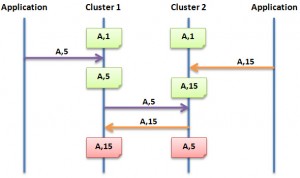
    Detecting conflicts

    Part of the latest MySQL Cluster Development Milestone Release (MySQL Cluster 7.2.1 – select the “Development Release” tab at http://dev.mysql.com/downloads/cluster/#downloads) is a couple of enhancements to the conflict detection and resolution mechanism for active-active (multi-master) replication. While MySQL Cluster has had conflict detection for years it has now been made much more complete and a lot easier to use:

    • No changes needed to the application schema
    • Entire conflicting transaction is rolled back together with any dependent transactions

    The focus of this post will be to step through how to use this feature – while it will also attempt to explain how it works at a high level, you should refer to the following posts for the design details and philosophy: Eventual consistency with MySQL & Eventual Consistency – detecting conflicts.

    What is a conflict?

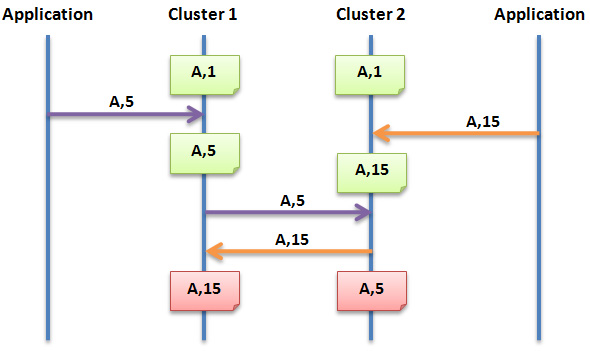
    MySQL Cluster allows bi-directional replication between two (or more) clusters. Replication within each cluster is synchronous but between clusters it is asynchronous which means the following scenario is possible:

    Conflict with asynchronous replication
    Site A Replication Site B
    x == 10 x == 10
    x = 11 x = 20
    – x=11 –> x == 11
    x==20 <– x=20 –


    In this example a value (column for a row in a table) is set to 11 on site A and the change is queued for replication to site B. In the mean time, an application sets the value to 20 on site B and that change is queued for replication to site A. Once both sites have received and applied the replicated change from the other cluster site A contains the value 20 while site B contains 11 – in other words the databases are now inconsistent.

    How MySQL Cluster 7.2 implements eventual consistency

    There are two phases to establishing consistency between both clusters after an inconsistency has been introduced:

    1. Detect that a conflict has happened
    2. Resolve the inconsistency

    Detecting the conflict

    The following animation illustrates how MySQL Cluster 7.2 detects that an inconsistency has been introduced by the asynchronous, active-active replication:

    Detecting conflicts

    While we typically consider the 2 clusters in an active-active replication configuration to be peers, in this case we designate one to be the primary and the other the secondary. Reads and writes can still be sent to either cluster but it is the responsibility of the primary to identify that a conflict has arisen and then remove the inconsistency.

    A logical clock is used to identify (in relative terms) when a change is made on the primary – for those who know something of the MySQL Cluster internals, we use the index of the Global Checkpoint that the update is contained in. For all tables that have this feature turned on, an extra, hidden column is automatically added on the primary – this represents the value of the logical clock when the change was made.

    Once the change has been applied on the primary, there is a “window of conflict” for the effected row(s) during which if a different change is made to the same row(s) on the secondary then there will be an inconsistency. Once the slave on the secondary has applied the change from the primary, it will send a replication event back to the slave on the primary, containing the primary’s clock value associated with the changes that have just been applied on the secondary. (Remember that the clock is actually the Global Checkpoint Index and so this feature is sometimes referred to as Reflected GCI). Once the slave on the primary has received this event, it knows that all changes tagged with a clock value no later than the reflected GCI are now safe – the window of conflict has closed.

    If an application modifies this same row on the secondary before the replication event from the primary was applied then it will send an associated replication event to the slave on the primary before it reflects the new GCI. The slave on the primary will process this replication event and compare the clock value recorded with the effected rows with the latest reflected GCI; as the clock value for the conflicting row is higher the primary recognises that a conflict has occured and will launch the algorithm to resolve the inconsistency.

    Resolving the inconsistency

    In earlier releases of MySQL Cluster (or if choosing to use the original algorithm in MySQL Cluster 7.2) you had a choice of simply flagging the primary key of the conflicting rows or backing out one of the changes to the conflicting rows. Using the new NDB$EPOCH_TRANS function, the primary will overwrite the data in the secondary for the effected row(s) and any other rows that were updated in the same transaction (even if they are in tables for which conflict detection has not been enabled).

    In fact the algorithm goes a step further and if there were subsequent transactions on the secondary that wrote to the conflicting rows then all of the changes from those dependent transactions on the secondary will be backed-out as well.

    Worked example

    In this section, we step through how to setup the active-active replication, with the new conflict detection/resolution feature enabled and then test it out by manually introducing some conflicting transations.

    Set-up MySQL Clusters and basic active-acative replication

    Hosts used for active-active replication tests

    Hosts used for replication

    To keep things simple, just two hosts are used; “black” will contain all nodes for the primary cluster and “blue” will contain all nodes for the secondary. As an extra simplification a single MySQL Server in each cluster will act as both the master and the slave.

    This post will quickly show the configuration files and steps to get the 2 clusters up and running but for a better understanding of these steps you can refer to Deploying MySQL Cluster over multiple hosts.

    config.ini (black):

    [ndb_mgmd]
    hostname=localhost
    datadir=/home/billy/my_cluster/data
    nodeid=1
    
    [ndbd default]
    noofreplicas=2
    datadir=/home/billy/my_cluster/data
    
    [ndbd]
    hostname=localhost
    nodeid=3
    
    [ndbd]
    hostname=localhost
    nodeid=4
    
    [mysqld]
    nodeid=50

    config.ini (blue):

    [ndb_mgmd]
    hostname=localhost
    datadir=/home/billy/my_cluster/data
    nodeid=1
    
    [ndbd default]
    noofreplicas=2
    datadir=/home/billy/my_cluster/data
    
    [ndbd]
    hostname=localhost
    nodeid=3
    
    [ndbd]
    hostname=localhost
    nodeid=4
    
    [mysqld]
    nodeid=50

    my.cnf for primary cluster (black):

    [mysqld]
    ndbcluster
    datadir=/home/billy/my_cluster/data
    server-id=8
    log-bin=black-bin.log 
    ndb-log-transaction-id=1
    binlog-format=ROW
    ndb-log-update-as-write=0

    my.cnf for secondary cluster (blue):

    [mysqld]
    ndbcluster
    datadir=/home/billy/my_cluster/data
    server-id=9
    log-bin=blue-bin.log
    ndb-log-transaction-id=1
    binlog-format=ROW
    ndb-log-update-as-write=0
    ndb-log-apply-status=1

    Note that the options set in the my.cnf file are very important – if any of these are missing then things will not work as expected.

    Start up primary cluster (black):

    billy@black:~/my_cluster$ ndb_mgmd --initial
       -f conf/config.ini --configdir=/home/billy/my_cluster/conf/
    billy@black:~/my_cluster$ ndbd --initial
    billy@black:~/my_cluster$ ndbd --initial
    billy@black:~/my_cluster$ ndb_mgm -e show # wait for ndbds to finish starting
    Connected to Management Server at: localhost:1186
    Cluster Configuration
    ---------------------
    [ndbd(NDB)]     2 node(s)
    id=3    @127.0.0.1  (mysql-5.5.15 ndb-7.2.1, Nodegroup: 0, Master)
    id=4    @127.0.0.1  (mysql-5.5.15 ndb-7.2.1, Nodegroup: 0)
    
    [ndb_mgmd(MGM)] 1 node(s)
    id=1    @127.0.0.1  (mysql-5.5.15 ndb-7.2.1)
    
    [mysqld(API)]   3 node(s)
    id=50 (not connected, accepting connect from any host)
    
    billy@black:~/my_cluster$ mysqld --defaults-file=conf/my.cnf &

    Start up secondary cluster (blue):

    billy@blue:~/my_cluster$ ndb_mgmd --initial
       -f conf/config.ini --configdir=/home/billy/my_cluster/conf/
    billy@blue:~/my_cluster$ ndbd --initial
    billy@blue:~/my_cluster$ ndbd --initial
    billy@blue:~/my_cluster$ ndb_mgm -e show # wait for ndbds to finish starting
    Connected to Management Server at: localhost:1186
    Cluster Configuration
    ---------------------
    [ndbd(NDB)]     2 node(s)
    id=3    @127.0.0.1  (mysql-5.5.15 ndb-7.2.1, Nodegroup: 0, Master)
    id=4    @127.0.0.1  (mysql-5.5.15 ndb-7.2.1, Nodegroup: 0)
    
    [ndb_mgmd(MGM)] 1 node(s)
    id=1    @127.0.0.1  (mysql-5.5.15 ndb-7.2.1)
    
    [mysqld(API)]   3 node(s)
    id=50 (not connected, accepting connect from any host)
    
    billy@blue:~/my_cluster$ mysqld --defaults-file=conf/my.cnf &

    Both clusters are now running and replication can be activated for both sites:

    billy@black:~/my_cluster$ mysql -u root --prompt="black-mysql> "
    black-mysql> CREATE USER repl_user@192.168.1.16;
    black-mysql> GRANT REPLICATION SLAVE ON *.* TO repl_user@192.168.1.16
                     IDENTIFIED BY 'billy';
    billy@blue:~/my_cluster$ mysql -u root --prompt="blue-mysql> "
    blue-mysql> CREATE USER repl_user@192.168.1.20;
    blue-mysql> GRANT REPLICATION SLAVE ON *.* TO repl_user@192.168.1.20
                     IDENTIFIED BY 'billy';
    blue-mysql> CHANGE MASTER TO MASTER_HOST='192.168.1.20',
        -> MASTER_USER='repl_user',
        -> MASTER_PASSWORD='billy',
        -> MASTER_LOG_FILE='',
        -> MASTER_LOG_POS=4;
    blue-mysql> START SLAVE;
    black-mysql> CHANGE MASTER TO MASTER_HOST='192.168.1.16',
        -> MASTER_USER='repl_user',
        -> MASTER_PASSWORD='billy',
        -> MASTER_LOG_FILE='',
        -> MASTER_LOG_POS=4;
    black-mysql> START SLAVE;

    Set up enhanced conflict detection & resolution

    The first step is to identify the tables that need conflict detection enabling. Each of those tables then has to have an entry in the mysql.ndb_replication table where they’re tagged as using the new NDB$EPOCH_TRANS() function – you could also choose to use NDB$EPOCH(), in which case only the changes to conflicting rows will be backed-out rather than the full transactions. A few things to note:

    • This must be done before creating the application tables themselves
    • Should only be done on the primary
    • By default the table doesn’t exist and so the very first step is to create it
    black-mysql> CREATE TABLE mysql.ndb_replication  (
        ->     db VARBINARY(63),
        ->     table_name VARBINARY(63),
        ->     server_id INT UNSIGNED,
        ->     binlog_type INT UNSIGNED,
        ->     conflict_fn VARBINARY(128),
        ->     PRIMARY KEY USING HASH (db, table_name, server_id)
        -> )   ENGINE=NDB
        -> PARTITION BY KEY(db,table_name);
    black-mysql> INSERT INTO mysql.ndb_replication VALUES ('clusterdb', 'simple1', 8, 0,
    'NDB$EPOCH_TRANS()');
    black-mysql> INSERT INTO mysql.ndb_replication VALUES ('clusterdb', 'simple2', 8, 0,
    'NDB$EPOCH_TRANS()');
    black-mysql> INSERT INTO mysql.ndb_replication VALUES ('clusterdb', 'simple3', 8, 0,
    'NDB$EPOCH_TRANS()');

    For each of these tables you should also create an exceptions table which will record any conflicts that have resulted in changes being rolled back; the format of these tables is rigidly defined and so take care to copy the types exactly; again this only needs doing on the primary:

    black-mysql> CREATE DATABASE clusterdb;USE clusterdb;
    black-mysql> CREATE TABLE simple1$EX (server_id INT UNSIGNED,
                   master_server_id INT UNSIGNED, master_epoch BIGINT UNSIGNED,
                   count INT UNSIGNED, id INT NOT NULL, PRIMARY KEY(server_id,
                   master_server_id, master_epoch, count)) ENGINE=NDB;
    black-mysql> CREATE TABLE simple2$EX (server_id INT UNSIGNED,
                   master_server_id INT UNSIGNED, master_epoch BIGINT UNSIGNED,
                   count INT UNSIGNED, id INT NOT NULL, PRIMARY KEY(server_id,
                   master_server_id, master_epoch, count)) ENGINE=NDB;
    black-mysql> CREATE TABLE simple3$EX (server_id INT UNSIGNED,
                   master_server_id INT UNSIGNED, master_epoch BIGINT UNSIGNED,
                   count INT UNSIGNED, id INT NOT NULL, PRIMARY KEY(server_id,
                   master_server_id, master_epoch, count)) ENGINE=NDB;

    Finally, the application tables themselves can be created (this only needs doing on the primary as they’ll be replicated to the secondary):

    black-mysql> CREATE TABLE simple1 (id INT NOT NULL PRIMARY KEY, value INT) ENGINE=ndb;
    black-mysql> CREATE TABLE simple2 (id INT NOT NULL PRIMARY KEY, value INT) ENGINE=ndb;
    black-mysql> CREATE TABLE simple3 (id INT NOT NULL PRIMARY KEY, value INT) ENGINE=ndb;

    Everything is now set up and the new configuration can be tested to ensure that conflicts are detected and the correct updates are rolled back.

    Testing enhanced active-active replication and conflict detection

    The first step is to add some data to our new tables (note that at this point replication is running and so they only need to be created on the primary) and then update 1 row to make sure that it is replicated to the secondary:

    black-mysql> INSERT INTO simple1 VALUES (1,10);
    black-mysql> INSERT INTO simple2 VALUES (1,10);
    black-mysql> INSERT INTO simple3 VALUES (1,10);
    black-mysql> UPDATE simple1 SET value=12 WHERE id=1;
    blue-mysql> USE clusterdb;
    blue-mysql> SELECT * FROM simple1;
    +----+-------+
    | id | value |
    +----+-------+
    |  1 |    12 |
    +----+-------+

    It is important that the NDB$EPOCH_TRANS() function rolls back any transactions on the secondary that involve a conflict (as well as subsequent, dependent transactions that modify the same rows); to do this manually the simplest approach is to stop the slave IO thread on the secondary thread in order to increase the size of the window of conflict (which is otherwise very short). Once the slave IO thread has been stopped a change is made to table simple1 on the primary and then the secondary makes a (conflicting) change to the same row as well as making a change to table simple2 in the same transaction. A second transaction on the primary will change a row in simple3 – as it doesn’t touch any rows that have been involved in a conflict then that change should stand.

    blue-mysql> STOP SLAVE IO_THREAD;
    black-mysql> UPDATE simple1 SET value=13 WHERE id=1;
    blue-mysql> BEGIN; # conflicting transaction
    blue-mysql> UPDATE simple1 SET value=20 WHERE id=1;
    blue-mysql> UPDATE simple2 SET value=20 WHERE id=1;
    blue-mysql> COMMIT;
    blue-mysql> UPDATE simple3 SET value=20 WHERE id=1; # non conflicting
    blue-mysql> SELECT * FROM simple1;
    +----+-------+
    | id | value |
    +----+-------+
    |  1 |    20 |
    +----+-------+
    blue-mysql> SELECT * FROM simple2;
    +----+-------+
    | id | value |
    +----+-------+
    |  1 |    20 |
    +----+-------+
    blue-mysql> SELECT * FROM simple3;
    +----+-------+
    | id | value |
    +----+-------+
    |  1 |    20 |
    +----+-------+

    If you now check the exception tables then you can see that the primary (black) has received the changes from the secondary (blue) and because the first transaction updated the same row in simple1 during its window of conflict it has recorded that the change needs to be rolled back – this will happen as soon as the replication thread is restarted on the secondary:

    black-mysql> SELECT * FROM simple1$EX;
    +-----------+------------------+---------------+-------+----+
    | server_id | master_server_id | master_epoch  | count | id |
    +-----------+------------------+---------------+-------+----+
    |         8 |                9 | 1494648619009 |     3 |  1 |
    +-----------+------------------+---------------+-------+----+
    
    black-mysql> SELECT * FROM simple2$EX;
    +-----------+------------------+---------------+-------+----+
    | server_id | master_server_id | master_epoch  | count | id |
    +-----------+------------------+---------------+-------+----+
    |         8 |                9 | 1494648619009 |     1 |  1 |
    +-----------+------------------+---------------+-------+----+
    
    black-mysql> SELECT * FROM simple3$EX;
    Empty set (0.05 sec)
    blue-mysql> START SLAVE IO_THREAD;
    blue-mysql> SELECT * FROM simple1;
    +----+-------+
    | id | value |
    +----+-------+
    |  1 |    13 |
    +----+-------+
    
    blue-mysql> SELECT * FROM simple2;
    +----+-------+
    | id | value |
    +----+-------+
    |  1 |    10 |
    +----+-------+
    
    blue-mysql> SELECT * FROM simple3;
    +----+-------+
    | id | value |
    +----+-------+
    |  1 |    20 |
    +----+-------+

    These are the results we expect – simple1 has the value set by the primary with the subsequent change on the secondary rolled back; simple2 was not updated by the primary but the change on the secondary was rolled back as it was made in the same transaction as the conflicting update to simple1. The change on the secondary to simple3 has survived as it was made outside of any conflicting transaction and the change was not dependent on any conflicting changes. Finally just confirm that the data is identical on the primary:

    black-mysql> SELECT * FROM simple1;
    +----+-------+
    | id | value |
    +----+-------+
    |  1 |    13 |
    +----+-------+
    
    black-mysql> SELECT * FROM simple2;
    +----+-------+
    | id | value |
    +----+-------+
    |  1 |    10 |
    +----+-------+
    
    black-mysql> SELECT * FROM simple3;
    +----+-------+
    | id | value |
    +----+-------+
    |  1 |    20 |
    +----+-------+

    Statistics are provided on the primary that record that 1 conflict has been detected, effecting 1 transaction and that it resulted in 2 row changes being rolled back:

    black-mysql> SHOW STATUS LIKE 'ndb_conflict%';
    +------------------------------------------+-------+
    | Variable_name                            | Value |
    +------------------------------------------+-------+
    | Ndb_conflict_fn_max                      | 0     |
    | Ndb_conflict_fn_old                      | 0     |
    | Ndb_conflict_fn_max_del_win              | 0     |
    | Ndb_conflict_fn_epoch                    | 0     |
    | Ndb_conflict_fn_epoch_trans              | 1     |
    | Ndb_conflict_trans_row_conflict_count    | 1     |
    | Ndb_conflict_trans_row_reject_count      | 2     |
    | Ndb_conflict_trans_reject_count          | 1     |
    | Ndb_conflict_trans_detect_iter_count     | 1     |
    | Ndb_conflict_trans_conflict_commit_count | 1     |
    +------------------------------------------+-------+

    We’re anxious to get feedback on this feature and so please go ahead and download MySQL Cluster 7.2.1 and let us know how you get on through the comments for this post.

  • MySQL Cluster material from Oracle Open World 2011

    Posted on October 10th, 2011 andrew No comments

    For those people that weren’t able to attend the MySQL Cluster demo or sessions at this year’s Oracle Open World (or even for those that did) and would like copies of the material, links are provided here.

  • My sessions at Oracle OpenWorld 2011

    Posted on September 5th, 2011 andrew 1 comment

    Slight adjustment to some of the times + added the MySQL community reception (read  vodka!). Oracle OpenWorld (San Francisco) starts on Sunday 2nd October (including some MySQL community sessions) through Thursday 6th October. MySQL has a lot of sessions this year as well as 3 demo booths.

    This year I’m going to be involved in 3 public sessions – if you’re attending, please come along and say hello!

    • Getting the Most Out of MySQL on Windows – 13:15 on Tuesday (Marriott Marquis – Golden Gate C2)
    • Building Highly Available and Scalable Real-Time Services with MySQL Cluster – 10:15 on Wednesday (Marriott Marquis – Golden Gate C1)
    • NoSQL Access to MySQL: The Best of Both Worlds – 11:45 on Wednesday (Marriott Marquis – Golden Gate C1)
    • MySQL Community Reception – 19:00 on Wednesday (San Francisco Marriott Marquis – Foothill G)
    In addition I’ll be spending as much time as I can at the MySQL demo booths in the exhibition hall. Come and visit us for demos of MySQL Cluster, MySQL Enterprise Edition and MySQL WorkBench.
  • MySQL Cluster 7.1.15 released

    Posted on July 19th, 2011 andrew 9 comments


    The binary version for MySQL Cluster 7.1.15 has now been made available at http://www.mysql.com/downloads/cluster/

    A description of all of the changes (fixes) that have gone into MySQL Cluster 7.1.15 (compared to 7.1.13) can be found in the official MySQL Cluster documentation for Cluster 7.1.14 & 7.1.15.

  • MySQL Cluster 7.1.13 Released

    Posted on May 23rd, 2011 andrew No comments


    The binary version for MySQL Cluster 7.1.13 has now been made available at http://www.mysql.com/downloads/cluster/

    A description of all of the changes (fixes) that have gone into MySQL Cluster 7.1.13 (compared to 7.1.10) can be found in the official MySQL Cluster documentation for Cluster 7.1.13, 7.1.12 & 7.1.11.

  • Almost here – MySQL Cluster at Collaborate 11

    Posted on April 8th, 2011 andrew No comments


    A quick reminder that MySQL is well represented at the Oracle Collaborate conference which starts in Orlando on Sunday.

    For those not familiar with Collaborate, it’s the big community conference for Oracle users – this year it’s in Orlando from April 10th through 14th (I’ve just re-checked the weather forecast, 31 Celsius vs. -18 at the last conference I presented at – OOW Beijing in December – what a difference 4 months and 8,000 miles make!).

    I’ll be presenting on MySQL Cluster in a session called “Building Highly Available Scalable Real-Time Services with MySQL Cluster” where I’ll focus on:

    • Basics of MySQL Cluster – what it does, who uses it and why
    • Accessing your data – SQL and NoSQL access methods
    • Latest features
    • What’s coming in the future.

    My session starts at 8:00 am on Tuesday 12th April (sorry for the early start) and is in room 306A.

    For people interested in MySQL Cluster, another session you should try to attend is “MySQL Cluster for the Enterprise” presented by Craig Russell at 2:15 pm on Wednesday 13th April.

    Other MySQL HA topics from the Oracle team:

    To get an overall picture of what is happening to MySQL in Oracle, you should attend Tomas Ulin’s (VP of MySQL Engineering) “The State of MySQL” session at 9:15 am on Monday 11th April.

    You can see a full list of sessions in the MySQL track here.

    And last but not least, come and visit us at the MySQL booths in the Oracle Demo Grounds (Booth #657) to chat with us and/or get a demo. Here are the opening times:

    • Monday 6:00pm – 8:00pm (Welcome Reception)
    • Tuesday 10:15am – 4:00pm & 5:30pm-7:00pm (Reception)
    • Wednesday 10:15am – 4:00pm

    I’ll be at the demo booth as much as possible but definitely for the 6:00pm – 8:00pm slot on Monday and from 10:15am – 1pm on Wednesday – hope to see some of you there.

    Register for the event at http://collaborate11.ioug.org/Home/Registration/tabid/82/Default.aspx

  • High Availability Solutions – part for the MySQL On Windows Forum

    Posted on March 23rd, 2011 andrew 2 comments

    STOP PRESS: the recording of this forum is now available for replay.

    On March 16th, we’re holding an on-line forum to discuss MySQL on Windows – I’ll be handling the High Availability session (includes MySQL replication and MySQL Cluster). The event runs from 9 am Pacific Time until 12:00 pm; the HA session is schedules for 11:00 Pacific and runs for half an hour. I’ll also be answering questions on-line during the forum. As always the even is free but you need to register here.

    Here is the official description…

    Join our Online Forum and discover how you can win with MySQL on Windows. Oracle’s MySQL Vice President of Engineering Tomas Ulin will kick off a comprehensive agenda of presentations enabling you to better understand:

    • Why the world’s most popular open source database is extremely popular on Windows, both for enterprise users and ISVs
    • How MySQL fits into the Windows environment, and what are the upcoming milestones to make MySQL even better on the Microsoft platform
    • What are the visual tools at your disposal to effectively develop, deploy and manage MySQL applications on Windows
    • How you can deliver highly available business critical Windows based MySQL applications
    • Why Security Solutions Provider SonicWall selected MySQL over Microsoft SQL Server, and how they successfully deliver MySQL based solutions

    Additionally, Oracle experts will be on live chat throughout the event to answer your toughest questions.

    MySQL on Windows: It Just Keeps Getting Better!

    Oracle’s MySQL Vice President of Engineering Tomas Ulin will kick off the Online Forum and review why MySQL has become highly popular on Windows for both enterprise users and ISVs, as well as Oracle’s MySQL on Windows Strategy. Senior Product Manager Rob Young will then help you understand how MySQL fits into your familiar Windows environment, covering MySQL Connectors, integration with Visual Studio, security aspects…and more. They will also review the improvements Oracle recently delivered as well as the upcoming milestones to make MySQL even better on Windows.

    From Modeling to Performance Tuning: MySQL Visual Tools for Developers & DBAs

    Are you wondering what visual tools are at your disposal to effectively develop, deploy and manage MySQL applications on Windows? Mike Zinner and Rob Young will show you how you can benefit from the following tools:

    • MySQL Workbench, which provides visual data modeling, SQL development, and comprehensive administration tools for MySQL server configuration, user administration, and much more.
    • The MySQL Enterprise Monitor, a “Virtual DBA assistant” that helps MySQL DBAs manage more MySQL databases as well as find and fix problems before they become serious problems or costly outages.
    • The MySQL Query Analyzer, which helps improve your C# and .Net application performance by monitoring query performance and accurately pinpointing SQL code that is causing a slow down.
    • MySQL Enterprise Backup, to perform online hot MySQL backups.

    Implementing MySQL High Availability Solutions on Windows

    Databases play a key role in ensuring application availability, and MySQL offers a range of HA solutions on Windows. Senior Product Manager Andrew Morgan will in this session explore two of them:

    • MySQL Replication, which has been widely deployed by some of the leading web properties and in the enterprise to deliver highly available database services, providing a means of mirroring data across multiple hosts to withstand failures of individual systems.
    • MySQL Cluster combining 99.999% availability with the low TCO of an open source solution. With a distributed shared-nothing architecture and no single point of failure, MySQL Cluster can scale linearly to meet the unprecedented demands of the next generation web services & telecom applications.

    Customer Story: SonicWall

    SonicWALL provides network security and data protection solutions enabling to secure, control and scale global networks. Director of Product Management Jan Sijp will share with you how they have successfully delivered MySQL based solutions on both Windows & Linux, providing information about the challenges they were facing, why they selected MySQL over Microsoft SQL Server, and the implementation process.

  • MySQL Cluster 7.1.9 binaries released

    Posted on November 17th, 2010 andrew No comments

    The binary version for MySQL Cluster 7.1.9 has now been made available at http://www.mysql.com/downloads/cluster/

    A description of all of the changes (fixes) that have gone into MySQL Cluster 7.1.9 (compared to 7.1.8) can be found in the official MySQL Cluster documentation. In addition, there is a great BLOG posting from Johan Anderson explaining how to use the new table added to ndbinfo to tune DiskPageBufferMemory when storing tables on disk.