-
MySQL Cluster Connector for Java – replay available for part 1 of the webinar
Posted on February 19th, 2010 No commentsThe replay of the two webinars can now be accesed from mysql.com
Remember that the second part of the webinar will be on March 3rd (details below).
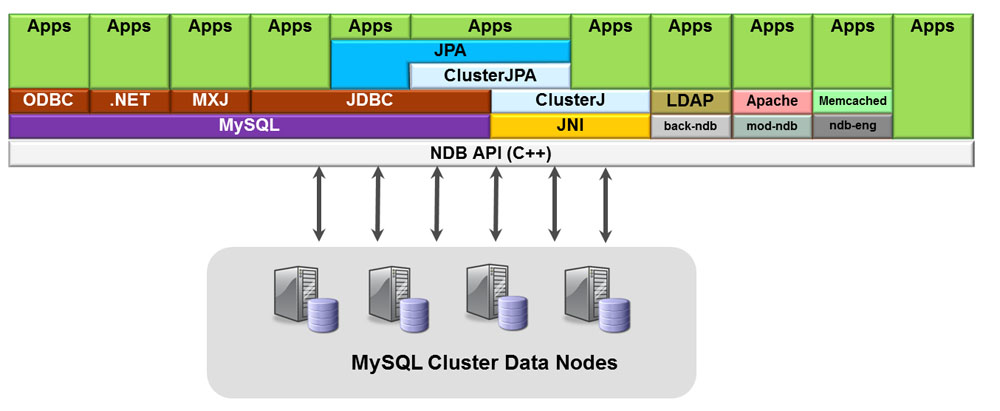
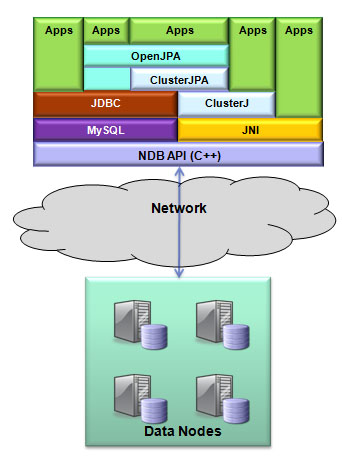
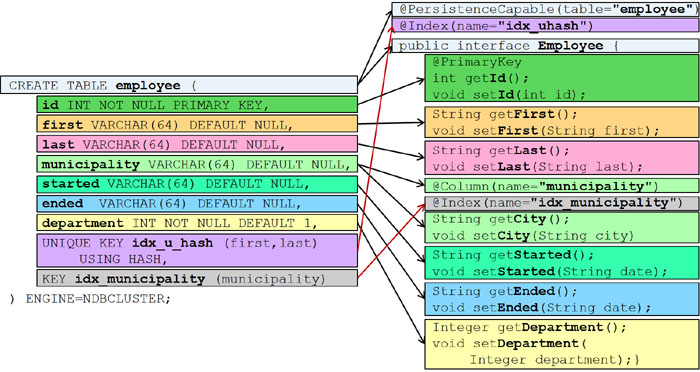
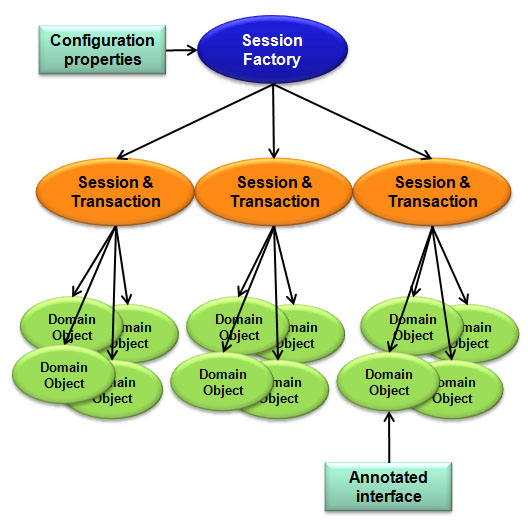
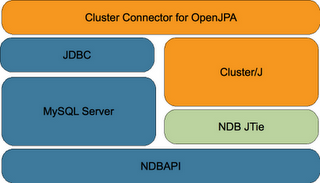
MySQL have been working on a new way of accessing MySQL Cluster using Java. Designed for Java developers, the MySQL Cluster Connector for Java implements an easy-to-use and high performance native Java interface and OpenJPA plug-in that maps Java classes to tables stored in the high availability, real-time MySQL Cluster database.
There is a series of 2 webinars coming up, as always these are free to attend – you just need to register in advance:
Part 1: Tuesday, February 16, 2010: 10:00 Pacific time
- an overview of the MySQL Cluster Connector for Java
- what these technologies bring to Java developers
- implementation details of the MySQL Cluster Java API and Plug-In for OpenJPA
- configuring the connection to MySQL Cluster
- creating the Java Domain Object Model for your tables
- managing insert, update, and delete operations
- querying the database
- how to get started developing new Java applications using these interfaces
Accessfrom mysql.com
an overview of the MySQL Cluster Connector for Javawhat these technologies bring to Java developersimplementation details of the MySQL Cluster Java API and Plug-In for OpenJPAconfiguring the connection to MySQL Clustercreating the Java Domain Object Model for your tablesmanaging insert, update, and delete operationsquerying the databasehow to get started developing new Java applications using these interfacesPart 2: Wednesday, March 03, 2010: 10:00 Pacific time
- how MySQL Cluster Connector for Java coexists with existing OpenJPA / TopLink / JDBC-based apps
- how to evaluate the MySQL Cluster Connector for Java alternatives
- performance comparisons with both existing Java access and with native NDB API access to MySQL Cluster
- what the future holds for this technology
Wed, Mar 03: 08:00 Hawaii time
Wed, Mar 03: 11:00 Mountain time (America)
Wed, Mar 03: 12:00 Central time (America)
Wed, Mar 03: 13:00 Eastern time (America)
Wed, Mar 03: 18:00 UTC
Wed, Mar 03: 18:00 Western European time
Wed, Mar 03: 19:00 Central European time
Wed, Mar 03: 20:00 Eastern European timeThis functionality isn’t GA but it is available for you to try and we’d love to get feedback (which you can provide through the MySQL Cluster forum or by emailing cluster@lists.mysql.com
If you want to see for yourself then take a look at the Blog entry from Bernhard Ocklin – the engineering manager responsible for this work.
-
New white paper: Guide to Optimizing Performance of the MySQL Cluster Database
Posted on December 7th, 2009 2 commentsThis guide explores how to tune and optimize the MySQL Cluster database to handle diverse workload requirements. It discusses data access patterns and how to build distribution awareness into applications, before exploring schema and query optimization, tuning of parameters and how to get the best out of the latest innovations in hardware design.
The Guide concludes with recent performance benchmarks conducted with the MySQL Cluster database, an overview of how MySQL Cluster can be integrated with other MySQL storage engines, before summarizing additional resources that will enable you to optimize MySQL Cluster performance with your applications.
Download the white paper (as always, for free) from: http://www.mysql.com/why-mysql/white-papers/mysql_wp_cluster_perfomance.php
-
Using NDB API Events to mask/hide colum data when replicating
Posted on August 13th, 2009 No commentsIf you have asynchronous replication where the slave database is using MySQL Cluster then you can use the NDB API events functionality to mask/overwrite data. You might do this for example if the replica is to be used for generating reports where some of the data is sensitive and not relevant to those reports. Unlike stored procedures, NDB API events will be triggered on the slave.
The first step is to set up replication (master->slave rather than multi-master) as described in Setting up MySQL Asynchronous Replication for High Availability).
In this example, the following table definition is used:
mysql> use clusterdb; mysql> create table ASSETS (CODE int not null primary key, VALUE int) engine=ndb;
The following code should be compiled and then executed on a node within the slave Cluster:
#include <NdbApi.hpp> #include <stdio.h> #include <iostream> #include <unistd.h> #include <cstdlib> #include <string.h> #define APIERROR(error) \ { std::cout << "Error in " << __FILE__ << ", line:" << __LINE__ << ", code:" \ << error.code << ", msg: " << error.message << "." << std::endl; \ exit(-1); } int myCreateEvent(Ndb* myNdb, const char *eventName, const char *eventTableName, const char **eventColumnName, const int noEventColumnName); static void do_blank(Ndb*, int); int main(int argc, char** argv) { if (argc < 1) { std::cout << "Arguments are <connect_string cluster>.\n"; exit(-1); } const char *connectstring = argv[1]; ndb_init(); Ndb_cluster_connection *cluster_connection= new Ndb_cluster_connection(connectstring); // Object representing the cluster int r= cluster_connection->connect(5 /* retries */, 3 /* delay between retries */, 1 /* verbose */); if (r > 0) { std::cout << "Cluster connect failed, possibly resolved with more retries.\n"; exit(-1); } else if (r < 0) { std::cout << "Cluster connect failed.\n"; exit(-1); } if (cluster_connection->wait_until_ready(30,30)) { std::cout << "Cluster was not ready within 30 secs." << std::endl; exit(-1); } Ndb* myNdb= new Ndb(cluster_connection, "clusterdb"); // Object representing the database if (myNdb->init() == -1) APIERROR(myNdb->getNdbError()); const char *eventName= "CHNG_IN_ASSETS"; const char *eventTableName= "ASSETS"; const int noEventColumnName= 2; const char *eventColumnName[noEventColumnName]= {"CODE", "VALUE"}; // Create events myCreateEvent(myNdb, eventName, eventTableName, eventColumnName, noEventColumnName); // Normal values and blobs are unfortunately handled differently.. typedef union { NdbRecAttr* ra; NdbBlob* bh; } RA_BH; int i; // Start "transaction" for handling events NdbEventOperation* op; printf("create EventOperation\n"); if ((op = myNdb->createEventOperation(eventName)) == NULL) APIERROR(myNdb->getNdbError()); printf("get values\n"); RA_BH recAttr[noEventColumnName]; RA_BH recAttrPre[noEventColumnName]; for (i = 0; i < noEventColumnName; i++) { recAttr[i].ra = op->getValue(eventColumnName[i]); recAttrPre[i].ra = op->getPreValue(eventColumnName[i]); } // set up the callbacks // This starts changes to "start flowing" if (op->execute()) APIERROR(op->getNdbError()); while (true) { int r = myNdb->pollEvents(1000); // wait for event or 1000 ms if (r > 0) { while ((op= myNdb->nextEvent())) { NdbRecAttr* ra = recAttr[0].ra; if (ra->isNULL() >= 0) { // we have a value if (ra->isNULL() == 0) { // we have a non-null value printf("CODE: %d ", ra->u_32_value()); do_blank(myNdb, ra->u_32_value()); } else printf("%-5s", "NULL"); } else printf("%-5s", "-"); // no value ra = recAttr[1].ra; printf("\n"); } } } } int myCreateEvent(Ndb* myNdb, const char *eventName, const char *eventTableName, const char **eventColumnNames, const int noEventColumnNames) { NdbDictionary::Dictionary *myDict= myNdb->getDictionary(); if (!myDict) APIERROR(myNdb->getNdbError()); const NdbDictionary::Table *table= myDict->getTable(eventTableName); if (!table) APIERROR(myDict->getNdbError()); NdbDictionary::Event myEvent(eventName, *table); myEvent.addTableEvent(NdbDictionary::Event::TE_INSERT); myEvent.addEventColumns(noEventColumnNames, eventColumnNames); // Add event to database if (myDict->createEvent(myEvent) == 0) myEvent.print(); else if (myDict->getNdbError().classification == NdbError::SchemaObjectExists) { printf("Event creation failed, event exists\n"); printf("dropping Event...\n"); if (myDict->dropEvent(eventName)) APIERROR(myDict->getNdbError()); // try again // Add event to database if ( myDict->createEvent(myEvent)) APIERROR(myDict->getNdbError()); } else APIERROR(myDict->getNdbError()); return 0; } static void do_blank(Ndb* myNdb, int code) { const NdbDictionary::Dictionary* myDict= myNdb->getDictionary(); const NdbDictionary::Table *myTable= myDict->getTable("ASSETS"); if (myTable == NULL) APIERROR(myDict->getNdbError()); NdbTransaction *myTransaction= myNdb->startTransaction(); if (myTransaction == NULL) APIERROR(myNdb->getNdbError()); printf("Replacing VALUE with 0 for CODE: %d ", code); NdbOperation *myOperation= myTransaction->getNdbOperation(myTable); if (myOperation == NULL) APIERROR(myTransaction->getNdbError()); myOperation->updateTuple(); myOperation->equal("CODE", code); myOperation->setValue("VALUE", 0); if (myTransaction->execute( NdbTransaction::Commit ) == -1) APIERROR(myTransaction->getNdbError()); myNdb->closeTransaction(myTransaction); } shell> slave_filter 127.0.0.1:1186From the master Cluster, insert some values (note that the example can easily be extended to cover updates too):
mysql> insert into ASSETS values (101, 50),(102, 40), (103, 99);
and then check that on the slave the value has been set to 0 for each of the entries:
mysql> select * from ASSETS; +------+-------+ | CODE | VALUE | +------+-------+ | 100 | 0 | | 103 | 0 | | 101 | 0 | | 102 | 0 | +------+-------+
How this works…. The table data is replicated as normal and the real values are stored in the slave. The “slave_filter” process has registered against insert operations on this table and when it’s triggered it sets the VALUE field to 0. The event is processes asynchronously from the replication and so there will be some very narrow window during which the true values would be stored in the slave.
-
Doxygen output for MySQL Cluster NDB API & MGM API
Posted on July 20th, 2009 No comments
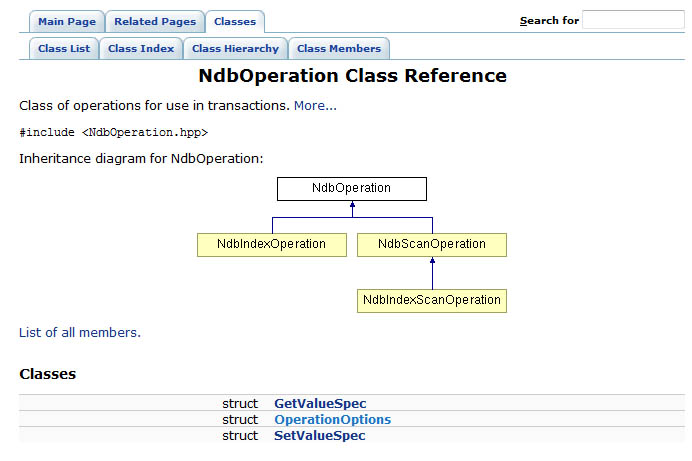
A new page has been added to this site: NDB API Docs which presents the information from the header files for both the NDB API and the NDB Management API.
The material has been generated using doxygen and will be refreshed shortly after any new major, minor or maintenance release is made generally available (starting from MySQL Cluster 7.0.6). -
Intelligent user-controlled partitioning and writing distribution-aware NDB API Applications
Posted on July 6th, 2009 2 commentsDefault partitioning
When adding rows to a table that’s using MySQL Cluster as the storage engine, each row is assigned to a partition where that partition is mastered by a particular data node in the Cluster. The best performance comes when all of the data required to satisfy a transaction is held within a single partition so that it can be satisfied within a single data node rather than being bounced back and forth between multiple nodes where extra latency will be introduced.
By default, Cluster partions the data by hashing the primary key. This is not always optimal.
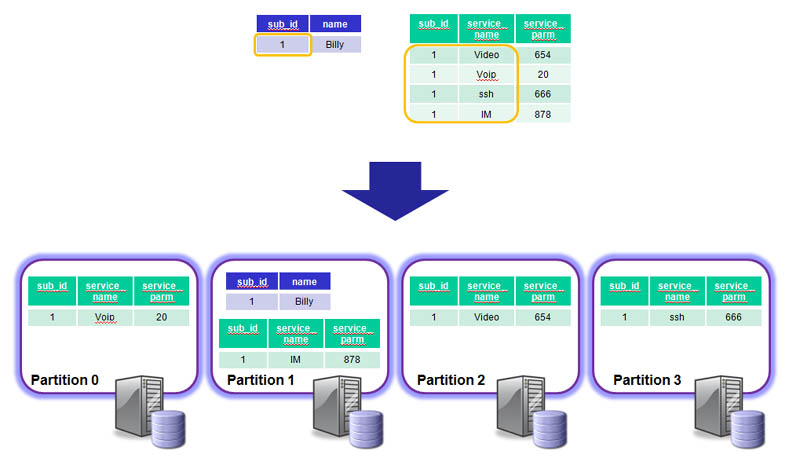
For example, if we have 2 tables, the first using a single-column primary key (sub_id) and the second using a composite key (sub_id, service_name)…
mysql> describe names; +--------+-------------+------+-----+---------+-------+ | Field | Type | Null | Key | Default | Extra | +--------+-------------+------+-----+---------+-------+ | sub_id | int(11) | NO | PRI | NULL | | | name | varchar(30) | YES | | NULL | | +--------+-------------+------+-----+---------+-------+ mysql> describe services; +--------------+-------------+------+-----+---------+-------+ | Field | Type | Null | Key | Default | Extra | +--------------+-------------+------+-----+---------+-------+ | sub_id | int(11) | NO | PRI | 0 | | | service_name | varchar(30) | NO | PRI | | | | service_parm | int(11) | YES | | NULL | | +--------------+-------------+------+-----+---------+-------+
If we then add data to these (initially empty) tables, we can then use the ‘explain’ command to see which partitions (and hence phyical hosts) are used to store the data for this single subscriber…
mysql> insert into names values (1,'Billy'); mysql> insert into services values (1,'VoIP',20),(1,'Video',654),(1,'IM',878),(1,'ssh',666); mysql> explain partitions select * from names where sub_id=1; +----+-------------+-------+------------+-------+---------------+---------+---------+-------+------+-------+ | id | select_type | table | partitions | type | possible_keys | key | key_len | ref | rows | Extra | +----+-------------+-------+------------+-------+---------------+---------+---------+-------+------+-------+ | 1 | SIMPLE | names | p3 | const | PRIMARY | PRIMARY | 4 | const | 1 | | +----+-------------+-------+------------+-------+---------------+---------+---------+-------+------+-------+ mysql> explain partitions select * from services where sub_id=1; +----+-------------+----------+-------------+------+---------------+---------+---------+-------+------+-------+ | id | select_type | table | partitions | type | possible_keys | key | key_len | ref | rows | Extra | +----+-------------+----------+-------------+------+---------------+---------+---------+-------+------+-------+ | 1 | SIMPLE | services | p0,p1,p2,p3 | ref | PRIMARY | PRIMARY | 4 | const | 10 | | +----+-------------+----------+-------------+------+---------------+---------+---------+-------+------+-------+
The service records for the same subscriber (sub_id = 1) are split accross 4 diffent partitions (p0, p1, p2 & p3). This means that the query results in messages being passed backwards and forwards between the 4 different data nodes which cnsumes extra CPU time and incurs extra latency.
User-defined partitioning to the rescue
We can override the default behaviour by telling Cluster which fields should be fed into the hash algorithm. For our example, it’s reasonable to expect a transaction to access multiple records for the same subscriber (identified by their sub_id) and so the application will perform best if all of the rows for that sub_id are held in the same partition…
mysql> drop table services; mysql> create table services (sub_id int, service_name varchar (30), service_parm int, primary key (sub_id, service_name)) engine = ndb -> partition by key (sub_id); mysql> insert into services values (1,'VoIP',20),(1,'Video',654),(1,'IM',878),(1,'ssh',666); mysql> explain partitions select * from services where sub_id=1; +----+-------------+----------+------------+------+---------------+---------+---------+-------+------+-------+ | id | select_type | table | partitions | type | possible_keys | key | key_len | ref | rows | Extra | +----+-------------+----------+------------+------+---------------+---------+---------+-------+------+-------+ | 1 | SIMPLE | services | p3 | ref | PRIMARY | PRIMARY | 4 | const | 10 | | +----+-------------+----------+------------+------+---------------+---------+---------+-------+------+-------+
Now all of the rows for sub_id=1 from the services table are now held within a single partition (p3) which is the same as that holding the row for the same sub_id in the names table. Note that it wasn’t necessary to drop, recreate and re-provision the services table, the following command would have had the same effect:
mysql> alter table services partition by key (sub_id);
Writing a distribution-aware application using the NDB API
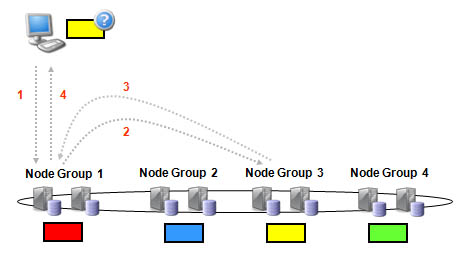
In our example, the data is nicely partitioned for optimum performance when accessing all of the subscriber’s data – a single data node holding all of their data. However, there is another step to take to get the best out of your NDB-API based application. By default, the NDB API will use the Transaction Coordinator (TC) on a ‘random’ data node to handle the transaction – we could get lucky and the guess is correct but it’s more likely that it will be sent to the wrong data node which with then have to proxy it to the correct data node. The probability of getting it right first time reduces as the number of node groups increases and so can prevent linear scaling.
It’s very simple to modify this behaviour so that the best data node/TC is hit first time, every time. When creating the transaction, the application can include parameters telling the NDB API one of the tables to be accessed and for what key(s). The NDB API will then use that information to identify the best TC to use…
const NdbDictionary::Dictionary* myDict= myNdb.getDictionary(); const NdbDictionary::Table *namesTable= myDict->getTable("names"); const NdbDictionary::Table *servicesTable= myDict->getTable("services"); NdbRecAttr *myRecAttr; Ndb::Key_part_ptr dist_key[2]; dist_key[0].ptr = (const void*) &sub_id; dist_key[0].len = sizeof(sub_id); dist_key[1].ptr = NULL; dist_key[1].len = NULL; if (namesTable == NULL) APIERROR(myDict->getNdbError()); if (servicesTable == NULL) APIERROR(myDict->getNdbError()); NdbTransaction *myTransaction= myNdb.startTransaction(namesTable, dist_key); if (myTransaction == NULL) APIERROR(myNdb.getNdbError()); NdbOperation *myOperation= myTransaction->getNdbOperation(namesTable); if (myOperation == NULL) APIERROR(myTransaction->getNdbError()); myOperation->readTuple(NdbOperation::LM_Read); myOperation->equal("sub_id",sub_id); myRecAttr= myOperation->getValue("name", NULL); if (myRecAttr == NULL) APIERROR(myTransaction->getNdbError()); // Perform operations on "services" table as well as part of another operation // if required; the subscriber's data will be in the same data node if (myTransaction->execute( NdbTransaction::Commit ) == -1) APIERROR(myTransaction->getNdbError()); printf(" %2d %s\n", sub_id, myRecAttr->aRef()); myNdb.closeTransaction(myTransaction);Note that as the services table has been configured to use the same field (sub_id) for partitioning as the names table, the startTransaction method only needs to know about the namesTable as the TC that the NDB API selects will serve just as well for this subscriber’s data from the services table. The rest of the code can be found in distaware.
-
Batching – improving MySQL Cluster performance when using the NDB API
Posted on June 29th, 2009 1 commentAs many people are aware, the best performance can be achieved from MySQL Cluster by using the native (C++) NDB API (rather than using SQL via a MySQL Server). What’s less well known is that you can improve the performance of your NDB-API enabled application even further by ‘batching’. This article attempts to explain why batching helps and how to do it.
What is batching and why does it help?
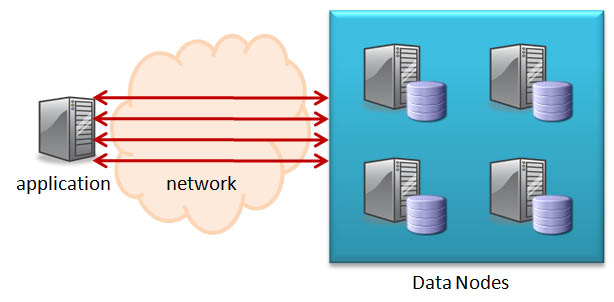
Batching involves sending multiple operations from the application to the Cluster in one group rather than individually; the Cluster then processes these operations and sends back the results. Without batching, each of these operations incurs the latency of crossing the network as well as consuming CPU time on both the application and data node hosts.
By batching together multiple operations, all of the requests can be sent in one message and all of the replies received in another – thus reducing the number of messages and hence the latency and CPU time consumed.
How to use batching with the MySQL Cluster NDB API
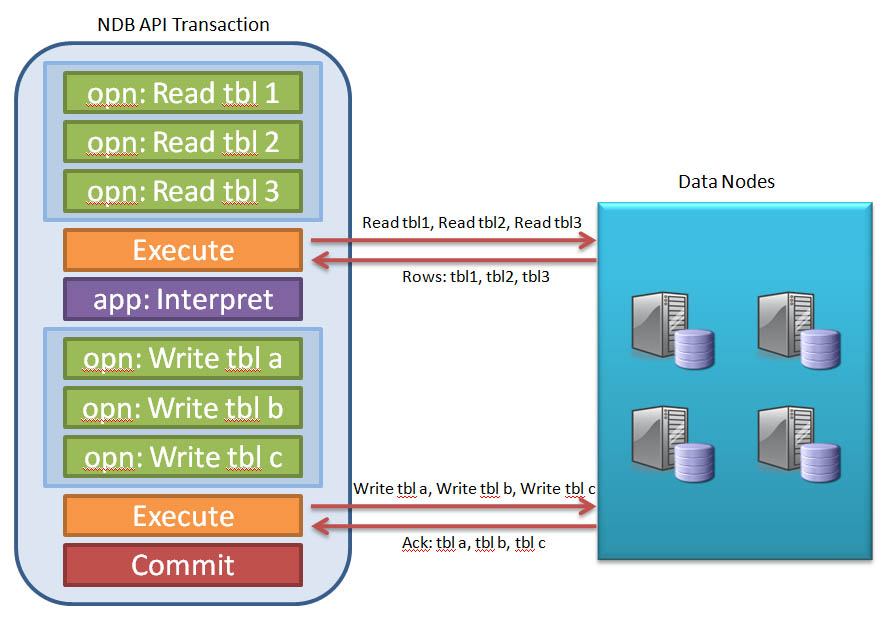
The principle is that you batch together as many operations as you can, execute them together and then interpret the results. After interpretting the results, the application may then decide to send in another batch of operations.
An NDB API transaction consists of one or more operations where each operation (currently) acts on a single table and could be a simple primary key read or write or a complex table scan.
The operation is not sent to the Cluster at the point that it’s defined. Instead, the application must explicitly request that all operations defined within the transaction up to that point be executed – at which point, the NDB API can send the batch of operations to the data nodes to be processed. The application may request that the transaction be committed at that point or it may ask for the transaction to be held open so that it can analyse the results from the first set of operations and then use that information within a subsequent series of operations and then commit the transaction after executing that second batch of operations.
The following code sample shows how this can be implemented in practice (note that the application logic and all error handling has been ommited).
const NdbDictionary::Dictionary* myDict= myNdb.getDictionary(); const NdbDictionary::Table *myTable= myDict->getTable("tbl1"); const NdbDictionary::Table *myTable2= myDict->getTable("tbl2"); NdbTransaction *myTransaction= myNdb.startTransaction(); // Read all of the required data as part of a single batch NdbOperation *myOperation= myTransaction->getNdbOperation(myTable1); myOperation->readTuple(NdbOperation::LM_Read); myOperation->equal("ref", asset_num); myRecAttr= myOperation->getValue("cost", NULL); NdbOperation *myOperation2= myTransaction->getNdbOperation(myTable2); myOperation2->readTuple(NdbOperation::LM_Read); myOperation2->equal("ref", asset_num); myRecAttr= myOperation->getValue("volume", NULL); myTransaction->execute(NdbTransaction::NoCommit); // NOT SHOWN: Application logic interprets results from first set of operations // Based on the data read during the initial batch, make the necessary changes myOperation *myOperation3= myTransaction->getNdbOperation(myTable1); myOperation3->updateTuple(); myOperation3->equal("ref", asset_num); myOperation2->setValue("cost", new_cost); myOperation *myOperation4= myTransaction->getNdbOperation(myTable2); myOperation4->updateTuple(); myOperation4->equal("ref", asset_num); myOperation4->setValue("volume", new_volume); myTransaction->execute( NdbTransaction::Commit); myNdb.closeTransaction(myTransaction); -
Are Stored Procedures available with MySQL Cluster?
Posted on May 1st, 2009 No commentsThe answer is yes – kind of.
Stored procedures are implemented in a MySQL Server and can be used regardless of the storage engine being used for a specific table. One inference from this is that they won’t work when accessing the Cluster database directly through the NDB API.
This leads to the question of whether or not that limitation actually restricts what you can achieve. This article gives a brief introduction to stored procedures and looks at how the same results can be achieved using the NDB API.
Stored procedures provide a rudimentary way of implementing functionality within the database (rather than in the application code). They are implemented by the database designer and have the ability to perform computations as well as make changes to the data in the database. A typical use of stored procedures would be to control all access to the data by a user or application – for example, to impose extra checks on the data or make sure that all linked data is updated rather than leaving it to the user or application designer to always remember to do it. To impose this, the DBA could grant permission to users to call the stored procedures but not write to the tables directly.
This functionality can be very useful when the data is being accessed through the SQL interface. If using the NDB API then you have the full power of the C++ language at your disposal and so a designer can code whatever checks and side effects are needed within a wrapper method and then have applications use those methods rather than accessing the raw NDB API directly for those changes.
There is one piece of functionality available using stored procedures which could be very helpful to applications using the NDB API – triggers. The rest of this article explains what triggers are; how they’re used and how that same results can be achieved using the NDB API.
Triggers
Triggers allow stored code to be invoked as a side effect of SQL commands being executed on the database through a MySQL Server. The database designer can implement a stored procedure and then register it to be invoked when specific actions (INSERT, DELETE etc.) are performed on a table.
The following example shows how a simple stored procedure can be implemented and then registered against a table.
mysql> USE test; Database changed mysql> create table ASSETS (NAME varchar(30) not null primary key,VALUE int) engine=ndb; Query OK, 0 rows affected (0.67 sec) mysql> create table AUDIT_LOG (NOTE varchar(30) not NULL primary key) engine=ndb; Query OK, 0 rows affected (0.56 sec) mysql> delimiter // mysql> create procedure log_it (log_string varchar(30)) -> begin -> insert into AUDIT_LOG values(log_string); -> end -> // Query OK, 0 rows affected (0.00 sec) mysql> delimiter ; mysql> create trigger ins_asset before insert on ASSETS -> for each row call log_it(new.name); Query OK, 0 rows affected (0.00 secThe stored procedure in this example is triggered whenever a new tuple is inserted into the ASSETS table. The procedure then inserts the asset’s name into the AUDIT_LOG table. If the tuple is deleted from the ASSETS table then the entry in the AUDIT_LOG table remains intact.
The following screen capture shows the results when adding a tuple to the table that contains the trigger.
mysql> insert into ASSETS values ('Computer',350); Query OK, 1 row affected (0.01 sec) mysql> select * from AUDIT_LOG; +----------+ | NOTE | +----------+ | Computer | +----------+ 1 row in set (0.00 sec)Note that as the trigger and stored procedure are implemented in the MySQL Server, they need to be separately defined in all of the MySQL Server instances where they are needed.
The following NDB API code adds a new tuple to the ASSETS table in much the same way as was done through SQL above (Note: my C++ is very rusty and so there will be glitches in this code – especially for string handling).
#include <NdbApi.hpp> #include <stdio.h> #include <string.h> #include <iostream> #include <cstdlib> static void run_application(Ndb_cluster_connection &, char*); #define PRINT_ERROR(code,msg) \ std::cout << "Error in " << __FILE__ << ", line: " << __LINE__ \ << ", code: " << code \ << ", msg: " << msg << "." << std::endl #define APIERROR(error) { \ PRINT_ERROR(error.code,error.message); \ exit(-1); } int main(int argc, char** argv) { if (argc != 3) { std::cout << "Arguments are <connect_string cluster><asset_name>.\n"; exit(-1); } ndb_init(); // connect to cluster and run application { const char *connectstring = argv[1]; char *asset_name = argv[2]; // Object representing the cluster Ndb_cluster_connection cluster_connection(connectstring); // Connect to cluster management server (ndb_mgmd) if (cluster_connection.connect(4 /* retries */, 5 /* delay between retries */, 1 /* verbose */)) { std::cout << "Cluster management server was not ready within 30 secs.\n"; exit(-1); } // Connect and wait for the storage nodes (ndbd's) if (cluster_connection.wait_until_ready(30,0) < 0) { std::cout << "Cluster was not ready within 30 secs.\n"; exit(-1); } // run the application code run_application(cluster_connection, asset_name); } ndb_end(0); return 0; } static void do_insert(Ndb &, char*); static void run_application(Ndb_cluster_connection &cluster_connection, char *asset_name) { /******************************************** * Connect to database via NdbApi * ********************************************/ // Object representing the database Ndb myNdb( &cluster_connection, "test" ); if (myNdb.init()) APIERROR(myNdb.getNdbError()); do_insert(myNdb, asset_name); } static void do_insert(Ndb &myNdb, char *asset_name) { const NdbDictionary::Dictionary* myDict= myNdb.getDictionary(); const NdbDictionary::Table *myTable= myDict->getTable("ASSETS"); char str[20]; str[0] = strlen(asset_name); strcpy(str +1, asset_name); if (myTable == NULL) APIERROR(myDict->getNdbError()); NdbTransaction *myTransaction= myNdb.startTransaction(); if (myTransaction == NULL) APIERROR(myNdb.getNdbError()); NdbOperation *myOperation= myTransaction->getNdbOperation(myTable); if (myOperation == NULL) APIERROR(myTransaction->getNdbError()); myOperation->insertTuple(); myOperation->setValue("NAME", str); myOperation->setValue("VALUE", 555); if (myTransaction->execute( NdbTransaction::Commit ) == -1) APIERROR(myTransaction->getNdbError()); myNdb.closeTransaction(myTransaction); }This code can then be executed and then the effects verified using SQL commands through the MySQL Server – note that the stored procedure has not been triggered and so the name has not been copied into the AUDIT_LOG table.
[billy@ws1 stored]$ ./test_stored_procedures localhost:1186 Monitor mysql> select * from ASSETS; +----------+-------+ | NAME | VALUE | +----------+-------+ | Monitor | 555 | | Computer | 350 | +----------+-------+ 2 rows in set (0.01 sec) mysql> select * from AUDIT_LOG; +----------+ | NOTE | +----------+ | Computer | +----------+ 1 row in set (0.00 sec)
It could easily be argued that triggers are not required when using the NDB API – simply code a wrapper method that also applies the required side effects. However, it is possible to come up with scenarios where triggers would be much more convenient – for example if the application is already littered with accesses to the data and you want to retrofit the side effect.
Fortunately, the NDB API includes the ability to register triggers against operations for a specific table. The code that follows implements a process that waits for an INSERT to be performed on the ASSETS table and then creates an entry in the AUDIT_LOG table just as the earlier stored procedure did.
#include <NdbApi.hpp> #include <stdio.h> #include <iostream> #include <unistd.h> #include <cstdlib> #include <string.h> #define APIERROR(error) \ { std::cout << "Error in " << __FILE__ << ", line:" << __LINE__ << ", code:" \ << error.code << ", msg: " << error.message << "." << std::endl; \ exit(-1); } int myCreateEvent(Ndb* myNdb, const char *eventName, const char *eventTableName, const char **eventColumnName, const int noEventColumnName); static void do_insert(Ndb*, char*); int main(int argc, char** argv) { if (argc < 2) { std::cout << "Arguments are <connect_string cluster> <timeout>].\n"; exit(-1); } const char *connectstring = argv[1]; int timeout = atoi(argv[2]); ndb_init(); Ndb_cluster_connection *cluster_connection= new Ndb_cluster_connection(connectstring); int r= cluster_connection->connect(5 /* retries */, 3 /* delay between retries */, 1 /* verbose */); if (r > 0) { std::cout << "Cluster connect failed, possibly resolved with more retries.\n"; exit(-1); } else if (r < 0) { std::cout << "Cluster connect failed.\n"; exit(-1); } if (cluster_connection->wait_until_ready(30,30)) { std::cout << "Cluster was not ready within 30 secs." << std::endl; exit(-1); } Ndb* myNdb= new Ndb(cluster_connection, "test"); // Object representing the database if (myNdb->init() == -1) APIERROR(myNdb->getNdbError()); const char *eventName= "CHNG_IN_ASSETS"; const char *eventTableName= "ASSETS"; const int noEventColumnName= 2; const char *eventColumnName[noEventColumnName]= {"NAME", "VALUE"}; // Create events myCreateEvent(myNdb, eventName, eventTableName, eventColumnName, noEventColumnName); // Normal values and blobs are unfortunately handled differently.. typedef union { NdbRecAttr* ra; NdbBlob* bh; } RA_BH; int i, j; j = 0; while (j < timeout) { // Start "transaction" for handling events NdbEventOperation* op; if ((op = myNdb->createEventOperation(eventName)) == NULL) APIERROR(myNdb->getNdbError()); RA_BH recAttr[noEventColumnName]; RA_BH recAttrPre[noEventColumnName]; for (i = 0; i < noEventColumnName; i++) { recAttr[i].ra = op->getValue(eventColumnName[i]); recAttrPre[i].ra = op->getPreValue(eventColumnName[i]); } if (op->execute()) APIERROR(op->getNdbError()); NdbEventOperation* the_op = op; i= 0; while (i < timeout) { int r = myNdb->pollEvents(1000); // wait for event or 1000 ms if (r > 0) { while ((op= myNdb->nextEvent())) { i++; NdbRecAttr* ra = recAttr[0].ra; if (ra->isNULL() >= 0) { // we have a value if (ra->isNULL() == 0) { // we have a non-null value printf("NAME: %s ", ra->aRef()); do_insert(myNdb, ra->aRef()); } else printf("%-5s", "NULL"); } else printf("%-5s", "-"); // no value ra = recAttr[1].ra; printf("\n"); } } } if (myNdb->dropEventOperation(the_op)) APIERROR(myNdb->getNdbError()); the_op = 0; j++; } { NdbDictionary::Dictionary *myDict = myNdb->getDictionary(); if (!myDict) APIERROR(myNdb->getNdbError()); if (myDict->dropEvent(eventName)) APIERROR(myDict->getNdbError()); } delete myNdb; delete cluster_connection; ndb_end(0); return 0; } int myCreateEvent(Ndb* myNdb, const char *eventName, const char *eventTableName, const char **eventColumnNames, const int noEventColumnNames) { NdbDictionary::Dictionary *myDict= myNdb->getDictionary(); if (!myDict) APIERROR(myNdb->getNdbError()); const NdbDictionary::Table *table= myDict->getTable(eventTableName); if (!table) APIERROR(myDict->getNdbError()); NdbDictionary::Event myEvent(eventName, *table); myEvent.addTableEvent(NdbDictionary::Event::TE_INSERT); myEvent.addEventColumns(noEventColumnNames, eventColumnNames); // Add event to database if (myDict->createEvent(myEvent) == 0) myEvent.print(); else if (myDict->getNdbError().classification == NdbError::SchemaObjectExists) { printf("Event creation failed, event exists\n"); printf("dropping Event...\n"); if (myDict->dropEvent(eventName)) APIERROR(myDict->getNdbError()); // try again // Add event to database if ( myDict->createEvent(myEvent)) APIERROR(myDict->getNdbError()); } else APIERROR(myDict->getNdbError()); return 0; } static void do_insert(Ndb* myNdb, char *asset_name) { const NdbDictionary::Dictionary* myDict= myNdb->getDictionary(); const NdbDictionary::Table *myTable= myDict->getTable("AUDIT_LOG"); char str[30]; str[0] = strlen(asset_name); strcpy(str +1, asset_name); printf("Storing %i characters: %s\n", strlen(asset_name), asset_name); if (myTable == NULL) APIERROR(myDict->getNdbError()); NdbTransaction *myTransaction= myNdb->startTransaction(); if (myTransaction == NULL) APIERROR(myNdb->getNdbError()); myOperation->insertTuple(); myOperation->setValue("NOTE", str); if (myTransaction->execute( NdbTransaction::Commit ) == -1) APIERROR(myTransaction->getNdbError()); myNdb->closeTransaction(myTransaction); }
We can then use the code to make the addition through the NDB API. We use one terminal to run the listener and then another to run the code to add the tuple.
[billy@ws1 stored]$ ./trigger_listener localhost:1186 100 [billy@ws1 stored]$ ./test_stored_procedures localhost:1186 Keyboard mysql> select * from ASSETS; +----------+-------+ | NAME | VALUE | +----------+-------+ | Keyboard | 555 | | Computer | 350 | | Monitor | 555 | +----------+-------+ 3 rows in set (0.00 sec) mysql> select * from AUDIT_LOG; +-----------+ | NOTE | +-----------+ | Computer | | Keyboard | +-----------+ 2 rows in set (0.00 sec)
A major advantage of this approach is that the trigger is implemented within the Cluster database and so is invoked regardless of where the INSERT is requested – whether it be through the NDB API or through any of the MySQL Servers. This is shown in the results that follow.
mysql> drop trigger ins_asset; Query OK, 0 rows affected (0.00 sec) mysql> drop procedure log_it; Query OK, 0 rows affected (0.00 sec) mysql> insert into ASSETS values("Printers", 200); Query OK, 1 row affected (0.00 sec) mysql> select * from ASSETS; +----------+-------+ | NAME | VALUE | +----------+-------+ | Keyboard | 555 | | Computer | 350 | | Monitor | 555 | | Printers | 200 | +----------+-------+ 4 rows in set (0.00 sec) mysql> select * from AUDIT_LOG; +-----------+ | NOTE | +-----------+ | Printers | | Keyboard | | Computer | +-----------+ 4 rows in set (0.00 sec)
Note that I first removed the original trigger and stored procedure that were defined in the MySQL Server.
There is another key difference between MySQL triggers and NDB events – triggers are executed as part of the MySQL transaction making the main database change whereas NDB events happen asynchronously. The effect of this is:
- The original transaction will commit succesfully before the side effects have been processed
- If the process waiting for the event disappears then the side effect will not be processed – for this reson, you may want to consider an audit/clean-up scripts to cover these cases.
Conclusion
Stored procedures are fully supported for users or applications which access a Cluster database through a MySQL Server (whether directly using SQL or through any of the numerous connectors that are available). Applications which access the database through the NDB API have the full flexibility of C++ to implement functionality that can achieve the same results. Triggers are available whichever method is used to access the database – albeit with different implementations and slightly different functionality.