




Following on from the earlier article on running MySQL Cluster on a single Windows host, this one looks at installing and running over multiple Windows machines.
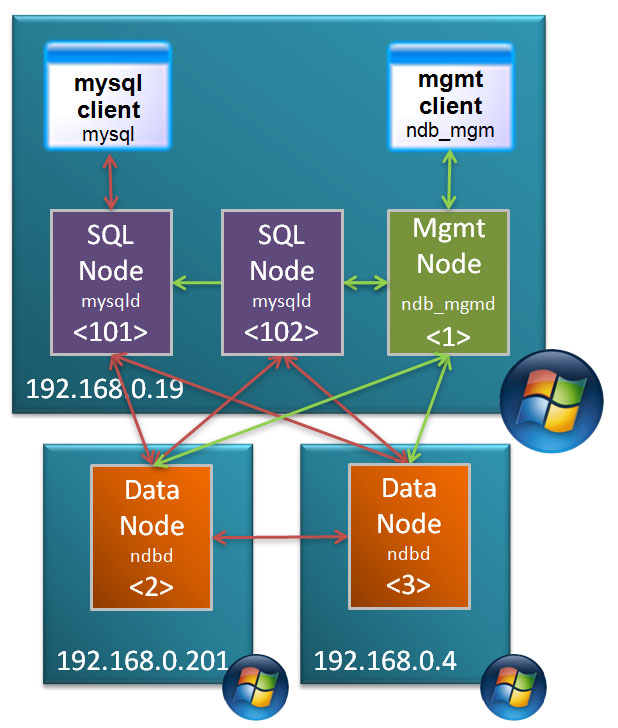
Target Deployment
In this post, the MySQL Cluster database will be split over 3 Windows machines:
- 2 hosts with each running 1 data node
- 3rd host running management node and 2 MySQL Servers
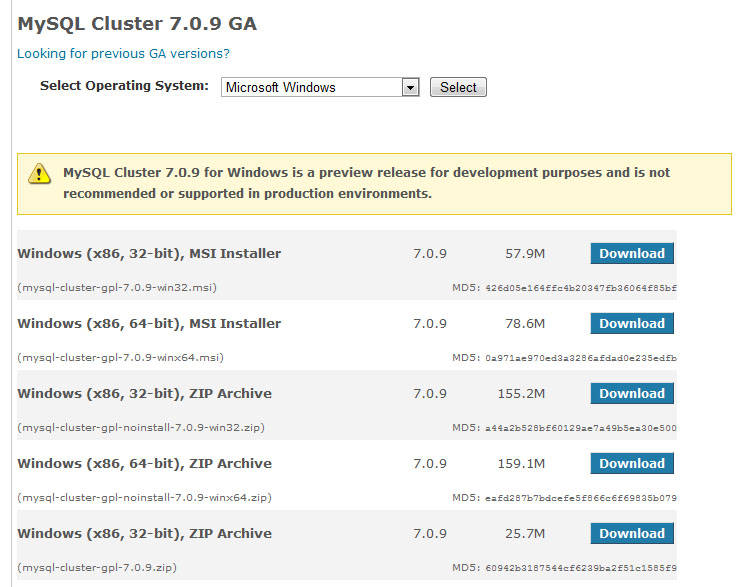
MySQL Cluster Downloads
The first step is to download and install the software on each of the Windows hosts. There are 2 main ways that you can install MySQL Cluster on Windows – the first is an MSI installer and the second is extracting the files from a Zip archive – this article focuses on using the Zip file as the single host article used the MSI installer. You can get the Zip archive from the Cluster downloads page on mysql.com
Make sure that you choose the correct file MSI vs. Zip, 32 bit vs. 64 bit. Also make sure that you don’t download the source code rather than the binaries (you can tell the source archive as it’s a much smaller file).
Repeat this on each of the hosts that will run a Cluster node (or download it once and then copy it to each of the hosts).
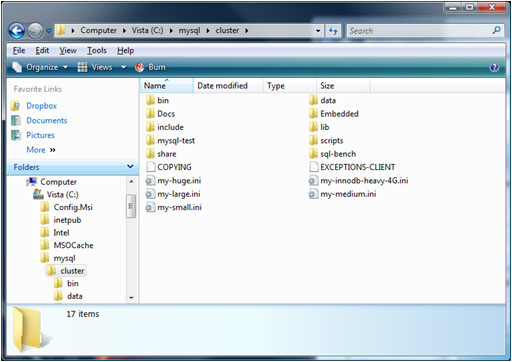
Extract Zip archive
Extract the contents of the Zip archive to “c:mysqlcluster”.
I prefer to keep the configuration and data files separate from the software and so I create a new folder “MySQL_ClusterMy_Cluster” in my home directory and in there create “conf” and “data” folders. Within the “data” folder on 192.168.0.19, create a sub-folder for each of the 2 MySQL Server (mysqld) processes and then copy “c:mysqlclusterdatamysql” to each – this creates the mysql database for each of the MySQL nodes containing data such as privileges and password.
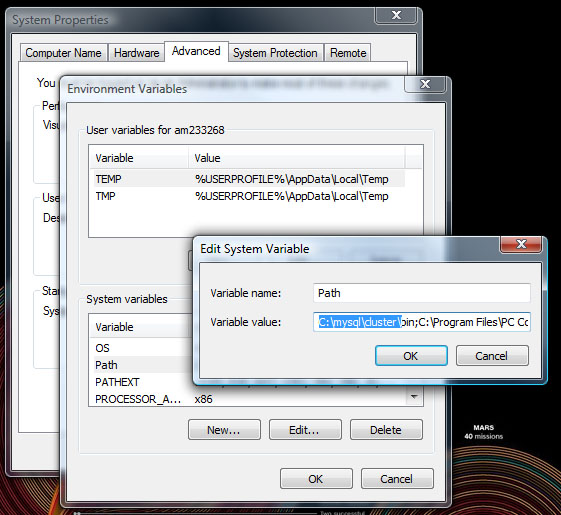
Add MySQL executables to PATH
To get access to the executables from the command line, add “c:mysqlclusterbin” to the PATH environment variable.
Create a “config.ini” file within the “conf” folder that was created on the host to run the management node (ndb_mgmd) – which in this example is 192.168.0.19:
[ndbd default]
noofreplicas=2
datadir=E:am233268DocumentsMySQL_ClusterMy_Clusterdata

[ndbd]
hostname=192.168.0.201
id=2

[ndbd]
hostname=192.168.0.4
id=3

[ndb_mgmd]
id=1
hostname=192.168.0.19

mysqld]
id=101
hostname=192.168.0.19

[mysqld]
id=102
hostname=192.168.0.19
As both of the MySQL Server nodes will also run on 192.168.0.19, we create a cnf file for each of them in that same “conf” folder:
my.101.cnf
[mysqld]
ndb-nodeid=101
ndbcluster
datadir=E:am233268DocumentsMySQL_ClusterMy_Clusterdatamysqld_1
port=3306
ndb-connectstring=192.168.0.19:1186
my.102.cnf
[mysqld]
ndb-nodeid=102
ndbcluster
datadir=E:am233268DocumentsMySQL_ClusterMy_Clusterdatamysqld_2
port=3307
ndb-connectstring=192.168.0.19:1186
Note that the “ndb-connectstring” is not strictly needed as the MySQL Servers happen to be on the same host as the management node but they’ve been included to make it clearer what to change if you moved those nodes to another machine.
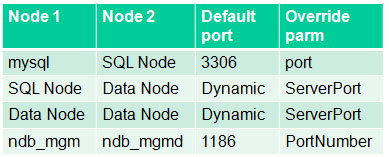
Ports to open for MySQL Cluster nodes
The information from this table can help you set up the firewall rules to allow the nodes to communitcate with each other but if possible, turn off the firewall for connections between these 3 nodes.
The next step is to start the nodes (processes) but before then, a hint.
If you run each command from a different command prompt then your screen will quickly fill with Windows. Instead, rather than just typing “c: <command>” use “c: start /B <command>” (for example “c: start /B ndbd –initial”) so that multiple processes can be run from the same Window. To keep things simple, the “start /B” has been skipped for the rest of this article.
The first process to start is the management node; run the following from the “<home>DocumentsMySQL_ClusterMy_Cluster” folder on 192.168.0.19:
192.168.0.19: ndb_mgmd --initial -f conf/config.ini --configdir=./conf
Next, start the data nodes on 192.168.0.201 and 192.168.0.4:
192.168.0.201: ndbd -c 192.168.0.19:1186 --initial

192.168.0.4: ndbd -c 192.168.0.19:1186 --initial
and then finally start the MySQL Server nodes on 192.168.0.19:
192.168.0.19: mysqld --defaults-file=confmy.101.cnf
192.168.0.19: mysqld --defaults-file=confmy.102.cnf
Finally, check that all of the nodes are up and running:
192.168.0.19: ndb_mgm
-- NDB Cluster -- Management Client --
ndb_mgm> show
Connected to Management Server at: localhost:1186
Cluster Configuration
---------------------
[ndbd(NDB)]     2 node(s)
id=2    @192.168.0.201  (mysql-5.1.39 ndb-7.0.9, Nodegroup: 0, Master)
id=3    @192.168.0.4  (mysql-5.1.39 ndb-7.0.9, Nodegroup: 0)

[ndb_mgmd(MGM)] 1 node(s)
id=1    @192.168.0.19  (mysql-5.1.39 ndb-7.0.9)

[mysqld(API)]   2 node(s)
id=101  @192.168.0.19  (mysql-5.1.39 ndb-7.0.9)
id=102  @192.168.0.19  (mysql-5.1.39 ndb-7.0.9)
Known limitation of running MySQL Cluster on Windows:
- No angel process for data nodes -> processes will not be automatically restarted even if you set StopOnError to FALSE
- Running nodes as Windows services is not really practical (as well as software limitations, would still need to activate processes through ndb_mgm)
- Safe to run management node or MySQL Servers (or NDB API Apps) on Windows in production: will soon be supported
- See open MySQL Cluster bugs reported for Windows:
- You tell us! Help us get to GA quality on Windows:
- bugs.mysql.com
- Category = MySQL Cluster
- OS = Microsoft Windows
- bugs.mysql.com
Is it possible you could post a guide on how to install MySQL Cluster on Multiple Windows Machines, but using the MSI installer.
I have tried but unable to get the MySQL Cluster to see the other machine running wither the API Node or NDB Node.
Many thanks,
Kriss
Hi Kriss,
I covered this in a recent webinar – you can view the replay at http://www.mysql.com/news-and-events/on-demand-webinars/display-od-445.html
Personally, I prefer to extract the software from the zip file as it’s more transparent.
Please let me know if you have any questions.
Regards, Andrew.
Hi Andrew thank you for your response.
Have you have any trouble remote access mysql using the binaries?
I have posted a full report regarding this on
http://bugs.mysql.com/bug.php?id=50417&thanks=2¬ify=67
I am unable to access mysql database from any remote machine either using a query browser or a command prompt.
If I follow your example using the MSI on a single system, I can remote access mysql, but using the binaries I can’t. I have updated the user table to allow remote access, but still no luck.
Many thanks for your reply and if you need any more information just let me know.
Kriss
I tried this with a fresh Windows VM and got the same error (even with the mysql database
created)…
ERROR 1042 (HY000): Can’t get hostname for your address
I resolved it by adding the hostnames/IP addresses to
C:WindowsSystem32driversetchosts
Of course, if DNS were set up for these hosts then that wouldn’t have been needed.
This could well be a problem with the ‘mysql’ folder copied over from the zip archive – might have been better to install Perl and then execute the mysql_install_db.pl script.
Andrew.
Andrew, thank you very much for your help.
This has resolved the issue. I understand that this could of work straight away if install with perl, and I will look into this and let you know.
Hopefully MySQL may release a fix where you shouldn’t have to edit the ‘Hosts’ file to allow remote access to the database, surely editing the user talbe should be enough.
Again many thanks Andrew, a great help! 🙂
Hi Andrew,
Just a quick question.
When i shutdown the management node my datanode also shuts down. I run One computer with both a Management Node and a Data Node, and a Second computer with just a Data Node.
I f i shut down the Managment computer completely, my secondary Data Node also shuts down.
When i do run the second data node i use the query:
ndb -c 10.0.10.4:1186
Shut down the management node and they both come offline, and then i carnt access the mysql nodes if both Data Nodes come offline.
Any reason for this?
Hi Kriss,
yes this is expected behaviour. When a subset of the data nodes lose contact with the rest, they try to figure out if it’s safe for them to stay up or not.
In your case, the data node on the surviving host realises that it can’t communicate with the second data node and it can’t know whether that data node has died or not (could just be an issue with the network connection between the 2 hosts). The worst case scenario would be that both data nodes decided that they were the only survivors and continue to independently process transactions – this is referred to as split brain.
To prevent the split brain scenario, the data node consults the arbitrator to see if it can stay up. By default, the management node acts as the arbitrator – as that too is uncontactable, the data node decides that the only safe option is to shut down.
The way to make sure that your Cluster is highly available is to move your management node to a 3rd host.
This is covered in much more detail at http://www.clusterdb.com/mysql-cluster/mysql-cluster-fault-tolerance-impact-of-deployment-decisions/
Regards, Andrew.
Hi Andrew,
Are you aware of any problems running a Data Node and a MySQL Node on the same host?
Basically I am wanting to only use 5-Hosts, 3 of these hosts for MySQL + Data Nodes and the remaining 2-Hosts for 2-Management Nodes.
I was just woundering if you were aware of any problem with NDB and MySql on the same Host?
Many thanks again in advance,
Kriss
Hi Kriss,
it’s possible to run data nodes and mysqld’s on the same hosts *but* there is potential for resource conflicts (memory, CPU, disk IO). If you’ve 5 hosts then consider:
Host 1: Data node
Host 2: Data node
Host 3: mysqld(s) + management node
Host 4: mysqld(s) + management node
Host 5: mysqld(s)
Regards, Andrew.
Hi Andrew,
Are yuo aware of any way to keep the Cluster Server running using only one Data node and one MySQL Node.
As far as i can you you always need two Data Nodes running otherwise the cluster will shutdown as one Data node is unable to keep the cluster alive.
At present I am using 5 host using replication (not cluster) and if any machine fails there is no action needed, I can just bring it back online when I see it has failed. My replication server can go down to One Server, meaning Four server can go down and the service will still be alive, and working.
Where as with cluster it looks like you always need two or three computer running in a cluster to keep it running for example one MySQL Node and two Data Nodes each one a single host, or MySQL Node and a Data node on the same Host and another data node.
But again any host failed then the cluster fails, which dosn’t offer me a better system to what I am using now.
Is there any way to allow cluster to run on a single MySQL Node and Data Node.
Many thanks,
Kriss
Hi Kriss,
you can run Cluster with a single data node. By setting NoOfReplicas to 1 and only have 1 [ndbd] section in configi.ini – however, this isn’t fault tolerant as if that 1 process or machine dies then you’ve lost your database. It is also possible to run with just 1 data node with NoOfReplicas=2 when the other data node has failed *but* only if that surviving data node can still contact the management server.
If you’ve got access to 5 machines then just run the management node for 1 server on any of the 5 hosts that isn’t running data nodes for the same Cluster.
One advantage of MySQL Cluster over regular replication is that the replication between the data nodes is synchronous and so if your 5 machines are in the same location then you should be able to build a far more fault tolerant solution than you have today. When using MySQL Cluster, you only tend to use the regular MySQL (asynchronous) replication when you want to replicate the data to a different storage engine or you want to have geographic redundancy.
In the end, MySQL Cluster is a clustered database and it’s in that way (having a cluster of nodes) that it can scale AND provide high availability.
Regards, Andrew.
Hi,
really nice article and worked pretty well (tried in a test env)… btw it is obscure to me why the mysqld(s) resides on the same server of the management node instead on the nodes server; I’m asking this because I’ve read a nice article too for mysql (5.x) cluster on Ubuntu http://bieg.wordpress.com/2008/08/03/mysql-clustering-ubuntu/ where the roles are opposite.
Thx for your patience.
Den
Hi Den, if your management nodes are acting as arbitrators (which one of them is by default) then it’s important that they are running on an independent host from the data nodes. More details on http://www.clusterdb.com/mysql-cluster/mysql-cluster-fault-tolerance-impact-of-deployment-decisions/
Regards, Andrew.
Hi Andrew,
yes, the management node it is independent, but I try to figure out why mysqld(s) described in your article
datadir=E:am233268DocumentsMySQL_ClusterMy_Clusterdatamysqld_1
and
datadir=E:am233268DocumentsMySQL_ClusterMy_Clusterdatamysqld_2
is different from the link that I’ve post before; in substance why:
[mysqld(API)] 2 node(s)
id=101 @192.168.0.19 (mysql-5.1.39 ndb-7.0.9)
id=102 @192.168.0.19 (mysql-5.1.39 ndb-7.0.9)
and why not
[mysqld(API)] 2 node(s)
id=101 @192.168.0.201 (mysql-5.1.39 ndb-7.0.9)
id=102 @192.168.0.4 (mysql-5.1.39 ndb-7.0.9)
Maybe I’ve missing something important in the link http://www.clusterdb.com/mysql-cluster/mysql-cluster-fault-tolerance-impact-of-deployment-decisions/ but I’m not so expert..
Thx
Hello, great article, thanks for this…
I have tested out the previous cluster example you kindly posted and that worked fine. I added a copy of one of our development databases into the cluster and tested it with our application (a game) and all worked fine..
Now I have a few other questions…
Can I add additional MySQL nodes, Data nodes and Management nodes without taking down the cluster?
In the original setup how can I close the cluster down and restart it, or do I have to manually restart each node?
Are there any GUI tools for cluster yet? Like MySQL query browser and MySQL Administrator
It’s fairly straight forward to add new MySQL Server and data nodes (never tried adding management nodes).
For MySQL Server nodes, just add the relevant [mysqld] sections to your config.ini file(s) and then restart the management nodes followed by all of the data nodes in sequence. You can then start your new MySQL Server process.
It’s a little more complex for the data nodes as you’ll probably want to repartition your existing tables once you’ve created the new node-group. Full instructions can be found in this white paper: http://www.mysql.com/why-mysql/white-papers/mysql_wp_cluster7_architecture.php
Hi… I followed all the instructions and got to the point where everything is started except the mysql servers:
***********
ndb_mgm> show
Cluster Configuration
———————
[ndbd(NDB)] 2 node(s)
id=2 @10.192.58.16 (mysql-5.1.44 ndb-7.1.3, starting, Nodegroup: 0)
id=3 @10.192.59.128 (mysql-5.1.44 ndb-7.1.3, starting, Nodegroup: 0)
[ndb_mgmd(MGM)] 1 node(s)
id=1 @10.192.57.123 (mysql-5.1.44 ndb-7.1.3)
[mysqld(API)] 2 node(s)
id=101 (not connected, accepting connect from any host)
id=102 (not connected, accepting connect from any host)
***********
When I try to start mysql I got the errors:
***********
C:UsersAdministratorDocumentsMySQL_ClusterMy_Cluster>mysqld –defaults-file
=confmy.101.cnf –console –verbose
100529 2:14:54 [Note] Plugin ‘FEDERATED’ is disabled.
mysqld: Table ‘mysql.plugin’ doesn’t exist
100529 2:14:54 [ERROR] Can’t open the mysql.plugin table. Please run mysql_upgr
ade to create it.
InnoDB: The first specified data file .ibdata1 did not exist:
InnoDB: a new database to be created!
100529 2:14:54 InnoDB: Setting file .ibdata1 size to 10 MB
InnoDB: Database physically writes the file full: wait…
100529 2:14:54 InnoDB: Log file .ib_logfile0 did not exist: new to be created
InnoDB: Setting log file .ib_logfile0 size to 5 MB
InnoDB: Database physically writes the file full: wait…
100529 2:14:54 InnoDB: Log file .ib_logfile1 did not exist: new to be created
InnoDB: Setting log file .ib_logfile1 size to 5 MB
InnoDB: Database physically writes the file full: wait…
InnoDB: Doublewrite buffer not found: creating new
InnoDB: Doublewrite buffer created
InnoDB: Creating foreign key constraint system tables
InnoDB: Foreign key constraint system tables created
100529 2:14:55 InnoDB: Started; log sequence number 0 0
100529 2:14:55 [Note] NDB: NodeID is 101, management server ‘10.192.57.123:1186
‘
100529 2:14:56 [Note] NDB[0]: NodeID: 101, no storage nodes connected (timed ou
t)
100529 2:14:56 [Note] Starting Cluster Binlog Thread
100529 2:14:56 [ERROR] Fatal error: Can’t open and lock privilege tables: Table
‘mysql.host’ doesn’t exist
***********
The only way mysql will even startup is if I use the c:mysqlclusterdata as the data directory, instead of following the instructions. But then it says no storage nodes connected:
*********
C:UsersAdministratorDocumentsMySQL_ClusterMy_Cluster>mysqld –defaults-file
=confmy.101.cnf –console –verbose
100529 2:34:58 [Note] Plugin ‘FEDERATED’ is disabled.
100529 2:34:58 InnoDB: Started; log sequence number 0 44233
100529 2:34:58 [Note] NDB: NodeID is 101, management server ‘10.192.57.123:1186
‘
100529 2:34:59 [Note] NDB[0]: NodeID: 101, no storage nodes connected (timed ou
t)
100529 2:34:59 [Note] Starting Cluster Binlog Thread
100529 2:34:59 [Note] Event Scheduler: Loaded 0 events
100529 2:35:14 [Warning] NDB : Tables not available after 15 seconds. Consider
increasing –ndb-wait-setup value
100529 2:35:14 [Note] mysqld: ready for connections.
Version: ‘5.1.44-ndb-7.1.3-cluster-gpl’ socket: ” port: 3306 MySQL Cluster S
erver (GPL)
**********
And then when I connect to the db and try to create db (gives first error below, but mysql prompt seems happy) and then a table (gives second error below) I get:
**********
100529 2:55:04 [Warning] NDB: Could not acquire global schema lock (4009)Cluste
r Failure
100529 2:55:50 [Warning] NDB: Could not acquire global schema lock (4009)Cluste
r Failure
**********
Any one know what’s going on???
Thanks,
DY
Hi Andrew,
Please ignore my previous post, I figured out. Now on the data nodes I keep getting warning: timerhandlinglab with diffs of mostly 62 to 63. I have checked the times of my win 2008 servers and they seem to be in sync.
I have searched online but couldn’t find any other useful info about this warning and how to resolve it.
Thanks,
DY
Hi DY,
not sure if it will fix it for you but have you taken a look at http://forums.mysql.com/read.php?25,285742,285922#msg-285922 ?
Regards, Andrew.
Hi Andrew,
The data on SQL data nodes is not in sync.
Do I have to setup replication separately between the data nodes as well to keep them in sync?
I have chosen mysql cluster setup over SQL server 2008 setup.
Your help would be really appreciated.
If a table is stored in MySQL Cluster (by specifying “engine=ndb” when creating the table) then the contents of that data will be visible through all MySQL Servers that are part of the Cluster. The data is automatically replicated between the data nodes in order to achieve High Availability. If you specify a different storage engine (or don’t specify one at all) when creating the table then the data is held locally (and independently) within each MySQL Server. If you created the table with a different storage engine then you can migrate it to Cluster with “mysql> ALTER TABLE engine=ndb;”.
Regards, Andrew.
DY;
I have the same error with you, mysql server would not run.
Logs:
100717 12:31:30 InnoDB: Started; log sequence number 0 44233
100717 12:31:30 [Note] NDB: NodeID is 50, management server ‘localhost:1186’
100717 12:31:30 [Note] NDB[0]: NodeID: 50, all storage nodes connected
100717 12:31:30 [Warning] NDB: server id set to zero will cause any other mysqld with bin log to log with wrong server id
100717 12:31:30 [Note] Starting Cluster Binlog Thread
100717 12:31:30 [ERROR] Fatal error: Can’t open and lock privilege tables: Table ‘mysql.host’ doesn’t exist
How did you manage to overcome it.
Do I need to install MySQL Community Server? or just download the zip file then extract followed by the tutorial?
Rabin,
you should use the mysqld executable that comes with MySQL Cluster and not the ‘regular’ version.
when I use mysql proxy to use load balancer. but when 1 mysqld down, it not redirect to another mysqld.
Can you help me solve this problem.
Thanks
I’m no expert on MySQL proxy but a bit of Googling came up with this incantation…
mysql-proxy –proxy-backend-addresses=serverA:3306 –proxy-backend-addresses=serverB:3306 –proxy-backend-addresses=serverC:3306 –proxy-read-only-backend-addresses=serverD:3306
… Note that when people talk about load balancing with MySQL, it will usually be focused on read-only queries but with Cluster you can also load balance writes as all of the changes are actually made in the data nodes and so are visible immediately to all MySQL Servers in the Cluster. Because of this, you probably don’t need to specify any servers with the proxy-read-only-backend-addresses option.
If this doesn’t work then you can try the MySQL Proxy forum at http://forums.mysql.com/list.php?146
Andrew.
When I run ndbd, i have error:
2011-01-17 10:34:41 [ndbd] INFO — Angel connected to ‘10.88.40.29:1186’
2011-01-17 10:34:41 [ndbd] ERROR — Failed to allocate nodeid, error: ‘Error
: Could not alloc node id at 10.88.40.29 port 1186: Connection done from wrong h
ost ip 10.88.40.29.’
How can I fix it
Regards
Hi Duy,
this suggests that you’re trying to start the ndbd process on the ‘wrong’ host.
In your config.ini file you specify the IP address of the host where each of the processes should run. Check that you’re running the ndbd.exe on the server with the IP address that you specify in the [ndbd] sections of the config.ini file. You can also check where the Cluster expects the data node processes to be run by executing…
ndb_mgm -e show
Hey, is fully functional for windows 2008 server now? I means, can I use it in a production environment?
Thanks in advances,
Reuel
Reuel,
go ahead and use Windows 2008.
Andrew.
Hi,
I am having problems, when i start up my data nodes, I get the following issue: “Couldnt Start daemon error failed to open logfile …. for write errno2”
I think its a windows permissions issue, for the data node contacting the mangement node – any ideas on how to fix it?
Andrew,
Take a look at the permissions for the folder that you designate as the “datadir” in your config.ini file.
Regards, Andrew.
Hi,
I have looked into the permissions. But cant figure out how to allow another computer access to the file system- its a windows problem i know, but its holding up the whole thing.
Im thinking of setting up a domain, with both computers in it and then setting permission for the second computer to access the file system. Sound Right? Or is this a way too complicated solution to a permissions issue?
Thanks for the help, im running around in circles!
Hi Andrew,
it should only be local processes writing to the local file system (I’ve never had to set up cross-system file access) – a key feature of MySQL Cluster is that it’s shared-nothing with no need for shared storage. Firewalls on the other hand may need opening up (ideally turned off between the Cluster hosts).
Have you tried getting everything running on a single server first?
Andrew.
Ok,
I did set it up on the single server first and it worked fine.
Once i moved it to 2 servers the problems started, particularly when i started the data nodes. This is what I received:
## Start Data Node B on 50.57.80.204 – using multithreading option ndbmtd.exe
C:MySQL DATA NODE 2mysql-cluster-gpl-noinstall-7.1.15-winx64mysql-cluster-gpl-7.1.15-winx64binndbmtd.exe -c 184.106.79.42:1186
I then get this:
INFO- Angel connected to 184.106.79.42:1186
INFO- Angel Allocated nodeid: 3
WARNING- cannot change directory to ‘c:my_clusterndb_data’, error 2
ERROR- Couldnt start as daemon, error Failed to open logfile ‘c:my_clusterndb_datandb_3_out.log’ for write, errno: 2
Not sure what it means, the log file is there, so i guess it was a permissions issue – any ideas?
Thanks again!
what about error when i try this :
C:UsersSav_MySQL_clustermy_cluster>start /B ndb_mgmd –initial -f conf/confi
g.ini –configdir=./conf
C:UsersSav_MySQL_clustermy_cluster>MySQL Cluster Management Server mysql-5.1
.56 ndb-7.1.18
2011-12-26 09:18:29 [MgmtSrvr] ERROR — Could not determine which nodeid to u
se for this node. Specify it with –ndb-nodeid= on command line
i’m newbie…
Septian,
As a first step, try following the suggestion and specify the node id as a command line option.
Regards, Andrew.
Hi
any one know how to correct this error when i run ndb_mgmd by giving host ip in the config.ini file
2012-01-13 12:56:34 [MgmtSrvr] ERROR — at line 16: Mixing of localhost (default for [NDBD]HostName) with other hostname(172.16.24.70) is illegal
Thanks in advance
Krishnalal
Krishnalal – you are using a mix of “localhost” and real host names or IP addresses in your config.ini file – this isn’t allowed. Replace localhost with the machine’s IP address or 127.0.0.1
Andrew.
Hi Andrew
Thanks for the help. it worked fine.
Now i am facing another problem, the mysqld is started and then exited when i executed it.
I am having Two Pcs, one pc running management, data and mysqld’s. another pc with a data node.
The following i have done…
C:MySQLcluster>mysqld –defaults-file=confmy1.cnf
C:MySQLcluster>mysqld –defaults-file=confmy2.cnf
C:MySQLcluster>ndb_mgm -e show
Connected to Management Server at: localhost:1186
Cluster Configuration
———————
[ndbd(NDB)] 2 node(s)
id=2 @172.16.24.70 (mysql-5.1.56 ndb-7.1.18, starting, Nodegroup: 0, Master)
id=3 @172.16.24.77 (mysql-5.1.56 ndb-7.1.18, starting, Nodegroup: 0)
[ndb_mgmd(MGM)] 1 node(s)
id=1 @172.16.24.70 (mysql-5.1.56 ndb-7.1.18)
[mysqld(API)] 3 node(s)
id=4 (not connected, accepting connect from 172.16.24.70)
id=5 (not connected, accepting connect from 172.16.24.70)
id=6 (not connected, accepting connect from 172.16.24.70)
Pls help..
Thanks in Advance
Krishnalal
Hi
can any one know why this error occurs when mysqld is executed….
120120 10:06:15 [Note] Plugin ‘FEDERATED’ is disabled.
C:MySQLMySQLServer5.0binmysqld: Table ‘mysql.plugin’ doesn’t exist
120120 10:06:15 [ERROR] Can’t open the mysql.plugin table. Please run mysql_upgrade to create it.
120120 10:06:15 InnoDB: Initializing buffer pool, size = 8.0M
120120 10:06:15 InnoDB: Completed initialization of buffer pool
InnoDB: The log sequence number in ibdata files does not match
InnoDB: the log sequence number in the ib_logfiles!
120120 10:06:15 InnoDB: Database was not shut down normally!
InnoDB: Starting crash recovery.
InnoDB: Reading tablespace information from the .ibd files…
InnoDB: Restoring possible half-written data pages from the doublewrite
InnoDB: buffer…
120120 10:06:16 InnoDB: Started; log sequence number 0 44233
120120 10:06:51 [Warning] NDB: server id set to zero – changes logged to bin log with server id zero will be logged with another server id by slave mysqlds
120120 10:06:51 [Note] Starting Cluster Binlog Thread
120120 10:06:51 [ERROR] Fatal error: Can’t open and lock privilege tables: Table ‘mysql.host’ doesn’t exist
Pl help
Regards
Krishnalal
Hi Krishnalal,
are you sure that you copied the mysql database files into the data directory for the MySQL Server(s) and that they have permissions set correctly for whatever user is being used to run the mysqld process?
Regards, Andrew.
Hi Andrew
yes, i have copied the mysql database files in to the data directory as specified in the blog.
How to set permissions for running mysqld process.?
Pls help as early as possible.becoz i am stuck up with the cluster implementation.
Thanks in advance
Krishnalal
Hi Krishnalal,
in your .cnf file(s) you should have specified a “datadir” folder. Check that folder to make sure that it exists (on the host where you’re running the mysqld process). In there you should see a bunch of folders (that you’ve previously copied there) including one called “mysql” – that sub-folder should contain the files that the error message is referring to.
Double check that you’re including the correct .cnf file with the –defaults-file when you start the mysqld process.
You should be able to check which users have read/write access to a file by right clicking it, selecting properties and then Security – details depend on what version of Windows you’re running.
Andrew.
Hello
my mysqld is started and stoped after 1 minute.
The error i got is
120123 17:57:08 [Note] Plugin ‘FEDERATED’ is disabled.
mysqld: Table ‘mysql.plugin’ doesn’t exist
120123 17:57:08 [ERROR] Can’t open the mysql.plugin table. Please run mysql_upgrade to create it.
120123 17:57:08 InnoDB: Initializing buffer pool, size = 8.0M
120123 17:57:08 InnoDB: Completed initialization of buffer pool
InnoDB: The log sequence number in ibdata files does not match
InnoDB: the log sequence number in the ib_logfiles!
120123 17:57:08 InnoDB: Database was not shut down normally!
InnoDB: Starting crash recovery.
InnoDB: Reading tablespace information from the .ibd files…
InnoDB: Restoring possible half-written data pages from the doublewrite
InnoDB: buffer…
120123 17:57:09 InnoDB: Started; log sequence number 0 44233
120123 17:57:44 [Warning] NDB: server id set to zero – changes logged to bin log with server id zero will be logged with another server id by slave mysqlds
120123 17:57:44 [Note] Starting Cluster Binlog Thread
120123 17:57:44 [ERROR] Fatal error: Can’t open and lock privilege tables: Table ‘mysql.host’ doesn’t exist
I followed all the steps, that Andrew instructed.
Can any help..
Krishnalal
Hi I have configured MYSQL Cluster 5.0 on windows xp(single system).
But i m unable to launch Management node, getting the following error, Can any show me the right way to do this.
C:MysqlCluster>mysqld
‘mysqld’ is not recognized as an internal or external command,
operable program or batch file.
Rajini.
Hi Rajini,
a couple of comments
1) You should switch to the latest version of MySQL Cluster – download Cluster 7.2 from http://www.mysql.com/downloads/cluster/
2) mysqld is the MySQL Server process; ndb_mgmd is the management node
3) Make sure that you’ve added the MySQL bin folder to your Windows path if you don’t want to give the full path name every time you run a command
Regards, Andrew.
Hi Andrew,
Thanks for the reply.
Iam using mysql 5.5 version and cluster also 5.5.
Is it possible combination of server 5.5 n cluster 7.2?
– Where i need to add this bin folder path to my windows ?
-how i need to check weather my ports are running or not? if so how i need to start
-i have node 3306,3307,3308 and i havee added this ports in firewall tab i windows XP.
Rajini.
Fore the firewall you need to open up the ports needed for clients to connect to each MySQL Server (3306 by default). You should also open up 1186 for any machines accessing the ndb_mgmds (including all hosts in the Cluster). By default, the port used for each data node to connect to all other nodes is allocated dynamically but you can fix it by setting ServerPort in each [ndbd] section (make sure that no 2 data nodes on the same host use the same value) and then add that to the firewall exceptions.
Ideally just turn off the firewall or at least between the hosts making up the Cluster.
It varies slightly between versions of Windows but to set the Path variable,try navigating through Control Panel/System/Advanced System Settings/Environment Variables/System Variables
Regards, Andrew.
Hi Andrew,
Followed the steps as above but encountered the following error when I tried to start mysqld:
C:Program FilesMySQLclusterMySQL_ClusterMy_Cluster>mysqld –defaults-file=c
onfmy.102.cnf.txt -show
120310 2:49:27 [Warning] Can’t create test file C:Program FilesMySQLcluster
owdes.lower-test
120310 2:49:27 [Warning] Can’t create test file C:Program FilesMySQLcluster
owdes.lower-test
mysqld: Can’t change dir to ‘C:Program FilesMySQLclusterow’ (Errcode: 2)
120310 2:49:28 [ERROR] Aborting
120310 2:49:28 [Note] mysqld: Shutdown complete
It seems like a permission issue-I did grant full permission to everyone. I did followed the process(mgmt node–data nodes–sql node).Do you have any ideas what causing the error?
Hi,
I tried to configure the cluster mysql on windows following the step by step guide and running the command to check the status of the cluster I get this result:
ndb_mgm> show
cluster Configuration
———————
[ndbd (NDB)] 2 node (s)
id = 2@192.168.1.2 (mysql-5.5.19 ndb-7.2.4, Nodegroup: 0,
id = 3@192.168.1.3 (mysql-5.5.19 ndb-7.2.4, Nodegroup: 0)
[ndb_mgmd (MGM)] 1 node (s)
id = 1@192.168.1.4 (mysql-5.5.19 ndb-7.2.4)
[mysqld (API)] 2 node (s)
id = 101 (not connected, accepting connect from 192.168.1.4)
id = 102 (not connected, accepting connect from 192.168.1.4)
My doubt and on the [mysqld (API)] 2 node (s).
It is correct what I see or the cluster is not working properly?
Hi Luca,
this is showing that the mysqld processes have not connected to the Cluster. Check if there are any errors when you start the mysqlds. Use the verbose option to get more information if required.
One possible causes… make sure you use the mysqld binaries that come as part of the MySQL Cluster install – other versions will not work
Check if the mysqld process is actually running and if you can connect to it, run SHOW ENGINES to check that ndbcluster is enabled.
Regards, Andrew.
Hi,
I have followed your step by step guide for mysql cluster configuration on Windows. The data nodes and managed servers have started properly. When i start mysql nodes i get the below error.
———————-
120326 21:17:51 [Note] Plugin ‘FEDERATED’ is disabled.
mysqld: Table ‘mysql.plugin’ doesn’t exist
120326 21:17:51 [ERROR] Can’t open the mysql.plugin table. Please run mysql_upgrade to create it.
120326 21:17:51 InnoDB: The InnoDB memory heap is disabled
120326 21:17:51 InnoDB: Mutexes and rw_locks use Windows interlocked functions
120326 21:17:51 InnoDB: Compressed tables use zlib 1.2.3
120326 21:17:51 InnoDB: Initializing buffer pool, size = 128.0M
120326 21:17:51 InnoDB: Completed initialization of buffer pool
120326 21:17:51 InnoDB: highest supported file format is Barracuda.
InnoDB: The log sequence number in ibdata files does not match
InnoDB: the log sequence number in the ib_logfiles!
120326 21:17:51 InnoDB: Database was not shut down normally!
InnoDB: Starting crash recovery.
InnoDB: Reading tablespace information from the .ibd files…
InnoDB: Restoring possible half-written data pages from the doublewrite
InnoDB: buffer…
120326 21:17:51 InnoDB: Waiting for the background threads to start
120326 21:17:52 InnoDB: 1.1.8 started; log sequence number 1595675
120326 21:17:52 [Note] NDB: NodeID is 101, management server ‘192.168.92.120:1186’
120326 21:17:52 [Note] NDB[0]: NodeID: 101, all storage nodes connected
120326 21:17:52 [Warning] NDB: server id set to zero – changes logged to bin log with server id zero will be logged with another server id by slave mysqlds
120326 21:17:52 [Note] Starting Cluster Binlog Thread
120326 21:17:52 [ERROR] Fatal error: Can’t open and lock privilege tables: Table ‘mysql.host’ doesn’t exist
——————
I have used Zip archive for cluster installation and mysql coming with cluster.
Can someone help ?
Thanks !
Did you copy over the data files as described? If so, did you specify the correct directory for the –defaults-file option?
Regards, Andrew.
hi andrew,
i’ve been trying to run command :
192.168.0.4: ndbd -c 192.168.0.19:1186 –initial
from the mgmt node computer,but there was an error :
“The filename,directory name,or volume label syntax is incorrect”
how to solve this problem?thanks you
Hi Ramdan,
I haven’t seen that error but on Windows, the format of the path name in the config.ini and my.cnf files is very specific (e.g. forward vs. back slashed) so make sure that you have things entered exactly as they should be.
When you’re starting up the data nodes it will be using the contents of the config.ini file so make sure that things like the datadir are correctly defined.
Regards, Andrew.
this my config.ini
[ndbd default]
noofreplicas=1
datadir=C:UsershamkaMYSQL_ClusterMy_Clusterdata
[ndbd]
hostname=192.168.0.4
id=3
[ndb_mgmd]
id=1
hostname=192.168.0.19
[mysqld]
id=101
hostname=192.168.0.19
[mysqld]
id=102
hostname=192.168.0.19
Hi Ramdan,
have you double checked that the folder C:UsershamkaMYSQL_ClusterMy_Clusterdata exists on 192.168.0.4?
Andrew.
yes,and i’ve copied data from mysqlclusterdatamysql into that folder too
hi Andrew,
I did a rather simpler installation of the cluster on windows server 2008 (1 server with mangament and sql nodes and 2 servers, each w. one data node) but when I start the sql node (all other processes started up fine) I get this ‘listener’ warning. Do you have an idea what is going wrong?
Thank you so much,
– Kiril
c:mysqlbin>mysqld –console
120521 23:51:02 [Note] Plugin ‘FEDERATED’ is disabled.
120521 23:51:02 InnoDB: The InnoDB memory heap is disabled
120521 23:51:02 InnoDB: Mutexes and rw_locks use Windows interlocked functions
120521 23:51:02 InnoDB: Compressed tables use zlib 1.2.3
120521 23:51:02 InnoDB: Initializing buffer pool, size = 128.0M
120521 23:51:02 InnoDB: Completed initialization of buffer pool
120521 23:51:02 InnoDB: highest supported file format is Barracuda.
120521 23:51:03 InnoDB: Waiting for the background threads to start
120521 23:51:04 InnoDB: 1.1.8 started; log sequence number 1595675
120521 23:51:04 [Note] NDB: NodeID is 4, management server ‘192.168.1.2:1186’
120521 23:51:34 [Note] NDB[0]: NodeID: 4, some storage nodes connected
120521 23:51:34 [Warning] NDB: server id set to zero – changes logged to bin log
with server id zero will be logged with another server id by slave mysqlds
120521 23:51:34 [Note] Starting Cluster Binlog Thread
120521 23:51:34 [Note] Event Scheduler: Loaded 0 events
120521 23:51:34 [Note] mysqld: ready for connections.
Version: ‘5.5.20-ndb-7.2.5-gpl’ socket: ” port: 3306 MySQL Cluster Community
Server (GPL)
120521 23:51:35 [Note] NDB Binlog: DISCOVER TABLE Event: REPL$mysql/ndb_schema
120521 23:51:45 [Warning] execute index stats listener failed: error 1427 line 2
537
120521 23:51:46 [Warning] create index stats listener failed: error 4716 line 24
83
120521 23:51:47 [Warning] create index stats listener failed: error 4716 line 24
83
120521 23:51:48 [Warning] create index stats listener failed: error 4716 line 24
83
Saraswathi
You need to also copy the ndbinfo folder over to the mysqld_1 folder.
So you should have two folders in mysqld_1
mysql
ndbinfo
same goes with mysqld_2
Devin – what version of MySQL Cluster are you using?
hi Andrew,
I have the same probleme like Kiril. just like this:
Version: ‘5.5.27-ndb-7.2.8-cluster-gpl’ socket: ‘/var/lib/mysql/mysql.sock’ port: 3306 MySQL Cluster Community Server (GPL)
121108 14:25:07 [Note] NDB Binlog: DISCOVER TABLE Event: REPL$mysql/ndb_schema
121108 14:25:26 [Warning] execute index stats listener failed: error 1427 line 2537
121108 14:25:28 [Warning] create index stats listener failed: error 4716 line 2483
121108 14:25:29 [Warning] create index stats listener failed: error 4716 line 2483
121108 14:25:30 [Warning] create index stats listener failed: error 4716 line 2483
121108 14:25:31 [Warning] create index stats listener failed: error 4716 line 2483
121108 14:25:32 [Warning] create index stats listener failed: error 4716 line 2483
Could you give me some advice? thank you!
Neo,
unfortunately I don’t know the cause of that warning – is the database running properly (despite the warning)?
Andrew.
Andrew,
Thank you for your respond! I have solved this problem in another way. I re-installed Mysql Server,rebuiding a new environment. And I disabled any firewalls on each computer. Then the simple cluster can be started.
I think it is night in your country now. And Good night!
Neo.
After making mysql cluster, how do I use database. I mean how to connect to database and what is the default credential to use. Secondly I need to know how to coonect MySql database throug SQLYOG.
Regards
Aasim shaikh
Aasim,
you should be able to connect to the mysqld’s in the Cluster just as if they were ‘regular’ ones. I’ve no experience with SQLYOG and so can’t help you with that.
Regards, Andrew.
Thanks Andrew,
I downloaded MySQL Workbench Tools which is really fantastic and helpful to perform most of the administrative task.
Regards
Aasim Shaikh
Hi Andrew,
I tried the steps slightly modifying for my reqts.
MGM – 192.168.0.201
NBD – 192.168.0.122
NBD – 192.168.0.202
API – 192.168.0.122
Except for the API others worked fine.
For the API, I created a .conf file with ndb_connectstring. When I try mysqld without datadir value in .conf file, it attempts to connect which I ensured by checking the log file in the MGM server. But when the datadir is present in .conf file, there is attempt to connect to MGM though the mysql is connected and the ndbcluster process is also running.
Any suggestions ?
Hi Muthu,
not sure that I understand your question – perhaps you could post the config files you’re using?
Regards, Andrew.
Hello Andrew, has the same problem as Luca, no errors when I start mysqld, the cluster log shows that I get Alert Node 101 disconnected.
Have followed your guide and done exactly as it says
Hi Alex,
Have you tried starting the mysqld with the verbose option to get more information?
Is the mysqld running and if so, can you can connect to it, run SHOW ENGINES to check that ndbcluster is enabled.
Are you using the mysqld binaries that come as part of the MySQL Cluster install – other versions will not work
What version of MySQL Cluster are you using?
Andrew.
Hello Andrew, I have tried to start mysqld in the verbose option but nothing happens.
Ndbcluster is disabled when I start mysqld-console, how do I get it enabled?
yes I use mysqld binaries that came with the installation, have done exactly as your instructions.
I’m using version 5.5, mysql, and think there is 7.2 MySQL Cluster
/ Alex
Hi Alex,
could you please confirm that there is no firewall blocking ports between the hosts making up the Cluster?
Could you also please share your config.ini and my.cnf files?
Andrew.
Hello, have opened port 3306, so there should not be the problem
This is my config.ini file
[ndbd default]
noofreplicas=2
datadir=c:MySQL_ClusterMy_Clusterdata
[ndbd]
hostname=192.168.1.109
Nodeid=2
[ndbd]
hostname=192.168.1.112
Nodeid=3
[ndb_mgmd]
Nodeid=1
hostname=192.168.1.114
mysqld]
Nodeid=101
hostname=192.168.1.114
[mysqld]
Nodeid=102
hostname=192.168.1.114
////////////////////////////////////////
ndb_1_cluster.log file
2013-04-04 19:57:48 [MgmtSrvr] INFO — Nodeid 101 allocated for API at 192.168.1.114
2013-04-04 19:57:48 [MgmtSrvr] INFO — Node 101: mysqld –server-id=0
2013-04-04 19:57:48 [MgmtSrvr] INFO — Node 2: Node 101 Connected
2013-04-04 19:57:48 [MgmtSrvr] INFO — Node 2: Node 101: API mysql-5.5.27 ndb-7.2.8
2013-04-04 19:57:48 [MgmtSrvr] INFO — Node 3: Node 101 Connected
2013-04-04 19:57:48 [MgmtSrvr] INFO — Node 3: Node 101: API mysql-5.5.27 ndb-7.2.8
2013-04-04 19:57:49 [MgmtSrvr] ALERT — Node 3: Node 101 Disconnected
2013-04-04 19:57:49 [MgmtSrvr] INFO — Node 3: Communication to Node 101 closed
2013-04-04 19:57:49 [MgmtSrvr] INFO — Node 2: Communication to Node 101 closed
2013-04-04 19:57:49 [MgmtSrvr] ALERT — Node 2: Node 101 Disconnected
2013-04-04 19:57:52 [MgmtSrvr] INFO — Node 3: Communication to Node 101 opened
2013-04-04 19:57:52 [MgmtSrvr] INFO — Node 2: Communication to Node 101 opened
2013-04-04 19:58:51 [MgmtSrvr] INFO — Nodeid 101 allocated for API at 192.168.1.114
2013-04-04 19:58:51 [MgmtSrvr] INFO — Node 101: mysqld –server-id=0
2013-04-04 19:58:51 [MgmtSrvr] INFO — Node 2: Node 101 Connected
2013-04-04 19:58:51 [MgmtSrvr] INFO — Node 2: Node 101: API mysql-5.5.27 ndb-7.2.8
2013-04-04 19:58:51 [MgmtSrvr] INFO — Node 3: Node 101 Connected
2013-04-04 19:58:51 [MgmtSrvr] INFO — Node 3: Node 101: API mysql-5.5.27 ndb-7.2.8
2013-04-04 19:58:53 [MgmtSrvr] ALERT — Node 3: Node 101 Disconnected
2013-04-04 19:58:53 [MgmtSrvr] INFO — Node 3: Communication to Node 101 closed
2013-04-04 19:58:53 [MgmtSrvr] INFO — Node 2: Communication to Node 101 closed
2013-04-04 19:58:53 [MgmtSrvr] ALERT — Node 2: Node 101 Disconnected
2013-04-04 19:58:57 [MgmtSrvr] INFO — Node 2: Communication to Node 101 opened
2013-04-04 19:58:57 [MgmtSrvr] INFO — Node 3: Communication to Node 101 opened
And this is my.101.cnf
[mysqld]
ndb-nodeid=101
ndbcluster
datadir=c:MySQL_ClusterMy_Clusterdatamysqld_1
port=3306
ndb-connectstring=192.168.1.114:1186
Hi Alex,
port 3306 is what you’ve configured for clients to use to connect to the mysqld; other ports need openning up in the firewall in order for the mysqlds to connect to the ndbd/ndbmtds. By default, this port is allocated dynamically but you can lock it down if required using the ServerPort config parameter… http://dev.mysql.com/doc/refman/5.5/en/mysql-cluster-ndbd-definition.html#ndbparam-ndbd-serverport
Even better if you can disable the firewall between your cluster hosts altogether.
Andrew.
Hi Andrew, ok I will try this.
But why is ndbcluster disabled?, Have I missed something? or could it be that a firewall is blocking
/ Alex
Alex – yes, it could be that the firewall is stopping the mysqld from connecting to the data nodes. In that case there’s no way for the mysqld to store data using the ndbcluster storage engine and so it would be disabled.
Hi Andrew,
a very newbie question. In this specific configuration, are the data exactly the same on a node then other?
Thanks in advance
NGnasso,
the data is held in the data nodes rather than in the MySQL Servers.Each MySQL Server connects to every data node and so they all access the same data. If you have 2 data nodes then they form a node group and they each store all of the data but only access half of it; if you have 4 data nodes then they form 2 node groups and each node group stores half the data,….
Andrew.
Hi, have turned off the firewall but it does not work, very strange.
Hi Andrew, i tried 2 different configurations for my tests. I have 4 hosts and my topology is: 2 management nodes, 2 data nodes and 2 sql nodes.
My first try was:
management1 : 172.25.49.1
management2 : 172.25.49.2
data node 1 : 172.25.49.3
data node 2 : 172.25.49.4
SQL node 1 : 172.25.49.3
SQL node 2 : 172.25.49.4
In this configuration, my cluster goes up, i connect through HeidiSQL on 172.25.49.3/4 on local host, create a table engine=ndbcluster in my test database and data are replicated between each data node.
Now i’m trying to configure a cluster with a topology like yours. The SQL nodes are on the management host instead of data node.
I launch the cluster and it goes up, but if i try to launch HeidiSQL connecting to localhost where mysqld runs, to do the same operations, it creates the test db on localhost (management node) instead of data nodes. I’m new about mysql and i think i’m missing something.
Thanks in advance.
Hi Nicola,
first of all, what makes you believe that the data is not being stored in the data nodes?
If there is a firewall blocking ports between the SQL node hosts and the data node hosts then the mysqlds would not be able to communicate with the data nodes and so would revert to storing the data using the InnoDB storage engine (rather than ndbcluster). This should be easy to check…
mysql> SHOW ENGINES; # Check that NDBCLUSTER is enabled
c: ndb_mgm -e show :: Confirm that both the MySQL Servers, Data Nodes and both Management Nodes are shown as part of the Cluster.
If you can’t turn off the firewalls then you can force the mysqld/ndbd connection to use as specific port by specifying the ServerPort parameter in the config.ini files.
Regards, Andrew.
There is something not clear for me surely. I have to create a database through SQL node…but should i find this database on storage node or on sql node? When i tried to do it, i found this database on SQL node, instead of storage node. So my question is, is the db structure (tables,data type, etc) on sql node and the data physically on storage, or should i find db structure and date on storage?
Thanks
Nicola,
for Cluster tables, you’ll see files on the MySQL Server hosts *but* these are for the data schema and they don’t hold the data. On the data nodes, the data is stored but it isn’t 1 file per table and you won’t find any files named after the tables. Those data node files contain the checkpoints and redo logs for in-memory tables as well as the table spaces and undo logs for disk-based tables/columns.
Andrew.
Thanks Andrew, now everything is much clearer. But now i have another problem. One of the SQL nodes won’t goes up. It’s on the management2; All the cluster is up except it. I copied the data dir with all db created from sql node 1 to the second. The error message shown by the –console –verbose is NDB : Tables not available after 30 secs. I checked for communication between storage node hosts and management2/sql node host and they pings each other.
Thanks a lot
mysqld config is:
[mysqld]
ndbcluster
datadir=C:/mysql-cluster/data
ndb-connectstring=DGM1,DGM2
[mysql_cluster]
ndb-connectstring=DGM1,DGM2
The SQL Node on DGM1 (my management host 1) is up and can send queries to data nodes. The console shows me [Note] NDB[0]: NodeID 5, all storage node connected.
About second SQL Node on management 2 (DGM2) the log is
[Note] NDB[0] : NodeID 6, no storage nodes connected (time out).
Hi Nicola,
my suspicion would be that your firewall is preventing the MySQL Server connecting to one or more of the nodes. The host running the mysqld needs port 1186 open to connect to the management node and (by default) any possible dynamically allocated port to each of the data nodes. You can reduce how many ports you need to open up by fixing the port used for mysqlds to connect to data nodes by setting the ServerPort config parameter.
As a first step, if you’re able to disable the firewall on all of these machines then try that out just to confirm or rule it out as the cause.
Andrew.
Hi Andrew, firewalls were down, pings reached every host, i dunno. Btw, the configuration has been changed again.
Now i have 4 management, 2 data node and 2 SQL node splitted on 4 hosts. Every host has a management, 2 of them have 1 data node and 1 sql node too.
I start the cluster and all 4 management nodes go up, but the 2 data node remain in the starting state, immediatly after the phase 0 (completed), without producing any error message.
Hi Nicola,
note that ping going through doesn’t necessarily mean that the firewall is turned off as firewalls are configured to let certain protocols through but not others.
Note that there is no advantage to having 2 management nodes and you should *not* run management nodes on the same machines as your data nodes – this post explains how that can lead to a single point of failure in the Cluster.
Regards, Andrew.
I know, but i don’t decide the topology, i only execute. So i’m trying to run this configuration, i’m still having the same problem, data nodes won’t pass the starting phase 0.
The only things I can suggest are:
– Make sure that the management nodes all have identical config.ini files and are started with “ndb_mgmd –initial”
– Make sure that the firewalls really are turned off (if local mysqlds can connect but remote ones can’t then this is the usual suspect)
– Start the data nodes with the –initial option (assuming you don’t have any data in the database yet!)
Other than that, if it still fails then check the MySQL Server logs and the Cluster logs on the management nodes. If there’s still no smoking gun then try posting your config.ini and my.cnf files here, together with the output from “ndb_mgm -e show” and the commands you’re using to start each of your nodes.
Andrew.
I only have windows firewall and it’s deactivated. When i start any node i receive this message: Failed to report event to event log, error: 1502
My config.ini is:
#
# Configuration file for MyCluster
#
[NDB_MGMD DEFAULT]
Portnumber=1186
[NDB_MGMD]
NodeId=49
HostName=ART1
DataDir=C:mysql-clustermycluster-data49data
Portnumber=1186
[NDB_MGMD]
NodeId=52
HostName=ART2
DataDir=C:mysql-clustermycluster-data52data
Portnumber=1186
[NDB_MGMD]
NodeId=63
HostName=DGM1
DataDir=C:mysql-clustermycluster-data63data
Portnumber=1186
[NDB_MGMD]
NodeId=64
HostName=DGM2
DataDir=C:mysql-clustermycluster-data64data
Portnumber=1186
[TCP DEFAULT]
[NDBD DEFAULT]
NoOfReplicas=2
[NDBD]
NodeId=1
HostName=DGM2
DataDir=C:mysql-clustermycluster-data1data
[NDBD]
NodeId=3
HostName=DGM1
DataDir=C:mysql-clustermycluster-data3data
[MYSQLD DEFAULT]
[MYSQLD]
NodeId=61
HostName=DGM1
[MYSQLD]
NodeId=50
HostName=DGM2
I do not use my.cnf but run processes through options by command line
Management Nodes:
ndb_mgmd –initial –ndb-nodeid=49 –config-dir=c:mysql-clustermycluster-data49data –config-file=c:mysql-clustermycluster-data49dataconfig.ini
Data Nodes:
ndbd –ndb-nodeid=3 –ndb-connectstring=ART1:1186,ART2:1186,DGM1:1186,DGM2:1186
SQL Node:
mysqld –no-defaults –datadir=C:mysql-clustermycluster-data61data –tmpdir=C:mysql-clustermycluster-data61datatmp –basedir=C:/mysql-cluster/ –socket=C:mysql-clustermycluster-data61sockmysql.socket –port=3306 –ndbcluster –ndb-nodeid=61 –ndb-connectstring=ART1:1186,ART2:1186,DGM1:1186,DGM2:1186
Solved.
My network administrator changed my data node subnet mask without inform me about.
Sorry and thanks a lot.
Hi Andrew, my cluster works fine now, but i found a strange problem while installing processes as Windows services, particullary management process. The process starts then fails due it can’t find the config.ini file. I specified the path in the installation command as below
C:mysql-clusterbinndb_mgmd.exe –install -f config.ini –configdir=C:mysql-clusterbin
and also
C:mysql-clusterbinndb_mgmd.exe –install -f config.ini –configdir=.
In the Windows event log i found this message:
Error opening ‘config.ini’, error 2, No such file or directory.
Clearly is a path error, but i can’t understand where the error in my command line is.
Thanks in advance
Found solution searching in mysql cluster official forum. I post the solution, someone could find same problem.
The command line is
“C:\mysql-cluster\bin\ndb_mgmd.exe” –install –config-file=”C:\mysql-cluster\bin\config.ini” –configdir=”C:\mysql-cluster\bin”
Thanks
buenas tardes Sr Andrew tengo 4 (A>B>C>D>A) tiendas con MySQL Server 5.6 con MySQL cluster 5.6 instalados(Los 4 servidores lo tengo Replicados(A>B>C>D>A)). tengo windows 7 instalado, mi idea es que las 4 tiendas esten sincronizados, si quiero actualizar el almacen de la tienda 1(A), el resto se refleje dicha actualizacion(B>C>D), Quiero saber si MySQL cluster me sirve, tambien necesito que si el Nodo C falla, en la replicacion se rompe, me gustaria saber si existe un metodo para que si C falla la replicacion seria ((A>B>D>A)), aqui encontre algo pero no se como aplicarlo http://www.onlamp.com/pub/a/onlamp/2006/04/20/advanced-mysql-replication.html?page=5 o me conviene mas MySQL Cluster…Ayudame por favor Andrew…Gracias
In https://translate.google.com.mx/ good afternoon Mr Andrew I have 4 (A> B> C> D> A) MySQL Server 5.6 stores the MySQL Cluster 5.6 installed (I have the 4 servers so Replicated (A > B> C> D> A)). I have windows 7 installed, my idea is that the 4 shops are synchronized, if I want to upgrade the stock the store 1 (A), the remainder reflects this update (B> C> D), I want to know if I use MySQL cluster, I also need it if Node C fails, the replication is broken, I wonder if there is a method so that if C fails serious replication ((A> B> D> A)), here found something but not how to apply http://www.onlamp.com/pub/a/onlamp/2006/04/20/advanced-mysql-replication.html?page=5 or more MySQL Cluster for me … Help me please … Thanks Andrew
Wow, it took me forever to find a clear explanation of this. Thanks for the help.
Hi Andrew
In “Target Deployment” picture it is mentioned API node(102) is communicating with API node(101), is it valid?
In general I would like to ask a question that does a API node communicate with other API node in mysql cluster?
Thanks
Gaurav
Hi Gaurav,
not the best of diagrams – the line is actually from the management node to each of the MySQL Servers. The API nodes do not communicate with each other.
Andrew.
Thank you Andrew for clarification,
I have other query that suppose I have 2 sql nodes are running in a cluster, a request went to first sql node and while performing the request ,the sql node went down then in this case will other sql node take responsibility to process the request to complete?
Thanks
Gaurav
Hi Gaurav,
no, the transaction will fail and then the application would be responsible for rerunning it on the surviving MySQL Server.
Andrew.
Thanks a lot for maintain such a wonderful blog
How do I deploy MySQL Cluster on Windows Azure? Is there a step by step article on this?
I want to use a front end opencart eCommerce app with a high availability SQL Cluster. I know that Windows azure provides availability for load balancing but I am unable to figure out a way for mySQL?
Hi Abbas,
I’m not aware of anyone deploying MySQL Cluster on Windows Azure but would love to hear from anyone who’s tried.
Andrew.
Hi guys,
I really need your help, I already tried all the possibilities! I reinstall the program thousand times! my problem as a lot of others is the sqld. when I try to launch the sqld in the nodes I received a message of error, and in my main node when I type ndb_mgm show its appear that the myswld API is not connected. I was thinking that maybe I shoul use the sql serve only in the main node and left the other ones with the data. So I am fscing this same problem for more the one week and I really need to solve this as soon as possible.
What is the error message?
good day i am having a problem with running multiple sql servers
the error looks like this.
[mysqld (API)] 2 node (s)
id = 101 (not connected, accepting connect from 192.168.1.26)
id = 102 (not connected, accepting connect from 192.168.1.26)
can you please helm me with this????
thanks
What does your
config.inifile contain, what commands are you using to start each process and from what hosts?Andrew.
My Mysql cluster has 4 nodes with following details
1. Management node
2. two data nodes
3. 1 sql node->here is the problem for me.
SQl/API node is not working connected to my cluster some times and i observed following error continuosly at sql node.
2015-05-21 16:06:40 2068 [Warning] execute index stats listener failed: error 1427 line 2545
2015-05-21 16:06:59 2068 [Warning] execute index stats listener failed: error 1427 line 2545
2015-05-21 16:07:19 2068 [Warning] execute index stats listener failed: error 1427 line 2545
2015-05-21 16:07:38 2068 [Warning] execute index stats listener failed: error 1427 line 2545
2015-05-21 16:07:57 2068 [Warning] execute index stats listener failed: error 1427 line 2545
Can you please help what was the problem?
A couple of suggestions…
config.inifile then stop and restart the management node with the--initialand then restart every data node and then every MySQL Server nodeLet us know how you get on.
Andrew.
Hello,
Thank you for an amazing tutorial.
I created config.ini and my.101.cnf and my.102.cnf files on every node. i followed your instruction. when use ndb_mgmd –initial -f conf/config.ini –configdir=./conf ,it’s working perfectly on management node.
after that i tried to start sql node using ndbd -c 192.168.0.19:1186 –initial and i am having “[ndbd] ERROR — couldnot connect to management server, error “””
Please help me ASAP.
Thank you.
Thanks for your question. I’m no longer directly involved with MySQL (I’m now with MongoDB) and so I’d suggest that you seek help from http://forums.mysql.com/.
Best Regards, Andrew.