



Restart times have been reduced in MySQL Cluster 6.3.28a & 7.0.9a – refer to that article for the new timings: http://www.clusterdb.com/mysql-cluster/mysql-cluster-restarts-get-faster/
Restarts are required for certain, infrequent maintenance activities. Note that there is no loss of service while a single node restarts.
When a data node restarts, it first attempts to load the data into memory from the local log files and then it will catch up with any subsequent changes by retrieveing them from the surviving node(s) in its node group.
Based on this, you would expect the time taken to restart a data node to be influenced by:
- The amount of data that was stored on the data node before the restart
- Rate of updates being made to the data during the restart
- Network performance (assuming the data is being updated during recovery)
The times will also be influenced bycertain configuration parameters, performance of the host machine and whether the multi-threaded data node (ndbmtd) is being used.
To provide some insight into how these factors impact restart times, tests have been performed where the following factors are varied:
- Database size (Each Gbyte is made up of 1,000,000 tuples in each of 5 tables)
- Whether traffic is running or not (a single thread using the NDB API to send in up to 2K tps (10K updates/second))
- Whether the 2 data nodes in the node group are on the same host or separated by a Gbit Ethernet network
The following factors are kept constant:
- Physical hosts: Intel Core 2 Quad Q8200@2.33 GHz; 7.7 GBytes RAM
- NoOfFragmentLogFiles: 300
- MaxNoOfExecutionThreads=4
Here are the observed results:
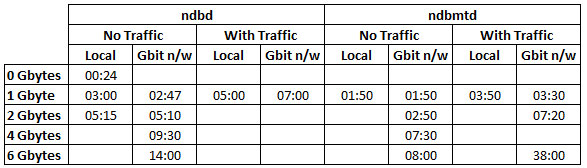
Data Node restart times
There are a couple of things to note from these results:
- Using the multi-threaded data node (ndbmtd) greatly improves the restart time (in this case, 4 threads were available, improvements could be even greater on an 8 core/thread system)
- Results become less predictable when heavy update traffic is being processed (in this case, up to 10,000 updated rows/second on a single node group). In the tests, no attempt was made to regulate this traffic and the test application was run on the same host as the one of the data nodes. Changes to the rate of updates will vary how long it takes for the restarting node to catch-up as it’s a moving target.
There is another recovery/restart scenario. The measurements shown above assumed that the file system on the data node’s host was intact and could be used to recover the in-memory copy – if that were not the case (or the data nodes were restarted with the “initial” option) then all of the data would have to be recovered from the surviving data node(s) in the same node group. As a comparison restarting a 6 Gbyte data node with the “initial” option took 20 minutes compared to 8 minutes without it (ndbmtd, over Gbit n/w).
[…] 6.3.27a and 7.0.8a source releases are now available from http://www.clusterdb.com/mysql-cluster/mysql-cluster-data-node-restart-times/ […]
[…] The benefits you see will depend on many factors including including the size of your database and the frequency, size and complexity of your transactions. As an experiment, I re-ran some data node restart timings from an earlier post (http://www.clusterdb.com/mysql-cluster/mysql-cluster-data-node-restart-times/) […]
Once MySQL Cluster is set up should I be seeing the MySQL database and table data stored in my datadir on my datanodes? Right now the data appears only in the datadir of my MySQL node, so something doesn’t seem right.
My setup is 2 data nodes and 1 server with the management node and sql node, 3 servers total.
I run /etc/init.d/mysql.server start on the sql node, then log into mysql and create a db and tables, but the data files for the tables only appear in the sql node datadir. They do not appear in the data nodes’ datadir.
Any help or pointers would be appreciated!
Hi Girish,
first step – check that MySQL Cluster is enabled in the MySQL Servers – from the mysql CLI run SHOW ENGINES; and check that NDBCLUSTER is enabled.
If it is then step 2 is to make sure that you’re telling MySQL to use Cluster when you create your tables. For example…
CREATE TABLE clusterdb.simples (id INT NOT NULL PRIMARY KEY) ENGINE=NDBCLUSTER;
You can migrate an existing table using…
ALTER TABLE clusterdb.existing ENGINE=NDBCLUSTER;
Let me know how you get on.
Regards, Andrew.
Hi Andrew, thanks for the prompt reply.
When I run the SHOW ENGINES statement, ndbcluster is set to DEFAULT.
So when I create a database and table, the table’s engine is automatically set to ndbcluster.
I’m looking at the following log files:
on sql node: /var/lib/mysql-cluster/ndb_1_cluster.log
on data nodes: $BASEDIR/data/ndb_2_out.log and ndb_3_out.log
The logs seem okay.
But I don’t see the database and table data in the datadir on the data nodes. I do see the database and table data in the datadir on the mysql node.
Is it possible there is a permissions issue? Or the my.cnf is not being read properly?
This is my data node my.cnf file:
[mysqld]
# Options for mysqld process:
ndbcluster # run NDB storage engine
ndb-connectstring=xx.xxx.xxx.xxx
basedir=/mnt/db/mysql
datadir=/mnt/db/mysql/data
[mysql_cluster]
# Options for ndbd process:
ndb-connectstring=xx.xxx.xxx.xxx
Any insight would be much appreciated!
Hi Girish,
everything is in order!
The data nodes don’t have individual files for each table and so you won’t see the table names there. What you’re seeing with the MySQL Server directories is not the files containing the contents of the tables but a copy of the data disctionary/schema definitions for those tables (e.g. if you add more rows to these tables then the files you see with the data nodes should increase in size but the ones with the MySQL Servers should not).
Regards, Andrew.
To start mysql on the mysql node I run this command, the ndbcluster option sets this engine to default:
sudo ./mysqld_safe –user=mysql –ndbcluster &
Hi Andrew,
Okay thank you for this information. I don’t think this is clearly stated in the documentation.
Just to be clear, which files on my datanode should increase in size?
There are files named ndb_2_* in my data dir as well as files in $datadir/ndbinfo/
Thanks again.
>>>>>>>
Just to be clear, which files on my datanode should increase in size?
There are files named ndb_2_* in my data dir as well as files in $datadir/
>>>>>>>>>
I’m also interested in knowing this. Could you please clarify
The best approach is to monitor the files for a while. You’ll see that the files get allocated but then as new ones are created, old ones are deleted and so you should see the overall disk usage level out.
Hi Andrew,
I am having problem with my data node “reconnecting” back to the network. I am running MySQL cluster on window platform.
I managed to set up mySQL cluster and i pull out the cable connecting the data node to the network to simulate network failure for that particular host. However, when I try to reconnect the data node back to the network, it could not detect the data node.
Could you teach me how to resolve this issue?
Thanks,
Brian
Brian,
first of all, I’ll mention that it’s worth checking the log files.
My best guess would be that when you isolated the host running one or more data nodes, those data nodes running there realised that they no longer formed a majority and so needed to check if they could continue. If 50% of the data nodes were on that host then they would attempt to contact the management node for an arbitration decision – if they can’t contact the arbitrator then they will shut themselves down to avoid the potential for a split-brain scenario. You can configure the hertbeat interval and so influence how long the network can be dropped.
Assuming that this is the case then you need to restart the data nodes once network connectivity has been restored.
Refer to MySQL Cluster fault tolerance – impact of deployment decisions for more details on how this works.
Regards, Andrew.